Product teams often face a critical challenge: the gap between what users need and what the development pipeline delivers. This disconnect leads to feature bloat, low adoption rates, and frustrated stakeholders. The solution lies in bridging the divide between strategic planning and user experience. By integrating journey maps into product roadmaps, organizations can ensure that every initiative directly addresses a specific user pain point or opportunity.
This guide explores the methodology for aligning these two essential artifacts. We will examine the structural differences, the benefits of integration, and a step-by-step process for implementation. The goal is to create a living strategy that remains responsive to customer feedback while maintaining long-term vision.
Understanding the Core Artifacts 📄
To integrate effectively, one must first understand the distinct purpose of each document. They serve different functions within the organization, yet they rely on the same foundational data.
What is a Journey Map? 🗺️
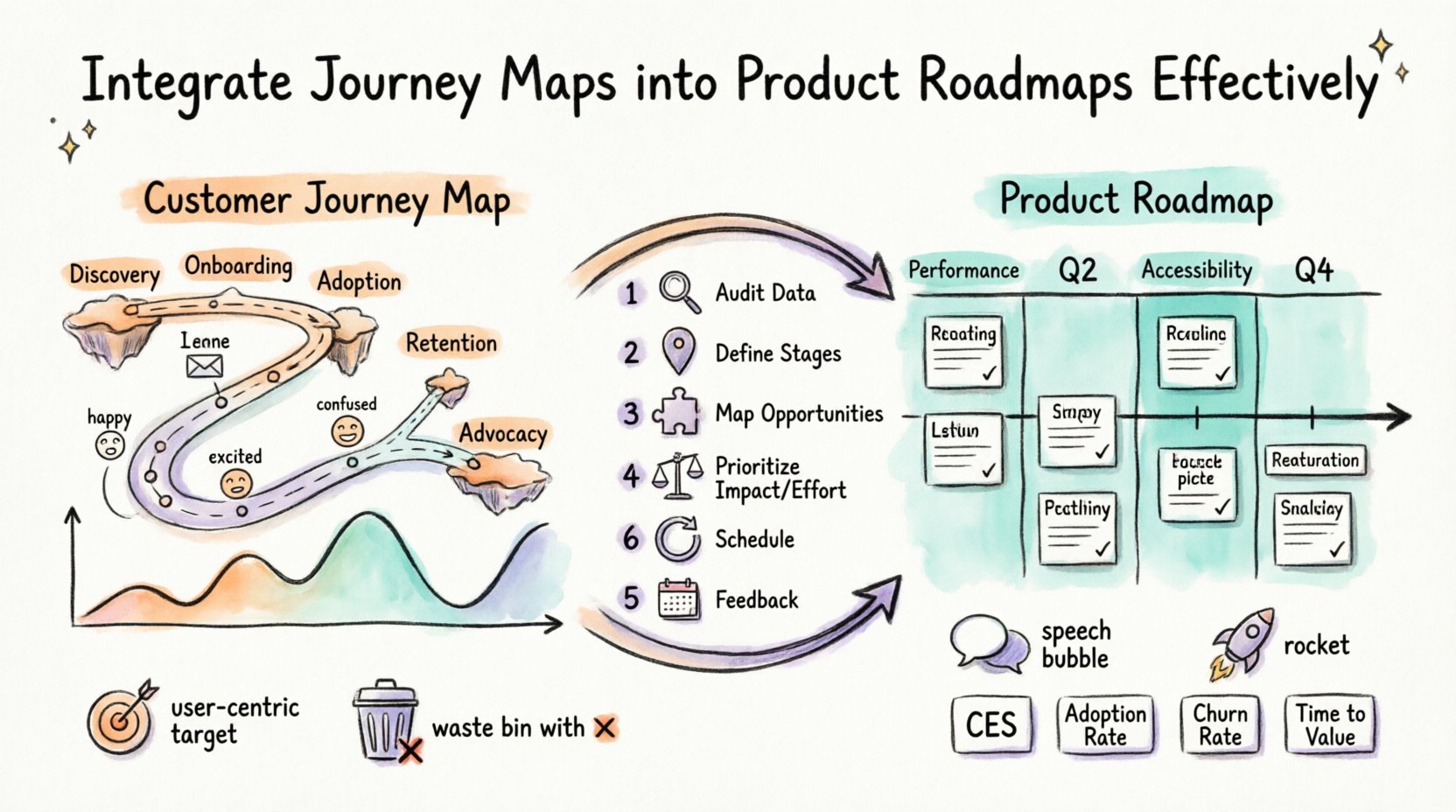
A customer journey map is a visual representation of the experience a user has with your organization over time. It goes beyond a simple flowchart. It captures the emotional state, motivations, and pain points at each stage of the interaction. Key elements include:
- Phases: Awareness, Consideration, Onboarding, Usage, Retention, Advocacy.
- Touchpoints: Specific interactions like website visits, support tickets, or email notifications.
- Emotional Curve: How the user feels at each step (frustrated, excited, confused).
- Opportunities: Areas where the experience can be improved or optimized.
What is a Product Roadmap? 🗓️
A product roadmap is a high-level strategic document that outlines the vision, direction, and progress of a product over time. It is primarily an internal tool used to communicate priorities to engineering, design, and business stakeholders. Key components include:
- Themes: Broad areas of focus (e.g., “Performance,” “Accessibility”).
- Epics/Features: Specific deliverables scheduled for release.
- Timeline: Quarterly or monthly planning horizons.
- Goals: Business outcomes tied to the work being done.
Why Alignment Matters 💡
When these documents operate in silos, the product becomes a collection of features rather than a cohesive solution. Integrating them ensures that technical debt, new features, and bug fixes are prioritized based on actual user impact.
Benefits of Integration
- User-Centric Decision Making: Prioritization shifts from “what is easy to build” to “what solves the most critical user problems.”
- Reduced Waste: Teams stop building features that do not fit into the user’s natural workflow.
- Clearer Communication: Stakeholders understand the “why” behind every item on the roadmap.
- Improved Velocity: Teams spend less time debating scope and more time executing validated plans.
Step-by-Step Integration Process 🛠️
Integration is not a one-time event. It requires a structured approach to ensure the roadmap remains dynamic and responsive. Follow this six-step framework to begin.
Step 1: Audit Existing Data 🔍
Before drawing new maps, review what you already know. Gather qualitative and quantitative data from support logs, user interviews, analytics, and NPS scores. Identify the most frequent friction points. If a specific stage in the journey has a high drop-off rate, that becomes a priority area for the roadmap.
- Review Support Tickets: Look for recurring complaints.
- Analyze Funnel Data: Identify where users abandon the process.
- Conduct User Interviews: Ask open-ended questions about their goals and frustrations.
Step 2: Define the Journey Stages 🗺️
Create or update the journey map to reflect the current state. Ensure the stages align with the actual user behavior, not the internal business process. A common mistake is defining stages by department (Sales, Marketing, Support) rather than user intent.
Example of user-centric stages:
- Discovery
- Onboarding
- First Value Realization
- Advanced Usage
- Renewal
Step 3: Map Opportunities to Roadmap Themes 🧩
This is the core integration step. Take the opportunities identified in the journey map and convert them into roadmap themes. Do not list features yet. List the problems you intend to solve.
For example, if the journey map shows confusion during the “Onboarding” phase, the roadmap theme might be “Streamlined First Experience.” Under this theme, you can list specific epics like “Simplified Sign-Up Flow” or “Interactive Tutorial.”
Step 4: Prioritize Using Impact vs. Effort 📊
Not all journey friction points can be fixed at once. Use a prioritization matrix to evaluate opportunities. Score them based on how much they improve the user experience versus the resources required to fix them.
- High Impact, Low Effort: Quick wins. Schedule these immediately.
- High Impact, High Effort: Strategic initiatives. Plan these for future quarters.
- Low Impact, Low Effort: Fillers. Do only if capacity allows.
- Low Impact, High Effort: Avoid. These are often distractions.
Step 5: Schedule and Communicate 📅
Once prioritized, assign the themes to specific timeboxes. Ensure that the roadmap is visible to cross-functional teams. The goal is to make the connection between the user’s pain point and the team’s work explicit.
- Label roadmap items with the specific journey stage they address.
- Share the journey map alongside the roadmap in planning meetings.
- Update the roadmap regularly to reflect changes in user behavior.
Step 6: Establish Feedback Loops 🔁
Integration fails if the roadmap becomes static. Establish mechanisms to validate if the roadmap items actually improved the journey. Post-launch surveys and usage analytics are critical here. If a feature does not move the needle on the journey metric, adjust the plan.
Common Obstacles and Solutions 🚧
Implementing this workflow introduces friction. Understanding these challenges beforehand helps mitigate risks.
| Challenge | Impact | Solution |
|---|---|---|
| Data Silos | Marketing, Support, and Product teams hold different data. | Create a centralized repository for customer insights accessible to all. |
| Scope Creep | Teams add features that do not align with the journey. | Implement a strict gating process for new feature requests. |
| Stakeholder Buy-In | Leadership focuses on revenue over experience. | Correlate journey improvements with retention and LTV metrics. |
| Outdated Maps | Maps become irrelevant as the product changes. | Schedule quarterly reviews to update journey maps. |
Deep Dive: Mapping Stages to Roadmap Themes 🧠
To visualize the integration, consider how specific journey stages translate into product planning. The following table demonstrates this relationship.
| Journey Stage | Common Pain Points | Roadmap Theme | Example Epic |
|---|---|---|---|
| Discovery | Confusing value proposition, slow load times. | Brand Clarity & Performance | Landing Page Optimization |
| Onboarding | Too many steps, lack of guidance. | Frictionless Activation | Progressive Profiling |
| Adoption | Features are hard to find, low utility. | Usability & Discovery | Contextual Help Tool |
| Retention | Feature fatigue, lack of engagement. | Engagement & Personalization | Automated Recommendation Engine |
| Advocacy | Referral process is complex. | Growth & Community | In-App Referral System |
Measuring Success 📊
How do you know the integration is working? You need metrics that track both the journey health and the product performance. Relying solely on revenue is insufficient.
Key Performance Indicators (KPIs)
- Customer Effort Score (CES): Measures how easy it is for users to complete tasks defined in the journey.
- Feature Adoption Rate: Are users actually using the features built to solve their journey problems?
- Churn Rate: Does the roadmap reduce attrition at specific stages?
- Task Success Rate: Can users complete their goals without assistance?
- Time to Value: How long does it take from sign-up to first meaningful action?
The Role of Cross-Functional Collaboration 🤝
Integration cannot happen in a vacuum. Product managers cannot build this alone. It requires input from Design, Engineering, Marketing, and Customer Success.
- Designers: Ensure the visual interface matches the emotional needs identified in the map.
- Engineers: Provide technical constraints and feasibility estimates for journey fixes.
- Marketing: Ensure messaging aligns with the journey stages (e.g., don’t promise enterprise features to free-tier users).
- Customer Success: Provide real-time feedback on user struggles before they become major issues.
Maintaining the Lifecycle 🔄
A journey map is not a document that sits on a shelf. It is a living system. As the product evolves, the journey evolves. Regularly scheduled workshops should be held to revisit the map.
Quarterly Review Cadence
- Review Metrics: Check KPIs for the previous quarter.
- Update Touchpoints: Are new channels emerging (e.g., mobile app, chatbot)?
- Validate Emotional Data: Has user sentiment shifted?
- Adjust Roadmap: Remove items that no longer serve the journey.
Best Practices for Long-Term Success ✅
To sustain this integration, adopt these habits within your organization.
- Keep it Simple: Avoid over-complicating the map. Focus on the critical path.
- Use Real Data: Never rely on assumptions. Back every insight with evidence.
- Visualize the Connection: Use color coding to link roadmap items to journey stages.
- Empower the Team: Allow developers to see the user story behind their code.
- Stay Flexible: Be willing to pivot if the user journey changes significantly.
Integrating Feedback Channels 📢
Feedback is the fuel for this integration. You need structured ways to capture user sentiment and feed it back into the planning process.
- In-App Feedback Widgets: Allow users to comment on specific features.
- Scheduled User Testing: Observe users performing tasks defined in the journey.
- Customer Advisory Boards: Regular meetings with power users to discuss roadmap direction.
- Support Ticket Analysis: Categorize tickets by journey stage to identify systemic issues.
Final Thoughts on Strategic Alignment 🌟
Aligning customer journey maps with product roadmaps is a strategic necessity in modern product development. It shifts the focus from output to outcome. By ensuring that every line of code written contributes to a smoother, more effective customer experience, organizations build products that users actually love.
This process requires discipline, data, and collaboration. It is not about creating perfect documents, but about creating a shared language between the business and the user. When these two perspectives converge, the result is a product that drives growth and satisfaction simultaneously.
Start small. Pick one journey stage, map the friction, and adjust one roadmap item. Measure the impact. Repeat. Over time, this iterative approach will transform your product strategy into a customer-centric engine.
Frequently Asked Questions ❓
How often should we update the journey map?
At minimum, review it quarterly. Major product changes or shifts in market conditions warrant an immediate update.
Can we integrate this with existing agile methodologies?
Yes. Map the journey stages to your sprint cycles. Ensure user stories are tagged with the relevant journey phase.
What if the roadmap is already set?
Do not discard it. Audit the current items against the journey. Identify misalignments and adjust the upcoming quarter’s plan accordingly.
Does this slow down development?
Initially, it may add planning time. However, it reduces rework and churn in the long run, increasing overall velocity.