


Introduction: Welcome to AI-Assisted Architecture Modeling
If you’re new to enterprise architecture or just starting your journey with modeling tools, you might feel overwhelmed by complex notations, layered frameworks, and technical jargon. That’s completely normal—and you’re in the right place.
This beginner-friendly guide introduces you to AI-powered ArchiMate diagram generation using Visual Paradigm Desktop. Whether you’re a business analyst, IT professional, student, or curious learner, you’ll discover how artificial intelligence can help you transform simple text descriptions into professional, standards-compliant architecture diagrams—without needing to be an ArchiMate expert first.
By the end of this guide, you’ll understand:
-
What ArchiMate is and why it matters
-
How AI can accelerate your modeling workflow
-
Step-by-step instructions to generate your first AI ArchiMate diagram
-
Practical tips to get the best results from your prompts
Let’s begin your journey to smarter, faster architecture design.
Key Concept 1: What is ArchiMate? (Explained Simply)
ArchiMate is an open, international standard language for describing, analyzing, and visualizing enterprise architectures. Think of it as a “universal blueprint language” for organizations.
The Three Core Layers of ArchiMate:
| Layer | What It Represents | Simple Example |
|---|---|---|
| Business Layer | People, processes, services | Customer, Order Process, Payment Service |
| Application Layer | Software systems and components | E-commerce Platform, Inventory App |
| Technology Layer | Hardware, networks, infrastructure | Cloud Server, Database, API Gateway |
Why Use ArchiMate?
-
Clarity: Visualize how business goals connect to technology
-
Communication: Speak a common language across teams
-
Decision-Making: Identify gaps, redundancies, or risks
-
Compliance: Follow an industry-recognized standard
💡 Beginner Tip: You don’t need to memorize all ArchiMate elements upfront. Start with high-level concepts, and let AI help you build the details.
Key Concept 2: What is AI ArchiMate Diagram Generation?
AI ArchiMate Diagram Generation is a feature in Visual Paradigm Desktop that uses artificial intelligence to convert your plain English descriptions into formal ArchiMate models.
How It Works (Simplified):
-
You type a description like: “A cloud-based e-commerce platform that handles order processing, inventory management, and payment integration.”
-
The AI analyzes your text, identifies key architectural elements (actors, processes, applications, technology), and maps relationships between them.
-
Visual Paradigm automatically arranges these elements into a compliant ArchiMate diagram—ready for review, refinement, or presentation.
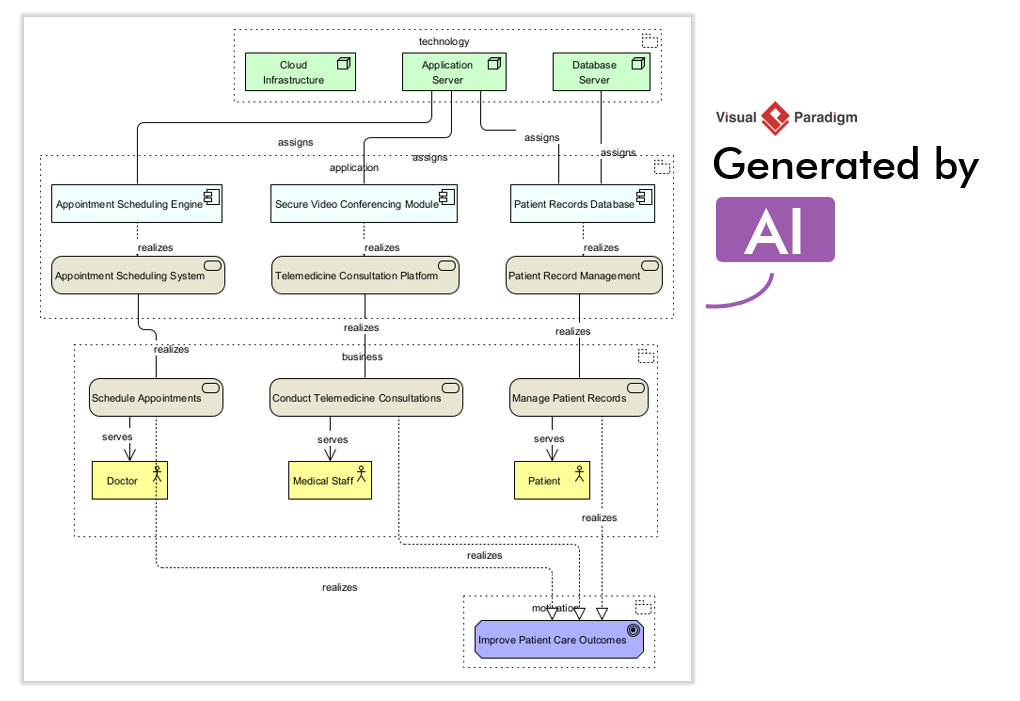
✨ No coding required. No drag-and-drop expertise needed. Just describe what you want, and let AI do the heavy lifting.
Why the Enhanced Quality Matters: 3 Improvements Explained for Beginners
Visual Paradigm recently upgraded its AI ArchiMate engine to deliver smarter, more accurate results. Here’s what that means for you:
1. Contextual Relevance: The AI “Gets” Your Intent
-
Before: Generic elements might appear that weren’t directly related to your prompt.
-
Now: The AI better understands business context. If you mention “payment integration,” it prioritizes payment-related components and relationships.
-
Beginner Benefit: Less cleanup, more focus on what matters to your project.
2. Comprehensive Element Mapping: Seeing the Hidden Connections
-
Before: Only obvious relationships were drawn.
-
Now: The AI identifies implicit connections like:
-
Assignment: “The Order Service is assigned to the E-commerce Application”
-
Serving: “The Payment API serves the Checkout Process”
-
-
Beginner Benefit: Richer diagrams that reveal how pieces fit together—helping you learn ArchiMate relationships naturally.
3. Structural Clarity: Diagrams That Make Sense at First Glance
-
Before: Complex prompts could produce cluttered layouts requiring manual reorganization.
-
Now: Multi-layered prompts (business → application → technology) generate intuitively structured diagrams with logical flow.
-
Beginner Benefit: Professional-looking results immediately, building your confidence and saving time.
How to Use the Enhanced AI ArchiMate Generator: Step-by-Step Tutorial
Ready to create your first AI-generated ArchiMate diagram? Follow these beginner-friendly steps in Visual Paradigm Desktop:
Step 1: Open the AI Diagram Generation Tool
-
Launch Visual Paradigm Desktop
-
Navigate to Tools > AI Diagram Generation to open the dialog box
Step 2: Choose Your Diagram Type
-
Select ArchiMate Diagram
Step 3: (Optional) Select a Viewpoint
-
Viewpoints guide the AI’s focus (e.g., “Application Cooperation,” “Infrastructure”)
-
Beginner Recommendation: Leave as Unspecified for a broad, comprehensive overview
Step 4: Enter Your Prompt (The Fun Part!)
Describe what you want in simple, clear language. Be specific but concise.
✅ Good Beginner Prompt:
“Generate an ArchiMate Diagram for a cloud-based e-commerce platform handling order processing, inventory management, and payment integration.”
❌ Avoid: Overly vague prompts like “Make an architecture diagram”
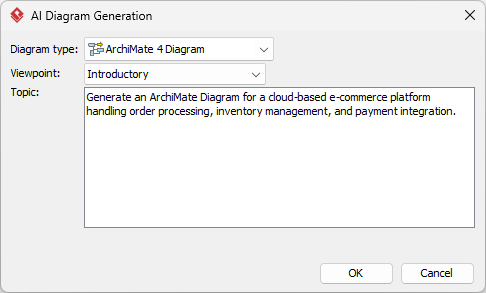
Step 5: Generate and Review
-
Click OK
-
Watch as the AI processes your request and generates a new ArchiMate diagram directly in your project
-
Review the result: elements, relationships, and layout
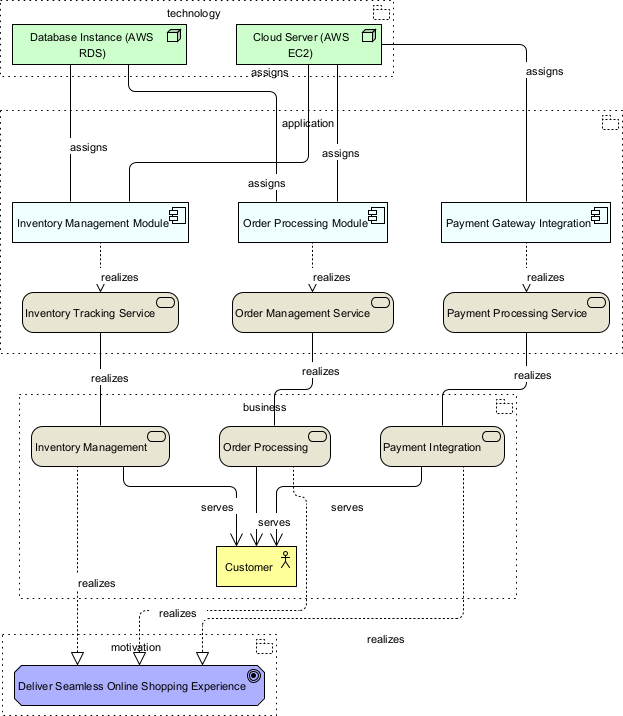
Step 6: Refine (Optional but Recommended)
-
Drag elements to improve readability
-
Add notes or customize colors
-
Export or share your diagram
🎯 Pro Tip for Beginners: Start small. Generate a diagram for one business process first. As you gain confidence, tackle more complex scenarios.
Practical Examples for Beginners: Try These Prompts
Practice makes perfect. Here are three beginner-friendly prompts to experiment with:
Example 1: Simple Business Process
“Show the ArchiMate model for a customer onboarding process: Customer submits application → System validates data → Approval service notifies customer.”
What You’ll Learn: Basic business actors, processes, and application services.
Example 2: Application Integration
“Create an ArchiMate diagram for a mobile banking app that connects to a core banking system via APIs, using cloud infrastructure for security and storage.”
What You’ll Learn: Cross-layer relationships (business → application → technology).
Example 3: Digital Transformation Scenario
“Model an ArchiMate view for a retail company migrating from on-premise servers to a hybrid cloud architecture, including inventory, POS, and analytics components.”
What You’ll Learn: Complex, multi-layered modeling with migration context.
💡 Experiment: Modify these prompts. Add or remove elements. See how the AI adapts. This is the fastest way to learn.
The AI Ecosystem: Four Pillars of Support
Visual Paradigm’s AI capabilities extend beyond diagram generation. Here’s how the full ecosystem supports your learning and work:
| Tool | Purpose | Beginner Benefit |
|---|---|---|
| Desktop AI Diagram Generation | Create ArchiMate, UML, BPMN diagrams from text | Start modeling instantly without deep notation knowledge |
| AI Chatbot | Ask questions about modeling standards or tool features | Get real-time help when you’re stuck—like a friendly tutor |
| OpenDocs | Organize and query project documentation with AI | Keep your diagrams, notes, and decisions in one searchable place |
| AI Apps | Web-based tools for quick tasks (e.g., idea brainstorming) | Experiment with AI assistance without installing software |
Together, these tools create a supportive environment where beginners can learn by doing—with AI as a helpful guide, not a replacement for your expertise.
Tips for Getting the Best Results: A Beginner’s Checklist
Maximize your success with these simple strategies:
✅ Be Specific, But Not Overwhelming
Include key elements (actors, processes, systems) but avoid paragraph-long prompts.
✅ Use Clear, Action-Oriented Language
“Handles,” “manages,” “integrates with” help the AI identify relationships.
✅ Start with One Layer, Then Expand
Generate a Business Layer diagram first. Then add Application or Technology layers in subsequent iterations.
✅ Review and Learn
Don’t just accept the output. Examine why the AI placed certain elements or relationships. This builds your ArchiMate intuition.
✅ Iterate
Your first diagram doesn’t have to be perfect. Refine the prompt, regenerate, and compare results.
✅ Use Viewpoints Strategically
Once comfortable, experiment with viewpoints to focus on specific concerns (e.g., security, performance).
🌱 Remember: Every expert was once a beginner. Your prompts will improve as your understanding grows—and the AI learns from your feedback too.
Conclusion: Your Journey to Confident Architecture Modeling Starts Now
You’ve just taken your first steps into the world of AI-assisted enterprise architecture. With Visual Paradigm’s enhanced AI ArchiMate generator, you no longer need to be a notation expert to create professional, standards-compliant diagrams. You just need a clear idea—and the willingness to describe it.
As a beginner, your greatest advantage is curiosity. Experiment with prompts. Explore the generated diagrams. Ask the AI Chatbot questions. Over time, you’ll develop an intuitive sense for architectural thinking—and the AI will become a powerful partner in your growth.
Remember: Great architecture isn’t about perfect diagrams on day one. It’s about clarity, communication, and continuous improvement. With the right tools and mindset, you’re already on your way.
Ready to build better models faster?
Get the Latest Visual Paradigm Desktop and start generating your first AI-powered ArchiMate diagram today.
Reference List
- AI Diagram Generation Feature Page: Learn about Visual Paradigm’s AI-powered diagram generation capabilities for ArchiMate, UML, and more.
- Visual Paradigm Desktop: Download and explore the full-featured desktop application for professional modeling and design.
- Visual Paradigm AI Chatbot: Access an interactive AI assistant to help you navigate modeling standards and software features in real-time.
- Visual Paradigm OpenDocs: Discover a powerful AI-enhanced knowledge management platform for organizing and querying project documentation.
- Download Visual Paradigm Desktop: Get the latest version of Visual Paradigm Desktop to start using enhanced AI ArchiMate generation.
- Best AI Diagram Generator: Visual Paradigm Ecosystem Guide: Explore how Visual Paradigm’s integrated AI tools support every phase of your digital transformation journey.
- New Feature: Send Visual Paradigm Online Creations to OpenDocs: Learn about exporting your online diagrams directly to the OpenDocs knowledge platform.
- New Integration: Share Flipbooks to OpenDocs: Discover how to seamlessly share interactive flipbook content with your OpenDocs repository.
Related posts:
 ArchiMate 4 Modeling Guide: Simplifying Enterprise Architecture with Visual Paradigm 18.0
From Prompt to Precision: A User’s Journey with Visual Paradigm’s Enhanced AI ArchiMate Genera
ArchiMate 4 Modeling Guide: Simplifying Enterprise Architecture with Visual Paradigm 18.0
From Prompt to Precision: A User’s Journey with Visual Paradigm’s Enhanced AI ArchiMate Genera
 Real-World Case Study: Implementing ArchiMate in a Large Corporation
 Mastering UML for Exams and Projects: A Step-by-Step AI Assistant Guide