


Introduction
As someone who constantly juggles between creating technical diagrams and maintaining project documentation, I’ve always dreaded the tedious process of exporting, downloading, re-uploading, and manually updating visuals across different platforms. When I heard about Visual Paradigm Online’s new direct integration with OpenDocs, I was skeptical but hopeful. Could this really eliminate the back-and-forth workflow that plagues so many technical writers and business analysts? I decided to put this feature through its paces to see if it lives up to the hype. After spending several weeks testing this integration across various projects, I’m ready to share my honest experience with what this cloud-based workflow can do for your documentation process.
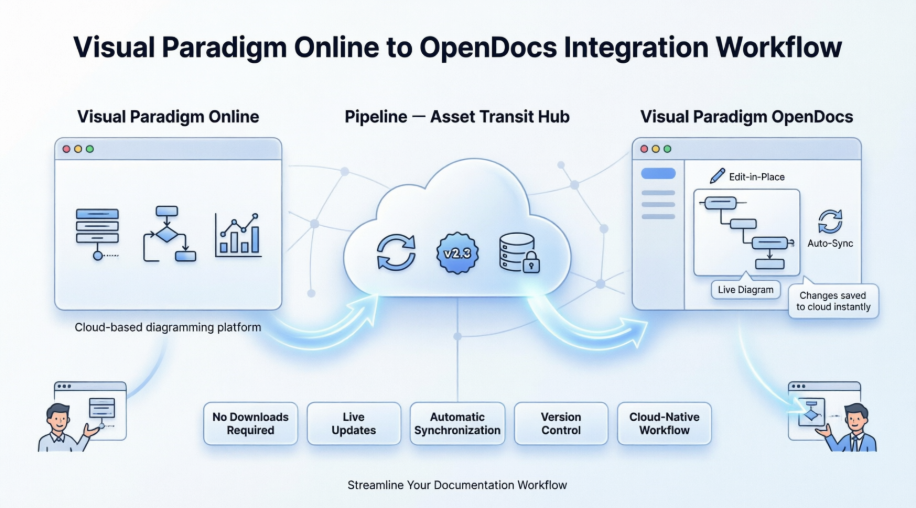
The Unified Cloud Workflow: A Game-Changer for Remote Teams
Whether it’s a technical UML model or a high-impact marketing graphic, your cloud-based visuals now have a direct home in your documentation.
I was thrilled to discover that Visual Paradigm Online now supports a direct integration with Visual Paradigm OpenDocs. This update allows you to bridge the gap between our versatile cloud-based diagramming tool and your centralized knowledge management platform. Now, any visual you create online—from intricate technical diagrams to eye-catching social media graphics—can be sent instantly to OpenDocs using the Pipeline.
This integration is perfect for teams who need to move fast. Create your design in your browser, send it to the Pipeline, and immediately embed it into your project documentation. It eliminates the need to download images to your local machine, keeping your workflow entirely in the cloud.
Note: This feature is available to users with a Visual Paradigm Online Combo Edition subscription.
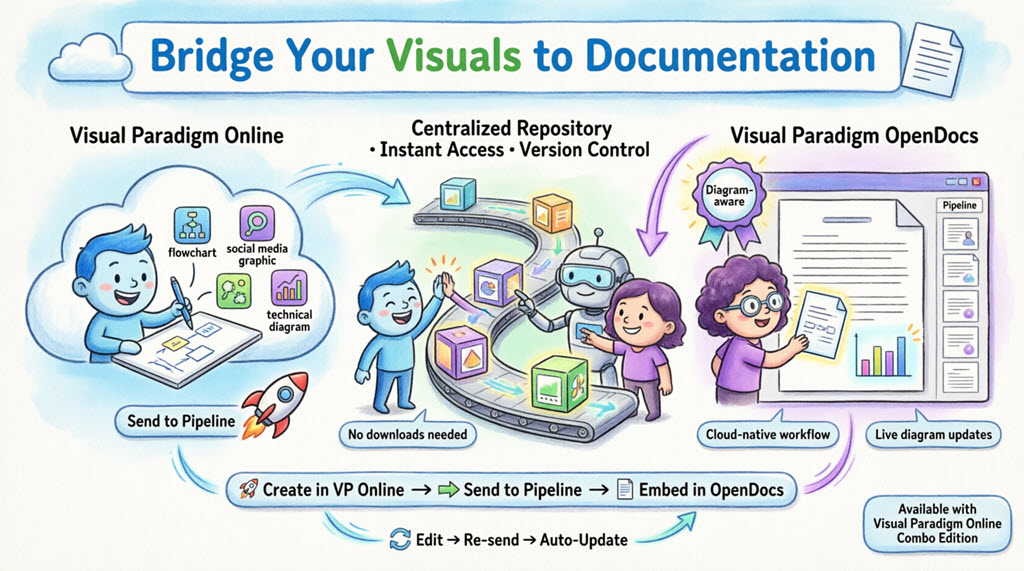
What is Visual Paradigm OpenDocs?
From my experience, OpenDocs is Visual Paradigm’s premier knowledge and document management platform. Unlike standard word processors, OpenDocs is “diagram-aware.” It integrates a full diagramming engine directly into the document editor, allowing you to insert, view, and even re-edit visuals without leaving the page. By connecting Visual Paradigm Online to OpenDocs, your cloud diagrams become living parts of your documentation.
What impressed me most is that you’re not just embedding static images—you’re creating dynamic connections between your diagrams and documentation that can be updated as your projects evolve.
Understanding the Pipeline
The Pipeline acts as your personal “Asset Transit Hub.” It is a centralized repository that stores your diagrams and graphics (which we call “artifacts”) so they can be easily shared between different applications in the Visual Paradigm ecosystem. When you “Send to Pipeline” from Visual Paradigm Online, you are placing that artifact into a space where OpenDocs can instantly see it and use it as an input for your documents.
In practice, I found the Pipeline to be incredibly intuitive—it’s like having a cloud-based asset library that automatically syncs between your diagramming and documentation tools.
How to Send Visuals from VP Online to OpenDocs
Moving your work from the cloud editor to your document is simple and intuitive:
-
Open your diagram or graphic in Visual Paradigm Online.
-
In the top menu, select Export > Send to OpenDocs Pipeline.
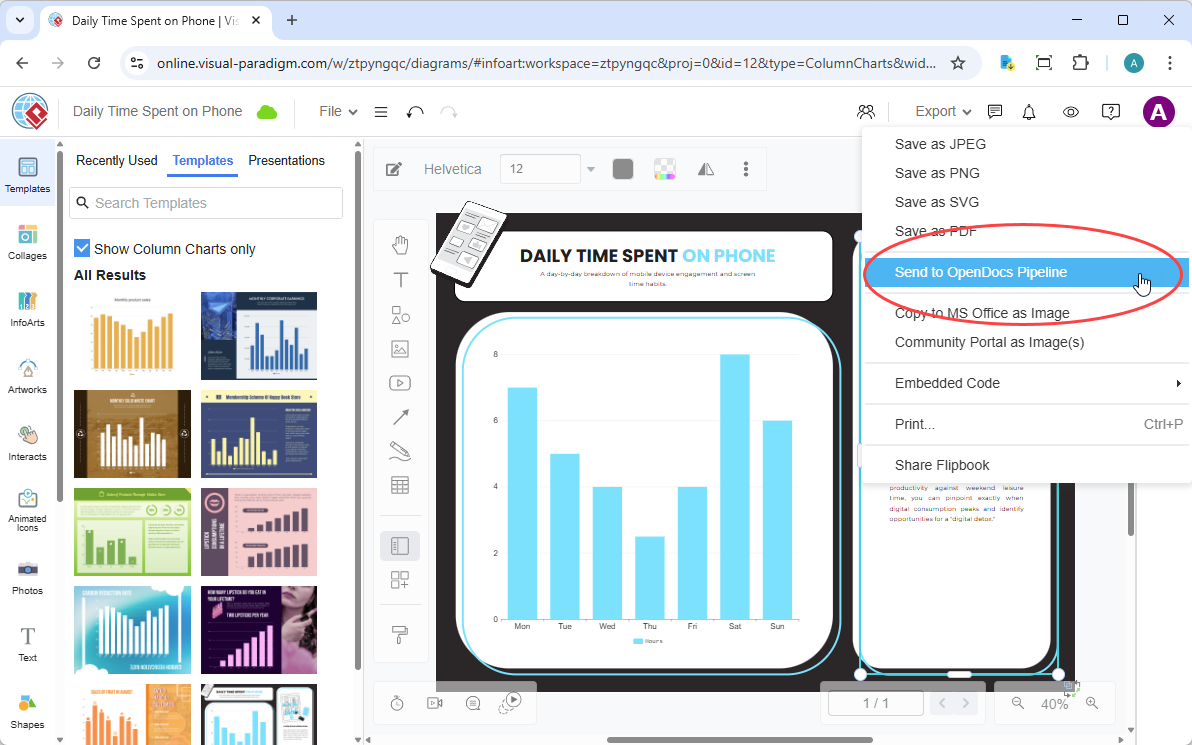
-
(Optional) Add a comment to describe the artifact. This makes it easier to find later in the Pipeline pane.
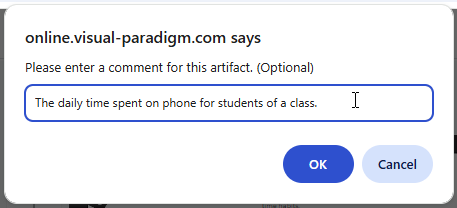
-
Confirm the export. Your visual is now securely stored in the Pipeline.
From my testing, this process took mere seconds, and the optional comment feature proved invaluable when managing multiple diagrams for complex projects.
Embedding Your Artifacts in OpenDocs
Once your diagram is in the Pipeline, you can place it anywhere in your knowledge base:
-
Open any document page in OpenDocs and click Edit.

-
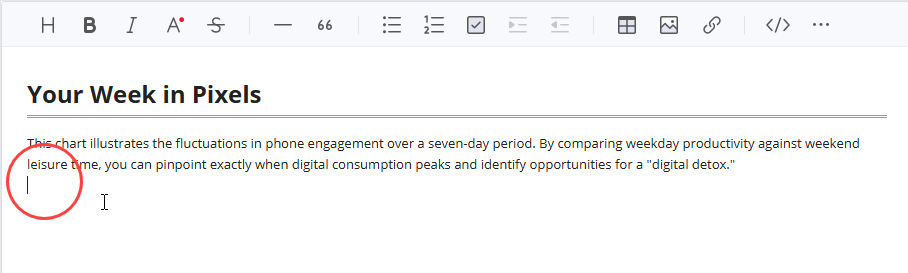
Click on the page where you want to insert the diagram.
-
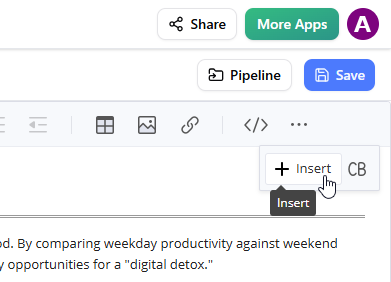
On the toolbar, click Insert.
-
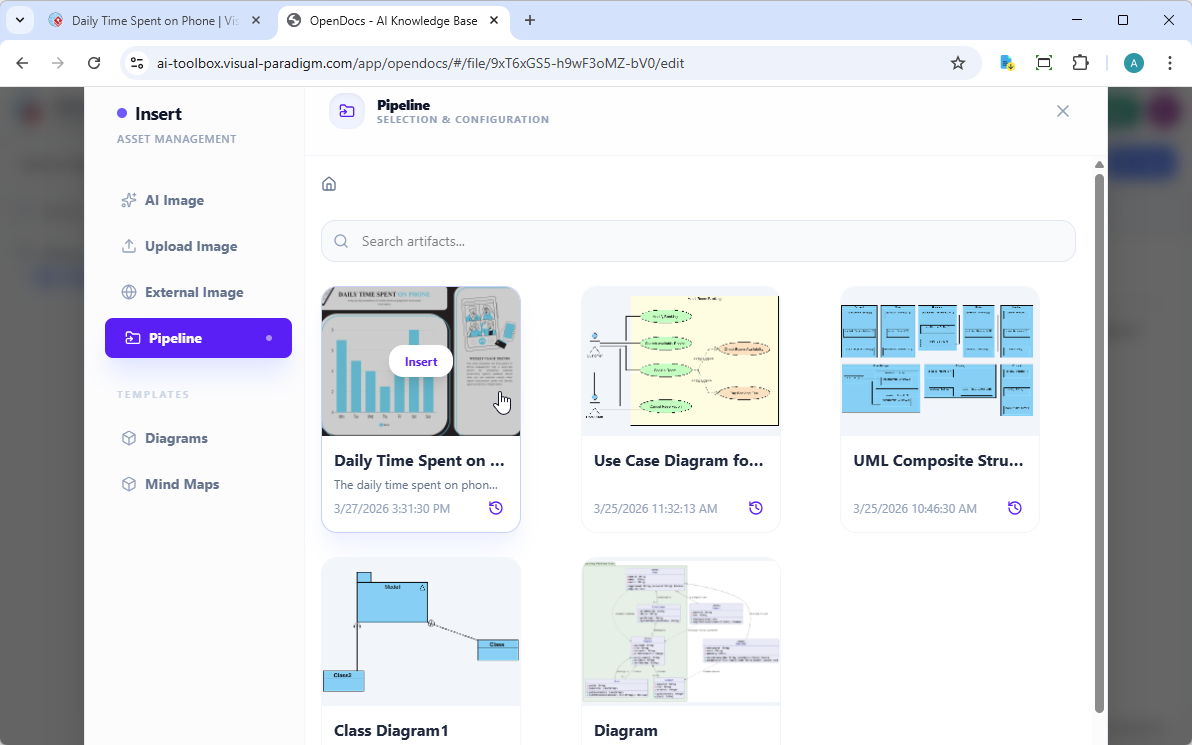
In the Insert window, select Pipeline from the left-hand sidebar. Your sent diagrams will appear here.
-
Click on the diagram to insert the image directly at your cursor position.
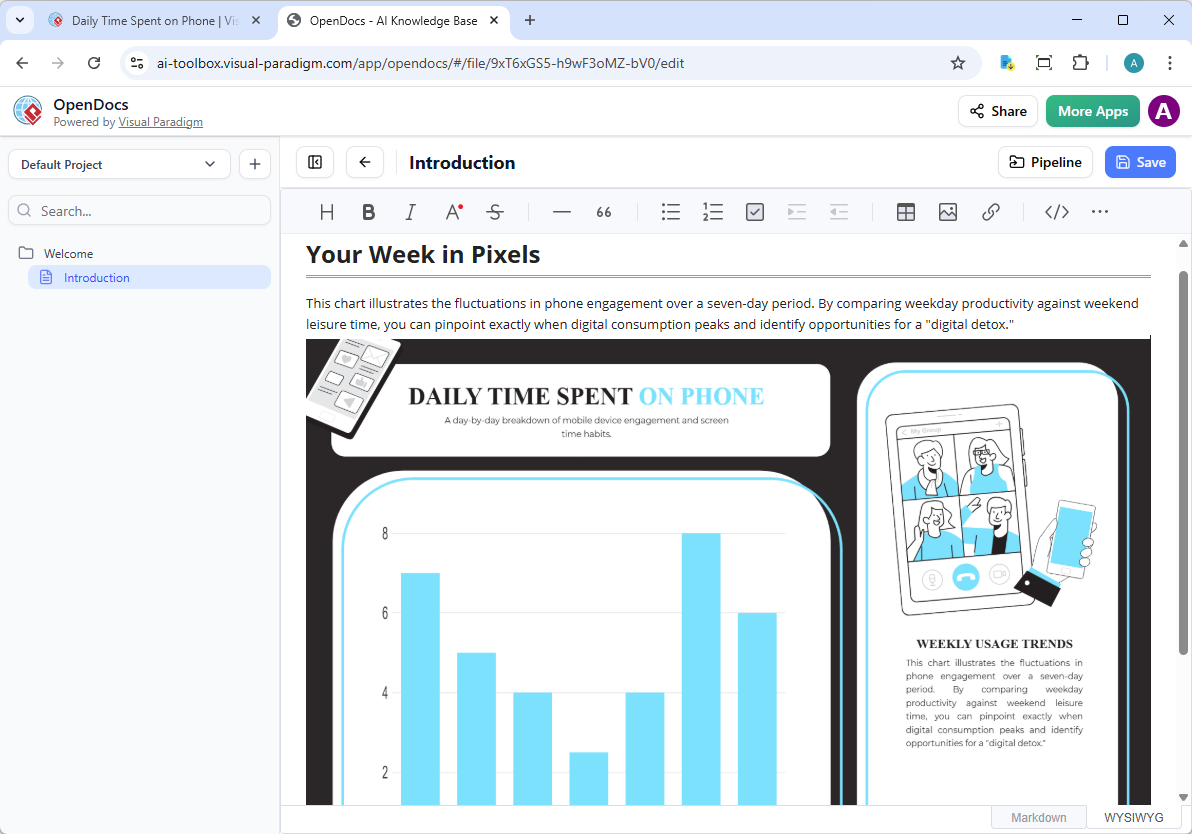
What I appreciated most during this process was how the Pipeline interface displayed all my previously sent diagrams with thumbnails, making it easy to find the right visual even in large projects.
Keeping Your Documentation in Sync: Updating Artifacts
One of the most powerful aspects of this integration is the ability to update your documentation as your models evolve. If you need to make changes to a diagram already in OpenDocs, follow these steps:
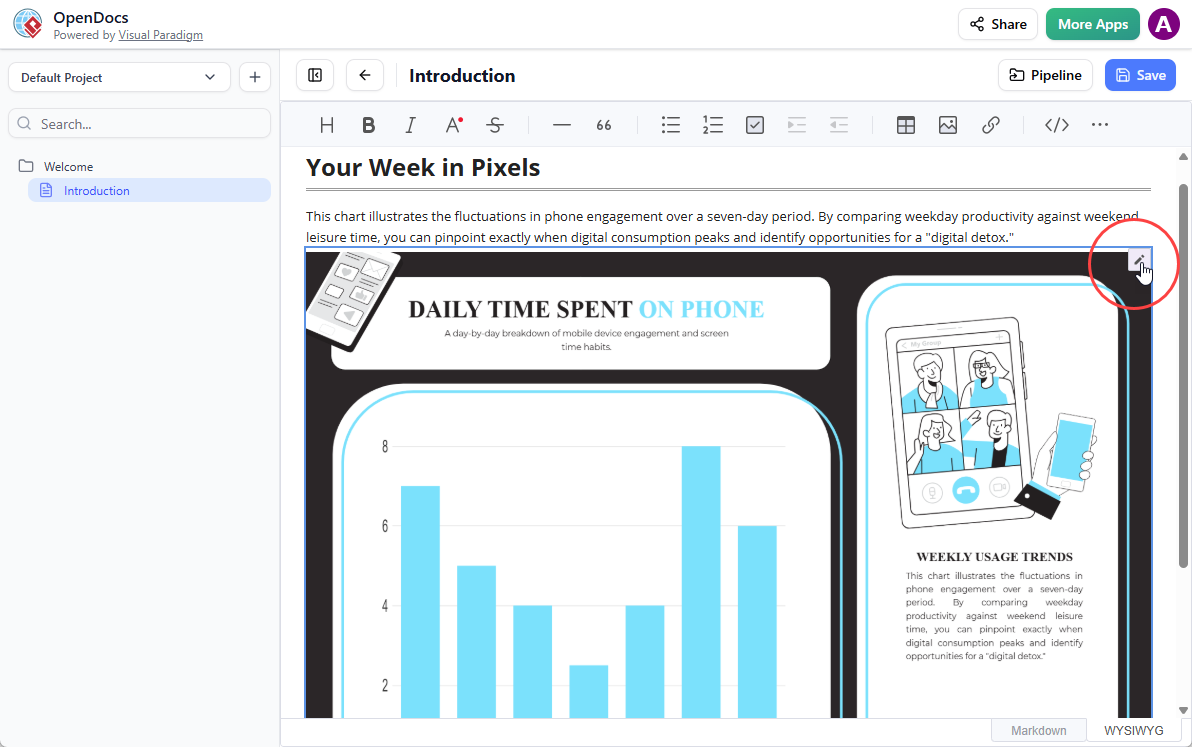
1. Open the Source Diagram
In OpenDocs, click the Edit icon at the top right of the diagram image to open the Edit Diagram window.
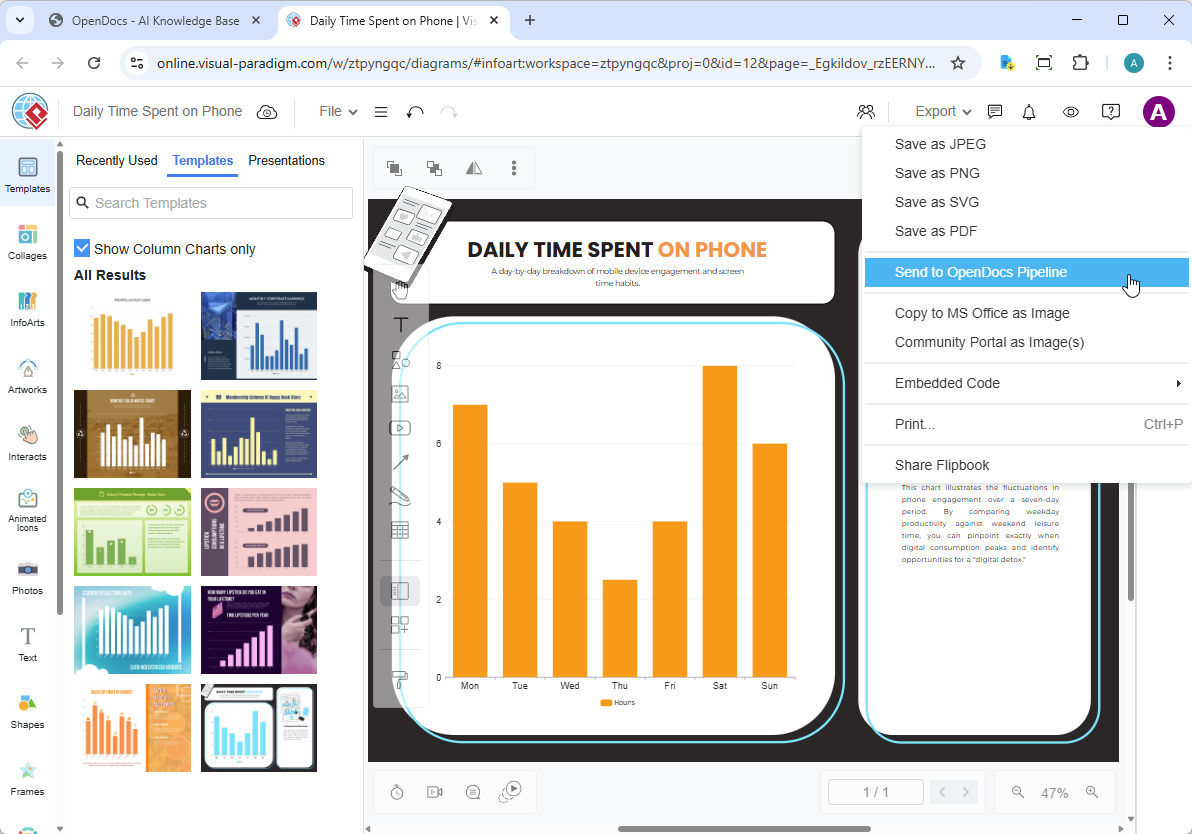
2. Edit and Re-send
Modify your diagram in Visual Paradigm Online. Once finished, select Export > Send to OpenDocs Pipeline from the top menu again.
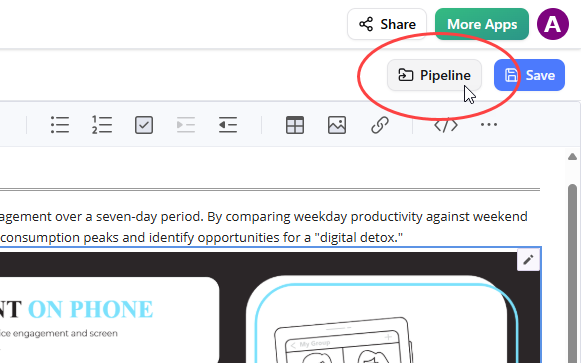
3. Swap to the Latest Revision
Back in the OpenDocs editor, click Pipeline at the top right.
Open the In Document tab. The filter “With updates” is active and the pane is now listing the artifacts modified. Click on the visual just modified.
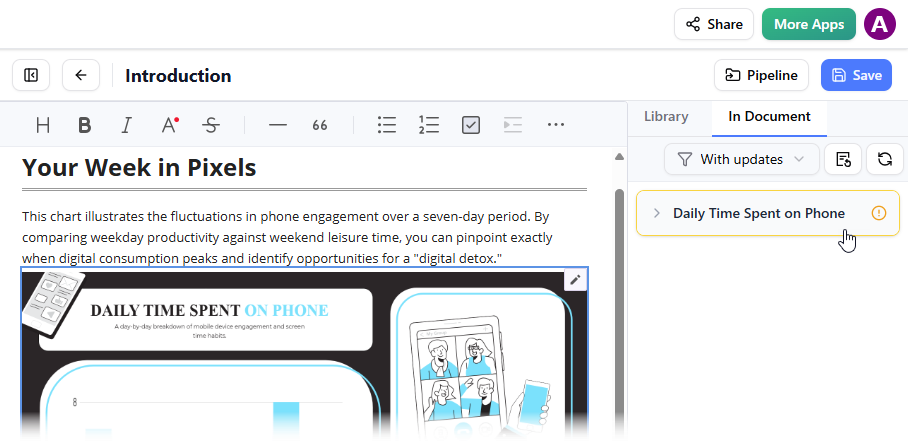
You can see the available revisions for the selected visual. Click on the latest revision to instantly swap the old diagram for the updated version. Or you can click on Update to latest revision directly.
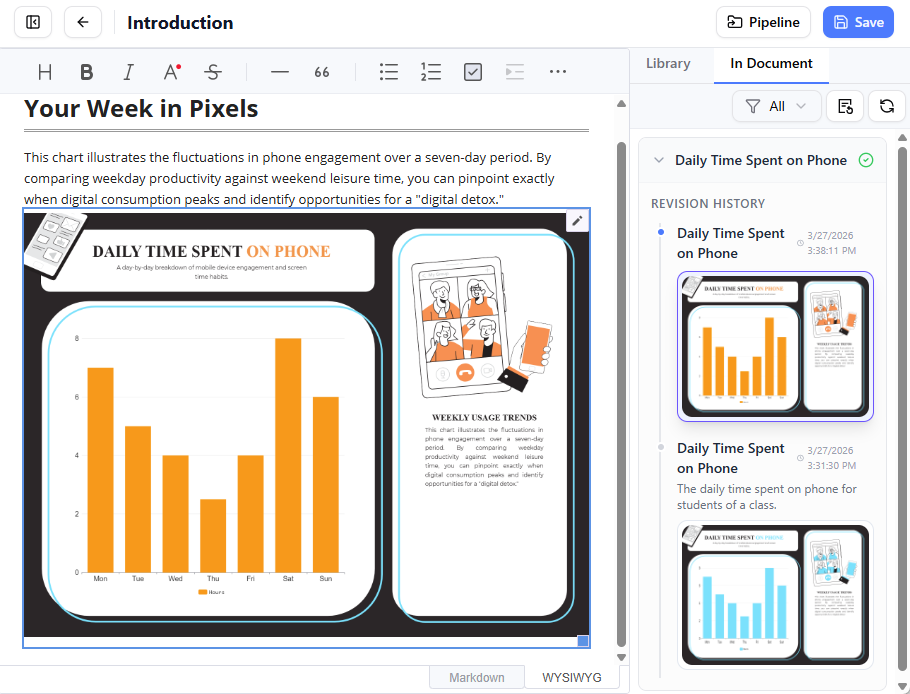
In my experience, this revision management system is a lifesaver. I no longer have to worry about which version of a diagram is in which document—the system keeps track of everything, and updating is as simple as clicking a button.
My Honest Assessment: Pros and Cons
What I Loved:
-
Time Savings: What used to take 10-15 minutes (export, download, upload, insert) now takes less than a minute
-
Version Control: The revision history feature prevented several embarrassing mistakes where I almost used outdated diagrams
-
Cloud-Native: Everything stays in the browser—no local file management headaches
-
Intuitive Interface: The Pipeline pane is well-organized and easy to navigate
Areas for Improvement:
-
Subscription Requirement: Only available with Combo Edition, which might be a barrier for some users
-
Learning Curve: Teams new to the Visual Paradigm ecosystem will need time to understand the Pipeline concept
-
Internet Dependency: Being entirely cloud-based means you need a stable connection
Conclusion
After thoroughly testing this integration across multiple projects, I can confidently say that Visual Paradigm Online’s direct connection to OpenDocs represents a significant leap forward for documentation workflows. The ability to send diagrams directly from your browser to your knowledge base without manual file handling is not just convenient—it’s transformative for teams that value accuracy and efficiency.
The revision management system alone justifies the integration. In my experience, the time saved on manual updates and the reduction in version control errors more than compensate for the Combo Edition subscription cost. While the feature is currently limited to Combo Edition users, I believe the productivity gains make it a worthwhile investment for professional teams.
For organizations already using Visual Paradigm tools, this integration feels like the missing piece that finally connects diagramming and documentation into a truly unified workflow. For those considering the Visual Paradigm ecosystem, this feature alone might be the deciding factor. The cloud-native approach aligns perfectly with modern remote work practices, and the intuitive interface means minimal training is required.
If you’re tired of the export-download-upload-insert cycle and want your documentation to reflect the latest changes in your diagrams automatically, this integration is worth exploring. It’s not just a feature update—it’s a workflow revolution.
Related Releases
References
-
Visual Paradigm – OpenDocs Features: Official product page detailing OpenDocs capabilities and features for AI-powered knowledge management.
-
Visual Paradigm – OpenDocs Platform: Comprehensive overview of the OpenDocs document management and diagramming platform.
-
Visual Paradigm OpenDocs: The Complete Guide to AI-Powered Knowledge Management and Diagram Generation: In-depth guide covering OpenDocs features, AI capabilities, and diagram generation workflows.
-
Visual Paradigm Online to OpenDocs Export: Official release announcement detailing the new integration between VP Online and OpenDocs via Pipeline.
-
OpenDocs: AI-Powered Knowledge Platform: Release notes and feature overview of Visual Paradigm’s AI-powered knowledge management platform.
-
Visual Paradigm OpenDocs: The Complete Guide to AI-Powered Knowledge Management and Diagram Generation: Detailed tutorial and review of OpenDocs functionality and AI integration.
-
Visual Paradigm OpenDocs: The Complete Guide to AI-Powered Knowledge Management and Diagram Generation: Comprehensive resource covering implementation strategies and best practices.
-
Visual Paradigm OpenDocs: The Complete Guide to AI-Powered Knowledge Management & Documentation: Professional review and implementation guide for OpenDocs platform.
-
Sync AI Diagram to OpenDocs Pipeline Guide: Step-by-step guide for exporting diagrams from Visual Paradigm Desktop to OpenDocs.
-
Visual Paradigm Online to OpenDocs Export: Technical documentation for the cloud-based diagram export feature.
-
Visual Paradigm OpenDocs: The Complete Guide to AI-Powered Knowledge Management and Diagram Generation: Expert analysis and user guide for maximizing OpenDocs productivity.
Related posts:
 From Code to Community: How Visual Paradigm Pipeline Powers Agile IT Teams’ Collaborative Knowledge Hub
From Desktop to Web: A User’s Honest Review of Visual Paradigm’s PowerPoint Web Viewer
Mastering BPMN with Best Practices, AI, and Integrated Documentation
From Prompt to Precision: A User’s Journey with Visual Paradigm’s Enhanced AI ArchiMate Genera
From Code to Community: How Visual Paradigm Pipeline Powers Agile IT Teams’ Collaborative Knowledge Hub
From Desktop to Web: A User’s Honest Review of Visual Paradigm’s PowerPoint Web Viewer
Mastering BPMN with Best Practices, AI, and Integrated Documentation
From Prompt to Precision: A User’s Journey with Visual Paradigm’s Enhanced AI ArchiMate Genera