Introduction
When business rules are modeled directly in a BPMN process, each new condition can add another gateway, sequence flow, and exception path. The diagram can quickly become difficult to read and maintain. Decision Model and Notation (DMN) helps address this by separating the process flow from the decision logic: BPMN orchestrates activities, while DMN evaluates business rules and returns a result for the process to use.
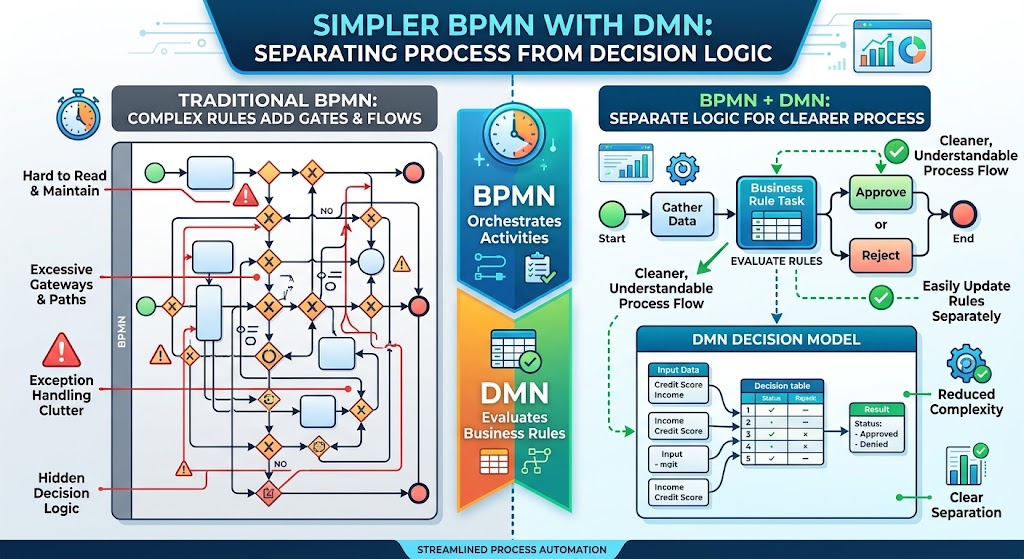
This guide explains the core concepts, shows how the pattern works through a loan-application example, and outlines how to document it using Visual Paradigm.
Key concepts
-
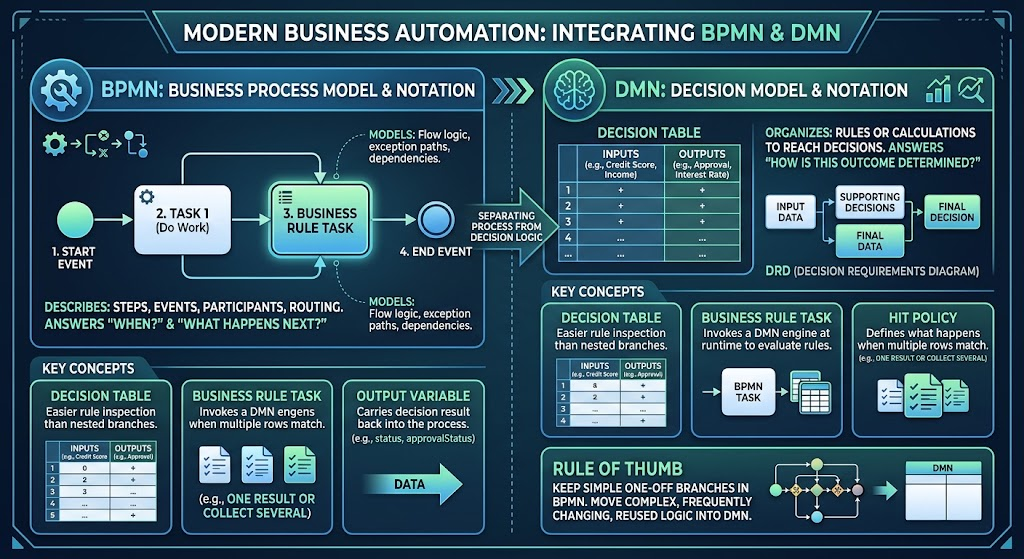
BPMN describes the steps, events, participants, and routing in a business process—the “when” and “what happens next.”
-
DMN describes decisions and the rules or calculations used to reach them—the “how is this outcome determined?”
-
Decision table organizes input conditions and resulting outputs into rows. It makes rules easier to inspect than a large collection of nested branches.
-
Business Rule Task is a BPMN task type used to represent a decision or rule evaluation in the process. It is a modeling element; whether it invokes a DMN engine at runtime depends on the process platform and its configuration.
-
Decision Requirements Diagram (DRD) shows how decisions depend on input data and on other decisions.
-
Output variable carries the decision result back into the process—for example,
approvalStatus. -
Hit policy defines what happens when more than one decision-table row matches, such as returning one result or collecting several. Choose a policy that matches the intended business behavior.
A useful rule of thumb: keep a simple, one-off branch in BPMN; move complex, frequently changing, or reused decision logic into DMN.
How BPMN and DMN work together
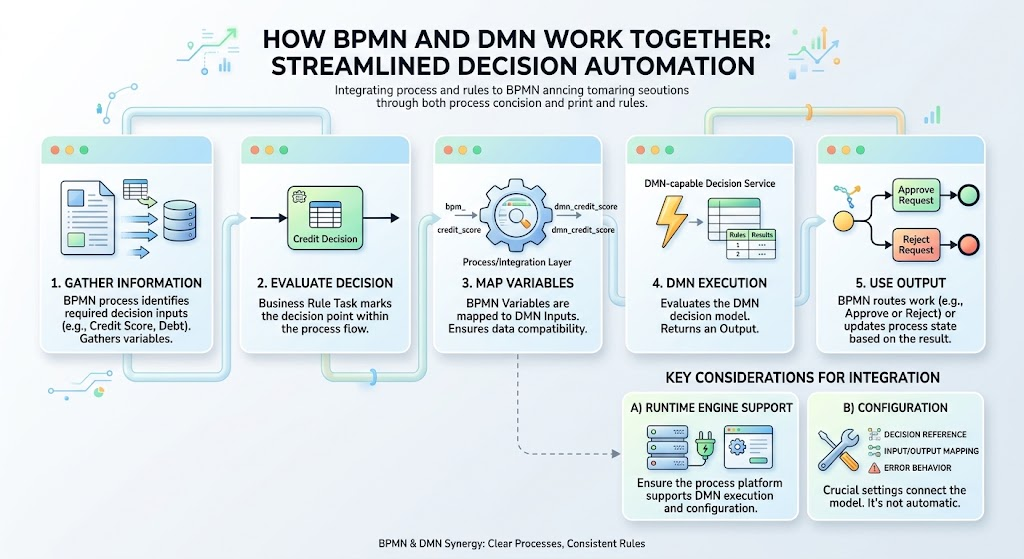
A typical interaction follows this pattern:
-
The BPMN process gathers the information needed for a decision.
-
A Business Rule Task represents the point where the decision is evaluated.
-
The process or integration layer maps BPMN variables to the DMN decision’s inputs.
-
A DMN-capable decision service evaluates the model and returns an output.
-
BPMN uses that output to route work or update the process state.
The connection between a BPMN task and a DMN model is not automatically guaranteed just because both are drawn. The runtime engine must support the integration, and the decision reference, input/output mapping, and error behavior need to be configured for that engine.
Example: loan application review
Suppose a lender wants to classify applications using the requested amount and credit score. The process collects the application, checks that required information is present, evaluates eligibility, and then routes the case.
A simplified DMN decision table could look like this:
| Credit score | Requested amount | Decision |
|---|---|---|
| 720 or higher | Any amount | APPROVED |
| 650–719 | Up to $25,000 | MANUAL_REVIEW |
| Below 650 | Any amount | DECLINED |
| 650–719 | Above $25,000 | DECLINED |
This is illustrative rather than a complete lending policy. In a real model, define boundaries precisely, cover missing or invalid values, and confirm that the selected hit policy produces the intended result.
The BPMN process can then remain concise:
Receive application → Check completeness → Evaluate eligibility → Route by approvalStatus
After the decision, an Exclusive (XOR) Gateway can send the case to the appropriate path:
-
APPROVED→ prepare an offer -
MANUAL_REVIEW→ assign a reviewer -
DECLINED→ notify the applicant
The DMN model determines the classification; the gateway directs the process based on the returned classification. If multiple activities should run concurrently after a decision, a Parallel (AND) Gateway may be appropriate—but it is not a substitute for evaluating decision rules.
Modeling the pattern in Visual Paradigm
Visual Paradigm can be used to document the BPMN process and decision logic. Check the capabilities of your specific edition and version before treating a Visual Paradigm decision table as an executable DMN model. Visual Paradigm’s public material describes a Decision Table feature and DMN export for its AI-powered decision-table tool, while its forum has also described decision tables as a workaround for DMN modeling. A decision table, a standards-compliant DMN model, and an executable decision service are not necessarily the same thing.
A practical modeling workflow is:
-
Create the BPMN process. Add the activities that collect and validate application data, followed by a Business Rule Task named “Evaluate loan eligibility.”
-
Add the routing gateway. Place an XOR Gateway after the decision task and label outgoing flows with the returned outcomes, such as
APPROVED,MANUAL_REVIEW, andDECLINED. -
Create a separate decision artifact. Use a decision table or other supported decision-modeling feature to document inputs, conditions, outputs, and the rule’s owner. If your tool version supports DMN export or native DMN modeling, confirm the exported artifact conforms to the format your runtime engine expects.
-
Show the relationship. Link or reference the decision artifact from the Business Rule Task using a consistent decision name or ID. If Visual Paradigm does not provide a direct executable connection for your setup, document the relationship clearly and keep the runnable DMN artifact in the compatible decision-modeling tool or repository.
-
Document the data contract. Specify the input names and types—such as
creditScoreandrequestedAmount—and the output name and allowed values, such asapprovalStatus. -
Validate the behavior. Test normal cases, boundary values, missing inputs, and cases that may match multiple rows. Confirm that each valid input produces the intended output.
-
Maintain versions and ownership. Record who approved the rules, when they take effect, and which process version uses them. Update the process mapping if the decision’s inputs or outputs change.
Good practices and common pitfalls
-
Keep BPMN focused on orchestration. The process should show where the decision is made and what happens next, not duplicate every rule from the table.
-
Make outputs easy to route. A small, stable set of outcomes—such as
APPROVED,REVIEW, andDECLINED—usually makes the BPMN gateway clearer. -
Define defaults and gaps. Decide what happens when no rule matches, when data is absent, or when the decision service is unavailable. Avoid silently treating missing data as a negative result unless policy explicitly requires it.
-
Choose the hit policy deliberately. Overlapping rows can produce surprising results if the table’s policy is not understood and tested.
-
Separate decisions from actions. DMN returns a decision; BPMN or application services perform actions such as sending a notice, creating a task, or updating a record.
-
Do not assume “independent maintenance” means “no deployment.” Rules may be maintained separately from the BPMN diagram, but whether changes can be published independently depends on the runtime architecture, versioning approach, and governance process.
-
Keep the model and implementation aligned. If Visual Paradigm is being used for documentation while another tool executes DMN, establish a controlled handoff and a way to identify the authoritative version.
Conclusion
DMN can make complex decision logic easier to understand, test, and maintain by keeping it out of sprawling BPMN gateway structures. BPMN remains responsible for process orchestration, while the decision model evaluates rules and returns a clear result for downstream routing. With Visual Paradigm, document the process and decision logic as coordinated artifacts, but verify whether your chosen edition and runtime support the particular DMN modeling, export, and execution capabilities you need.