
Introduction
Gateways are the decision points and flow-control markers in a BPMN process. Shown as diamonds, they determine how a process branches into multiple paths or brings paths back together. They do not represent work themselves; they control the movement of the process through the diagram.
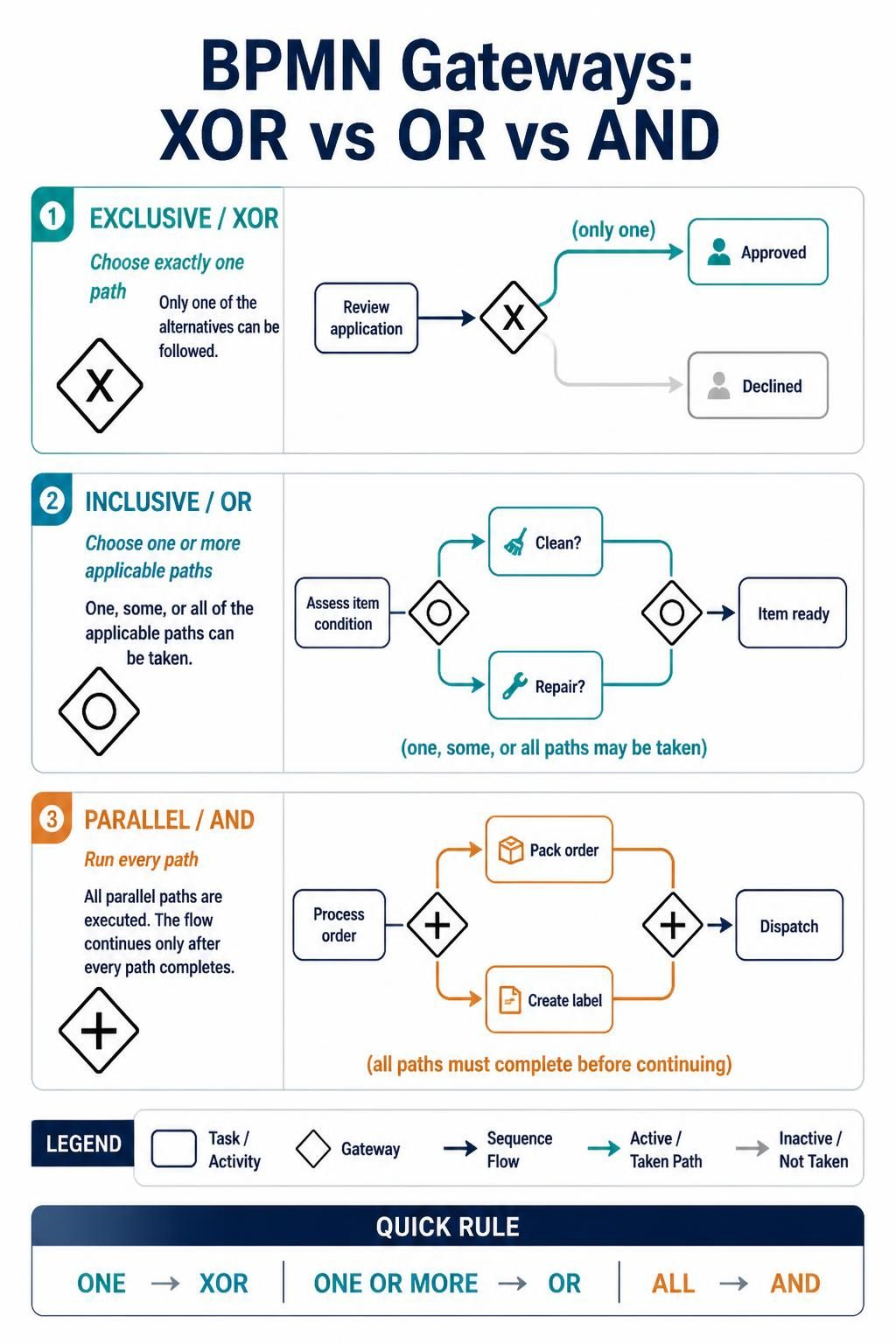
The three gateways most often compared are exclusive (XOR), inclusive (OR), and parallel (AND). The key question is simple: should the process take one path, one or more paths, or all paths?
Key Concepts
A gateway can be used to split a process, merge paths, or do both. When a gateway splits, it determines which outgoing paths become active. When it merges, it determines when the process can continue.
| Gateway | Split behavior | Merge behavior | Ask yourself |
|---|---|---|---|
| Exclusive (XOR) | Takes exactly one path | Continues along the path that arrives; does not wait for other alternatives | “Which one option applies?” |
| Inclusive (OR) | Takes one or more paths whose conditions are met | Waits for the paths that were activated | “Which optional actions apply?” |
| Parallel (AND) | Takes every outgoing path | Waits for every incoming path | “Which tasks must all happen?” |
These behaviors are the practical distinction to keep in mind when choosing a gateway.
Exclusive gateway: choose one
Use an exclusive gateway when a decision leads to exactly one outcome. For example, a payment might be approved or declined. Even if multiple outgoing conditions could evaluate as true, an exclusive gateway selects only one route; make the conditions clear and provide a default route when appropriate.
Example — invoice approval
Review invoice → XOR
                 ├─ Amount within limit → Manager approves
                 └─ Amount over limit   → Finance director approves
The two approvals are alternatives, not tasks that should both run.
Inclusive gateway: choose one or more
Use an inclusive gateway when one or several paths may apply, depending on conditions. Each outgoing condition is evaluated, and every matching path can be activated. If the paths later rejoin, the inclusive join waits for the activated paths—not for paths that were never selected.
Example — prepare a returned vehicle
Inspect vehicle → OR
                  ├─ Needs cleaning? → Clean vehicle
                  └─ Needs repair?   → Repair vehicle
                                      ↓
                              Ready for next step
If the vehicle needs only cleaning, only that path runs. If it needs cleaning and repair, both run, and the process continues after both active tasks finish.
Parallel gateway: do all paths
Use a parallel gateway when every outgoing path must happen, without evaluating conditions. A parallel split creates concurrent paths; a matching parallel join waits for all incoming paths before continuing.
Example — fulfill an online order
Order confirmed → AND
                  ├─ Pick and pack items ─┐
                  └─ Create shipping label ┴→ AND → Dispatch order
Dispatch should begin only after both required tasks are complete.
Choosing the Right Gateway
Use this quick decision guide:
-
Exactly one route? Choose exclusive.
-
One or several conditional routes? Choose inclusive.
-
All routes are required? Choose parallel.
A useful modeling test is to describe the decision in plain language. “Choose the applicable approval route” suggests XOR. “Perform every check that applies” suggests OR. “Complete both checks” suggests AND.
Modeling Gateways in Visual Paradigm
In Visual Paradigm, add a BPMN gateway to the process diagram and connect it with sequence flows. The tool’s BPMN documentation describes gateways as flow objects that direct sequence flows based on conditions, and identifies exclusive, inclusive, and parallel gateways by their distinct control behavior.

-
Add the gateway where the process needs to branch or converge.
-
Select the gateway type that matches the actual business rule: exclusive, inclusive, or parallel.
-
Label outgoing flows with concise, meaningful conditions, such as “Approved” or “Needs repair.”
-
Check the split logic. For XOR, confirm the alternatives are mutually exclusive or that the intended selection rule is explicit. For OR, define when each branch activates. For AND, confirm every branch is genuinely required.
-
Check the merge logic. An AND join waits for every incoming path, so do not use it to rejoin routes when only one route will have been activated. An OR join is appropriate when one or more conditional branches may have run.
-
Review the diagram with process stakeholders. Confirm that the modeled paths match what actually happens, including the “none apply” or default case where relevant.
Visual Paradigm can optionally show an “X” marker inside an exclusive gateway. Its user guide says this can be enabled through Presentation Options → Gateway Display Options → Data-Based gateway Markers Visible.
Common Modeling Mistakes
-
Using XOR when multiple actions can be required. This hides work that should happen on more than one branch.
-
Using AND after an exclusive split. The join may wait for paths that could never have been activated.
-
Using OR when all paths are mandatory. This makes required work look optional.
-
Leaving conditions unclear. Readers should be able to tell why each route is taken.
-
Overcomplicating the diagram with inclusive gateways. Use one only when multiple conditional branches really can be active; simpler XOR or AND logic may be easier to understand.
Conclusion
Choose a BPMN gateway by asking how many paths should run: one means exclusive, one or more means inclusive, and all means parallel. Then check that the merge behavior matches the split—especially whether the process should wait for every branch, only the branches that were activated, or none of the alternative branches. Clear conditions and a quick review with stakeholders make the diagram easier to interpret and less likely to misrepresent the process.
