Enterprise architecture requires a standardized language to describe complex organizations. Without a common vocabulary, communication breaks down between business leaders, IT staff, and stakeholders. ArchiMate provides this standardized framework. It defines the semantics, syntax, and meta-model used to represent enterprise architecture. Understanding these semantics is not optional; it is fundamental to creating accurate, actionable models.
This guide explores the core semantics of the framework. It covers the layers, concepts, and relationships that form the backbone of enterprise modeling. We focus on the logic behind the notation, ensuring your team can apply these principles effectively across various domains.
🧠 Understanding the Core Semantics
At its heart, ArchiMate is a modeling language. It allows architects to visualize, analyze, and design enterprise architecture. The semantics define what elements mean and how they interact. Unlike a diagramming tool, which focuses on aesthetics, ArchiMate focuses on logical correctness.
- Concepts: The fundamental building blocks, such as Actors, Processes, and Applications.
- Relationships: The connections that show how concepts relate, such as flows, associations, and triggers.
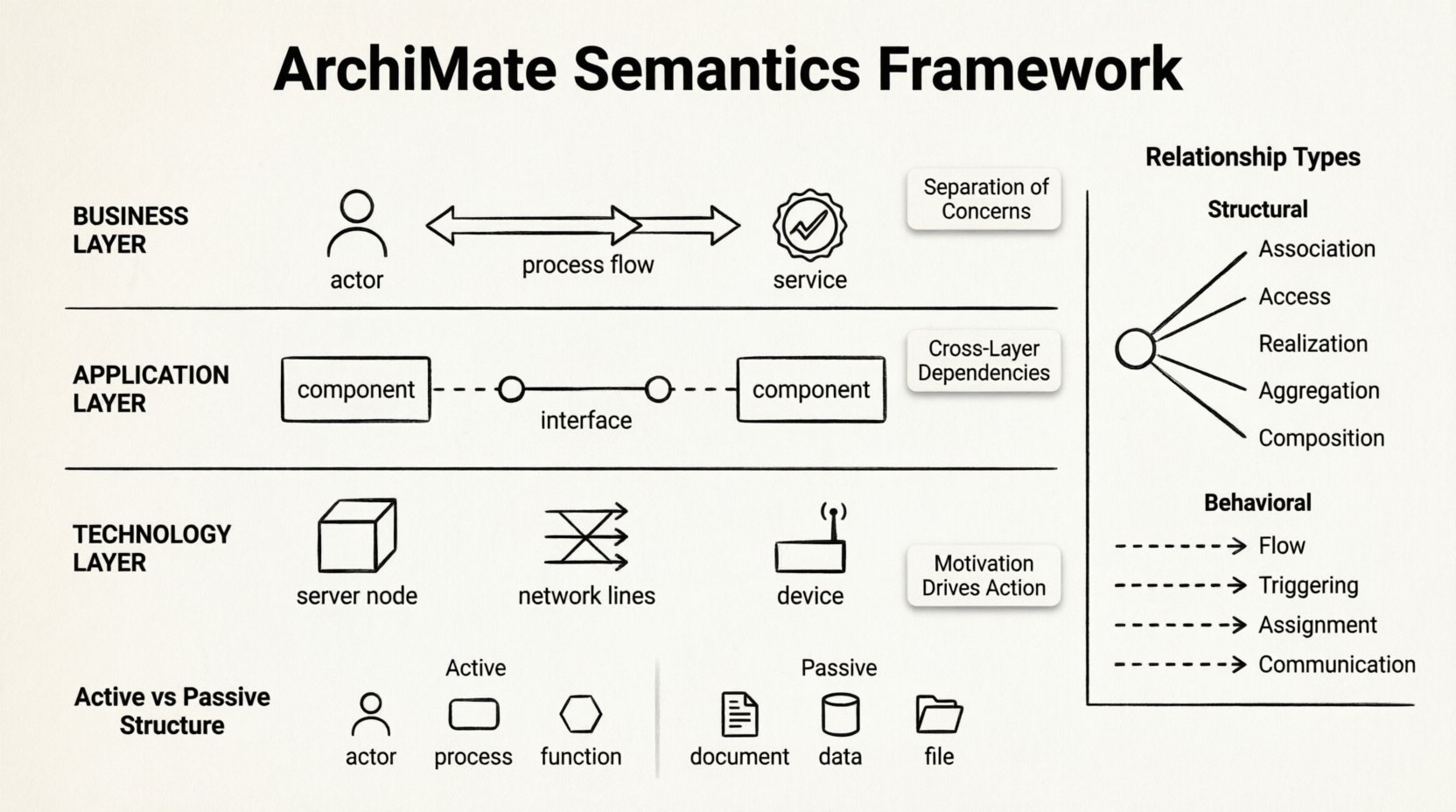
- Layers: The distinct domains where architecture exists, ensuring separation of concerns.
When building a model, every element must adhere to these definitions. Ambiguity leads to misinterpretation. For example, confusing a Business Process with a Business Function changes the granularity of your analysis. Semantics provide the rules to prevent this.
🏛️ The Three Core Layers
The architecture is divided into three primary layers. This separation helps teams focus on specific aspects of the enterprise without getting overwhelmed. Each layer contains specific concepts and relationships.
1. Business Layer
This layer represents the organization’s business capabilities, processes, and organizational structure. It answers the question: “What does the organization do?”
- Business Actor: An entity performing a business role (e.g., Customer, Employee).
- Business Role: A collection of responsibilities within the organization.
- Business Process: A set of business activities designed to achieve a goal.
- Business Function: A logical grouping of activities (e.g., “Sales Management”).
- Business Service: A unit of functionality provided to stakeholders.
- Business Interaction: A unit of work between business actors.
- Business Object: Information that is created, stored, and processed.
2. Application Layer
This layer describes the software applications supporting the business layer. It focuses on the logical view of the IT landscape.
- Application Component: A modular part of a software system.
- Application Function: A logical grouping of software functions.
- Application Service: A unit of functionality provided to the business layer.
- Application Interface: A point of access to an application component.
- Application Collaboration: A set of application components working together.
- Application Event: A significant change in state within an application.
3. Technology Layer
This layer represents the physical infrastructure and hardware that runs the applications.
- Node: A computational resource (e.g., a server).
- Device: A hardware device (e.g., a printer, sensor).
- System Software: Software managing the node (e.g., OS, Database).
- Network: Communication infrastructure connecting devices.
- Infrastructure Service: Services provided by the infrastructure (e.g., Email, Storage).
| Layer | Primary Focus | Key Concept Example |
|---|---|---|
| Business | Organization & Value | Order Processing |
| Application | Software Functionality | ERP System |
| Technology | Hardware & Infrastructure | Cloud Server |
🌐 The Six Domains of ArchiMate
While the three core layers are foundational, ArchiMate expands into six domains to cover the full lifecycle of enterprise architecture. This ensures alignment from high-level strategy down to physical implementation.
Strategy Layer
Strategic elements describe the motivation behind the architecture. This includes:
- Goal: Something an organization wants to achieve.
- Principle: A rule guiding decision-making.
- Requirement: A condition or capability needed.
- Assessment: An evaluation of the current state.
- Stakeholder: A person or group with an interest in the architecture.
Implementation & Migration Layer
This domain handles the transition from the current state to the target state. It includes:
- Work Package: A set of activities to be performed.
- Project: A temporary endeavor to create a unique result.
- Deliverable: A tangible or intangible output of a project.
- Gap: A difference between the baseline and target state.
Physical Layer
This layer extends the Technology layer to include physical locations and objects.
- Site: A physical location.
- Device: A hardware device (also in Technology).
- System Software: Software managing the device.
- Infrastructure Service: Services provided by the physical infrastructure.
🔗 Understanding Relationships
Relationships define how concepts interact. They are the glue that holds the model together. Different relationships imply different types of interaction. Misusing relationships can invalidate the semantic meaning of the diagram.
1. Structural Relationships
These relationships show static associations between elements.
- Association: A general connection between two elements. It implies a link but not necessarily a flow of information.
- Access: One element uses another. Common between a Business Process and an Application Function.
- Realization: One element implements another. For example, a Process realizes a Function.
- Aggregation: A whole-part relationship. The parts can exist independently of the whole.
- Composition: A strong whole-part relationship. If the whole is destroyed, the parts are destroyed.
2. Behavioral Relationships
These relationships describe dynamic behavior or the flow of information.
- Flow: Information flows from one element to another. This is common in business processes.
- Triggering: One event causes another to happen. Often used to show cause and effect.
- Assignment: An actor is assigned a role or function.
- Communication: Information is exchanged between elements. Similar to flow but often used for technology interactions.
| Relationship Type | Semantic Meaning | Typical Usage |
|---|---|---|
| Realization | Implementation of | Business Process → Business Function |
| Flow | Information movement | Business Process → Business Object |
| Access | Uses | Business Process → Application Component |
| Assignment | Assigned to | Business Actor → Business Role |
🔄 Active Structure vs. Passive Structure
One of the most critical distinctions in ArchiMate semantics is between Active Structure and Passive Structure.
Active Structure
Active Structure represents elements that can initiate action. They are the “doers” in the architecture.
- Business Actors: People or systems initiating processes.
- Business Processes: Activities that perform work.
- Application Functions: Software functions that execute logic.
- Nodes: Hardware resources processing data.
Passive Structure
Passive Structure represents elements that are acted upon. They are the “things” being processed or stored.
- Business Objects: Data entities like “Order” or “Invoice”.
- Application Data Objects: Specific data stored in applications.
- Documents: Physical or digital files.
- Files: Stored data in the technology layer.
Understanding this distinction helps prevent modeling errors. For instance, a Business Process (Active) should not be connected to another Business Process via an Association unless there is a specific reason. Usually, they are connected via Flow (behavior) or Aggregation (structure).
🔄 Cross-Layer Dependencies
Enterprise architecture is rarely isolated within a single layer. Business needs drive Application capabilities, which run on Technology infrastructure. ArchiMate provides specific semantics to model these cross-layer interactions.
1. Business to Application
This interaction describes how the business uses IT. The most common relationship here is Access. A Business Process accesses an Application Function to perform a task. Alternatively, a Business Service is provided by an Application Service.
2. Application to Technology
This interaction describes the deployment of software. An Application Component is deployed on a Node or Device. This relationship is often modeled using Realization or Assignment depending on the level of detail.
3. Technology to Physical
This interaction maps logical nodes to physical sites. A Node is located at a Site. This is crucial for disaster recovery planning and infrastructure management.
4. Strategy to Implementation
The Strategy layer drives the rest of the model. A Requirement in the Strategy layer can be satisfied by a Capability in the Business layer. A Goal is realized by a Work Package.
✅ Implementation Guidelines
To ensure your architecture models remain accurate and useful, follow these implementation guidelines. Adherence to these rules maintains the integrity of the semantics.
- Define Granularity Early: Decide the level of detail required before modeling. Are you modeling high-level functions or specific software modules? Consistency is key.
- Validate Relationships: Ensure relationships are semantically correct. Do not use “Flow” for structural dependencies. Do not use “Association” where “Access” is more precise.
- Separate Concerns: Keep Business, Application, and Technology layers distinct unless explicitly modeling a cross-layer dependency.
- Use Motivation Elements: Always link architectural decisions to business Goals or Requirements. This provides context and justification.
- Standardize Naming: Use consistent naming conventions across all layers. This improves readability and searchability.
- Review Regularly: Architecture evolves. Regular reviews ensure the model remains aligned with the actual enterprise state.
⚠️ Common Modeling Errors
Even experienced architects make mistakes. Identifying common pitfalls helps teams avoid them.
1. Mixing Layers Indiscriminately
Connecting a Business Actor directly to a Technology Device without an Application layer bridge often obscures the value chain. It skips the logical explanation of how the technology supports the business.
2. Overusing Associations
The Association relationship is a catch-all. Using it everywhere makes the model ambiguous. Specify if it is a Flow, Access, or Realization. Precision adds value.
3. Ignoring Passive Structure
Focusing only on processes and components while ignoring the data objects they manipulate creates an incomplete picture. Data is often the most critical asset.
4. Inconsistent Motivation
Models that lack Goals and Requirements become disconnected from business reality. They become diagrams without purpose. Always anchor the architecture in strategic intent.
5. Redundant Elements
Creating the same Business Process multiple times in different views creates confusion. Use composition and views to manage complexity rather than duplication.
🛠️ Practical Application
How do teams apply these semantics in daily work? The framework is used for gap analysis, target state design, and impact assessment.
- Gap Analysis: Compare the baseline architecture with the target architecture. Identify what needs to change.
- Impact Assessment: If a Business Process changes, trace the dependencies down to the Technology layer to see what breaks.
- Target State Design: Define the future architecture using the layers and relationships. Ensure the target is feasible.
- Communication: Use the models to explain complex IT structures to non-technical stakeholders. The standardized notation bridges the communication gap.
📊 Summary of Key Concepts
To summarize the essential takeaways for your enterprise teams:
- Layers Matter: Maintain separation between Business, Application, and Technology.
- Relationships Define Logic: Choose the right relationship to convey the correct meaning.
- Motivation Drives Action: Connect every architectural element to a business Goal or Requirement.
- Active vs. Passive: Distinguish between what does the work and what is processed.
- Consistency is Critical: Standardize your definitions and naming conventions.
Mastering the semantics of this framework enables organizations to build robust, scalable, and aligned architectures. It transforms abstract ideas into structured, actionable blueprints. By adhering to these principles, teams can navigate complexity with clarity and precision.