


In the modern enterprise landscape (2026), the gap between business stakeholders and IT implementation is bridged most effectively through Business Process Model and Notation (BPMN). When combined with an enterprise-grade tool like Visual Paradigm and augmented by Generative AI, Business Analysts (BAs) and Product Owners can transform ambiguous conversations into precise, traceable, and actionable requirements.
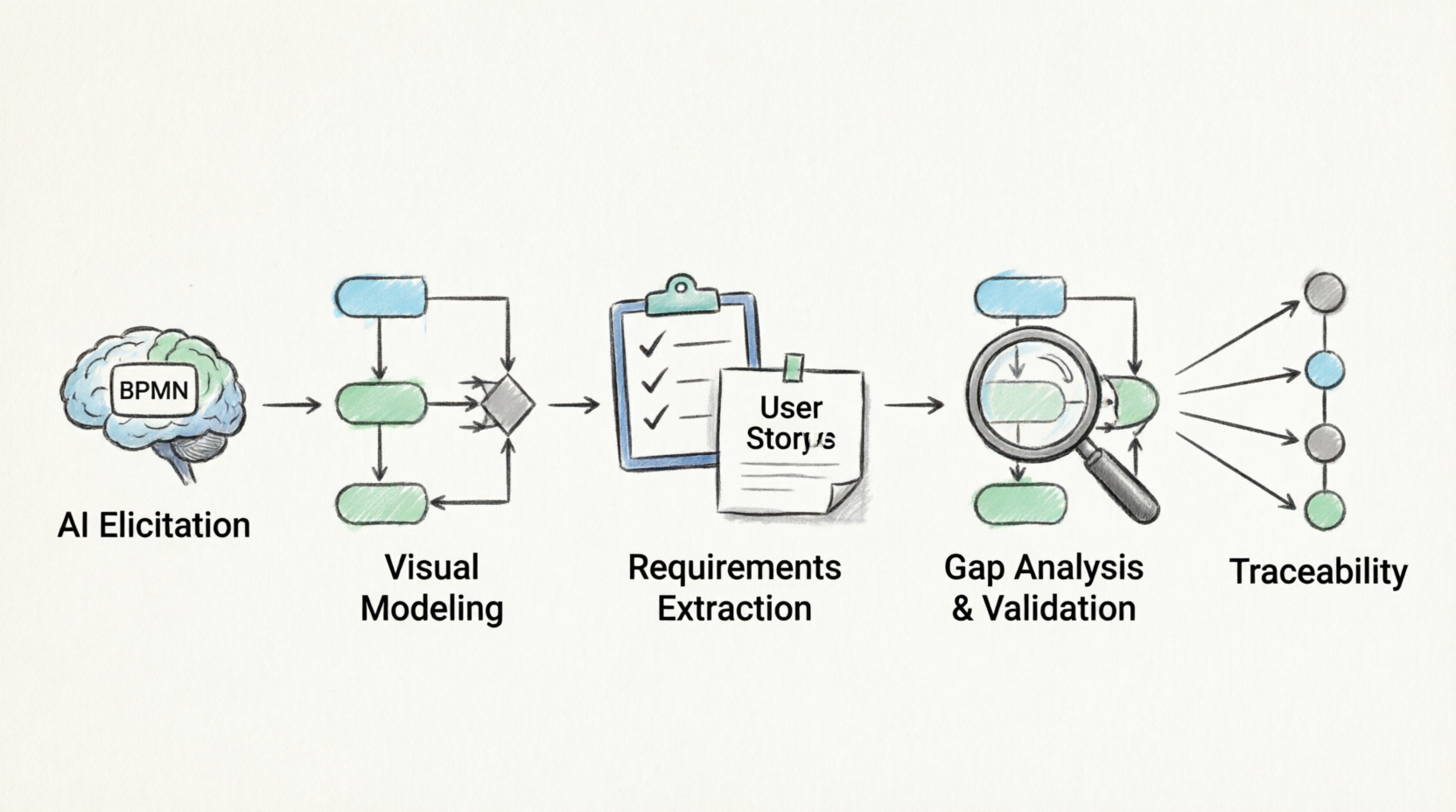
This comprehensive guide will walk you through the end-to-end methodology of using BPMN for requirement identification, leveraging Visual Paradigm’s modeling capabilities and its integrated AI assistant.
Phase 1: AI-Assisted Elicitation & Discovery
Before drawing a single shape, you must gather raw information. In 2026, AI has revolutionized the elicitation phase by turning unstructured data into structured insights.
1. Capture and Transcribe
Record stakeholder interviews, workshop sessions, and shadowing observations. Use AI transcription tools to convert these into text.
2. AI-Powered Process Extraction
Feed the meeting transcripts or raw policy documents into Visual Paradigm’s AI Assistant (VP AI).
-
Prompt Example: “Analyze this transcript of the Order-to-Cash workshop and extract the core business process steps, the actors involved, and the systems they interact with.”
-
Result: The AI will output a structured list of tasks, roles, and systems, giving you a blueprint for your initial BPMN draft.
Phase 2: Visualizing the Process in Visual Paradigm
Visual Paradigm provides a robust, standards-compliant BPMN diagrammer. The goal here is not just to draw a pretty picture, but to create a semantic model where every shape holds requirement data.
1. Rapid Prototyping with “Text-to-BPMN”
Instead of starting from a blank canvas, use Visual Paradigm’s generative AI features to draft the baseline model.
-
Action: Prompt the AI with a high-level description: “Generate a BPMN diagram for an Employee Onboarding process involving HR, IT, and the New Hire, including identity creation and equipment provisioning.”
-
Refinement: Review the AI-generated draft. Correct missing edge cases, adjust gateway logic, and ensure proper Pool/Lane delineations.
2. Mapping BPMN Elements to Requirement Types
To use BPMN for requirement identification, you must understand what each element represents in a requirements context:
| BPMN Element | Requirement Mapping | Example |
|---|---|---|
| Pools / Lanes | Actors / Roles / Systems | Defines who or what system is responsible (e.g., “CRM System”, “Sales Rep”). |
| Tasks (User/Manual) | Functional Requirements | “The system shall allow the user to upload a PDF.” |
| Tasks (Script/Service) | System Integrations / APIs | “The system must call the Payment Gateway API.” |
| Gateways (XOR/AND) | Business Rules & Logic | “If credit score < 600, route to manual review.” |
| Events (Message/Timer) | Triggers & SLAs (Non-Functional) | “System must send an alert if approval takes > 24 hours.” |
| Data Objects | Data Requirements / Entities | “Invoice Document”, “Customer Profile Data”. |
| Artifacts (Groups/Notes) | Constraints / Assumptions | “GDPR compliance required for data storage.” |
Phase 3: Extracting & Documenting Requirements
This is where Visual Paradigm’s model-centric architecture shines. You do not write requirements in a separate Word document; you extract them from the model.
1. AI-Driven User Story Generation
Link your BPMN tasks to Visual Paradigm’s Requirement Diagram or Agile Backlog.
-
The AI Workflow: Select a User Task (e.g., “Review Loan Application”) and use the AI Copilot to generate User Stories and Acceptance Criteria.
-
AI Output:
-
User Story: “As a Loan Officer, I want to view the applicant’s credit history on the dashboard so that I can make an informed approval decision.”
-
Acceptance Criteria: Derived automatically from the incoming Gateway conditions and Data Objects attached to the task.
-
2. Generating the Business Requirements Document (BRD)
Visual Paradigm allows for Model Transformation and automated documentation.
-
Use the Document Generator to create a BRD.
-
AI Enhancement: Use the AI assistant to write the Executive Summary, Process Descriptions, and Assumptions/Constraints sections based on the visual model and linked requirement metadata. This saves hours of manual writing.
Phase 4: Gap Analysis & Validation (The AI Superpower)
One of the hardest parts of requirement identification is finding what you forgot to ask. Visual Paradigm’s AI acts as an expert peer reviewer.
1. Automated Model Validation
Run Visual Paradigm’s built-in BPMN semantic checker to ensure structural integrity (e.g., no dead-end paths, all pools have start/end events).
2. AI-Powered “What-If” & Gap Analysis
Query the AI about your model to identify missing requirements.
-
Prompt: “Analyze the ‘Payment Processing’ lane. Are there any missing exception handling flows or error events?”
-
AI Response: “The model shows a successful payment path, but lacks an alternative flow for ‘Insufficient Funds’ or ‘API Timeout’. Consider adding an Error End Event and a retry loop.”
-
Prompt: “What non-functional requirements are implied by the Timer Events in this process?”
-
AI Response: “The 48-hour timer on the ‘Manager Approval’ task implies a requirement for automated escalation and SLA tracking dashboards.”
Phase 5: Traceability and Impact Analysis
Requirements change. When a business process changes, you need to know exactly what IT artifacts are impacted.
1. The Traceability Matrix
Use Visual Paradigm’s Dependency Matrix to map:
BPMN Process -> Business Requirements -> User Stories -> Test Cases
If a stakeholder changes a business rule (a Gateway condition), the matrix instantly highlights which User Stories and QA Test Cases need updating.
2. AI Impact Assessment
When modifying a process, ask the AI: “If I change the ‘Inventory Check’ task to an automated API call, what downstream requirements and data objects will be impacted?” The AI will scan the model’s dependencies and provide an impact report.
Best Practices for 2026 & Beyond
-
Maintain Strict Naming Conventions: AI tools parse text to generate models and requirements. Use clear, verb-noun naming for tasks (e.g., “Calculate Tax” instead of “Tax Stuff”).
-
Use Sub-Processes for Modularity: Do not create a “spaghetti” diagram with 100+ tasks. Break complex processes into collapsible Sub-Processes. This makes AI analysis more accurate and keeps stakeholders from being overwhelmed.
-
Human-in-the-Loop (HITL): AI is a powerful accelerator, not a replacement for business context. Always validate AI-generated User Stories and exception flows with actual Subject Matter Experts (SMEs).
-
Leverage BPMN Extensions for IT Handoff: If the requirement is heading straight to development, use Visual Paradigm’s BPMN extensions (like Camunda or custom properties) to embed technical requirements (e.g., database fields, API endpoints) directly onto the process tasks.
-
Centralize the “Single Source of Truth”: Never let BPMN diagrams and Word-based BRDs live in separate silos. Keep everything inside Visual Paradigm’s repository so AI can index the relationships and provide holistic insights.
Summary
By combining the structural rigor of BPMN, the enterprise repository capabilities of Visual Paradigm, and the analytical/generative power of AI, you shift requirement identification from a manual, error-prone documentation exercise into a dynamic, visual, and highly traceable engineering discipline. You spend less time writing documents and more time solving actual business problems.
Related posts:
 Review: Transforming Complex BPMN 2.0 Modeling with Visual Paradigm’s AI Generator
Mastering Business Process Modeling: A Comprehensive Review and Guide to BPMN with Visual Paradigm
Review: Transforming Complex BPMN 2.0 Modeling with Visual Paradigm’s AI Generator
Mastering Business Process Modeling: A Comprehensive Review and Guide to BPMN with Visual Paradigm
 5 Common BPMN Modeling Mistakes (And How to Avoid Them)
From Chaos to Clarity: A Comprehensive Guide to AI-Powered BPMN Modeling
5 Common BPMN Modeling Mistakes (And How to Avoid Them)
From Chaos to Clarity: A Comprehensive Guide to AI-Powered BPMN Modeling