Introduction
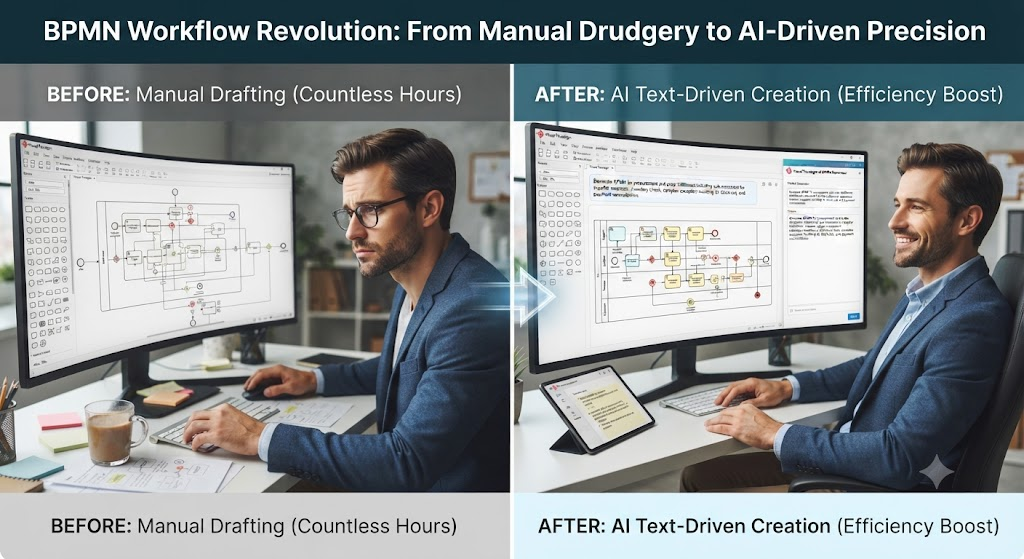
As a business analyst and process architect, I have spent countless hours manually dragging and dropping shapes to map out enterprise workflows. Recently, I was tasked with modeling a highly complex, multi-layered procurement and order fulfillment ecosystem. The challenge wasn’t just in understanding the business logic, but in accurately capturing the nuances of sub-processes, event handling, and context-sensitive exceptions using standard BPMN 2.0 notation.
To bring this vision to life without burning out, I turned to Visual Paradigm, specifically testing their new AI BPMN Diagram Generator. In this review, I want to share my experience breaking down a complex BPMN case study and how Visual Paradigm’s AI tools completely revolutionized my workflow from manual drafting to automated, text-driven creation.
The Challenge: Modeling a Complex BPMN 2.0 Ecosystem
Before diving into the tool, I needed to structure the business logic. The case study I was working on perfectly illustrates the power of process modularity, sub-processes, and advanced event handling. Here is how I broke down the architecture:
1. The Core Engine: Procurement Sub-process
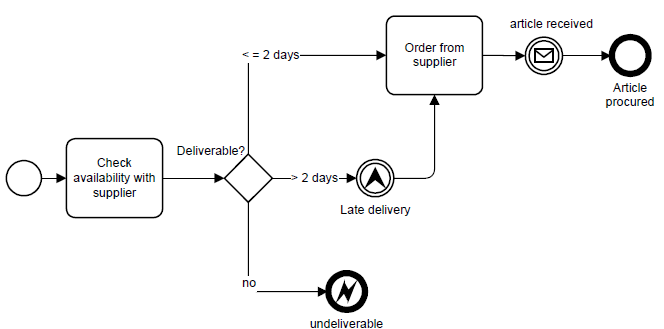
This diagram represents a Global Sub-process. It is a standalone process that doesn’t start on its own but is “called” by other parent processes.
The Logic:
The process checks if a supplier can deliver an item.
-
No (Not Deliverable): The process ends immediately with an Error End Event (a thick circle with a lightning bolt). This signals a critical failure back to the parent process.
-
Yes (Deliverable): The process checks the time. If it takes more than 2 days, it triggers an Escalation Intermediate Event (a circle with a triangle). This sends a “Late delivery” signal to the parent process but does not stop the sub-process. It then proceeds to order the item. If it takes 2 days or less, it proceeds directly to order.
-
Completion: Once the article is received (Message Catch Event), the process ends successfully.
2. The Customer-Facing Process: Order Fulfillment
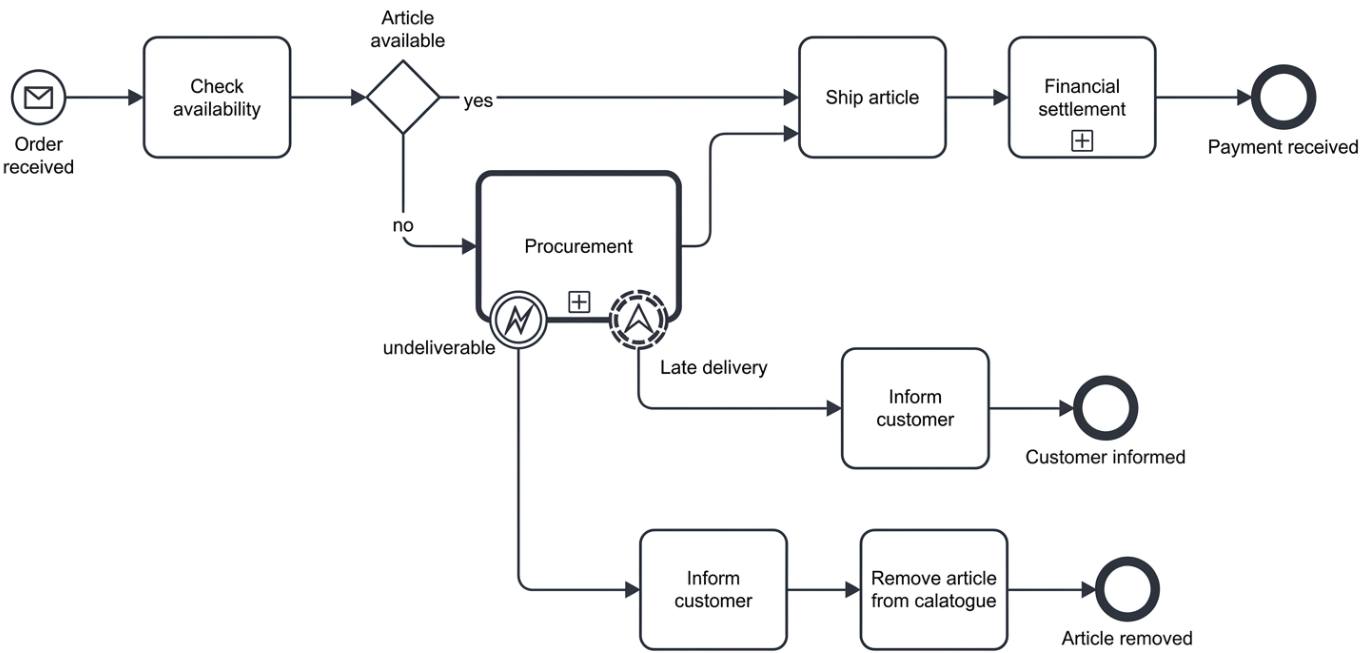
This is the main process triggered by a customer order, demonstrating how to handle the outcomes of the global sub-process.
The Logic:
-
Trigger: Starts with a Message Start Event (Order received).
-
Happy Path: If the item is available, it ships and settles payment.
-
Exception Path: If unavailable, it calls the Procurement Sub-process (indicated by a thick border and a plus sign).
-
Event Handling: Two boundary events are attached to the Procurement task:
-
Late Delivery (Escalation): A non-interrupting event. When the sub-process throws the “late” signal, this path activates to “Inform customer,” but the Procurement task continues running in the background.
-
Undeliverable (Error): An interrupting event. If the sub-process throws the error, the Procurement task stops immediately, moving the flow to “Inform customer” and “Remove article from catalogue.”
-
3. The Internal Process: Stock Maintenance
This process shows how the exact same global sub-process can be reused for internal restocking with entirely different rules.
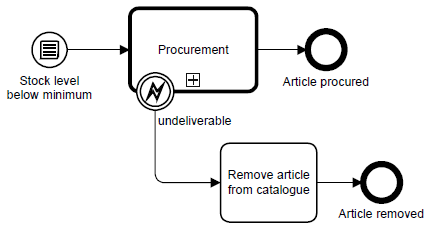
The Logic:
-
Trigger: Starts with a Conditional Start Event (Stock level below minimum).
-
Reuse: It calls the exact same Procurement sub-process.
-
Event Handling: It handles the “Undeliverable” error by removing the article from the catalogue. However, it completely ignores the “Late Delivery” escalation. Since there is no external customer waiting, there is no need to trigger an “Inform customer” task.
Key Takeaways from the Modeling Exercise
Working through this case study highlighted three massive “aha!” moments for me:
-
Reusability: Using a Call Activity for the Procurement box meant I didn’t have to redraw the supplier logic twice. If the logic changes, it updates everywhere.
-
Error vs. Escalation: Understanding that an Error (lightning bolt) is a “stop” condition (interrupting), while an Escalation (triangle) is a “warning” (non-interrupting) was crucial for accurate mapping.
-
Context-Sensitive Handling: The child process throws the same events every time, but the parent processes decide how to react based on their specific context.
My Experience with Visual Paradigm’s Core BPMN Capabilities
To map out the architecture above, I utilized Visual Paradigm. As an enterprise-grade BPMN suite, it provided exactly what I needed as a process architect:
-
Full BPMN 2.0 Compliance: It accurately mapped my formal business processes using exact notations for tasks, gateways, data objects, and event types. I didn’t have to worry about using the wrong symbol.
-
Advanced Layout Structure: Organizing workflows via customizable pools and swimlanes made it incredibly easy to differentiate roles, departments, and systems visually.
-
Verification & Validation: The built-in syntax engines were a lifesaver. They checked that my models complied with formal rules, preventing orphaned elements or invalid sequence flows before they became a problem.
-
Execution & Simulation: Being able to run simulations to expose process bottlenecks and export clean BPMN XML for downstream execution engines added immense professional value to my deliverables.
The Game Changer: The AI-Assisted BPMN Advantage
While the core modeling tools are fantastic, the integrated AI Diagram Generator is what truly shifted my workflow. Instead of building components manually, I was able to use text-driven automation.
-
Text-to-Diagram Translation: I simply supplied plain-English descriptions of my operational concepts, and the tool did the heavy lifting.
-
Contextual Parsing: The natural language processing engine recognized my operational tasks, defined logical sequence structures, and automatically applied appropriate gateways (like XOR logic).
-
Automated Swimlane Formatting: It actively identified distinct actors and departments in my text narrative and populated them into categorized pools and lanes.
-
Fully Editable Output: The generated result was not a flat, uneditable image. It was a fully interactive, adjustable model nested directly inside the Visual Paradigm Desktop environment, allowing me to fine-tune the AI’s output.
Step-by-Step: How I Generated My AI BPMN Diagram
For those looking to replicate my workflow, the AI feature operates natively inside the desktop software. Here is the exact step-by-step process I followed:
-
Open Workspace: I launched my project inside the Visual Paradigm Desktop.
-
Access the AI Tool: I navigated to the top menu and selected Tools > AI Diagram Generation.
-
Select Diagram Type: From the target diagram selection field, I chose Business Process Diagram.
-
Enable Structure: I made sure to enable the checkbox for Include Pools and Lanes to automatically structure the participants.
-
Input the Narrative: I typed my workflow narrative into the main description box.
-
Example text I used: “The customer submits a claim request. The Support Team reviews the submission. If approved, Finance processes the payment. If rejected, Support sends an update.”
-
-
Generate: I clicked OK and watched the engine instantly populate my compliance-ready process map.
Conclusion
Modeling complex, context-sensitive business processes like the procurement and order fulfillment case study can be incredibly daunting when done manually. My experience with Visual Paradigm proved that you no longer have to choose between deep, compliant BPMN 2.0 architecture and rapid delivery.
The core suite provides the rigorous, enterprise-grade environment necessary for professional process modeling, while the new AI BPMN Diagram Generator drastically reduces the time spent on tedious manual drafting. By simply translating natural language into interactive, standard-compliant process flows, Visual Paradigm has successfully bridged the gap between high-level business logic and rapid diagram creation. If you are a business analyst or process architect looking to modernize your workflow, this tool is absolutely worth integrating into your toolkit.
References
- From Narrative to Diagram: How Visual Paradigm’s AI BPMN Generator Transforms Process Modeling Workflows: Explores how AI converts text narratives into BPMN diagrams.
- Mastering Business Process Modeling (BPMN 2.0) with Visual Paradigm’s AI-Powered Tools: A guide to mastering BPMN 2.0 using AI tools.
- Visual Paradigm BPMN Review: Bridging the Gap Between Business Logic and Technical Execution: An in-depth review of Visual Paradigm’s BPMN capabilities.
- AI BPMN Business Process Diagram Generator Update: Release notes for the AI BPMN generator update.
- Understanding the BPMN Notation: A Key to Effective Business Process Modeling: A foundational guide to understanding BPMN notation.
- Visual Paradigm BPMN Tutorial: A video tutorial demonstrating BPMN features.
- Beyond Code and AI: Why Visual Paradigm Remains Essential for Professional Software Architecture: Discusses the enduring value of Visual Paradigm in software architecture.
- BPMN Activity Types Explained: A detailed explanation of different BPMN activity types.
- How AI-Powered NLP is Revolutionizing Text-to-BPMN Generation for Enterprise Process Modeling: Details the NLP technology behind text-to-BPMN generation.
- Visual Paradigm Features: An overview of the core features of Visual Paradigm.
- BPMN Diagram and Tools: A dedicated look at BPMN diagramming tools and features.
- Visual Paradigm Official Website: The official homepage for Visual Paradigm.
- Click Start AI – Technical Support: Technical support documentation for getting started with AI features.
- Testing Visual Paradigm’s AI-Powered BPMN Diagram Generator for Real-World Process Mapping: A practical test of the AI generator for real-world mapping.