


Introduction
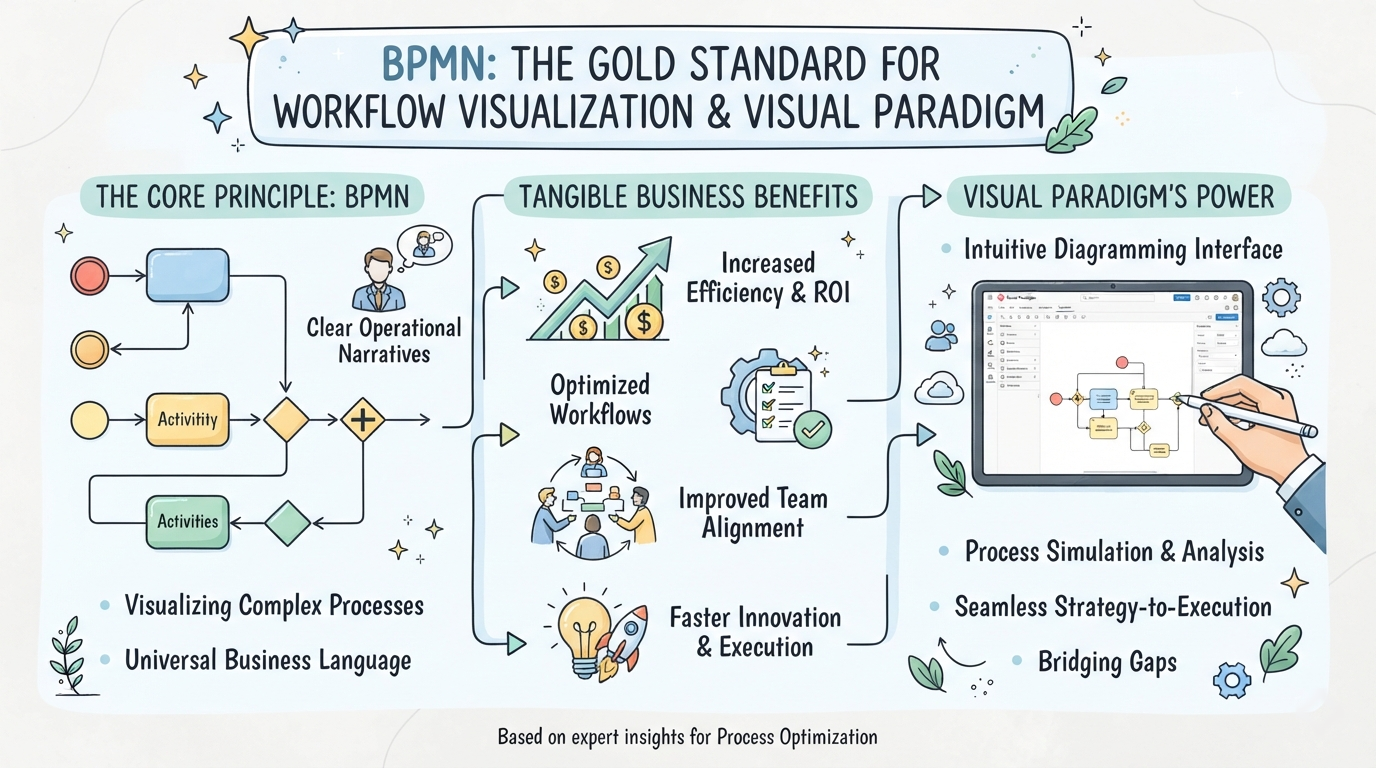
As a business analyst and process optimization consultant who has evaluated dozens of workflow mapping tools over the past decade, I can confidently say that Business Process Model and Notation (BPMN) remains the undisputed gold standard for visualizing organizational workflows. However, the true value of BPMN isn’t just in the standard itself, but in the software used to implement it. Recently, I had the opportunity to deeply explore how modern BPMN platforms—specifically Visual Paradigm—translate complex operational narratives into clear, actionable, and standardized diagrams. This guide is born from that hands-on experience, designed to walk you through the core principles of BPMN, its tangible business benefits, and a detailed, real-world review of how Visual Paradigm’s feature set empowers teams to bridge the gap between business strategy and technical execution.
What is Business Process Model and Notation?
Business Process Model and Notation (BPMN) is a standard way to represent business processes from beginning to end. It is explicitly designed to remove the ambiguity of process specifications and provide the context needed to execute them successfully. As process mapping is often very complex and confusing, BPMN provides a universal solution that uses standard modeling techniques and standardized symbols. This allows process models to be easily shared and read by anyone—whether technical or non-technical.
BPMN diagrams provide an easy-to-understand visual representation of the steps involved in a process, giving sufficient detail to enable successful implementation. They allow for better communication and collaboration and are particularly helpful when trying to increase efficiency and identify areas for improvement.
The Benefits of BPMN
All organizations can benefit from improved business processes supported by BPMN. With robust business process modeling software, you can create simple or complex diagrams—whatever your process requires. The flowcharts you make can easily be recognized and understood by stakeholders, whether they have a technical background or not.
The primary purpose of BPMN is to help support business process management throughout the organization with a standard that is understandable for all its users. Some of the key benefits I have observed include:
-
Understanding: As you create BPMN diagrams that all teams can decipher, intricate and complex workflows become easier to understand. It allows businesses to clearly define their business procedures.
-
Standardization: Having one solution in place allows information to be quickly shared and understood by everyone. BPMN works as a standard notation for all levels of your stakeholders.
-
Simplicity: Diagrams are a visual learning tool, making them easier to understand than narrative text. It is also an industry standard, so there is little room for error.
-
Communication: BPMN helps bridge the communication gap between various teams, departments, and organizations by designing flowcharts that all department levels can understand.
-
Collaboration: BPMN brings all relevant stakeholders into the process, making it an effective collaboration tool. Multiple departments can review your flowchart and almost immediately identify the business process, outcomes for your team, and next steps without requiring excessive detail.
-
Empowerment: As BPMN promotes effective and efficient communication across all departments, employees are empowered to create flowcharts representing their business processes and other activities. When teammates can quickly interpret your chart, they can make knowledgeable business decisions faster.
How BPMN Works
BPMN provides a visual flow that bridges the communication gap between internal and external teams, showing the actions needed from the first to the final step. As a global standard for process making, it has been maintained at a single source.
Originally developed by the Business Process Management Initiative (BPMI), BPMN has been maintained by the Object Management Group (OMG) since their merger in 2005. OMG currently houses other worldwide standards, helping to develop enterprise integration standards for various technologies and industries. In version 2.0 of BPMN, the name was changed from Business Process Modeling Notation to Business Process Model and Notation.
As the number one priority of BPMN is to create an easy-to-understand notation for process models while translating their inherent complexities, BPMN tackles this by organizing the graphical aspects into specific categories. By helping readers recognize the symbols within a chart through a small set of notation categories, they are able to identify the essential elements and understand the diagram at hand. BPMN works to capture pertinent data and present it graphically, accurately, and consistently throughout all your teams. Additional information and context can be added to a flowchart without changing the look and feel of the diagram. Each symbol and icon has a specific meaning or note for an action.
Creating a BPMN diagram is simple, especially if you already use capable diagramming software. You will need to understand and deploy the visual language and design elements used throughout all BPMN diagrams to create a visual representation of your process.
BPMN Design Elements
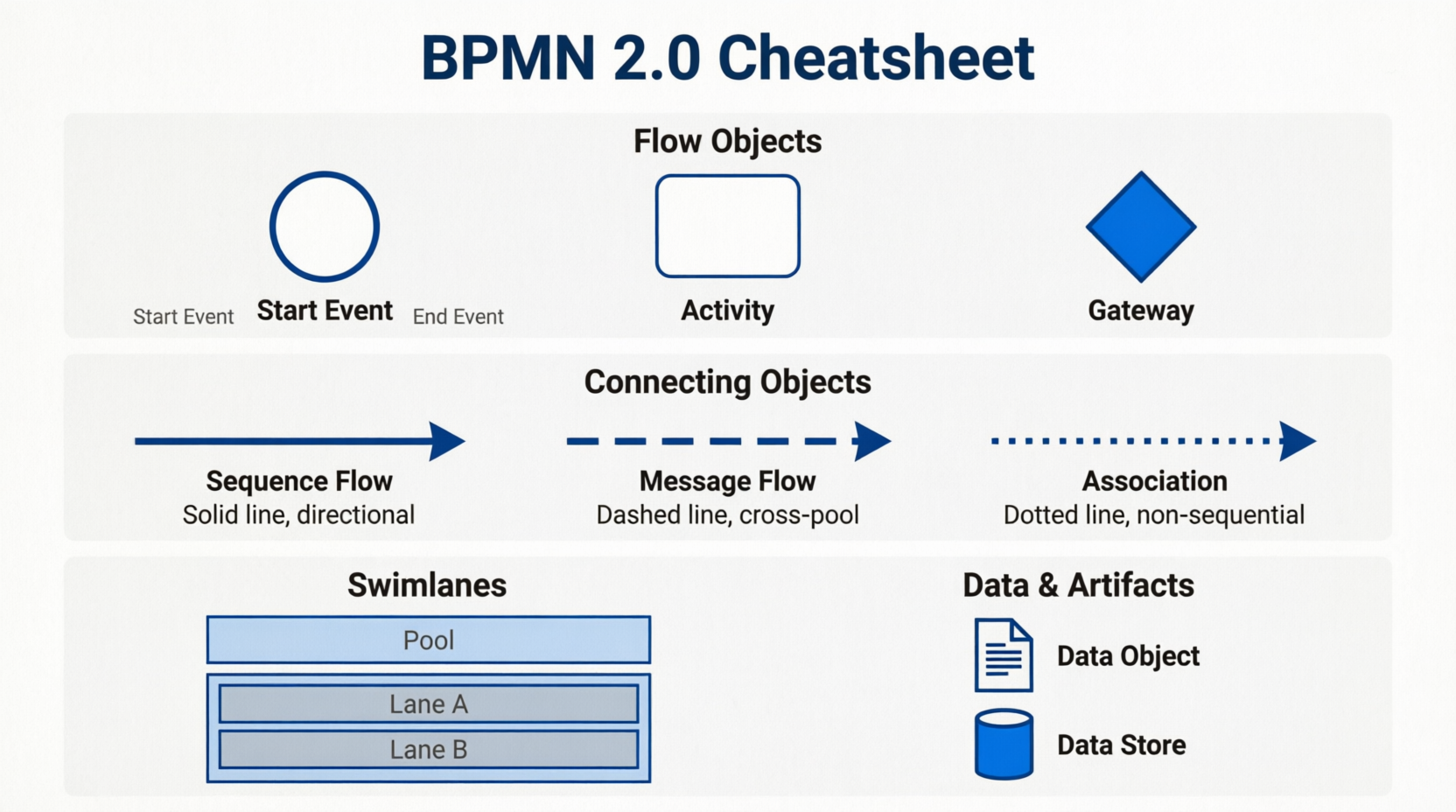
BPMN is a collection of symbols and rules used to connect those symbols to a business process model. The BPMN language used in those models is based on flowcharts and graphical notations divided into the following five core elements.
Flowchart
Flowcharts connect elements that help form a process.
-
Events: Depicted as circles, these represent an occurrence. Events are broken into three types: Start (signaling the first step of the process), Intermediate (describing any event that occurs between the first and the last), and End (signaling the final stage of your business process).
-
Activities: Visually presented as a rounded corner rectangle, these represent a task performed by a person or system. There are four BPMN activity types: task, sub-process, call, and transaction.
-
Gateways: Diamond-shaped icons signal if an activity needs to go through a different process flow. A few different gateway symbols separate and connect flows, including exclusive, inclusive, parallel, and complex.
Connecting Object
Connecting objects symbolize how objects are connected within the flow.
-
Sequence flows: Display the order of business activities with a solid line and arrow.
-
Message flows: Messages that “flow” across different departments or organizations, represented by a dashed line with a circle and an arrow.
-
Associations: Dotted lines connecting artifacts or text to an event, activity, or gateway.
-
Data associations: These dotted lines with an arrow represent data with flow objects. Data associations show the inputs and outputs of activities.
Swimlane
Swimlanes are graphical icons representing the process participants and who is accountable for which parts.
-
Pools: These are significant participants, whether within the company or externally, working in the process.
-
Lanes: These objects show the activities and flow for a participant, dictating their responsibilities within the process. Many lanes can make up a single pool, as a pool is determined by which actions must be completed by that group in the process.
Artifact
An artifact clarifies information added to the diagram while not affecting the flow. Artifacts are associated with a process or connection by an association connection.
-
Text annotation: Copy providing context to a part of the diagram.
-
Groups: The logical grouping of activities without changing the flow of the diagram.
Data
Data objects provide the information needed to produce or execute a business process, represented as a file icon. Data objects are also considered artifacts since they don’t directly affect the message or sequence flow.
-
Data objects: Showing what data is necessary for an activity.
-
Data input: External data input for the entire process.
-
Data output: The results of that data throughout the entire process.
-
Data stores: A place to read or write data, lasting throughout the process.
The latest iteration, BPMN 2.0, builds off the previous versions, providing a more extensive set of icons, symbols, and notations, allowing for more detail when necessary.
Visual Paradigm: A Power User’s Review of Core Features
Visual Paradigm provides full native support for the global Business Process Model and Notation (BPMN) 2.0 standard. This makes it a highly popular tool among business analysts and IT professionals to design, simulate, and analyze workflow processes. In my experience, it acts as a true semantic modeler rather than a simple drawing tool. Here is a comprehensive breakdown of the core BPMN features supported by the platform.

Core BPMN Notation & Modeling Elements
The platform fully implements the official Object Management Group (OMG) BPMN 2.0 specifications:
-
Swimlanes & Pools: Dedicated horizontal or vertical container layouts to clearly segment organizational boundaries, roles, and participants.
-
Flow Objects: A full palette of events (Start, Intermediate, End), Activities (User, Service, Script, Manual tasks), and branching Gateways (Exclusive, Parallel, Inclusive).
-
Connecting Objects: Smart management of Sequence Flows within pools and Message Flows crossing pool boundaries.
-
Data & Artifacts: Rich representation of Data Objects, Data Inputs/Outputs, and Text Annotations to fully document data states throughout the workflow.
Smart Productivity & AI Utilities
-
AI Text-to-Diagram Generator: Includes built-in AI that interprets natural language descriptions of business procedures and instantly drafts fully interactive, editable BPMN maps with correct swimlanes and logic. This is a massive time-saver during initial discovery phases.
-
Resource Catalog: A quick-access context menu that allows you to drag from an existing shape to instantly spawn and connect the next logical element, saving significant drafting time.
-
Hierarchical Sub-Processes: Supports nesting sophisticated workflows into compact Sub-Process elements that users can smoothly collapse or expand inline to handle complex multi-level workflows.
Architecture Integration & Traceability
-
Model Element Referencing: Easily bind any block or shape to supplemental materials like local files, folders, web URLs, or other internal diagrams to maintain direct traceability.
-
Multi-Notation Mapping: Allows you to map process components against other modeling layers, integrating seamlessly with UML shapes, ERD database entities, wireframes, and enterprise architecture models.
-
Process Performance Statistics: Track metrics directly inside your maps, giving summary reports on process costs, estimated processing hours, and message counts to identify systemic operational bottlenecks.
Conclusion
In conclusion, mastering BPMN is no longer just an IT or business analysis niche skill; it is a fundamental organizational competency. Based on my extensive testing, Visual Paradigm stands out not merely as a drawing tool, but as a true semantic modeler that respects the rigor of the OMG BPMN 2.0 standard while removing the traditional friction of diagram creation.
Whether you are documenting a simple approval workflow or orchestrating a complex, multi-departmental enterprise process, the combination of standardized BPMN notation and intelligent tooling—like Visual Paradigm’s AI generator, resource catalog, and simulation metrics—will dramatically accelerate your process improvement initiatives. For teams ready to move beyond static, ambiguous flowcharts and embrace dynamic, executable process models, this is the definitive toolkit to make that transition seamless and highly effective.
Reference
-
BPMN for Beginners: A Complete Guide to Business Process Modeling Notation: A foundational guide covering BPMN standards, core elements, and best practices for effective process modeling.
-
Process Design Tool: An overview of comprehensive diagramming and modeling features for business process design.
-
BPMN Made Easy: Highlights the intuitive, easy-to-use BPMN flowchart software capabilities designed to simplify workflow documentation.
-
Project Management Learning Resources: Educational resources and guides for integrating process modeling with project management frameworks.
-
BPMN Notation Overview: A detailed breakdown of BPMN notation, explaining how business goals align with process execution.
-
Introduction to BPMN: A multi-part tutorial series introducing BPMN concepts, swimlanes, and flow elements.
-
BPMN Activity Types Explained: A focused guide on the different kinds of BPMN 2.0 activities used in modeling business processes.
-
A Comprehensive Guide to BPMN: Key Concepts, Benefits, and Use Cases: An in-depth exploration of BPMN’s foundational concepts, organizational benefits, and real-world applications.
-
Sequence and Message Flows: Official user guide documentation on correctly modeling and visualizing sequence and message flows in BPMN.
-
Introduction to BPMN Part III – Flow and Connecting Objects: A practical tutorial demonstrating how to connect activities, events, and gateways using sequence and message flows.
-
Data Object: User guide reference for representing data inputs, outputs, and stores within a Business Process Diagram.
-
Introduction to BPMN Part I: The foundational tutorial covering the basic concepts and initial setup of Business Process Diagrams.
-
From Narrative to Diagram: How Visual Paradigm’s AI BPMN Generator Transforms Process Modeling Workflows: A case study and review of the AI-powered text-to-diagram generator that accelerates BPMN drafting.
-
Business Process Design with Powerful BPMN Software: A feature overview of Visual Paradigm’s BPMN 2.0 modeler, including process drill-down, simulation, and RACI chart generation.
-
Visual Paradigm Features Overview: A comprehensive catalog of all modeling, collaboration, and analysis features available in the Visual Paradigm suite.
-
Drawing Business Process Diagrams: Official documentation providing step-by-step instructions for creating and formatting Business Process Diagrams.
Related posts:
 Review: Transforming Complex BPMN 2.0 Modeling with Visual Paradigm’s AI Generator
 The Ultimate Guide to BPMN-Based Requirement Identification using Visual Paradigm & AI
Why BPMN Is Excellent for Business Stakeholders: A Comprehensive Guide
From Chaos to Clarity: A Comprehensive Guide to AI-Powered BPMN Modeling
The Ultimate Guide to BPMN-Based Requirement Identification using Visual Paradigm & AI
Why BPMN Is Excellent for Business Stakeholders: A Comprehensive Guide
From Chaos to Clarity: A Comprehensive Guide to AI-Powered BPMN Modeling
