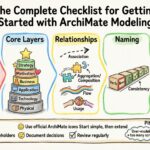
Enterprise architecture is complex. It involves aligning business strategy with IT capabilities, ensuring that technology investments drive real value, and managing change across large organizations. To navigate this complexity, professionals need a common language. ArchiMate provides that language. It is a modeling language designed to describe, analyze, and visualize enterprise architecture. This guide breaks down the fundamental concepts, layers, and relationships that form the backbone of this framework.
Whether you are new to enterprise architecture or looking to solidify your foundational knowledge, understanding the core building blocks is essential. This resource focuses on the structure and semantics of ArchiMate without relying on specific tool implementations. We will explore how to model business processes, application services, and technical infrastructure, and how they connect through specific relationship types.
🧩 What is ArchiMate?
ArchiMate is an open and independent standard for enterprise architecture. It provides a structured approach to designing, planning, and analyzing business architecture and information systems architecture. Developed by The Open Group, it serves as a bridge between business and IT.
The primary goal of this framework is to support the communication of architectural issues to stakeholders. It allows architects to create diagrams that are not just pretty pictures, but meaningful representations of reality. By using standardized symbols and definitions, teams can ensure that everyone from the CEO to the DevOps engineer understands the same model.
Key characteristics include:
- Independence: It is not tied to any specific vendor or software product.
- Openness: It is an open standard available to the public.
- Flexibility: It can be applied to various domains, including business, application, and technology.
- Modularity: It is structured in layers to manage complexity.
🏛️ The Core Layers of ArchiMate
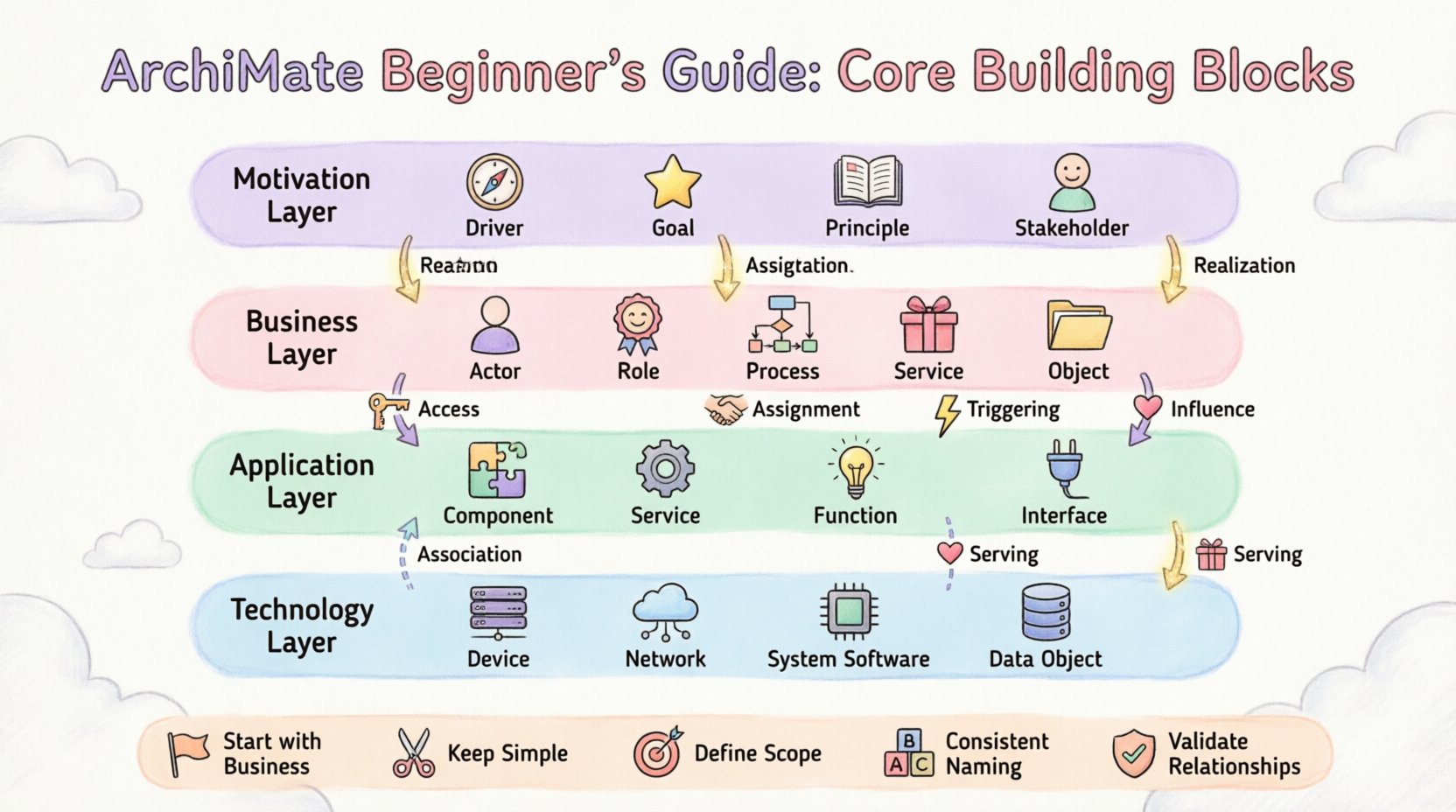
One of the most defining features of ArchiMate is its layered structure. This structure helps in managing complexity by separating concerns. There are three primary layers that form the core of the architecture model. Each layer contains specific building blocks that represent different aspects of the enterprise.
1. Business Layer
The Business layer focuses on the organization’s goals, strategies, and operations. It describes how the enterprise creates value for its stakeholders. This layer is often the starting point for many architectural initiatives because it defines what the organization does.
Key building blocks in this layer include:
- Business Actor: An entity that performs a business function. This could be a person, an organization, or even a system acting on behalf of a human.
- Business Role: A collection of business functions that are performed by a Business Actor. Roles define responsibilities.
- Business Function: A group of related activities that are performed by an organization. Functions are often stable over time.
- Business Process: A sequence of activities that produce a specific result. Processes are more dynamic than functions.
- Business Service: A collection of business behaviors that are exposed to a Business Actor. Services represent value delivered to the customer.
- Business Object: A representation of key business information. This includes data entities like Orders, Customers, or Products.
2. Application Layer
The Application layer sits below the Business layer. It describes the software systems and applications that support the business functions. This layer bridges the gap between what the business needs and the technical infrastructure that delivers it.
Key building blocks here include:
- Application Function: A group of related capabilities that are realized by an application component. It represents the logical functions of the software.
- Application Service: A collection of application functions that are exposed to an Application Component. This is what other applications or users consume.
- Application Component: A software element that is realized by a Deployment Node. This represents the actual code or module.
- Application Interface: A point of interaction between an Application Component and another element. It defines how data is exchanged.
- Application Interaction: A set of interactions between two Application Components.
- Application Event: A state change or occurrence within an Application Component.
3. Technology Layer
The Technology layer represents the physical or virtual infrastructure that hosts the applications. It includes hardware, networks, and system software. This is where the digital world becomes physical.
Key building blocks in this layer include:
- Device: A computing or communication device. This includes servers, routers, and IoT devices.
- Network: A collection of devices and communication channels. This represents the infrastructure for data transfer.
- System Software: Software that manages and supports the computer hardware. This includes operating systems and middleware.
- Data Object: A representation of information within the technology layer. This can be files, databases, or memory structures.
🎯 The Motivation Layer
While the three core layers describe the “what” and “how,” the Motivation layer describes the “why.” It captures the drivers, goals, and principles that influence the architecture. This layer ensures that the design decisions align with organizational strategy.
Important elements in the Motivation layer include:
- Driver: An external or internal factor that influences the enterprise. This could be a market trend, a regulation, or a cost pressure.
- Goal: An outcome that the enterprise wishes to achieve. Goals are often measurable.
- Principle: A rule or guideline that governs behavior. Principles help in decision-making when conflicts arise.
- Assessment: A statement about the current or future state of the enterprise. This can be positive or negative.
- Stakeholder: A person or group with an interest in the enterprise architecture.
- Value: A qualitative or quantitative benefit that results from achieving a goal.
🔗 Understanding Relationships
Connecting the building blocks is just as important as defining them. Relationships define how elements interact, depend on, or influence each other. Using the correct relationship type ensures the model is semantically accurate.
Below is a table summarizing the most common relationship types and their meanings.
| Relationship Type | Direction | Meaning | Example |
|---|---|---|---|
| Realization | Source to Target | One element realizes another. | A Process realizes a Business Function. |
| Assignment | Source to Target | One element is assigned to another. | A Business Role is assigned to a Business Actor. |
| Association | Source to Target | A non-specific link between two elements. | A Business Object is associated with a Process. |
| Access | Source to Target | One element accesses another. | An Application Component accesses a Data Object. |
| Influence | Source to Target | One element influences another. | A Driver influences a Goal. |
| Triggering | Source to Target | One event triggers another. | A Business Event triggers a Process. |
| Serving | Source to Target | One service serves another. | An Application Service serves a Business Service. |
Deep Dive: Realization vs. Assignment
It is common to confuse Realization and Assignment. Realization implies that the source element brings the target element into existence or provides the means for it to function. For example, a software component realizes an application function. Assignment implies that an actor or role is linked to a function or process. For instance, a person is assigned to a role. Distinguishing these ensures the model reflects the actual operational reality.
🔗 Domain Relations
ArchiMate also defines relations between the domains. These relations show how the layers interact with one another. Understanding these flows is crucial for tracing requirements from business down to technology.
- Business to Application: Business processes are supported by application services. Business objects are realized by data objects.
- Application to Technology: Application components are realized by deployment nodes. Application interfaces are mapped to system software.
- Business to Technology: This is a direct link showing how technology directly supports business goals, often bypassing the application layer in high-level views.
🛠️ Best Practices for Modeling
Creating a model is a skill that improves with practice. To ensure clarity and maintainability, follow these guidelines when constructing your diagrams.
1. Start with the Business
Always begin at the Business layer. Define the value proposition and the core processes before worrying about the software. This ensures that the technology serves the business, not the other way around.
2. Keep Diagrams Simple
Do not try to fit the entire enterprise into a single view. Break down complex models into smaller, manageable views. Use overview diagrams for high-level stakeholders and detail diagrams for technical teams.
3. Define Scope Clearly
Decide what is in scope and what is out of scope. If a process relies on an external system, represent that external system as a boundary element rather than modeling its internal details. This prevents unnecessary complexity.
4. Consistent Naming Conventions
Use consistent naming across all layers. If a business service is called “Order Processing,” the supporting application service should reflect that. Consistency aids in navigation and understanding.
5. Validate Relationships
Review every line drawn between elements. Does it represent a Realization? An Assignment? Or an Association? Misusing relationship types can lead to confusion. Ensure the directionality makes sense in the context of the enterprise.
🚧 Common Pitfalls to Avoid
Even experienced architects can make mistakes. Being aware of common pitfalls can save time and effort during the modeling process.
- Over-modeling: Trying to model every single detail can make the diagram unreadable. Focus on the elements that matter for the specific architectural question.
- Ignoring the Motivation Layer: Without goals and drivers, the architecture lacks context. It becomes a technical drawing rather than a strategic asset.
- Mixing Layers Indiscriminately: While cross-layer connections are valid, cluttering a diagram with too many layers reduces readability. Use separate views for different layers when possible.
- Static Views of Dynamic Processes: Ensure that flows and triggers are represented correctly. A static list of components does not show how data moves through the system.
📈 Implementation and Evolution
Once the model is created, it must be used to drive decisions. ArchiMate is not just a documentation tool; it is a planning tool. Here is how it supports implementation.
Gap Analysis
Compare the current state architecture with the target state architecture. Identify the gaps between where the organization is and where it wants to be. This analysis highlights the projects needed to bridge the difference.
Impact Analysis
When a change is proposed, use the model to understand the impact. If a specific technology component is replaced, trace the dependencies upwards to see which business processes might be affected. This prevents unintended consequences.
Communication
Use the model as a communication artifact. Walk stakeholders through the diagram to explain complex dependencies. Visual representations often convey information faster than text documents.
🔄 Integration with Other Frameworks
ArchiMate is often used in conjunction with other frameworks. It is designed to be compatible with methodologies like TOGAF. It provides the visual and semantic layer that complements the process guidance of other frameworks.
- Business Architecture: ArchiMate excels here, providing detailed modeling of processes and value streams.
- Information Architecture: The data object concepts allow for clear modeling of information flows.
- IT Architecture: The technology layer supports infrastructure planning and cloud migration strategies.
🔍 Looking Ahead
The landscape of enterprise architecture is constantly evolving. Cloud computing, microservices, and artificial intelligence are changing how systems are built. ArchiMate adapts to these changes by providing a flexible structure that can accommodate new technologies.
Staying current with updates to the standard is important. New versions may introduce additional elements or refine relationship semantics. However, the core principles remain stable. The focus on value, alignment, and clarity ensures that ArchiMate remains relevant.
📚 Summary of Key Concepts
To recap, the essential elements for a beginner include:
- Layers: Business, Application, Technology, and Motivation.
- Elements: Actors, Functions, Services, Components, Devices.
- Relationships: Realization, Assignment, Association, Access, Influence.
- Practice: Keep models simple, validate connections, and focus on value.
Mastering these building blocks provides a strong foundation for any architecture initiative. It enables you to speak a common language with your team and stakeholders. By focusing on the core structure, you can build robust, scalable, and aligned enterprise architectures.
🚀 Next Steps
Now that you understand the theory, it is time to apply it. Start by mapping a small part of your organization. Identify the key business functions and the applications that support them. Draw the relationships. Test the model with a colleague. This hands-on approach is the best way to internalize the concepts. As you gain confidence, expand the scope to cover more domains and layers.
Remember, the goal is clarity. If the diagram is confusing, simplify it. If the relationships are unclear, revisit the definitions. Architecture is a discipline of communication, and ArchiMate is the vocabulary that makes that communication possible.
By following these guidelines and leveraging the core building blocks, you can create models that drive real business value and support long-term strategic goals.