
Introduction
In the rapidly evolving landscape of software architecture and business process management, tool fragmentation has become a significant bottleneck for productivity. Teams often find themselves juggling between robust desktop modeling tools for deep technical diagrams and agile cloud-based applications for quick collaboration. This disconnect leads to “tool fatigue,” version control issues, and fragmented workflows that hinder the seamless transition from business needs to technical implementation.
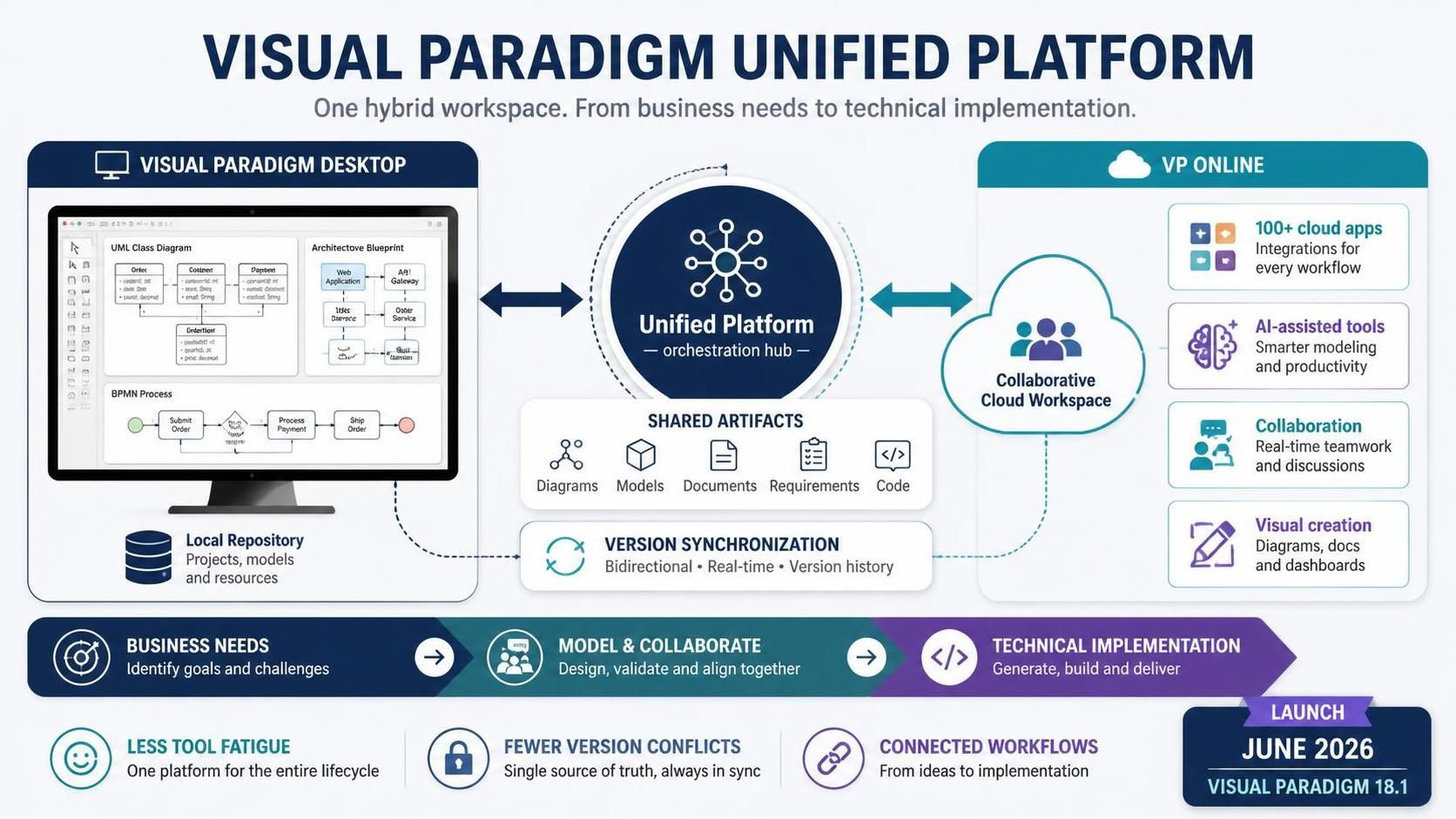
Launched in June 2026 alongside Visual Paradigm 18.1, the Visual Paradigm Unified Platform emerges as a transformative solution to this challenge. Acting as a central workspace and orchestration hub, it bridges the gap between Visual Paradigm Desktop and Visual Paradigm Online (VP Online). By unifying over 100 cloud-based applications, AI-assisted tools, and deep desktop modeling repositories into a single hybrid workflow, the platform offers a cohesive environment where artifacts, apps, and creation processes are seamlessly integrated. This guide explores the core pillars, ecosystem architecture, and generative AI capabilities that define this new era of visual modeling.
The Three Core Pillars of the Platform
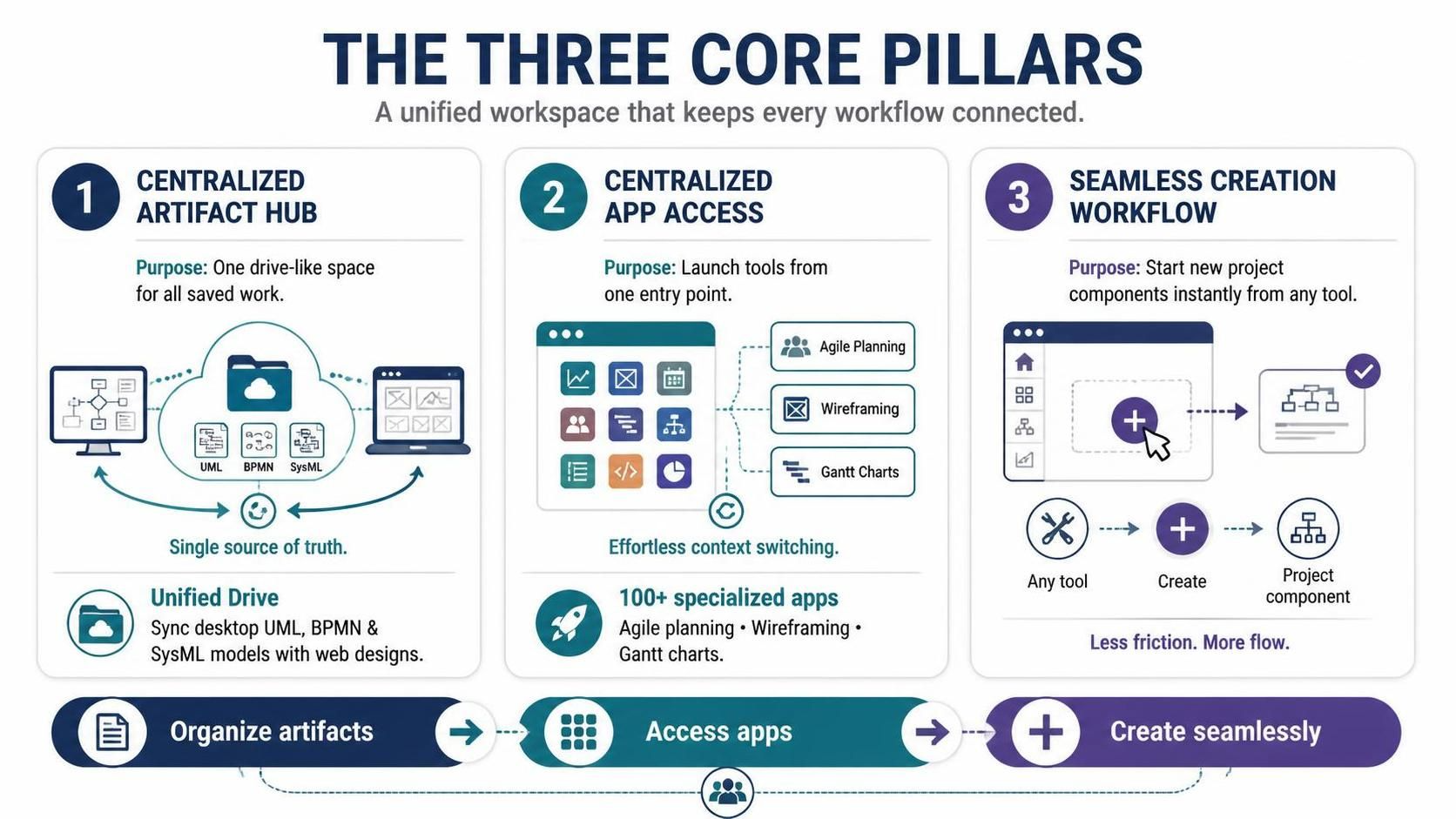
The Visual Paradigm Unified Platform is built around three central objectives designed to eliminate workflow fragmentation and enhance user efficiency. These pillars ensure that whether you are a business analyst defining high-level processes or a software architect detailing complex system interactions, your work remains connected and accessible.
1. Centralized Artifact Hub
Operational Purpose: To provide a single, drive-like space that organizes all saved work in one unified dashboard, eliminating the need to search across disparate local and cloud storage systems.
Key Features:
-
Unified Drive: This feature natively syncs local desktop models—including UML, BPMN, and SysML diagrams—with web-based designs. It ensures that changes made in the robust desktop environment are immediately reflected in the cloud, and vice versa, maintaining a single source of truth for all project artifacts.
2. Centralized App Access
Operational Purpose: To serve as an instant entry point for launching any existing or future application within the Visual Paradigm ecosystem, reducing the time spent navigating between different tools.
Key Features:
-
App Launcher: Users gain direct access to over 100 specialized applications ranging from Agile planning tools and wireframing suites to Gantt chart generators. This centralized access point allows teams to switch contexts effortlessly without losing their place in the broader project lifecycle.
3. Seamless Creation Workflow
Operational Purpose: To provide a revamped interface that allows users to instantly spin up new project components from any tool, reducing the friction associated with starting new tasks.
Key Features:
-
Frictionless Creation Menu: This intuitive interface enables users to start documents, strategy maps, or diagrams instantly. Whether you need a quick sketch for a meeting or a detailed architectural model, the creation menu streamlines the initial setup process, allowing teams to focus on content rather than configuration.
| Pillar | Operational Purpose | Key Features |
|---|---|---|
| Centralized Artifact Hub | A single drive-like space organizing all saved work in one unified dashboard. | Unified Drive: Syncs local desktop models (UML, BPMN, SysML) and web designs natively. |
| Centralized App Access | Instant entry point to launch any existing or future application across the ecosystem. | App Launcher: Direct access to over 100+ specialized apps (Agile planning, wireframing, Gantt charts). |
| Seamless Creation Workflow | A revamped interface to instantly spin up new project components from any tool. | Frictionless Creation Menu: Start documents, strategy maps, or diagrams instantly. |
Ecosystem Architecture
The unified ecosystem maps project deliverables from baseline business needs down to final technical documentation via specialized components. This architecture ensures that every stage of the project lifecycle is supported by the right tools, all connected through the central Unified Platform Hub.
Note: The diagram above illustrates the flow from the Unified Platform Hub to specialized components like VP Desktop, VPasCode, and AI Chatbot & Web Studios, all converging into the Pipeline for live synchronization and finally into OpenDocs for technical specifications.
At the heart of this architecture is the Unified Platform Hub, which serves as the main central entry point and drive. From here, users can access:
-
VP Desktop: For local, robust, and deep modeling requirements. This component is ideal for complex UML, SysML, and BPMN diagrams that require extensive customization and offline access.
-
VPasCode: A browser-based text-to-diagram tool that allows developers to generate visual models directly from code or text descriptions. This bridges the gap between textual programming and visual representation.
-
AI Chatbot & Web Studios: Prompt-driven tools that leverage generative AI to create and modify diagrams. These components enable users to interact with the platform using natural language, making visual modeling more accessible to non-technical stakeholders.
All these components feed into the Pipeline, a live sync hub that ensures data consistency across the ecosystem. Finally, the processed information is published to OpenDocs, where technical specifications and knowledge bases are stored and shared, completing the lifecycle from idea to documentation.
Connected Project Lifecycle Stages
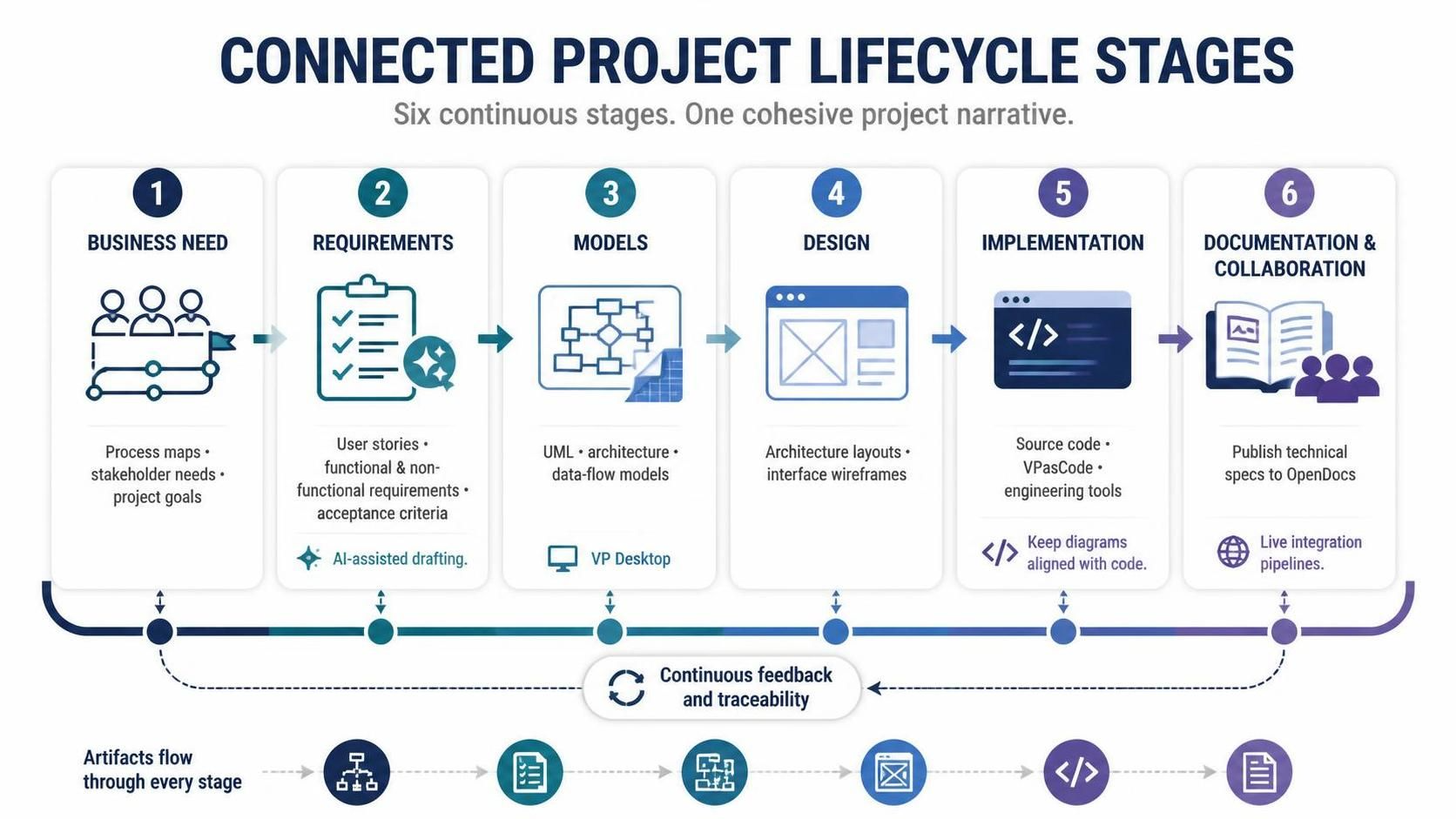
Rather than treating diagrams, code, and documentation as isolated files, the unified platform connects them through six continuous development stages. This holistic approach ensures that every artifact contributes to a cohesive project narrative.
-
Business Need: The journey begins with defining high-level process maps, stakeholder descriptions, and project goals. Tools within the platform help capture these initial requirements in a structured format, ensuring alignment among all parties.
-
Requirements: In this stage, user stories, functional and non-functional requirements, and acceptance criteria are generated. The platform’s AI capabilities can assist in drafting these elements based on the initial business needs, speeding up the requirements gathering process.
-
Models: Here, deep visual representations are constructed using UML, architecture diagrams, and data-flow models. VP Desktop plays a crucial role in this stage, providing the robust modeling capabilities needed for complex systems.
-
Design: The focus shifts to refining architecture layouts and interface wireframes. The seamless integration between modeling and design tools allows for iterative refinement, ensuring that the visual design aligns with the underlying architectural models.
-
Implementation: This stage involves transitioning to source code, text-driven diagramming via VPasCode, and other engineering tools. The platform supports developers by keeping diagrams synchronized with code changes, reducing the risk of drift between design and implementation.
-
Documentation & Collaboration: Finally, technical specifications are published to OpenDocs via live integration pipelines. This ensures that documentation is always up-to-date and accessible to all stakeholders, facilitating better collaboration and knowledge sharing.
Key Generative AI Capabilities
The Visual Paradigm Unified Platform heavily incorporates AI accelerators to speed up early-stage ideation and reduce manual effort. These capabilities transform how users interact with visual models, making the process more intuitive and efficient.
AI Chatbot v2
The AI Chatbot v2 is a powerful tool that allows users to modify diagrams dynamically using natural language prompts. Whether you are working with PlantUML, ArchiMate, or other modeling languages, the chatbot can establish connections, suggest architectural improvements, and even generate entire diagrams based on textual descriptions. This capability democratizes visual modeling, enabling non-technical users to contribute to the design process without needing deep expertise in modeling syntax.
Text-to-Diagram Workspace
This feature instantly converts natural language technical prompts or text summaries into live visual models. By simply describing the desired structure or behavior, users can generate accurate diagrams that serve as a starting point for further refinement. This not only speeds up the initial modeling phase but also helps in validating understanding among team members by providing a visual representation of textual requirements.
These AI-driven features are not just conveniences; they are integral to the platform’s mission of reducing friction and enhancing productivity. By automating routine tasks and providing intelligent suggestions, the Visual Paradigm Unified Platform allows teams to focus on higher-value activities such as strategic decision-making and innovative design.
Key Concepts and Examples
To better understand the practical application of the Visual Paradigm Unified Platform, let’s explore some key concepts and examples.
Concept: Hybrid Workflow
Definition: A workflow that seamlessly integrates local desktop tools with cloud-based applications, allowing users to leverage the strengths of both environments.
Example: A software architect uses VP Desktop to create a detailed SysML model of a complex embedded system. Once the model is complete, it is automatically synced to the Unified Drive. The architect then shares the model with a remote team member who uses VP Online to add comments and suggestions. The changes are synced back to the desktop, ensuring that both parties are working with the most up-to-date version.
Concept: Live Sync Pipeline
Definition: A mechanism that ensures real-time synchronization of data across different components of the platform, maintaining consistency and reducing manual update efforts.
Example: A developer updates a class diagram in VPasCode by modifying the underlying text description. The change is immediately reflected in the corresponding UML diagram in VP Desktop and the documentation in OpenDocs. This live sync ensures that all artifacts remain aligned, reducing the risk of inconsistencies.
Concept: Prompt-Driven Modeling
Definition: The use of natural language prompts to generate or modify visual models, leveraging generative AI to simplify the modeling process.
Example: A business analyst describes a new customer onboarding process in natural language. The AI Chatbot v2 interprets the description and generates a BPMN diagram representing the process. The analyst can then refine the diagram using standard modeling tools, saving significant time in the initial creation phase.
Conclusion
The Visual Paradigm Unified Platform represents a significant leap forward in the realm of visual modeling and project lifecycle management. By bridging the gap between desktop and cloud environments, unifying over 100 applications, and integrating powerful generative AI capabilities, it offers a cohesive and efficient workflow for teams of all sizes. The three core pillars—Centralized Artifact Hub, Centralized App Access, and Seamless Creation Workflow—ensure that users can focus on their work rather than managing tools. Meanwhile, the connected project lifecycle stages and live sync pipeline guarantee that every artifact, from initial business needs to final documentation, remains aligned and up-to-date.
As organizations continue to navigate the complexities of modern software development and business process optimization, platforms like Visual Paradigm Unified Platform will play a crucial role in enhancing productivity, fostering collaboration, and driving innovation. By embracing this unified approach, teams can overcome tool fatigue, reduce fragmentation, and achieve greater success in their projects.
Recommended Reading
-
Introducing the Visual Paradigm Unified Platform: Official announcement detailing the launch and core features of the Unified Platform.
-
Visual Paradigm Unified Platform Features: Overview of key features including Unified Drive, App Launcher, and Frictionless Creation Menu.
-
What is Unified Platform?: Quick introduction explaining the basic concept and benefits of the Unified Platform.
-
The Visual Paradigm Unified Platform: A Comprehensive Guide: In-depth guide covering the platform’s architecture, pillars, and lifecycle stages.
-
Guide to the Visual Paradigm Ecosystem: Detailed explanation of how different components of the Visual Paradigm ecosystem work together.
-
Visual Paradigm Unified Platform: A Practical Guide to a Unified Project Lifecycle: Practical examples and steps for implementing the unified project lifecycle.
-
Unified Platform: The Command Center for Visual Work: Article discussing the platform’s role as a central hub for visual modeling tasks.
