Understanding how users interact with your mobile application is crucial for sustained growth. User journey mapping provides a visual representation of the steps a person takes to achieve a goal within your app. This process reveals hidden friction points, emotional states, and opportunities for improvement. By analyzing the complete path from discovery to retention, teams can design experiences that feel intuitive and rewarding.
Mobile usage patterns differ significantly from desktop web interactions. Users expect speed, personalization, and seamless transitions between devices. A poorly mapped journey leads to high abandonment rates and low retention. Conversely, a well-structured journey guides users toward value quickly. This guide explores the essential techniques for mapping these journeys effectively.
Why Journey Mapping Matters for Mobile Apps 🎯
Mobile apps operate in a competitive environment where users have endless alternatives. If an app feels confusing or slow during the first few minutes, the likelihood of deletion increases sharply. Journey mapping helps teams anticipate these reactions before code is written.
- Empathy Building: It forces stakeholders to view the product through the eyes of the user, not the business.
- Friction Identification: It highlights where users drop off, allowing for targeted fixes.
- Consistency: It ensures that messaging and functionality align across all touchpoints.
- Resource Allocation: It directs development efforts toward features that actually drive value.
Without a clear map, teams often optimize for vanity metrics like downloads rather than meaningful engagement. Mapping shifts the focus to the user’s actual experience and satisfaction levels.
Defining the Scope and Boundaries 📏
Before drawing lines on a diagram, you must define what constitutes the journey. A mobile app journey is not linear; it is a complex web of interactions. It begins before the download and continues long after the session ends.
Key Stages of the Mobile Journey
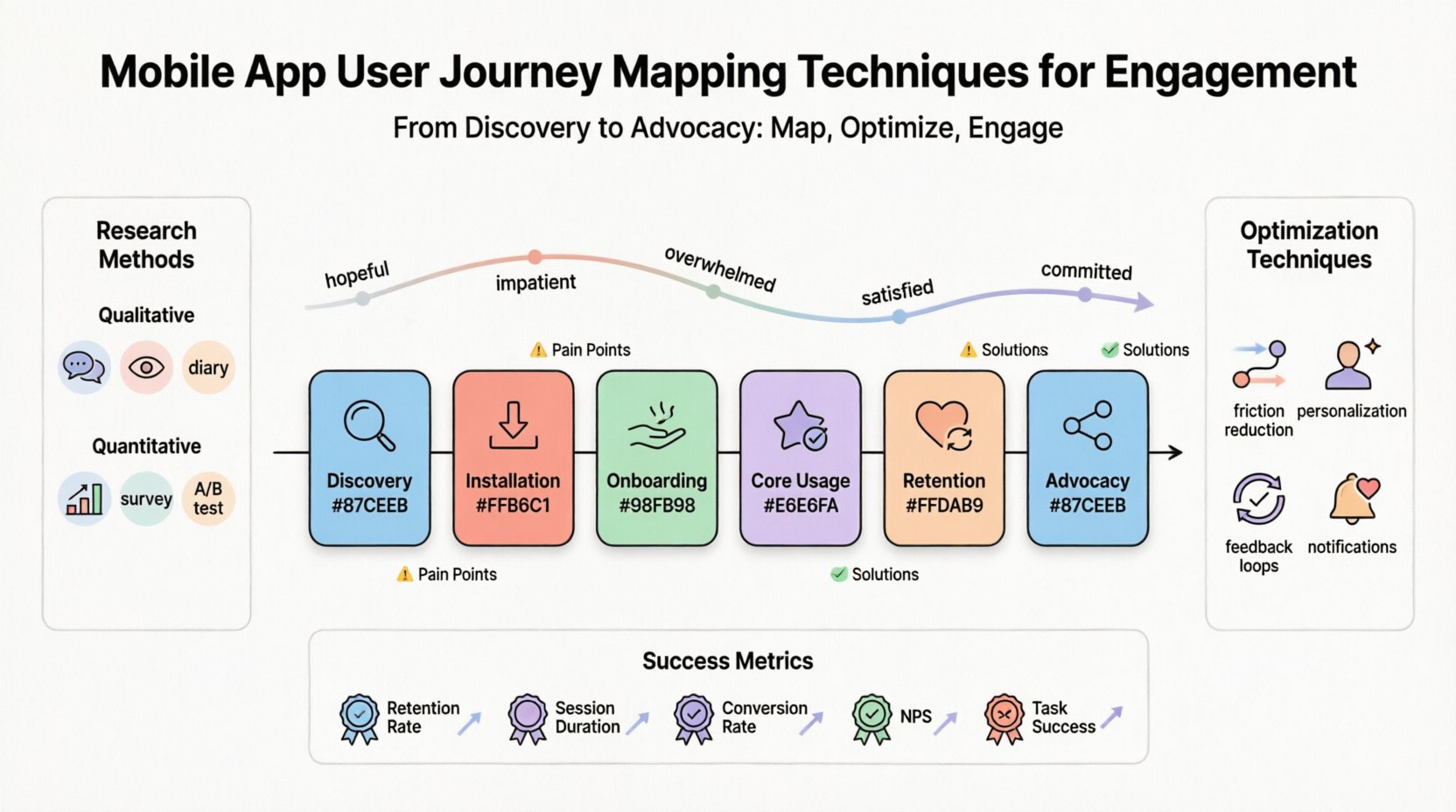
To create an accurate map, break the experience into distinct phases. Each phase has unique goals and challenges.
- Discovery: How does the user find the app? (Search, ads, referrals)
- Installation: The download and setup process.
- Onboarding: The initial training and welcome experience.
- Core Usage: The primary tasks the user performs repeatedly.
- Retention: Habits formed and return visits.
- Advocacy: Sharing the app or leaving a review.
Conducting User Research 🔍
Assumptions lead to poor design. You need data to validate your understanding of user behavior. Research methods vary in depth and cost, but all provide valuable insights.
Qualitative Methods
- Interviews: One-on-one conversations reveal motivations and pain points.
- Contextual Inquiry: Observing users in their natural environment while they use the app.
- Diary Studies: Users log their interactions and feelings over a period of time.
Quantitative Methods
- Analytics Review: Looking at drop-off rates, session length, and feature usage.
- Surveys: Gathering structured feedback from a large audience.
- A/B Testing: Comparing different versions of a flow to see which performs better.
Combining both qualitative and quantitative data creates a holistic view. Numbers tell you what is happening, while stories tell you why.
Creating User Personas 👥
A journey map is rarely universal. Different users have different goals. Creating personas helps segment the journey based on user types.
For example, a fitness app might have a Beginner User who needs guidance and motivation, and a Pro Athlete who needs detailed metrics and tracking. Mapping these two paths separately ensures both groups get a relevant experience.
Persona Attributes
- Demographics: Age, location, device type.
- Technical Proficiency: Are they tech-savvy or new to apps?
- Goals: What do they want to achieve?
- Frustrations: What stops them from succeeding?
- Emotional State: How do they feel at each stage?
When mapping the journey, annotate each step with the persona’s emotional state. A user feeling anxious during checkout needs different support than a user feeling curious during onboarding.
The Mapping Process Step-by-Step 🗺️
Once you have your data and personas, you can begin constructing the map. This process involves collaboration across product, design, and engineering teams.
1. List Touchpoints
A touchpoint is any interaction between the user and the app. This includes:
- App Store listing
- Push notifications
- In-app screens
- Customer support chats
- Email confirmations
- Shareable content
Ensure every interaction is accounted for. Missing a touchpoint creates a gap in the experience.
2. Identify Actions
For each touchpoint, define what the user does. Actions can be active or passive.
- Active: Tapping a button, entering data, selecting a setting.
- Passive: Waiting for a load, receiving a notification, viewing a banner.
Map the sequence of these actions. Does the user need to register before seeing the main content? Does the app request permissions too early?
3. Analyze Emotions
Plot the emotional curve. Users often experience a dip in confidence when faced with complexity. They feel joy when a task is completed easily.
| Stage | User Action | Emotional State | Potential Risk |
|---|---|---|---|
| Discovery | Searching in App Store | Hopeful / Skeptical | Confusing Title or Icon |
| Install | Downloading and Opening | Impatient / Curious | Slow Load Time |
| Onboarding | Setting Preferences | Overwhelmed / Eager | Too Many Steps |
| Core Usage | Performing Main Task | Focused / Satisfied | Bugs or Errors |
| Retention | Returning to App | Committed / Bored | Lack of New Value |
4. Document Pain Points
Mark where users struggle. These are the critical areas to fix. Common pain points include:
- Confusing navigation menus
- Unexpected crashes
- Lengthy form fills
- Unclear value proposition
- Aggressive permission requests
For every pain point identified, propose a potential solution. This turns the map into an action plan.
Optimizing for Engagement 🚀
The goal of mapping is to improve engagement. Engagement is not just about time spent; it is about value derived. Here are techniques to refine the journey for higher engagement.
Reduce Friction
Every extra step reduces conversion. Simplify forms. Use auto-fill where possible. Allow guest access so users can experience value before creating an account.
Personalize the Path
Use data to tailor the experience. If a user prefers dark mode, show dark mode. If they are a frequent traveler, highlight travel features. Personalization makes the app feel like it was built just for them.
Implement Feedback Loops
Users need to know their actions have consequences. Use micro-interactions to confirm actions. Send progress bars for uploads. Provide immediate feedback on errors.
Strategic Notifications
Push notifications can re-engage users, but they can also annoy them. Map the notification journey carefully. Ensure the timing is relevant and the content provides value.
Technical Considerations 🛠️
Design is not enough; the technology must support the journey. Latency, connectivity, and device capabilities play a role in user satisfaction.
Performance
- Load Times: Users expect instant responses. Delays cause frustration.
- Caching: Ensure content loads even with poor connectivity.
- Crash Rates: A single crash can end a relationship.
Offline Capabilities
Mobile users often face connectivity issues. Map what happens when the internet is down. Can they view saved content? Can they queue actions for later?
Accessibility
Ensure the journey is navigable for everyone. Use high contrast, support screen readers, and ensure touch targets are large enough. Accessibility is not a feature; it is a requirement.
Iterating and Monitoring 🔄
A journey map is a living document. It must evolve as the app changes and as user behavior shifts.
Continuous Measurement
Track key metrics at each stage of the map. If drop-off increases at a specific step, investigate immediately. Use heatmaps to see where users click.
Regular Updates
Review the map after every major release. New features change the path. Old features might become obsolete. Keep the map aligned with the current product state.
Stakeholder Alignment
Share the map with all departments. Marketing needs to know the onboarding flow to set correct expectations. Support needs to know common errors. Engineering needs to understand the priority of fixes.
Common Pitfalls to Avoid ⚠️
Even experienced teams make mistakes when mapping. Being aware of these traps helps ensure accuracy.
- Assuming a Single Path: Users take many routes. Map the most common ones, not just the ideal one.
- Ignoring Negative Feedback: Focus on what users complain about, not just what they praise.
- Overcomplicating the Map: If the map is too complex, no one will use it. Keep it readable.
- Skipping the Emotional Layer: Functionality matters, but feelings drive loyalty.
- One-Time Exercise: Treat mapping as a permanent tool, not a one-off project.
Measuring Success 📊
How do you know the mapping worked? Look for improvements in key performance indicators.
- Retention Rate: Are users coming back?
- Session Duration: Are users spending more meaningful time?
- Conversion Rate: Are they completing desired actions?
- Net Promoter Score: Are they recommending the app?
- Task Success Rate: Can they complete goals without help?
Correlate changes in these metrics with specific updates made to the journey. This proves the value of the mapping effort.
Final Thoughts on Mobile Engagement 💡
Building a successful mobile application requires a deep understanding of human behavior. User journey mapping is the tool that bridges the gap between business goals and user needs. It transforms abstract data into a human story.
By focusing on the details of the experience, from the first click to the final retention, teams can create apps that people love to use. The process requires patience, research, and a willingness to change based on evidence. When done correctly, it leads to products that stand out in a crowded market.
Remember, the journey never truly ends. As technology evolves and user expectations rise, your maps must adapt. Stay curious, keep listening, and prioritize the experience above all else.