Enterprise architecture frameworks provide the blueprint for organizational structure, but they often sit in isolation from the critical functions of governance, risk, and compliance (GRC). Integrating ArchiMate into these existing processes transforms static models into dynamic management tools. This integration ensures that architectural decisions are not merely technical exercises but are aligned with regulatory requirements and risk appetites. By connecting the dots between business capabilities, applications, and infrastructure, organizations can visualize the impact of risks before they materialize.
The goal is not to replace established GRC workflows but to enhance them with architectural context. When architecture and governance share a common language, decision-makers gain visibility into the consequences of change. This guide outlines the practical steps to merge these disciplines effectively without disrupting current operations.
Why Integrate Architecture with Governance and Risk? 🤝
Organizations frequently face a disconnect between the technology they build and the rules they must follow. IT teams focus on delivery, while governance teams focus on control. This separation creates blind spots where risks hide within complex dependency chains. Integrating ArchiMate addresses this gap by providing a structured way to represent these connections.
Key benefits of this integration include:
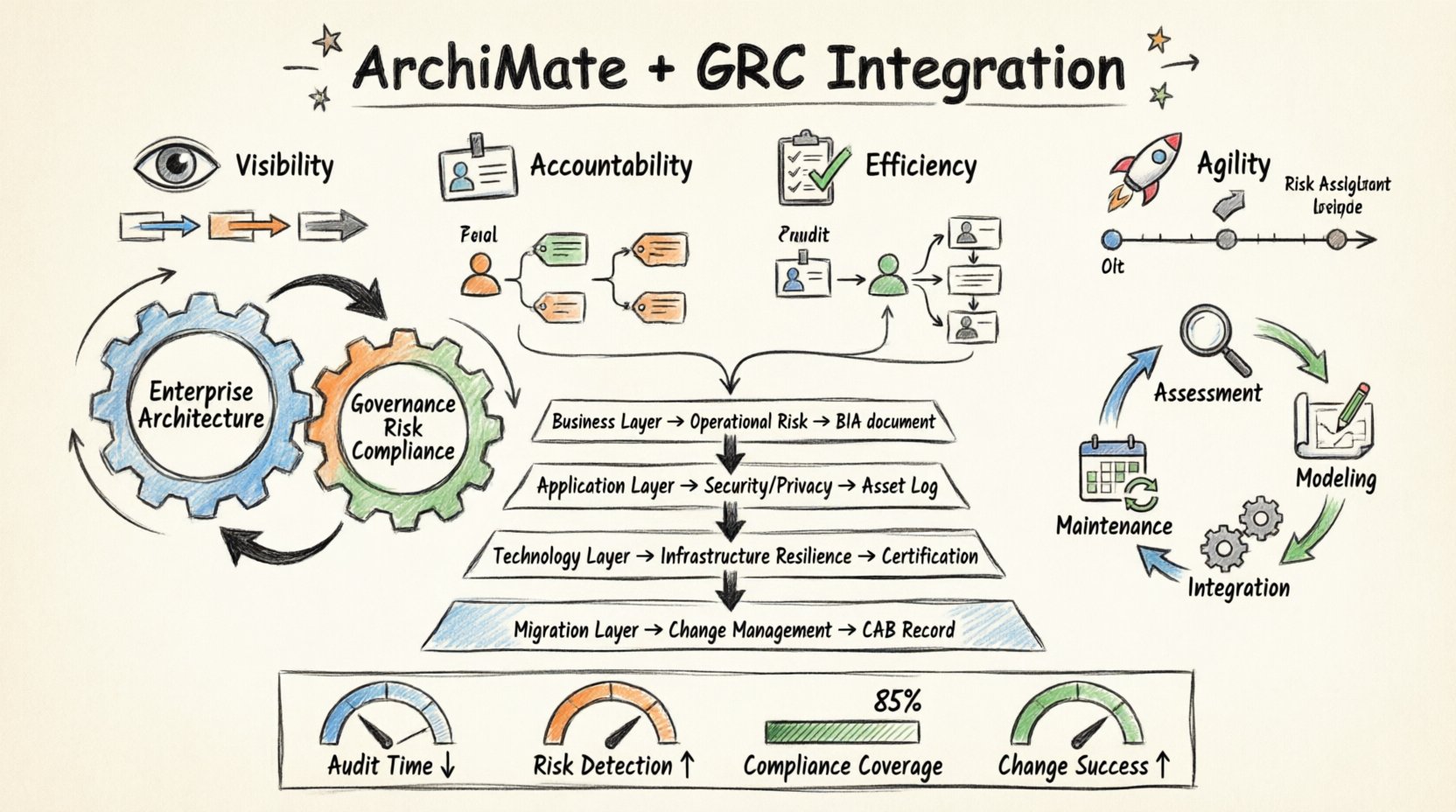
- Visibility: See how a change in a business process impacts downstream systems and compliance requirements.
- Accountability: Clearly assign ownership of architectural components to specific risk owners.
- Efficiency: Reduce redundant audits by using architecture models to demonstrate compliance.
- Agility: Assess risk faster when initiating new initiatives.
Without this integration, risk assessments often rely on outdated spreadsheets or verbal reports. Architecture provides a living repository of truth that reflects the current state of the enterprise.
Mapping ArchiMate Layers to GRC Domains 📊
ArchiMate defines specific layers for business, application, and technology. Each layer corresponds to different aspects of governance and risk. Understanding these mappings is the first step in implementation. Below is a breakdown of how these layers interact with GRC concerns.
| ArchiMate Layer | Primary GRC Focus | Risk Indicator Example | Compliance Artifact |
|---|---|---|---|
| Business Layer | Operational Risk, Strategy | Dependency on single business capability | Business Impact Analysis (BIA) |
| Application Layer | Security, Data Privacy | Unpatched software version in use | Software Asset Management Log |
| Technology Layer | Infrastructure Security, Resilience | Single point of failure in network | Data Center Certification |
| Implementation & Migration | Change Management, Project Risk | Unapproved change request | Change Advisory Board (CAB) Record |
This table serves as a starting point for data mapping. It ensures that when a risk is identified in the business layer, the relevant application and technology components are automatically flagged for review.
Identifying Risk Through Dependency Analysis 🔍
Risk often emerges from connections rather than isolated components. A single server failure might be minor, but if that server hosts the only instance of a critical authentication service, the risk is high. ArchiMate models expose these dependencies through relationship types such as flow, access, and assignment.
1. Analyzing Service Dependencies
Every business service relies on underlying applications and technology. By modeling these flows, you can identify single points of failure. When a service is decommissioned or fails, the architecture model shows exactly which business processes will be affected.
- Trace the path from a business function to the technology node.
- Identify critical nodes that have no redundancy.
- Calculate the potential impact if a specific node goes offline.
2. Assessing Security Boundaries
Governance requires strict control over data flow. ArchiMate allows you to model trust zones and security boundaries. This helps in answering questions about data residency and access control.
- Define where sensitive data enters the system.
- Map the flow of data across different trust zones.
- Ensure encryption is applied at the appropriate layers.
3. Evaluating Change Impact
Change management is a core governance activity. When a change is proposed, the architecture model allows for impact analysis. You can see which processes, applications, and infrastructure elements are touched by the change.
- Simulate the removal or modification of a component.
- Review the ripple effect on dependent services.
- Update the risk register based on the analysis.
Mapping Compliance Requirements to Capabilities ⚖️
Compliance is often viewed as a checklist. However, true compliance requires understanding how controls are implemented within the architecture. ArchiMate allows you to link compliance requirements directly to the capabilities that enforce them.
1. Requirement Traceability
Regulations such as GDPR, SOX, or HIPAA mandate specific controls. Instead of listing these in a document, link them to the specific business capabilities or applications that satisfy them. This creates a traceability matrix within the architecture model.
- Tag specific requirements to the relevant architectural element.
- Verify that every requirement has at least one supporting element.
- Identify gaps where a requirement lacks architectural support.
2. Control Implementation
Controls are not abstract concepts; they are implemented through processes and systems. ArchiMate enables you to model the implementation of controls.
- Model the process step where a control is executed.
- Link the process to the application that enforces the rule.
- Document the evidence required for auditing.
3. Automated Compliance Checks
While the model itself is static, it can feed into automated monitoring systems. By defining attributes within the model, you can trigger alerts if an element drifts from its compliance state.
- Set status flags for components (e.g., Certified, Non-Compliant).
- Integrate with monitoring tools to check component status.
- Generate reports showing compliance coverage by business unit.
Establishing the Integration Workflow 🔄
Integrating architecture with GRC is a process, not a one-time project. It requires a defined workflow that fits into the existing organizational rhythm. This workflow should be lightweight enough to avoid becoming a bottleneck.
Phase 1: Assessment and Alignment
Begin by reviewing current GRC processes. Identify where architectural information would add value. Do not attempt to model everything immediately. Focus on high-risk areas first.
- Conduct a gap analysis between current architecture and GRC needs.
- Identify key stakeholders in both architecture and risk teams.
- Define the data standards required for both sides.
Phase 2: Modeling and Mapping
Develop the specific models that link the two domains. This involves creating relationships between risk events and architectural elements. Ensure the data model supports the attributes needed for risk scoring.
- Create templates for risk assessment within the model.
- Define standard attributes for components (e.g., criticality, data classification).
- Build the initial mappings for critical services.
Phase 3: Process Integration
Embed the architecture review into the GRC lifecycle. For example, include architecture sign-off in the risk approval process. Ensure that risk owners have access to the relevant views of the architecture.
- Update governance charters to include architecture review.
- Train risk managers on how to read architectural models.
- Integrate architecture queries into risk management software.
Phase 4: Maintenance and Review
Architecture must remain current to be useful. Establish a cadence for updating models. If a model is outdated, it cannot accurately reflect the risk landscape.
- Schedule quarterly reviews of high-risk components.
- Automate synchronization where possible.
- Archive old versions to track historical changes.
Common Challenges and Mitigations 🛡️
Integrating these disciplines is not without obstacles. Organizations often encounter resistance or technical hurdles. Recognizing these challenges early helps in planning effective mitigation strategies.
Challenge 1: Data Silos
Architecture data often lives in one repository, while risk data lives in another. Merging these manually is error-prone.
- Mitigation: Use a unified data model or API integration to synchronize data between platforms.
- Strategy: Prioritize a single source of truth for component data.
Challenge 2: Complexity Overload
Architectural models can become overly complex. Risk managers may find it difficult to navigate the details.
- Mitigation: Create simplified views specifically for risk and governance.
- Strategy: Filter out non-essential technical details in GRC reports.
Challenge 3: Cultural Resistance
Teams may view architecture as overhead rather than a control mechanism.
- Mitigation: Demonstrate value through specific use cases, such as faster audit responses.
- Strategy: Involve risk teams in the early design of the integration.
Challenge 4: Skill Gaps
Not everyone understands ArchiMate notation or the concepts of enterprise architecture.
- Mitigation: Provide targeted training for GRC staff on architectural concepts.
- Strategy: Use visual aids and simplified legends to explain models.
Measuring the Value of Integration 📉
To justify the effort of integration, you must measure its impact. Define key performance indicators (KPIs) that reflect the health of the integration.
- Audit Cycle Time: Measure the reduction in time taken to prepare for audits.
- Risk Identification Rate: Track the number of risks identified through architectural analysis versus traditional methods.
- Compliance Coverage: Calculate the percentage of requirements mapped to active architecture elements.
- Change Success Rate: Monitor the rate of failed changes attributed to unassessed architectural impact.
These metrics provide evidence of the return on investment. They help in securing continued support from leadership for the architecture and GRC functions.
Sustaining the Integration Effort 🌱
Long-term success depends on embedding the integration into the organizational culture. It must become part of how decisions are made, not an add-on process.
Leadership Support
Executive sponsorship is crucial. Leaders must mandate the use of architecture models in risk assessments.
- Include architecture metrics in executive dashboards.
- Require architecture review for major budget approvals.
- Recognize teams that effectively use architecture for risk reduction.
Continuous Improvement
Feedback loops are essential. Regularly ask users if the integration is helping them.
- Solicit feedback from risk managers on model usability.
- Refine the data model based on new regulatory requirements.
- Adopt new modeling techniques as the framework evolves.
Automation Opportunities
As the model matures, look for opportunities to automate checks.
- Automate the generation of compliance reports from the model.
- Set up alerts when critical components are modified.
- Use scripts to validate data consistency between architecture and asset registries.
Final Thoughts on Architecture and Control 🎯
Integrating ArchiMate with governance and risk processes is about clarity. It brings structure to the chaos of modern IT environments. By linking the what, how, and where of technology to the why of regulation, organizations build a more resilient foundation.
This integration does not happen overnight. It requires patience, discipline, and a commitment to data quality. However, the payoff is significant. You move from reactive risk management to proactive risk intelligence. You shift from compliance as a burden to compliance as a strategic asset.
Start small. Pick a critical process. Map the risks. Build the model. Learn from the results. Expand the scope. Over time, the architecture becomes the backbone of your governance framework, ensuring that every decision is informed by a clear understanding of the organizational landscape.
Remember, the value lies in the insights gained, not the diagrams created. Use the model to tell the story of your organization’s risk posture. Ensure that story is accurate, up-to-date, and actionable. This is the true potential of enterprise architecture in a governed environment.