Enterprise architecture requires precision. It demands a common language to bridge the gap between business strategy and technology implementation. ArchiMate serves as this language. It provides a structured framework for documenting, analyzing, and designing enterprise architecture. This guide outlines the essential steps to begin modeling effectively.
Success in ArchiMate does not come from memorizing symbols. It comes from understanding the logic of the framework and applying it consistently. The following checklist provides a roadmap for building robust models. It covers preparation, core concepts, relationship mapping, and governance.
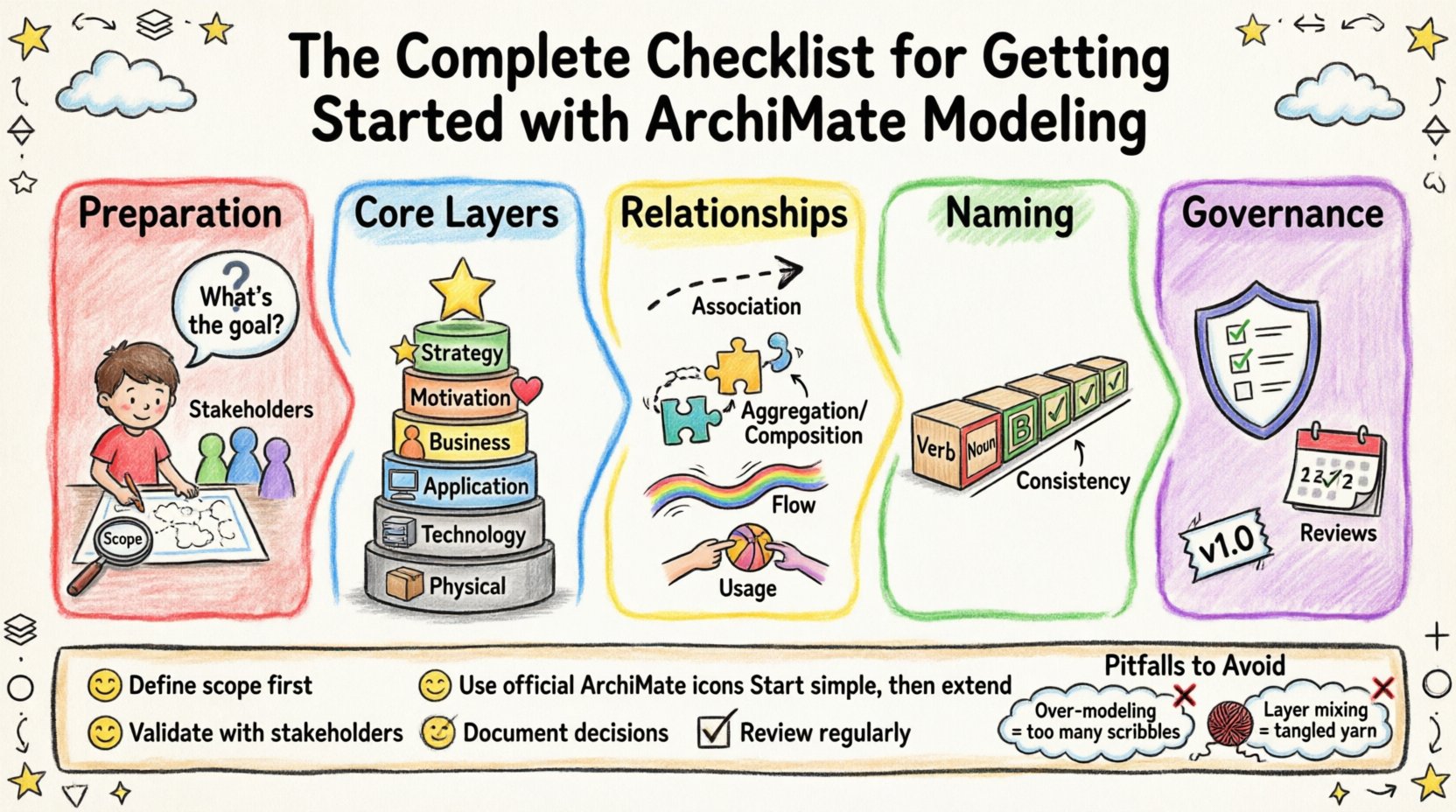
📋 Phase 1: Preparation and Scope Definition
Before drawing a single shape, you must define the boundaries of your work. ArchiMate models can range from a single business process to the entire infrastructure of a multinational organization. Without scope, the model becomes unmanageable.
- Define the Objective: What question are you trying to answer? Is this for a migration project, a cost reduction analysis, or a strategic alignment?
- Identify Stakeholders: Who will read these models? Executives need high-level views. Architects need detail. IT staff need technical specifics.
- Select the Viewpoint: ArchiMate allows different perspectives. Choose the right viewpoint for your audience. Do not mix too many layers in one view.
- Set the Scope: Define which departments, systems, or processes are included. Explicitly state what is out of scope to prevent scope creep.
🧱 Phase 2: Understanding the Core Layers
The heart of ArchiMate is its layered structure. This structure separates concerns, making complex systems easier to understand. Each layer represents a specific aspect of the enterprise.
2.1 The Motivation Layer
This layer captures the why behind the architecture. It is often overlooked but critical for alignment.
- Goal: What are we trying to achieve?
- Principle: What rules govern our decisions?
- Requirement: What must the system do?
- Assessment: How do we measure success?
2.2 The Business Layer
This layer represents the business organization and its operations. It describes how the organization functions regardless of IT.
- Actor: A person or organization performing an activity.
- Role: A part played by an actor within a context.
- Collaboration: A group of actors working together.
- Process: A structured set of activities to achieve a goal.
- Function: A unit of behavior with a specific purpose.
- Service: A behavior exposed by a function.
- Artifact: A unit of information used in a process.
2.3 The Application Layer
This layer describes the software systems that support the business processes.
- Application Component: A modular part of an application system.
- Application Function: A behavior of an application component.
- Data Object: Information used or created by an application function.
- Application Service: A behavior exposed by an application component.
2.4 The Technology Layer
This layer represents the hardware and software infrastructure.
- Node: A computational or physical resource.
- Device: A computing or storage device.
- System Software: Software providing services to applications.
- Network: A communication resource.
- Technology Service: A behavior exposed by a technology resource.
2.5 The Physical Layer
Often merged with Technology, this layer covers physical artifacts.
- Physical Device: Hardware equipment.
- Physical Process: Physical activities.
- Physical Artifact: Physical materials.
2.6 The Strategy Layer
This layer connects the enterprise to its context.
- Artifact: Documents and plans.
- Capability: An ability to perform a task.
- Location: A physical location.
- Value: A financial or social value.
To visualize how these layers interact, refer to the table below.
| Layer | Focus | Key Elements |
|---|---|---|
| Strategy | Context & Goals | Capability, Value, Artifact |
| Motivation | Drivers & Needs | Goal, Requirement, Principle |
| Business | Operations | Process, Role, Actor, Service |
| Application | Software Support | Component, Function, Data Object |
| Technology | Infrastructure | Node, Device, Network |
🔗 Phase 3: Structural and Dynamic Relationships
Models are not just collections of boxes. They are defined by how elements interact. ArchiMate defines specific relationship types that carry semantic meaning. Using the wrong relationship leads to confusion.
3.1 Structural Relationships
These relationships show how elements are connected statically.
- Association: A generic relationship between two elements. Use when no specific type fits.
- Aggregation: A part-of relationship where the part can exist independently.
- Composition: A strong part-of relationship where the part cannot exist without the whole.
- Realization: A relationship where an element provides the implementation for an abstract element. For example, a Process realizes a Function.
- Specialization: A relationship between a more general element and a more specific element.
3.2 Dynamic Relationships
These relationships show flow and interaction over time.
- Flow: Movement of information or material between two elements.
- Access: Access to a static element (like a Data Object) by a dynamic element.
- Usage: A behavior uses another behavior or a static element.
- Serving: A service is used by a business function or process.
Understanding the direction of these relationships is critical. Arrows indicate the flow of influence or control. Misinterpreting a Usage relationship as a Flow can completely change the meaning of the diagram.
| Relationship | Type | Meaning |
|---|---|---|
| Realization | Structural | Implementation of an abstract concept |
| Flow | Dynamic | Transfer of data or material |
| Access | Dynamic | Reading or writing to a data object |
| Usage | Dynamic | Dependency between behaviors |
| Association | Structural | General connection |
📝 Phase 4: Naming Conventions and Standards
Consistency is the foundation of maintainability. A model where similar elements have different names is a maintenance nightmare. Establish standards early.
- Verb-Noun Format: Use verbs for behaviors (e.g., Process Order) and nouns for static elements (e.g., Customer).
- Uniqueness: Ensure no two elements share the exact same name within the same context.
- Avoid Abbreviations: Use full terms unless there is a widely accepted industry standard.
- Consistent Capitalization: Decide on Title Case or Sentence Case and stick to it.
- Documentation: Add descriptions to every element. A name might be clear today, but a new architect joining next year needs context.
🛡️ Phase 5: Governance and Maintenance
Architecture models are living documents. They require ongoing care to remain useful. Without governance, models degrade into outdated diagrams.
- Version Control: Treat models like code. Track changes. Maintain a history of iterations.
- Review Cycles: Schedule regular reviews with stakeholders. Ensure the model matches reality.
- Change Management: Define a process for requesting changes to the architecture. Do not allow ad-hoc modifications.
- Tool Configuration: Ensure the modeling environment supports the standards defined. Disable elements that are not needed for the current scope.
- Export Capabilities: Plan how you will export views for reporting. Different audiences need different views of the same data.
✅ The ArchiMate Modeling Checklist
Use this summary list before finalizing any model.
Pre-Modeling
- ☐ Is the objective clearly defined?
- ☐ Are the stakeholders identified?
- ☐ Is the scope documented?
- ☐ Is the correct viewpoint selected?
Modeling
- ☐ Are the correct layers used for the content?
- ☐ Are elements named consistently (Verb-Noun)?
- ☐ Are relationships semantically correct?
- ☐ Are arrows pointing in the correct direction?
- ☐ Is the Motivation Layer connected to the Business Layer?
Post-Modeling
- ☐ Have descriptions been added to all elements?
- ☐ Have views been exported for stakeholders?
- ☐ Is the version recorded?
- ☐ Is there a plan for future reviews?
🚀 Common Pitfalls to Avoid
Even experienced architects make mistakes. Being aware of common traps helps you avoid them.
Over-Modeling
Trying to model everything leads to complexity that no one can read. Focus on the specific problem at hand. If an element does not contribute to the answer, leave it out.
Layer Mixing
Do not draw a Business Process directly connected to a Network Node without an Application Layer in between. The layers represent abstraction levels. Crossing them without justification obscures the logic.
Ignoring Motivation
Models that only show structure and function lack context. Connect the Goal to the Process. This explains why the architecture exists.
Static Views Only
A single diagram cannot show everything. Use multiple views. One for strategy, one for process flow, one for infrastructure mapping. Do not cram all information into one sheet.
🔍 Deep Dive: Relationship Semantics
Let us examine the nuance between Usage and Access. Both imply a dependency, but the nature differs.
- Usage: A behavior (like a Process) uses another behavior (like a Function). It implies a call or an invocation. It is dynamic.
- Access: A behavior interacts with a static element (like a Data Object). It implies reading or writing. It is also dynamic but targets data.
Consider a scenario where a Process needs Customer Data. The relationship is Access. If a Process calls a Service, the relationship is Usage. Distinguishing these ensures the model accurately reflects the system behavior.
🔍 Deep Dive: Motivation Layer Integration
The Motivation layer is often treated as an afterthought. However, it provides the justification for architectural decisions.
- Driver: A factor that forces a change. E.g., New Regulation.
- Goal: What the organization wants to achieve. E.g., Compliance.
- Requirement: A condition that must be met. E.g., Data must be encrypted.
- Principle: A rule to guide action. E.g., Data should be centralized.
Linking a Driver to a Goal creates a clear narrative. Linking a Goal to a Requirement ensures traceability. Linking a Requirement to an Architecture Element shows implementation. This traceability is vital for audits and strategic planning.
🔍 Deep Dive: Application and Technology Mapping
One of the most valuable use cases for ArchiMate is mapping Business Processes to Technology.
- Business Process: Order Fulfillment
- Application Service: Inventory Check
- Application Component: Warehouse System
- Node: Server A
Tracing this chain helps identify single points of failure. If Server A fails, which Business Process is impacted? This analysis supports risk management and capacity planning.
🔍 Deep Dive: Aggregation vs. Composition
These two structural relationships are often confused.
- Aggregation: The part can exist without the whole. E.g., An Actor is part of a Collaboration. If the Collaboration dissolves, the Actor remains.
- Composition: The part cannot exist without the whole. E.g., a Process Step is part of a Process. If the Process is deleted, the Step loses its context.
Choosing the correct relationship affects how the model is interpreted by downstream tools. It defines lifecycle dependencies.
🔍 Deep Dive: Specialization
Specialization allows you to create hierarchies. It reduces redundancy.
- General Element: Service
- Special Element: Payment Service
This allows you to show general behavior at a high level and specific behavior at a detail level. It keeps diagrams clean while preserving information.
📈 Final Thoughts on Adoption
Adopting ArchiMate is a cultural shift. It requires discipline. Teams must agree on the standards. Management must support the governance process. The goal is not just to draw diagrams, but to create a shared understanding of the enterprise.
Start small. Build a pilot model. Validate the standards. Then expand. This iterative approach reduces risk and builds confidence in the framework.
Remember, the value lies in the clarity of communication. If the model helps stakeholders make better decisions, it has succeeded. If it sits in a repository unseen, it has failed. Focus on utility and alignment.
By following this checklist, you establish a foundation for robust enterprise architecture. You ensure that the models are accurate, consistent, and useful. This is the path to effective architectural governance.