Enterprise architecture (EA) relies heavily on the ability to visualize complex systems. Without a standardized language, communication between stakeholders breaks down. Architects must choose the right modeling tool for the job. This guide compares ArchiMate against other prominent modeling languages. We will examine their strengths, weaknesses, and specific use cases. Understanding these distinctions helps teams select the appropriate framework for strategic planning. 🤔
Understanding the Role of Modeling Languages in EA 📐
Before diving into comparisons, it is essential to understand what a modeling language does. These languages provide a syntax and semantics for representing architectural concepts. They allow architects to describe the structure and behavior of an organization.
Without a common language, diagrams become personal art rather than technical specifications. Models serve as a contract between business leaders and IT teams. They ensure that investments align with strategic goals. Here are the primary functions of a modeling language:
- Abstraction: Hiding unnecessary detail to focus on relevant concepts.
- Standardization: Ensuring everyone interprets symbols the same way.
- Analysis: Enabling simulation and impact analysis of changes.
- Communication: Bridging the gap between technical and non-technical audiences.
What is ArchiMate? 🧩
ArchiMate is an open and independent enterprise architecture modeling language. It is maintained by The Open Group. The language focuses on the relationship between business, information systems, technology, and strategy. Unlike some tools that focus solely on code, ArchiMate addresses the broader enterprise context.
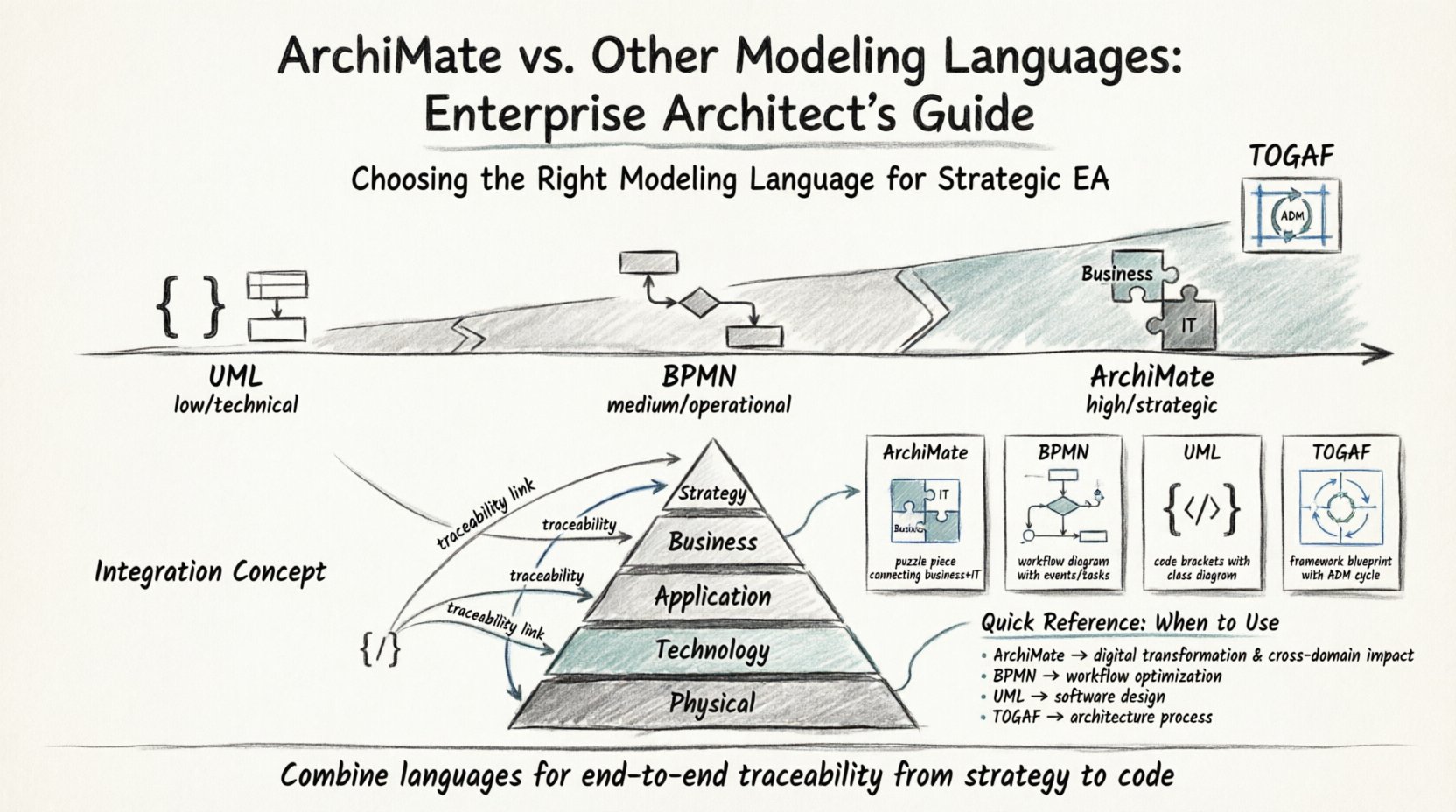
The language is structured into layers. This layered approach allows architects to map dependencies across the organization. The core layers include:
- Business Layer: Processes, functions, and organizational structure.
- Application Layer: Software applications and their interactions.
- Technology Layer: Hardware, networks, and infrastructure.
- Strategy Layer: Goals, drivers, and principles guiding the enterprise.
- Physical Layer: The actual deployment of technology.
ArchiMate also defines relationships. These include usage, assignment, and flow. Relationships show how elements interact. This makes it powerful for impact analysis. If a technology component changes, you can trace the effect up to the business process.
Key Competitors in the Modeling Space 🥊
Several other languages exist. Some focus on business processes. Others focus on software design. Some are frameworks rather than languages. It is vital to distinguish between a modeling language and a framework.
1. TOGAF (The Open Group Architecture Framework) 🏗️
TOGAF is often mentioned alongside ArchiMate, but it is not a modeling language. TOGAF is a framework. It provides a method for developing an enterprise architecture. It includes the Architecture Development Method (ADM).
TOGAF tells you how to work. ArchiMate tells you what to draw. In practice, TOGAF and ArchiMate are frequently used together. TOGAF provides the process, while ArchiMate provides the visual notation for the output.
2. BPMN (Business Process Model and Notation) ⚙️
BPMN focuses specifically on business processes. It is widely used for defining workflows. The notation is familiar to business analysts. It uses shapes like circles for events and rectangles for tasks.
While ArchiMate can model processes, BPMN offers more granular detail on execution flow. BPMN is ideal for operational efficiency. ArchiMate is better for strategic alignment and cross-domain impact.
3. UML (Unified Modeling Language) 💻
UML is the standard for software engineering. It describes the structure and behavior of software systems. Diagrams include class diagrams, sequence diagrams, and use case diagrams.
UML is too detailed for high-level enterprise architecture. It focuses on the code and database level. Architects use UML when designing specific software components. ArchiMate remains at a higher level of abstraction.
4. IDEF (Integrated Definition) 📉
IDEF is a family of modeling methods developed for government and defense. IDEF0 focuses on functional modeling. IDEF3 focuses on process capture.
These are older standards. While they offer rigor, they lack the modern enterprise focus of ArchiMate. They are less common in commercial sectors today.
Comparison Table: Side-by-Side Analysis 📊
The table below summarizes the key differences between ArchiMate and its competitors. This helps in quick decision-making.
| Feature | ArchiMate | BPMN | UML | TOGAF |
|---|---|---|---|---|
| Primary Focus | Enterprise Architecture | Business Processes | Software Systems | Architecture Method |
| Scope | Business to IT | Operational Flow | Implementation | Process & Governance |
| Abstraction Level | High (Strategic) | Medium (Operational) | Low (Technical) | N/A (Methodology) |
| Stakeholders | Enterprise Architects | Business Analysts | Software Developers | Architecture Board |
| Standard Body | The Open Group | OMG | OMG | The Open Group |
Deep Dive: ArchiMate vs. BPMN ⚖️
The comparison between ArchiMate and BPMN is the most common point of confusion. Both deal with business concepts. However, their intent differs significantly.
Process Granularity
BPMN excels at defining the sequence of actions. It answers who does what when. It handles exceptions, loops, and parallel flows in great detail. ArchiMate models business functions and processes at a higher level. It links these to the applications that support them.
Integration with IT
ArchiMate explicitly links business to technology. A business process in ArchiMate can connect to an application service. BPMN does not have native concepts for IT infrastructure. If you need to show how a process fails when the database is down, ArchiMate is the better choice.
When to Use BPMN
- Optimizing specific workflows.
- Documenting operational procedures.
- Creating executable process definitions.
- Training staff on specific tasks.
When to Use ArchiMate
- Planning digital transformation.
- Assessing IT landscape complexity.
- Aligning IT investments with strategy.
- Visualizing dependencies across layers.
Deep Dive: ArchiMate vs. UML 🛠️
UML is the language of developers. ArchiMate is the language of architects. Confusing the two leads to models that are either too detailed or too vague.
Abstraction Differences
UML deals with classes, objects, and interfaces. It describes the internal structure of a system. ArchiMate deals with capabilities, services, and components. It describes the role of the system within the business.
Scope of Impact
UML diagrams are often isolated to a specific project. ArchiMate models are designed to be integrated into a global repository. An architect can see how a change in one application affects a different business unit. UML does not support this cross-project view easily.
Mapping to Software
ArchiMate can be mapped to UML. An ArchiMate Application Component can be realized by a UML Class. This allows a layered approach. The strategic view stays in ArchiMate. The detailed design moves to UML. This separation of concerns is vital for large organizations.
Selection Criteria for Architects 🧭
Choosing the right language depends on the organization’s maturity and goals. Here are factors to consider when making a selection.
Organizational Maturity
Organizations new to EA might start with BPMN. It is intuitive for business users. Once the process foundation is laid, ArchiMate can be introduced to link processes to IT. Jumping straight to complex ArchiMate models can overwhelm stakeholders.
Strategic Goals
If the goal is cost reduction, ArchiMate helps identify redundant applications. If the goal is speed to market, BPMN helps streamline workflows. If the goal is system reliability, UML helps design robust interfaces.
Tooling Ecosystem
The availability of tools that support a language matters. While we do not name specific software, the market offers many options for each standard. Ensure the chosen language has community support and training resources.
Regulatory Requirements
Some industries require specific documentation. Banking and healthcare often have strict compliance needs. ArchiMate provides a structured way to document compliance risks. It maps regulatory requirements to technical controls.
Integration Strategies 🤝
It is rarely necessary to choose just one. A mature enterprise architecture practice uses a combination of languages.
The Composite Model
Use TOGAF to define the process. Use ArchiMate to document the target state. Use BPMN to detail the operational changes. Use UML for the technical implementation details. This creates a coherent narrative from strategy to code.
Traceability
Linking models is crucial. A business goal in ArchiMate should trace to a process in BPMN, which traces to a service in UML. This traceability ensures that every line of code supports a strategic objective.
Version Control
Models change. Version control is necessary for all modeling languages. Changes in one model must be reflected in others. Automation helps keep these synchronized. Manual synchronization leads to errors and outdated documentation.
Common Pitfalls to Avoid ⚠️
Even with the right language, mistakes happen. Common errors include over-modeling and under-communicating.
Over-Modeling
Creating diagrams for every single detail is a waste of time. Models should be as simple as possible but no simpler. Focus on the elements that drive decision-making. Ignore the noise.
Ignoring the Audience
A diagram for a CIO looks different from one for a developer. Use ArchiMate for the CIO. Use UML for the developer. Do not show technical class diagrams to a business owner. Context is king.
Lack of Governance
Who approves the models? Who updates them? Without governance, models become stale quickly. Establish a review cycle. Ensure that changes in the real world are reflected in the models.
Future Trends in Modeling Languages 🚀
The field of enterprise architecture is evolving. New standards are emerging to address modern challenges.
Cloud Integration
Legacy modeling languages are adapting to cloud-native architectures. New symbols and concepts are being added to represent containers, serverless functions, and microservices. ArchiMate has updated its specification to support cloud environments.
Data-Centric Models
Data is the new asset. Future modeling will place more emphasis on data flows and governance. Languages are integrating data modeling capabilities to bridge the gap between IT and analytics teams.
Automation
Modeling is becoming more automated. Tools can generate diagrams from code repositories. Conversely, code can be generated from models. This reduces the gap between design and implementation.
AI-Assisted Design
Artificial intelligence is starting to assist in model creation. AI can suggest relationships based on existing data. It can also identify inconsistencies in the architecture. This does not replace the architect but augments their capabilities.
Final Considerations for Implementation 🎯
Implementing a modeling standard is a journey. It requires training, tools, and patience. Start small. Pick one domain, such as infrastructure or application portfolio. Build a model. Review it with stakeholders. Refine the notation based on feedback.
Success is not about the complexity of the diagrams. It is about the decisions enabled by the models. If the models help leaders make better choices, the effort was justified. If they gather dust in a repository, the approach needs adjustment.
Continuous improvement is key. Review the modeling language annually. Is it still relevant? Do the symbols make sense? Are stakeholders using them correctly? Adaptation ensures longevity.
Summary of Key Takeaways 📝
- ArchiMate is the standard for end-to-end enterprise architecture.
- BPMN is superior for detailed business process workflows.
- UML remains the standard for software design and engineering.
- TOGAF provides the methodology, while ArchiMate provides the notation.
- Integration of multiple languages is often the best approach.
- Focus on stakeholder value rather than diagram complexity.
By understanding the strengths and limitations of each language, enterprise architects can build robust architectures. These architectures support the organization in achieving its strategic goals. The choice of language is not just technical; it is strategic. Select wisely. 🌟