Enterprise architecture (EA) can feel like navigating a labyrinth without a map. 🗺️ Organizations today juggle countless systems, business processes, and strategic goals. Keeping these elements aligned is difficult without a common language. This is where the ArchiMate modeling language comes into play. It offers a structured way to visualize, analyze, and design the architecture of an organization.
For beginners, the concept of enterprise architecture might seem daunting. It involves technical jargon, complex diagrams, and abstract concepts. However, adopting a standard framework like ArchiMate reduces this complexity significantly. It provides a shared vocabulary that bridges the gap between business stakeholders and IT professionals. This guide breaks down how this standard works, its core components, and why it is an essential tool for modern organizations.
📚 Understanding the ArchiMate Standard
ArchiMate is an open and independent enterprise architecture modeling language. It is not a software product, but rather a specification maintained by The Open Group. This distinction is crucial. It means the language is neutral and can be implemented by various tools. The primary goal is to create a comprehensive framework that covers all layers of an organization.
Before ArchiMate, different teams often used different diagrams. Business teams might use flowcharts, while IT teams used system architecture diagrams. These diagrams rarely communicated well with each other. ArchiMate solves this by providing a unified view. It allows you to map business capabilities to the applications that support them, and the technology infrastructure that runs those applications.
Key Objectives of the Standard:
- Alignment: Ensures IT investments match business goals.
- Communication: Provides a visual language understood by all stakeholders.
- Complexity Management: Breaks down large systems into manageable layers.
- Consistency: Uses standard notation to avoid ambiguity.
🧱 The Core Layers of Enterprise Architecture
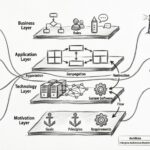
One of the most powerful aspects of this modeling language is its layered approach. Instead of treating the organization as a single monolithic block, it separates concerns into distinct layers. This separation allows architects to focus on specific areas without getting overwhelmed by the entire system at once.
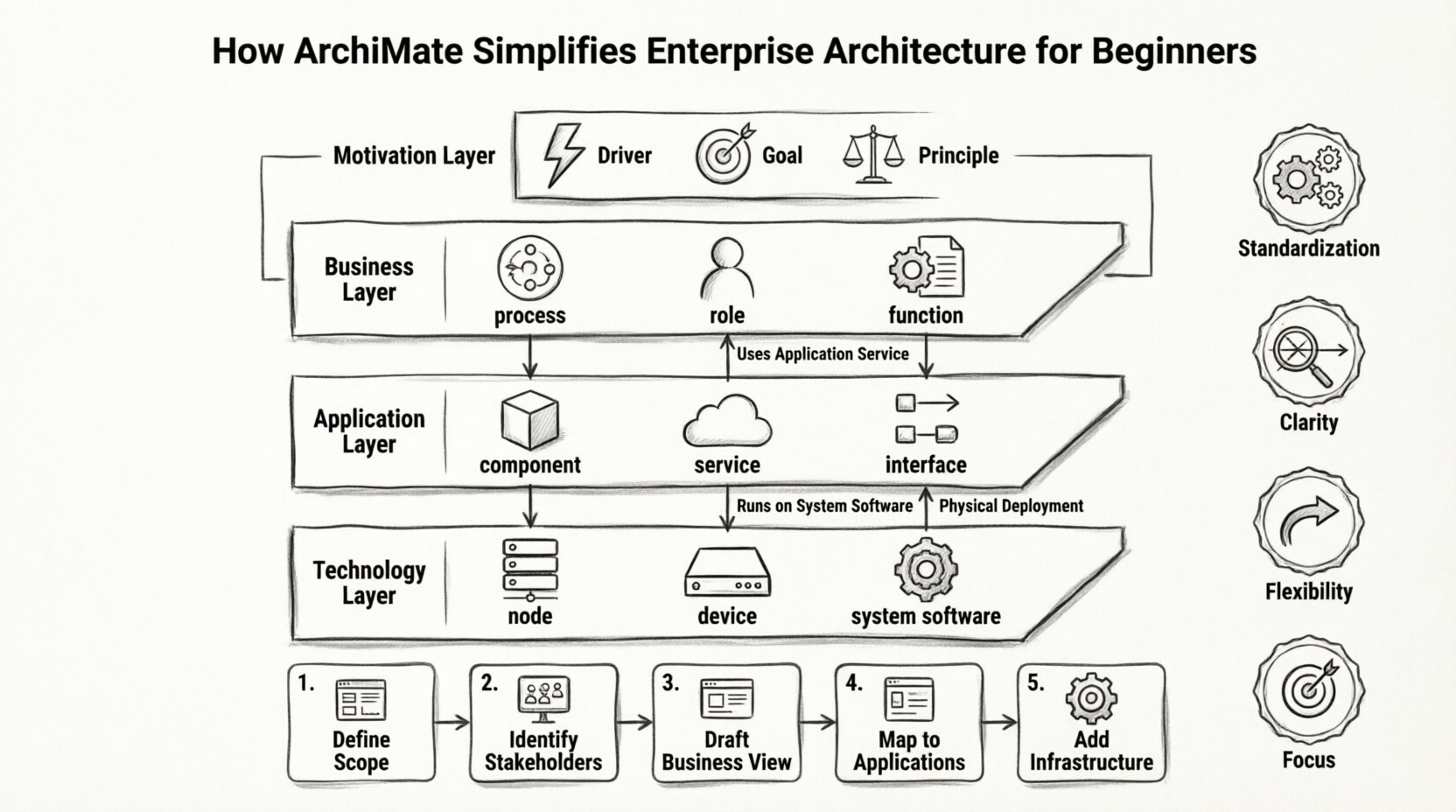
There are three primary layers often referred to as the “Architecture Triad.” These layers interact with each other, creating a flow from strategy down to infrastructure.
1. Business Layer
This layer represents the visible face of the organization. It includes business processes, business roles, business functions, and business objects. It answers the question: “What does the business do?”
- Business Process: A set of related, structured activities or tasks that produce a specific service or result.
- Business Role: A person or organization responsible for the activities in a business process.
- Business Function: An aggregation of capabilities required to accomplish a business goal.
2. Application Layer
The application layer sits below the business layer. It consists of software components that support the business processes. This layer answers: “How is the business supported by technology?”
- Application Component: A modular software unit that provides functionality.
- Application Service: The functionality provided by an application component to the business layer.
- Interface: The point of interaction between components.
3. Technology Layer
This is the infrastructure layer. It includes the hardware, network, and systems that execute the software. This layer answers: “Where does the technology run?”
- Node: A computational or physical resource.
- Device: A hardware element, such as a server or router.
- System Software: Software that manages computer hardware and software resources.
To visualize how these layers connect, consider the following mapping structure:
| Layer | Focus | Example Element | Relationship to Below Layer |
|---|---|---|---|
| Business | Strategy & Operations | Sales Process | Uses Application Service |
| Application | Functionality | CRM System | Runs on System Software |
| Technology | Infrastructure | Cloud Server | Physical Deployment |
🔄 Relationships and Dynamics
Static diagrams are useful, but architecture is dynamic. Elements interact, flow data, and change over time. ArchiMate defines specific relationship types to describe these interactions. Understanding these relationships is key to building accurate models.
Structural Relationships: These define how things are connected.
- Association: A non-directional link between two elements.
- Access: One element uses the functionality of another.
- Realization: A relationship between an interface and an implementation.
Behavioral Relationships: These define how things move and change.
- Trigger: One behavior initiates another.
- Flow: The movement of information or material between elements.
- Serving: A service is provided to a business role.
When modeling, it is important not to mix these relationships indiscriminately. For example, a Business Process should not directly connect to a Device. There should be an Application Layer element in between. This ensures the model reflects reality and maintains the integrity of the architectural layers.
🧠 The Motivation Layer
Often overlooked by beginners, the Motivation Layer is critical for understanding why an architecture exists. It introduces concepts like Drivers, Goals, and Principles. This layer provides the context for the structural and behavioral elements above.
Why is this layer important?
- Justification: It explains the business reasons behind a change.
- Alignment: It ensures technical decisions support strategic goals.
- Consistency: It enforces principles that govern the architecture.
For instance, if a business goal is “Reduce Costs,” a principle might be “Standardize Software.” This principle then influences which application components are selected in the Application Layer. Without this layer, architecture can become purely technical without business justification.
🛠️ Building Your First Model
Starting with a complex model is a common mistake. Beginners often try to model the entire organization at once. This leads to confusion and abandoned projects. A better approach is to start small and iterate.
Step 1: Define the Scope
Identify the specific problem you are trying to solve. Are you migrating a legacy system? Are you launching a new product line? Narrowing the scope helps in selecting the relevant layers and elements.
Step 2: Identify Key Stakeholders
Who needs to understand this model? Business leaders need high-level views. Engineers need detailed technical views. Define who the audience is before drawing anything.
Step 3: Draft the Business View
Start with the Business Layer. Map out the core processes. Use simple shapes to represent roles and processes. Do not worry about the technical details yet. Focus on the value chain.
Step 4: Map to Applications
Once the business process is clear, identify the applications that support it. Draw lines from the business process to the application services. This creates the “Business-Application” alignment.
Step 5: Add Infrastructure
Finally, link the applications to the technology layer. Show which servers or cloud environments host the software. This completes the end-to-end view.
🤝 Alignment and Integration
One of the primary benefits of this standard is integration. It allows different architectural viewpoints to coexist. You might have a process view, a data view, and a security view. All of these can be part of the same model.
Viewpoints:
- Process Viewpoint: Focuses on business processes and flows.
- Data Viewpoint: Focuses on data objects and relationships.
- Security Viewpoint: Focuses on access rights and security mechanisms.
By using viewpoints, you can filter the model for specific audiences. A security officer might only see the security elements, while a business manager sees the process elements. This reduces clutter and improves clarity.
⚠️ Common Pitfalls to Avoid
Even with a clear framework, mistakes happen. Being aware of common pitfalls can save time and prevent rework.
1. Ignoring the Motivation Layer
Many models start with boxes and lines without explaining the “Why.” This leads to confusion when stakeholders ask for the rationale behind a design decision.
2. Mixing Layers
Connecting a Business Process directly to a Device is a violation of the layering concept. Always use the Application Layer as the intermediary.
3. Over-Modeling
Trying to model every single detail of the organization is unnecessary. Focus on the critical paths and high-value areas. Detail can be added later as needed.
4. Tool Dependency
Do not rely solely on a specific tool. The standard is the standard. If you switch tools, your model should remain valid. Focus on learning the notation, not just the software features.
📈 Continuous Improvement
Architecture is not a one-time project. It is a living discipline. As the business changes, the architecture must evolve. This requires a process for versioning and change management.
Best Practices for Maintenance:
- Regular Reviews: Schedule periodic reviews of the architecture.
- Change Logs: Document every change made to the model.
- Version Control: Keep track of different versions of the architecture.
- Feedback Loops: Gather feedback from stakeholders to improve the model.
This iterative approach ensures the architecture remains relevant. It prevents the model from becoming a static document that is ignored after creation.
🎓 Learning Path for Beginners
Mastering this language takes time. There is no shortcut, but there is a clear path. Start with the official documentation. It provides the definitive reference for all concepts.
Recommended Steps:
- Read the Basics: Understand the core concepts of layers and relationships.
- Practice with Diagrams: Draw simple diagrams to test your understanding.
- Join the Community: Engage with other practitioners to share knowledge.
- Apply to Real Projects: Use the language on actual work tasks.
Consistency is more important than speed. Take the time to understand each element before moving to the next. This builds a solid foundation for future learning.
🚀 Summary of Benefits
Adopting this framework brings tangible value to an organization. It reduces ambiguity and improves decision-making. By using a standardized language, teams spend less time explaining concepts and more time solving problems.
Key Takeaways:
- Standardization: Provides a common language across the enterprise.
- Clarity: Visualizes complex relationships clearly.
- Flexibility: Adaptable to various industries and sizes.
- Focus: Helps prioritize architectural efforts.
For beginners, the journey starts with understanding the layers. Once the Business, Application, and Technology layers are clear, the rest follows naturally. The Motivation layer adds the necessary context. Relationships tie it all together.
Enterprise architecture is about connecting strategy to execution. This standard provides the blueprint for that connection. With practice and patience, beginners can become proficient in creating meaningful architectural models.
The complexity of modern business requires a structured approach. This language offers that structure. It does not replace the need for human judgment, but it supports it with clarity and precision. As you continue to explore this domain, remember that the goal is communication and alignment, not just diagramming.