In the fast-paced world of software development and product management, the tension between speed and knowledge preservation is constant. Teams often find themselves caught between two extremes: documentation that gathers dust and becomes obsolete before release, and documentation that consumes so much time it slows down development to a crawl. The Agile Manifesto values working software over comprehensive documentation, yet this is frequently misinterpreted as a license to document nothing at all. The reality lies in the middle ground. This guide explores the principles of Agile documentation, focusing on the concept of writing just enough to ensure success without unnecessary overhead.
Understanding the “Just Enough” Philosophy ⚖️
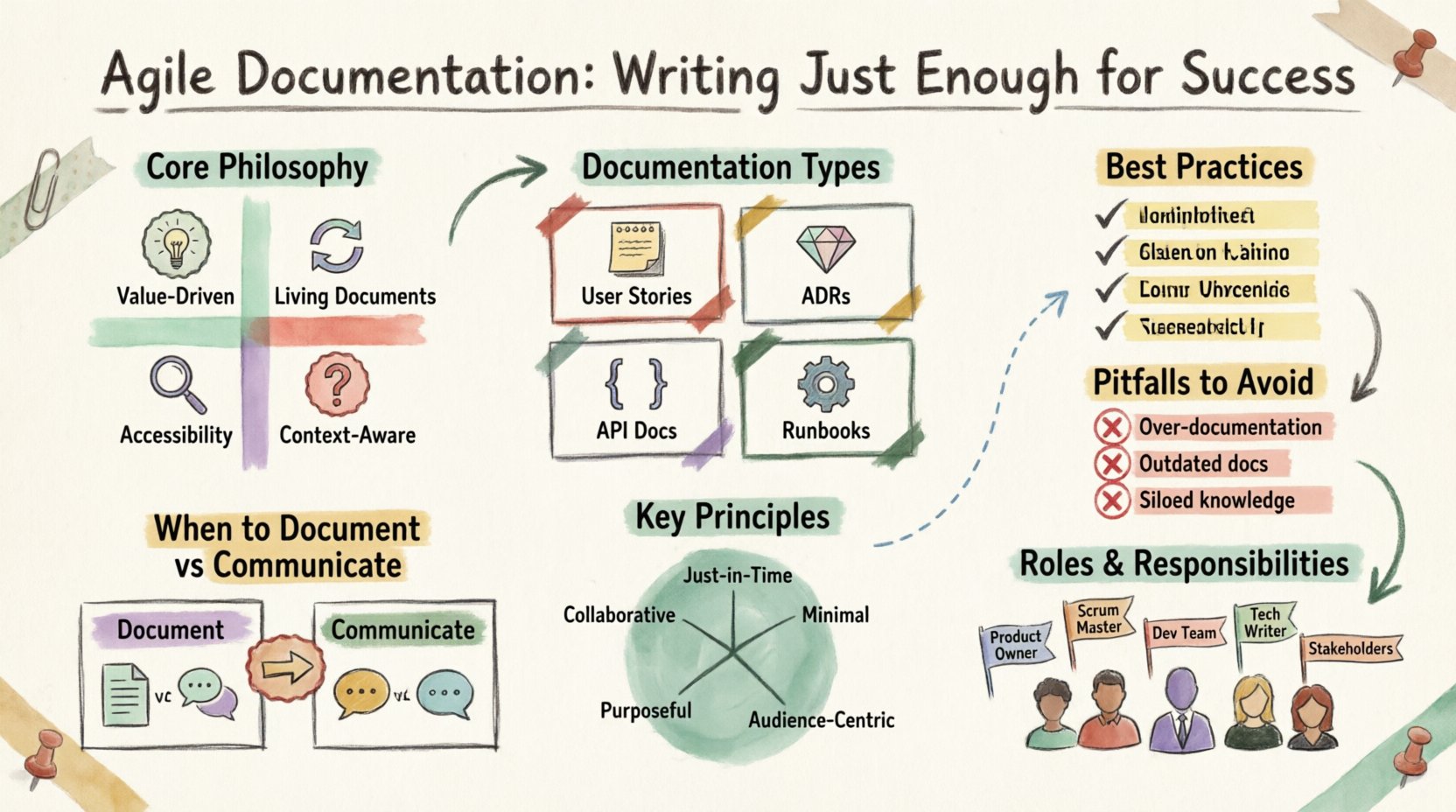
The core objective of documentation in an Agile environment is communication. It is not an archive for future historians; it is a tool for the current team to build, understand, and maintain the product. When we talk about “just enough,” we refer to documentation that provides sufficient context to make decisions, onboard new members, and maintain the system, without dictating every step of the process.
Value-Driven: Every document must serve a clear purpose. If a reader cannot use the information to perform a task or make a decision, the document is likely too verbose.
Living Documents: Agile documentation evolves alongside the code. It is treated as a living artifact, updated as features change.
Accessibility: Information must be easy to find. A document that exists but cannot be located is effectively non-existent.
Context-Aware: Documentation should explain why a decision was made, not just what the decision was.
By adopting this mindset, teams reduce the burden of maintenance and increase the reliability of the information available to stakeholders. The goal is clarity, not volume.
Types of Documentation in an Agile Workflow 📂
Not all information requires the same level of formality. Categorizing documentation helps teams prioritize effort. Below are the primary types of documentation that typically appear in an Agile context.
1. Product Requirements and User Stories
These documents define the scope of work. In Agile, this often takes the form of user stories with clear acceptance criteria. The focus here is on the user’s need, not the technical implementation details.
Format: Text-based, often within project management tools.
Lifecycle: Created during planning, refined during sprint execution, and archived upon completion.
Key Content: Who, What, Why, and Acceptance Criteria.
2. Architecture Decision Records (ADRs)
When a significant technical choice is made, it should be recorded. ADRs capture the context, the decision, and the consequences. This prevents the “why did we do it that way?” question from arising six months later.
Format: Markdown files stored in the version control system.
Lifecycle: Permanent records that are rarely updated after the decision is locked in.
Key Content: Status, Context, Decision, Consequences.
3. API Documentation
Interfaces between services need precise definitions. This ensures that frontend and backend teams can work in parallel without constant interruptions.
Format: OpenAPI specifications, Swagger, or Postman collections.
Lifecycle: Updated with every API version change.
Key Content: Endpoints, request/response schemas, error codes.
4. Runbooks and Operational Guides
These are instructions for operations, deployment, and troubleshooting. They are critical for stability and incident response.
Format: Knowledge base articles, wikis, or internal portals.
Lifecycle: Maintained by DevOps or Support teams.
Key Content: Deployment steps, rollback procedures, common error fixes.
When to Document vs. When to Communicate 🗣️
One of the most common challenges is knowing when to write a document and when to have a conversation. Writing a document is expensive in terms of time and maintenance. Communication is often faster and more dynamic. Use the following matrix to guide your decisions.
Scenario | Documentation Type | Reason |
|---|---|---|
Complex Logic Change | Design Doc / ADR | Requires review and future reference. |
Quick Clarification | Slack / Chat | Temporary context, not needed later. |
Onboarding New Hire | Wiki / Handbook | Recurring need, must be standardized. |
Team Sync Discussion | Meeting Notes | High level, decisions tracked in tickets. |
Regulatory Compliance | Formal Spec | Legal requirement, audit trail needed. |
Code Logic | In-Code Comments | Closest to the source, updates automatically. |
User Guide | Help Center | External audience, static content. |
Notice the pattern. Documentation is reserved for things that need to be remembered, shared across time, or audited. Communication is reserved for things that need to be resolved quickly or are temporary.
Best Practices for Lean Documentation 🛠️
To implement this strategy effectively, teams should adopt specific practices that keep documentation relevant and useful.
1. Write for the Reader, Not the Writer
Documentation is a gift to the person who will read it later. Assume they do not know your context. Avoid jargon where possible, or define it immediately. Use clear headings and concise sentences. If you find yourself writing a wall of text, break it down into bullet points or sections.
2. Version Control Your Docs
Just as code changes, documentation changes. Store documentation in the same version control system as the code. This allows for:
Review processes via pull requests.
Tracking history of changes.
Rollback capabilities if a document introduces errors.
3. Integrate Documentation into Definition of Done
Make documentation part of the acceptance criteria for a task. A feature is not complete until the relevant documentation is updated. This prevents the backlog of docs from accumulating and ensures that knowledge is current.
4. Use Templates
Consistency reduces cognitive load. Create standard templates for user stories, ADRs, and meeting notes. Templates ensure that critical information is not omitted and reduce the time spent on formatting.
5. Keep It Searchable
If a team member cannot find the information quickly, the documentation is failing. Use consistent naming conventions, tag resources effectively, and utilize tools that offer robust search capabilities. Avoid storing critical information in PDFs or local files that are not indexed.
Common Pitfalls to Avoid 🛑
Even with good intentions, teams often fall into traps that render documentation ineffective. Being aware of these pitfalls helps in steering clear of them.
Big Design Up Front (BDUF): Creating detailed specifications before coding begins. This often leads to wasted effort when requirements change. Instead, design just enough to start coding, then refine.
Outdated Information: The worst documentation is false information. If a feature changes and the docs do not, users will lose trust. Schedule regular reviews or rely on automated checks.
Siloed Knowledge: Keeping critical information in a single person’s head or a private file. Ensure knowledge is shared within the team repository.
Over-Engineering: Creating elaborate diagrams for simple logic. Sometimes a sketch or a simple list is sufficient. Match the complexity of the document to the complexity of the problem.
Lack of Ownership: If everyone is responsible for documentation, no one is. Assign specific roles or teams to maintain specific sections of the knowledge base.
Roles and Responsibilities 👥
Documentation is a team sport, but specific roles often take the lead. Understanding these responsibilities ensures accountability without bottlenecks.
Product Owner: Responsible for the “Why” and “What”. They ensure user stories are clear and acceptance criteria are met. They define the value.
Developers: Responsible for the “How”. They write technical specs, API docs, and ensure code comments are accurate. They own the implementation details.
QA Engineers: Responsible for validation. They often write test plans and edge case documentation. They ensure the system behaves as expected.
DevOps/Platform Team: Responsible for operations. They maintain runbooks, deployment guides, and infrastructure diagrams.
Technical Writers: (If available) Responsible for synthesis. They translate technical details into user-friendly guides and ensure consistency across all documentation.
Measuring Documentation Health 📊
How do you know if your documentation strategy is working? Metrics can help, though they should be used carefully to avoid gaming the system.
1. Usage Metrics
Track how often pages are viewed. Low usage might mean the content is irrelevant or hard to find. High usage on a specific page might indicate it is a critical resource or that users are confused and need clarification.
2. Update Frequency
Monitor how often documents are edited. A document that hasn’t changed in a year might be obsolete. A document that changes daily might be a prototype rather than a final spec.
3. Search Failure Rate
Track queries that return no results. This highlights gaps in your knowledge base. If users search for a term and find nothing, that is a signal to create content.
4. Onboarding Time
Measure how long it takes for a new team member to become productive. If onboarding takes too long, it may indicate that the documentation is insufficient or unclear.
5. Feedback Loops
Direct feedback is often the best metric. Add a “Was this helpful?” button to documentation pages. Read the comments and suggestions from users.
Integrating Documentation into CI/CD Pipelines ⚙️
To maintain the “Just Enough” standard, automation is key. Integrating documentation generation into the Continuous Integration and Continuous Deployment (CI/CD) pipeline ensures that docs stay in sync with code.
Auto-Generate API Docs: Use tools that parse code comments or specifications to generate API documentation automatically upon build.
Linting for Docs: Treat documentation files like code. Run linters to check for broken links, spelling errors, or formatting issues.
Deployment Checks: Ensure that documentation builds successfully before deploying the application. A broken website is bad, but broken docs that lead users down the wrong path is worse.
The Human Element of Documentation 👤
Ultimately, documentation is a communication tool. It requires empathy. Writers must anticipate the questions users will have. Readers must be willing to contribute corrections. This culture of shared knowledge is what sustains an Agile documentation strategy over the long term.
Encourage a culture where updating documentation is not seen as a punishment but as a contribution to the team’s success. When a developer finds a bug in the docs, celebrate the fix. When a writer improves clarity, acknowledge the effort. This positive reinforcement drives engagement.
Summary of Key Principles 🎯
To recap, successful Agile documentation relies on balance and intention.
Prioritize Value: Only document what adds value to the workflow.
Keep it Living: Treat docs as living code, not static artifacts.
Centralize Access: Ensure all information is in one place and searchable.
Automate Where Possible: Reduce manual overhead through tooling.
Assign Ownership: Ensure someone is responsible for maintenance.
Measure Impact: Use data to refine the documentation strategy.
By adhering to these principles, teams can maintain a lean, effective documentation strategy that supports rapid development without sacrificing knowledge retention. The aim is not to eliminate documentation, but to make it a seamless part of the development lifecycle that empowers the team rather than hindering it.
As the product evolves, the documentation should evolve with it. Regular retrospectives should include a review of the documentation itself. What worked? What was confusing? What was never read? Use these insights to refine the approach continuously.