In the fast-paced landscape of software development, the Agile methodology prioritizes iterative progress, adaptability, and continuous feedback. Within this framework, pair programming stands out as a distinct collaborative practice that fundamentally alters how code is produced. It is not merely about writing code faster; it is about writing code better, fostering knowledge exchange, and maintaining high standards of quality throughout the development lifecycle. This guide explores the intricate dynamics of pair programming within Agile environments, offering a deep dive into roles, benefits, challenges, and sustainable implementation strategies.
Understanding the nuances of this practice requires moving beyond the surface level of two people at one keyboard. It involves psychological safety, communication patterns, energy management, and the integration of specific behaviors into daily rituals. Whether teams are co-located or distributed, the principles remain consistent: collaboration is the engine, and quality is the destination.
🏗️ Understanding the Core Mechanics
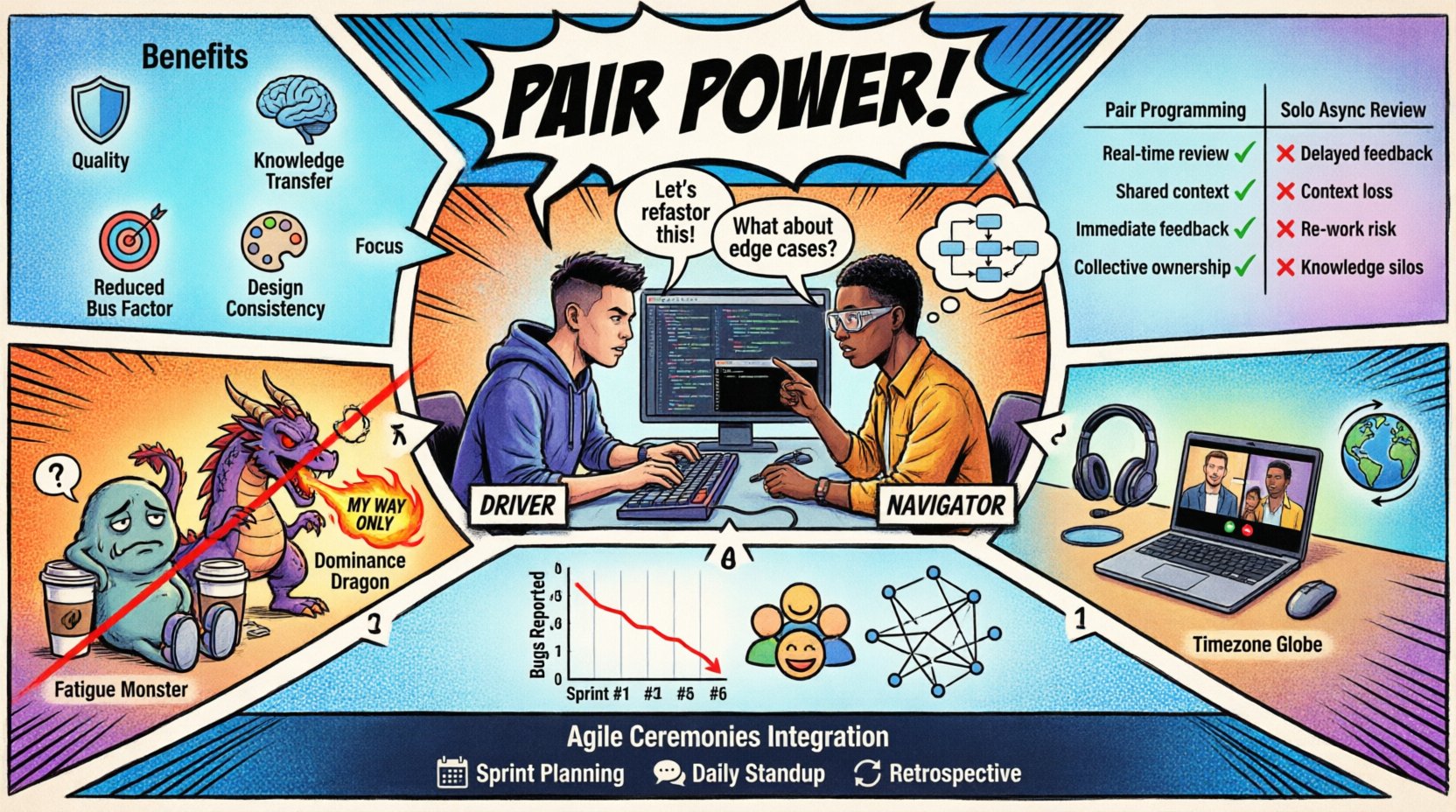
At its heart, pair programming involves two developers working together at a single workstation. One person drives while the other navigates, though these roles switch frequently. This setup ensures that code is reviewed in real-time rather than through asynchronous pull requests later. The physical proximity, even when virtual, creates a continuous feedback loop that catches errors before they become technical debt.
The dynamic shifts constantly based on the complexity of the task and the energy levels of the participants. It is a fluid state where control is shared, not hoarded. This sharing of control is what differentiates it from traditional pair debugging or code review sessions. The focus is on collective ownership of the solution.
👥 The Driver and Navigator Roles
Defining clear roles prevents confusion and ensures that both participants remain engaged. While the names suggest a hierarchy, the intent is symbiotic. Each role demands specific cognitive functions and contributions.
The Driver: This person controls the keyboard and mouse. Their primary focus is the syntax, the immediate implementation, and the execution of the navigation instructions. They must maintain a steady pace without rushing, allowing the Navigator to keep up. The Driver should not guess; if an idea is unclear, they pause to ask.
The Navigator: This person looks at the bigger picture. They monitor the code for logical errors, think about the overall architecture, and consider edge cases. They are responsible for guiding the Driver through the problem space. The Navigator often speaks more than the Driver, articulating thoughts and strategies aloud.
Switching roles is critical to prevent fatigue and maintain fresh perspectives. A common rhythm is switching every 15 to 30 minutes. This rotation ensures that both individuals absorb the context and skills required for the task.
🚀 Why Teams Adopt This Practice
The decision to implement pair programming is often strategic. Teams do not adopt it lightly because it requires two people to complete one task. The return on investment comes from quality and retention rather than raw velocity in the short term.
Key Advantages
Improved Code Quality: Errors are caught immediately. The second set of eyes acts as a continuous code review, reducing the likelihood of defects reaching production.
Knowledge Transfer: Junior developers learn from seniors without formal training sessions. Information flows naturally through conversation and shared context.
Reduced Bus Factor: When multiple people understand a specific module, the project is less vulnerable if one individual is unavailable.
Focus and Engagement: It is difficult to get distracted when someone else is watching your screen. This leads to deeper work and fewer context switches.
Design Consistency: Coding styles and architectural decisions are agreed upon in real-time, leading to a more uniform codebase.
Comparison of Pair vs. Solo Work
Aspect | Pair Programming | Solo Development |
|---|---|---|
Code Review | Continuous, Real-time | Asynchronous, Post-Write |
Knowledge Retention | High (Shared) | Low (Siloed) |
Immediate Feedback | Yes | No |
Short-Term Velocity | Slower | Faster |
Long-Term Stability | Higher | Variable |
⚠️ Navigating Common Obstacles
Despite the benefits, pair programming is not without friction. Teams often struggle with the initial shift in mindset. Recognizing these challenges allows for proactive management.
1. Dominance and Passivity
One partner may inadvertently take control, leaving the other feeling like a passenger. This often happens if one person is significantly more senior or confident. The solution lies in explicit agreement to switch roles and a culture where the Navigator is empowered to stop the Driver if they are not contributing.
2. Fatigue and Burnout
Concentration is expensive. Maintaining high-level focus for two people simultaneously can lead to exhaustion. It is vital to schedule breaks and not pair for the entire day. A typical limit is 4 hours of paired time per day.
3. Scheduling Conflicts
Aligning two busy calendars can be difficult. Teams may struggle to find time slots. Using a dedicated “pairing board” or rotating schedules can help manage this logistics issue.
4. Imposter Syndrome
Junior members might feel intimidated working next to a senior. Creating a safe environment where mistakes are treated as learning opportunities is essential. The goal is collaboration, not judgment.
💻 Remote Pairing Considerations
In modern Agile settings, teams are often distributed. Pair programming in a remote context introduces new layers of complexity regarding communication and tooling. The dynamic remains the same, but the medium changes.
Screen Sharing: High-quality screen sharing is non-negotiable. Latency can disrupt the flow of conversation. Tools should allow both participants to control the cursor to facilitate switching.
Audio Quality: Voice communication is the lifeline of remote pairing. Clear audio reduces the need to repeat information, which breaks concentration.
Environment: Both developers should be in quiet spaces. Background noise can be distracting and force the pair to stop.
Time Zones: Synchronous pairing across time zones requires flexibility. Rotating times can ensure fairness, though it may impact work-life balance.
Remote pairing often requires more explicit communication than in-person pairing. Verbalizing thoughts that might be assumed in a physical room is necessary to bridge the digital gap.
📊 Measuring Effectiveness
To justify the resource allocation, teams need to track value. Traditional velocity metrics can be misleading when pair programming is involved, as one story point might take two people longer but result in fewer bugs later.
Metrics That Matter
Defect Rate: Track the number of bugs reported after deployment. A decrease indicates higher quality output.
Lead Time: Measure how long it takes from code commit to production. While pairing might slow initial coding, it often speeds up testing and deployment phases.
Team Happiness: Use surveys to gauge satisfaction. High stress or resentment regarding pairing indicates a cultural issue.
Knowledge Coverage: Assess how many team members can work on a specific module without assistance.
🌱 Building a Supportive Environment
Success in pair programming relies heavily on culture. It is not a process that can be forced without buy-in. Leaders must model the behavior and protect the time allocated for it.
Establishing Norms
Respect Time: If a pair finishes early, do not expect them to start immediately on another task. Allow for decompression.
Rotate Partners: Avoid pairing with the same person indefinitely. Cross-pollination of ideas happens when different brains work together.
Focus on the Problem: When disagreements arise, focus on the code and the problem, not the person. Use “we” language rather than “you” language.
Encourage Questions: Silence is often a sign of confusion. Encourage the Driver to ask the Navigator for clarification and vice versa.
🔄 Integration with Agile Ceremonies
Pair programming does not exist in a vacuum. It must align with the broader Agile ceremonies to be effective.
Sprint Planning
During planning, teams should consider who pairs with whom based on skill gaps. If a complex feature is planned, pair a senior with a junior to facilitate learning.
Daily Stand-ups
The daily update should reflect the pairing status. Mentioning who you are paired with helps the team understand availability. It also highlights any roadblocks encountered during the pairing session.
Retrospectives
This is the best place to discuss the dynamics of pairing. Are people feeling drained? Are the roles clear? Use the retrospective to adjust the pairing strategy for the next sprint.
🛠️ Practical Implementation Steps
For teams new to this practice, a phased approach is recommended. Sudden implementation can cause resistance.
Start Small: Begin with pairing for specific tasks, such as bug fixes or critical features, rather than all work.
Define Goals: Decide if the goal is learning, quality, or speed. The goal dictates the pairing style.
Set Expectations: Clarify that this is not a test. Mistakes are expected and are part of the learning process.
Monitor Energy: Watch for signs of fatigue. If the pair is struggling, allow them to take a break or switch partners.
Review and Adapt: After a sprint, evaluate the impact. Did quality improve? Did knowledge spread? Adjust the strategy accordingly.
🤔 Handling Disagreements
Disagreements on implementation are inevitable. The dynamic of the pair should transform conflict into collaboration.
Debate the Code, Not the Person: Use phrases like “What if we try this approach?” instead of “That is wrong.”
Use Time-Boxing: If a decision cannot be made quickly, agree to try the preferred approach for a set time. If it fails, switch.
Seek External Input: If the pair is stuck, step away and ask a third person for their perspective. This brings a fresh view without breaking the flow entirely.
🧩 Onboarding and Training
New team members often find pair programming intimidating. A structured onboarding process helps them acclimate.
Pair with a Mentor: Assign a consistent partner for the first few weeks to build confidence.
Explain the Roles: Explicitly teach the Driver/Navigator dynamic so they understand how to switch.
Encourage Questions: Create an environment where asking “Why are we doing this?” is welcomed during the pairing session.
📝 Final Thoughts
Pair programming is more than a technical tactic; it is a social contract between developers. It demands trust, communication, and a shared commitment to excellence. When implemented with care, it transforms the development process from a solitary struggle into a collective journey.
The dynamics shift based on the team’s maturity and the complexity of the work. It is not a one-size-fits-all solution, but a flexible practice that adapts to the needs of the project. By focusing on the human element—energy, communication, and respect—teams can harness the full potential of collaborative coding.
Ultimately, the goal is to build software that is robust, maintainable, and delivered with a team that supports one another. Through the shared experience of writing code together, teams build resilience and a culture of continuous improvement.