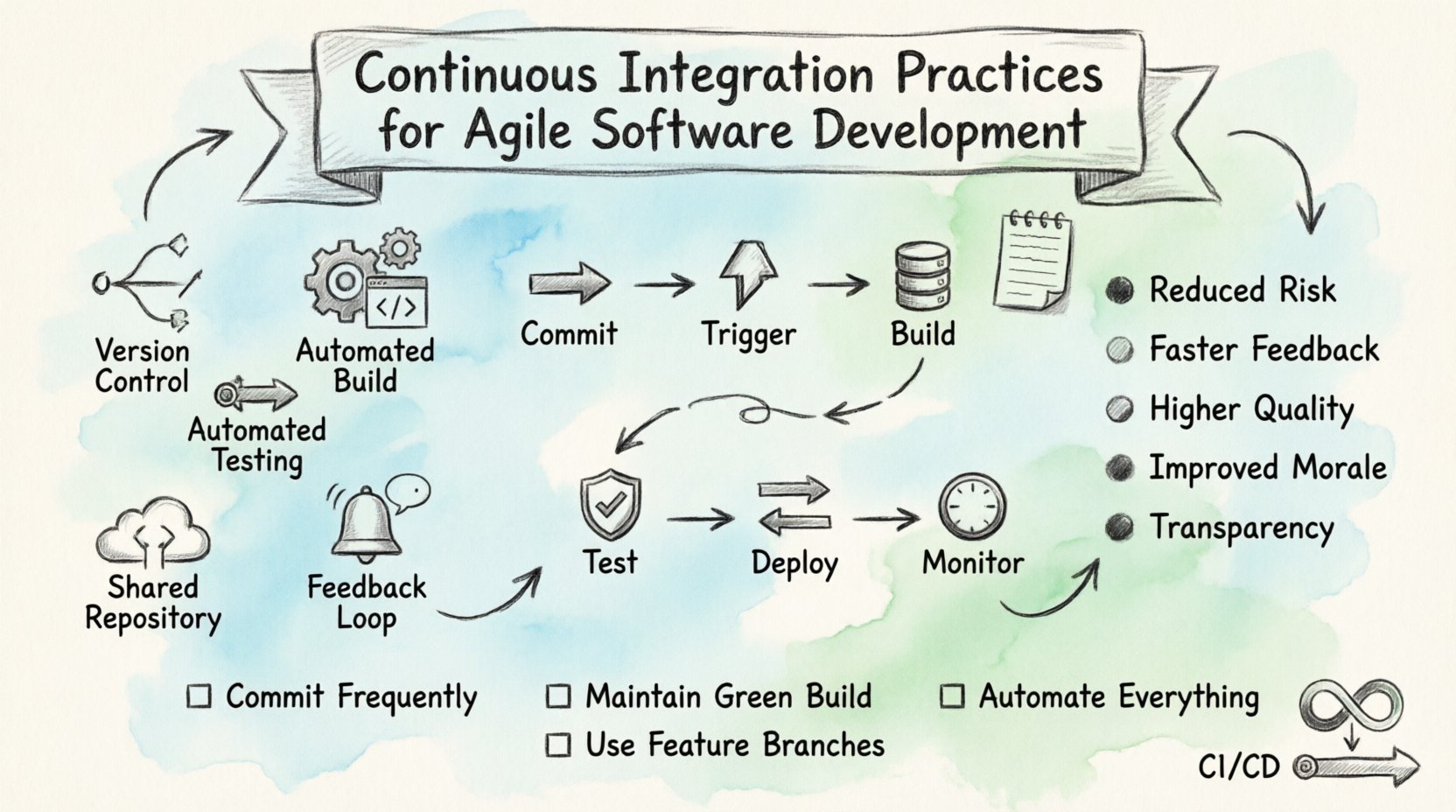
In the fast-paced world of software engineering, speed and stability often feel like opposing forces. Teams strive to release features quickly while maintaining high quality. This tension is where Continuous Integration (CI) becomes essential. It is not just a tool; it is a discipline. When implemented correctly, CI transforms the development lifecycle. It aligns technical practices with Agile values. This guide explores how to establish robust CI practices within an Agile environment. We will look at the mechanics, the culture, and the metrics that matter. No specific tools are required to understand the principles. Focus on the workflow and the outcomes.
Understanding Continuous Integration in Context 🧩
Continuous Integration is a development practice where developers integrate code into a shared repository frequently. Each integration is verified by an automated build and automated tests. The goal is to detect errors early. It prevents the integration hell that plagued older waterfall methodologies. In Agile, this frequency is non-negotiable. Agile relies on iterative delivery. CI supports this by ensuring every iteration is potentially shippable.
Core Components of the Practice
Several elements work together to make CI functional. These are the pillars that support the entire structure. Without them, the process becomes fragile. Consider the following components:
Version Control System: A single source of truth for code. All changes must be tracked.
Automated Build Process: The system compiles the code automatically upon change.
Automated Testing: Unit, integration, and regression tests run against the build.
Feedback Loop: Developers receive immediate notification of build status.
Shared Repository: Code is integrated into a common trunk or branch regularly.
The Relationship Between CI and Agile 🔄
Agile methodologies emphasize responsiveness to change and customer collaboration. CI directly enables these values. It reduces the risk associated with frequent changes. When code is integrated daily, the cost of fixing a bug is low. If you wait weeks to integrate, the cost skyrockets. This aligns with the Agile principle of welcoming change. It also supports the principle of delivering working software frequently.
Benefits of Integration with Agile
Integrating CI into an Agile workflow provides tangible advantages. These benefits extend beyond the technical team. Stakeholders see faster progress. Here is how it impacts the project:
Reduced Integration Risk: Small changes are easier to debug than large batches.
Faster Feedback: Developers know immediately if their code breaks the build.
Higher Code Quality: Automated tests enforce standards consistently.
Improved Morale: Less time spent fixing integration issues means more time building features.
Transparency: The build status provides a clear view of project health.
Essential Practices for Implementation 🛠️
Setting up CI requires discipline. It is not enough to have the technology. The team must adopt specific behaviors. These practices ensure the system remains stable over time. Deviations here lead to technical debt. Below are the critical practices to follow.
1. Commit Frequently
Developers should commit code multiple times a day. Large changes should be broken down into smaller, manageable units. This granularity makes it easier to identify the source of a failure. If a commit spans ten files, finding the error is difficult. If it spans one file, the issue is localized. Aim for atomic commits. Each commit should represent a logical step forward.
2. Maintain a Green Build
The build status should always be green. This means the latest code compiles and passes tests. If a build fails, it becomes the highest priority to fix. Do not commit new code on top of a broken build. This practice prevents the accumulation of errors. It forces the team to address quality issues immediately. A broken build blocks the pipeline.
3. Automate Everything
Manual processes are prone to human error. Automation reduces variability. The build process, testing, and deployment should be fully automated. This includes database migrations and configuration updates. If a task requires human intervention, it should be documented and scripted. The goal is to remove friction from the workflow.
4. Use Feature Branches
While the trunk is the main line of development, feature branches allow parallel work. Developers work on isolated branches. They integrate these branches into the main trunk regularly. This strategy protects the main line from unstable code. It also allows for code review before merging. Ensure the branch strategy is clear and agreed upon by the team.
The Continuous Integration Workflow 📊
Understanding the flow of data is crucial. This section details the typical lifecycle of a change. Each stage adds value and reduces risk. Visualizing this helps teams identify bottlenecks.
Stage | Action | Outcome |
|---|---|---|
Commit | Developer pushes code to repository | Change is recorded |
Trigger | Build system detects new commit | Process starts automatically |
Build | Code is compiled and packaged | Executable artifact created |
Test | Automated tests run against artifact | Quality verification passed |
Deploy | Artifact moves to staging or production | Software is available for use |
Monitor | System logs and metrics are reviewed | Feedback informs future commits |
Breaking Down the Stages
Commit: This is the starting point. Ensure commit messages are descriptive. They should explain what changed and why.
Trigger: The system listens for webhooks or polling events. Latency here should be minimal.
Build: Dependencies must be managed. Do not rely on local installations. Use a clean environment for every build.
Test: Tests should run in order. Unit tests first, then integration, then acceptance.
Deploy: Deployment should be repeatable. Environment parity is key.
Monitor: Observability is the final check. Does the application perform as expected?
Common Challenges and Solutions ⚠️
Implementing CI is not always smooth. Teams often encounter obstacles. Recognizing these early helps in mitigation. Here are common issues and how to address them.
Slow Build Times
If the build takes too long, developers lose patience. They may commit less frequently. This defeats the purpose of CI. To solve this, optimize the test suite. Run only relevant tests based on the code changed. Use caching for dependencies. Parallelize test execution across multiple machines. Infrastructure scaling can also help reduce wait times.
Flaky Tests
A flaky test passes sometimes and fails others without code changes. This erodes trust in the system. If developers ignore failures because they are flaky, the system becomes useless. Fix flaky tests immediately. Do not disable them. Ensure tests are deterministic. Avoid reliance on external services during testing. Mock external dependencies to isolate the code.
Environment Discrepancies
Code that works on a developer machine may fail in the build. This is the classic “it works on my machine” problem. Use containerization to standardize environments. Ensure the build environment matches production as closely as possible. Document all prerequisites. Version your dependencies explicitly.
Resistance to Change
Some team members may resist automation. They prefer manual control. This creates friction. Explain the benefits clearly. Show data on time saved. Involve them in the design of the pipeline. Give them ownership of the process. Training sessions can help alleviate fear of the new tools.
Metrics for Success 📈
How do you know if CI is working? You need metrics. These numbers provide insight into the health of the pipeline. Track them regularly. Use them to guide improvements. Do not use them for punishment. They are diagnostic tools.
Build Frequency: How often do successful builds occur? Higher is generally better.
Build Duration: How long does it take to complete a build? Shorter is better.
Test Coverage: What percentage of code is covered by tests? Aim for high coverage.
Failure Rate: How often do builds fail? Low is better.
Mean Time to Recovery: How long does it take to fix a broken build? Fast recovery is critical.
Deployment Frequency: How often is code deployed? This measures the agility of the team.
CI vs. Continuous Delivery 🚚
People often confuse Continuous Integration with Continuous Delivery. They are related but distinct. CI focuses on the code and the build. It ensures the code is stable. Continuous Delivery extends this. It ensures the code can be released to production at any time. CI is the foundation. Delivery is the roof. You cannot have delivery without integration.
Key Differences
Scope: CI covers development to testing. Delivery covers testing to production.
Goal: CI aims for code stability. Delivery aims for release readiness.
Automation: CI requires build automation. Delivery requires deployment automation.
Manual Steps: CI should be fully automated. Delivery may have a manual approval gate before production.
Culture and Collaboration 🤝
Technology is only half the battle. The culture surrounding the process is equally important. CI requires a shift in mindset. It moves the focus from individual heroics to team success. The build belongs to the team, not an individual.
Psychological Safety
When a build breaks, do not blame the developer. Treat it as a system failure. Ask what allowed the error to pass. Was the test missing? Was the environment wrong? Blameless post-mortems help the team learn. This encourages honesty. Developers will admit mistakes faster if they are not afraid of punishment.
Shared Ownership
Every team member is responsible for the build. If the pipeline breaks, anyone can fix it. Do not rely on a single person to maintain the CI infrastructure. Document the process. Rotate responsibilities. This prevents bottlenecks and knowledge silos.
Communication
Notifications should be clear. If a build fails, the message should explain why. Use chat integrations to broadcast status. Keep stakeholders informed. Transparency builds trust. If the pipeline is down, everyone should know. Do not hide failures.
Best Practices Checklist ✅
Before declaring the implementation complete, review this checklist. It serves as a final validation of your setup.
Is the build triggered automatically? No manual steps should be needed to start the process.
Are tests isolated? Tests should not depend on each other.
Is the environment clean? Start from a blank slate for every build.
Are dependencies versioned? Avoid using the latest version of libraries without specification.
Is the feedback immediate? Developers should know the result within minutes.
Is the documentation up to date? Onboarding new members should be easy.
Are security scans included? Check for vulnerabilities in code and dependencies.
Is rollback possible? If a deployment fails, you must be able to revert quickly.
Looking Forward 🔮
The landscape of software development continues to evolve. New tools emerge constantly. However, the core principles of CI remain constant. The need for speed and quality does not change. As teams grow, the complexity increases. CI helps manage that complexity. It scales the process of integration without scaling the chaos.
Investing in CI is investing in the future of the project. It reduces the cost of change. It increases the confidence of the team. It allows for innovation without fear of breaking the system. Start small. Automate one step. Then another. Build momentum. Over time, the discipline becomes second nature. The result is a robust, resilient, and efficient development lifecycle.
Final Thoughts on Implementation 🧭
Adopting these practices takes time. Do not expect perfection on day one. Expect to iterate on the process itself. Refine the tests. Optimize the scripts. Adjust the workflows based on feedback. The system should serve the team, not the other way around. If a practice hinders progress, question it. If it helps, keep it.
Remember that the goal is not just to integrate code. It is to integrate knowledge. Every build is a learning opportunity. Every failure is a chance to improve the system. By focusing on these values, teams can achieve a state of flow. Work becomes smoother. Releases become predictable. The pressure decreases. The quality rises. This is the true power of Continuous Integration in an Agile setting.