


In the fast-paced environment of software development, time is the most valuable currency. Teams often find themselves stuck in a cycle of repetitive clarification meetings. Developers stare at screens, confused by vague requirements. Product owners repeat themselves, hoping the message lands correctly. The result is wasted time, delayed sprints, and frustrated stakeholders. The root cause is often not a lack of communication, but a lack of precision in the artifacts that drive that communication.
Writing effective user stories is a skill that balances empathy for the end-user with technical specificity. When done correctly, a user story serves as a contract of understanding between the business and the technical team. It answers the what, the why, and the how much before a single line of code is written. This guide explores practical techniques to refine your user story writing process, reducing the need for back-and-forth questioning and accelerating delivery.
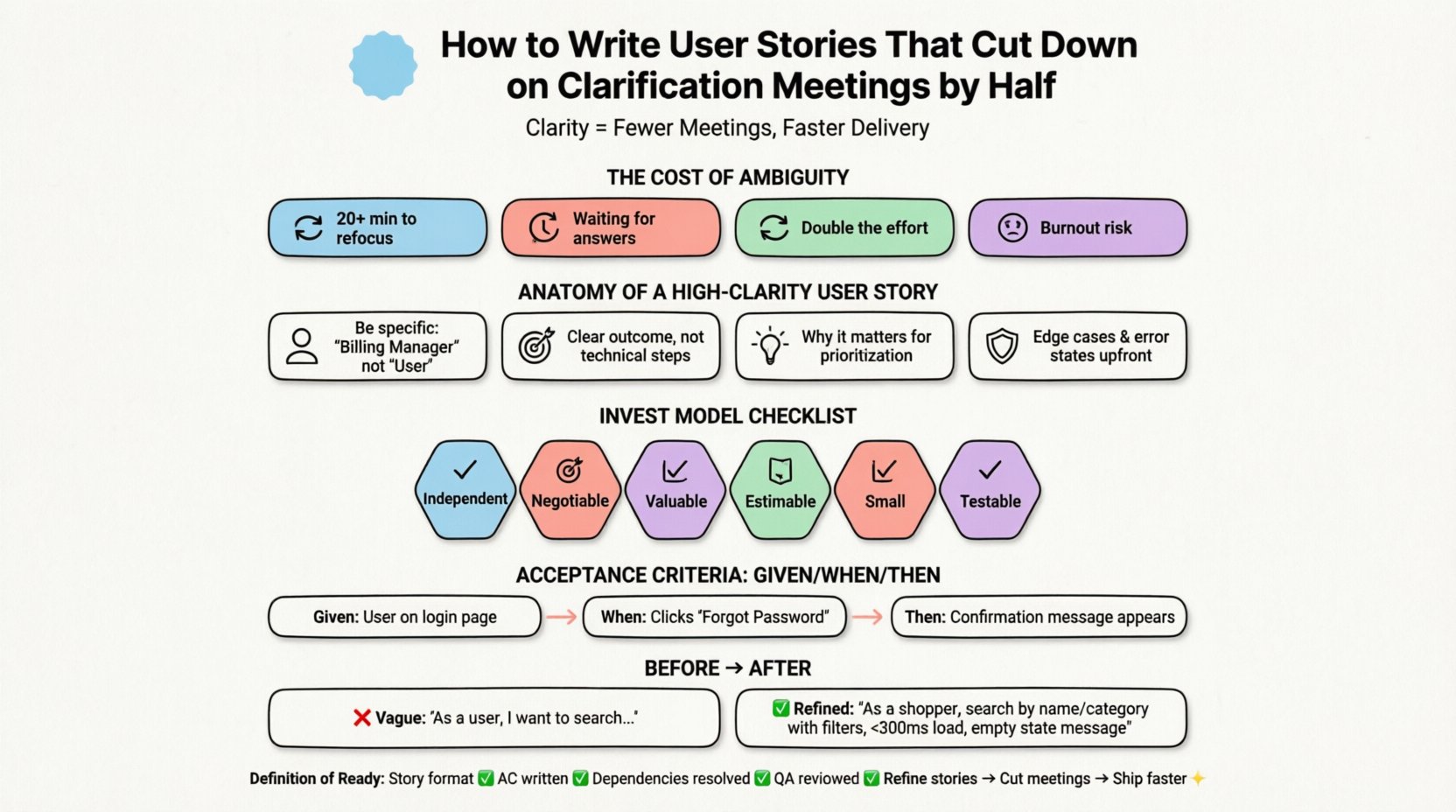
The Cost of Ambiguity in Agile Teams ⏳💸
Before diving into the mechanics of writing, it is necessary to understand the impact of poor documentation. Ambiguity creates friction. When a developer encounters a story that lacks detail, they cannot proceed with confidence. They must stop and ask questions. These questions usually happen in meetings, which are often scheduled inefficiently or interrupt deep work.
Consider the hidden costs of these interactions:
- Context Switching: Every time a developer leaves their code to attend a meeting, they lose focus. Research suggests it can take over 20 minutes to regain deep concentration.
- Idle Time: Developers often wait for answers from Product Owners or Business Analysts before starting implementation.
- Rework: If the initial understanding is wrong, the code written must be discarded. This doubles the effort for that feature.
- Team Morale: Constant interruptions and uncertainty lead to burnout and disengagement.
By improving the clarity of your user stories, you address the root of these inefficiencies. A well-written story minimizes the cognitive load required to understand the requirement, allowing the team to move from discussion to execution faster.
The Anatomy of a High-Clarity User Story 🧩📝
A standard user story follows the format: As a [type of user], I want [some goal], so that [some reason]. While this template is widely known, simply filling in the blanks is rarely enough. To cut down clarification meetings, you must expand beyond the template and provide context, constraints, and acceptance criteria.
Here are the essential components that must be present for a story to be actionable:
1. The Persona (Who)
Be specific about the user. Avoid generic terms like “user” or “admin” if there are distinct roles. Is this a power user? A new registrant? A billing manager? The behavior of these users differs significantly. Knowing the persona helps the technical team choose the right security permissions and UI patterns.
2. The Goal (What)
Describe the functionality clearly. Avoid technical jargon that confuses business stakeholders, but avoid business jargon that confuses developers. Focus on the outcome. Instead of “Click the button to save”, try “Save the configuration changes permanently”.
3. The Value (Why)
Explain the business value. This helps developers prioritize technical decisions. If a feature is high value, developers might invest more in performance. If it is low value, they might choose the quickest solution. Understanding the why prevents developers from building features that look good but solve no problem.
4. Constraints and Edge Cases
This is where most stories fail. What happens if the internet connection drops? What if the input is too long? What if the data is missing? Addressing these scenarios upfront removes the need for developers to ask, “What should I do if this happens?”.
The INVEST Model: A Framework for Quality 📊✅
To ensure your stories are of high quality, apply the INVEST model. This acronym stands for Independent, Negotiable, Valuable, Estimable, Small, and Testable. Each letter represents a filter you can use before adding a story to a sprint.
- Independent: A story should not rely on other stories being completed first. Dependencies create bottlenecks. If Story B cannot start without Story A, consider splitting them or acknowledging the risk.
- Negotiable: The details are open for discussion, but the core value is clear. This allows the team to propose better technical solutions without changing the goal.
- Valuable: It must deliver value to the end-user or the business. If it does not, it should not be built.
- Estimable: The team must have enough information to guess the effort. If it is too vague, you cannot estimate it.
- Small: Ideally, a story should be completable in a single sprint. Large stories are hard to estimate and difficult to test.
- Testable: There must be a way to verify the story is complete. This leads directly to Acceptance Criteria.
Stories that fail these criteria are the primary drivers of clarification meetings. If a story is not testable, the developer will ask, “How do I know this is done?”. If it is not estimable, they will ask, “How long will this take?”. Focusing on INVEST reduces these questions.
Acceptance Criteria: The Safety Net 🛡️📋
Acceptance Criteria (AC) are the conditions that must be met for a user story to be considered complete. They act as a shared definition of done between the business and the development team. Without AC, the story is open to interpretation.
Writing Effective Acceptance Criteria
AC should be specific, testable, and clear. Avoid vague words like “fast”, “user-friendly”, or “efficient”. These words are subjective. One person’s “fast” is another person’s “slow”.
Instead, use measurable terms:
- Bad: The page should load fast.
- Good: The page should load within 2 seconds on a 3G connection.
Using Given/When/Then Format
For complex logic, use the Given/When/Then structure. This format is derived from Behavior Driven Development (BDD) and is excellent for creating clarity.
- Given: The initial state or context.
- When: The action taken by the user.
- Then: The expected outcome or result.
This structure forces you to think through the logic flow. It also helps QA engineers create test cases directly from the story.
Example: Password Reset Flow
| Scenario | Given | When | Then |
|---|---|---|---|
| Valid Request | User is on the login page | User enters their registered email and clicks “Forgot Password” | A confirmation message appears: “If an account exists, an email has been sent” |
| Invalid Email | User is on the login page | User enters an email that does not exist and clicks “Forgot Password” | A generic message appears to prevent email enumeration |
| Rate Limit | 10 password reset requests were sent to the same email in the last hour | User requests another reset | A message appears: “Too many requests. Please try again in 60 minutes” |
This table removes ambiguity. It covers the happy path and the edge cases. A developer reading this knows exactly what to build and how to test it.
Common Pitfalls That Cause Clarification Meetings 🚫❌
Even experienced teams make mistakes. Identifying these pitfalls can help you audit your backlog and reduce future meetings.
1. The “As a User” Trap
Many stories begin with “As a user”. This is too broad. A user could be anyone. Specify the role. “As a billing manager” or “As a guest shopper” provides necessary context for permissions and UI.
2. Missing Negative Scenarios
Teams often write stories for the happy path only. They forget what happens when things go wrong. This leads to meetings where the team asks, “What if the API fails?” or “What if the user enters text in a number field?”. Always include error handling and validation rules in the story.
3. Mixing Features
Combining multiple features into one story makes it too large. If a story contains three distinct changes, it becomes a project, not a story. Split them. A large story increases the risk of errors and makes testing difficult.
4. Relying on Oral Communication
Assuming the team knows the context because you explained it verbally in a meeting is risky. People forget. If it is not written in the story, it does not exist. Always document the decision in the ticket itself.
5. Ignoring Non-Functional Requirements
Security, performance, and accessibility are often treated as afterthoughts. If a story requires high security, state it explicitly. Do not expect developers to guess the compliance requirements.
Collaboration Strategies for Better Stories 🤝💬
Writing a story is not a solitary act. It is a collaborative effort. Even the best-written story benefits from discussion before development begins. This is often called the Three Amigos session.
The Three Amigos
This practice involves three perspectives discussing a story before it enters the sprint:
- Business Analyst / Product Owner: Ensures the value and requirements are clear.
- Developer: Ensures the solution is technically feasible and identifies risks.
- QA Engineer: Ensures the story is testable and identifies edge cases.
This meeting is not a meeting for clarification of the story itself, but a meeting to refine the story. By doing this early, you catch gaps in logic before the sprint starts. It is far cheaper to change a story in a 30-minute planning session than to change code in the middle of a sprint.
Sprint Refinement
Do not wait until the sprint planning meeting to discuss stories. Conduct refinement sessions throughout the sprint. This is where you break down large stories and add acceptance criteria. When the team sits down for sprint planning, the stories should be Ready.
Definition of Ready: Setting the Bar 🚦📏
To ensure quality, teams should establish a Definition of Ready (DoR). This is a checklist that every story must pass before it can be pulled into a sprint. If a story does not meet the DoR, it is returned to the backlog for refinement.
A typical DoR checklist includes:
- The user story follows the As a… I want… So that… format.
- Acceptance criteria are written and agreed upon.
- Dependencies are identified and resolved.
- Design mockups or wireframes are attached (if applicable).
- Security and performance requirements are noted.
- The story is small enough to fit within a sprint.
- QA has reviewed the acceptance criteria.
Enforcing the DoR prevents the team from starting work on ambiguous tasks. It shifts the burden of clarification to the preparation phase, where it belongs.
Real-World Example: From Vague to Precise 🔄📝
Let us look at a concrete example of transforming a vague story into a precise one.
The Vague Story
“As a user, I want to search for products so I can find what I need.”
Issues: No details on search behavior. No error states. No filtering. No sorting. No performance metrics.
The Refined Story
“As a shopper, I want to search for products by name or category so that I can quickly find items to purchase.”
Added Details:
- Search Logic: Case-insensitive search. Support for partial matches (e.g., “lap” finds “laptop”).
- Results: Display up to 50 items per page. Default sort by relevance.
- Filters: Allow filtering by price range and availability.
- Performance: Search results must appear within 300ms.
- Empty State: If no results are found, display a message: “No products match your search. Try different keywords.”
The refined story provides enough detail for a developer to build the feature and for QA to write the test cases without asking follow-up questions. The clarification meetings are reduced because the answers are already in the ticket.
Continuous Improvement of Documentation 📈🔄
Writing user stories is a skill that improves with practice. Teams should review their stories periodically. Ask the team: “Did we have to ask questions about this story during development?” If the answer is yes, identify which part was unclear and update the template or guidelines.
Keep a repository of common questions that arise during development. If developers frequently ask, “How do we handle offline mode?”, create a standard template for offline capabilities. If they ask, “What are the character limits?”, add a field for constraints in your story template.
Documenting these patterns creates institutional knowledge. New team members can read the documentation and understand the standards without needing to ask senior members. This scales the team’s ability to produce clear work.
Final Thoughts on Clarity and Efficiency 🎯✨
The goal of writing user stories is not to create paperwork. It is to create shared understanding. When the team understands the goal, the constraints, and the expected outcome, they can work autonomously. This autonomy reduces the need for meetings and increases the velocity of delivery.
Start by auditing your current backlog. Pick five active stories and apply the acceptance criteria checklist. See if you can identify the gaps. Then, implement the Definition of Ready for your next sprint. Over time, you will notice a shift. The questions will decrease. The confidence will increase. The delivery will become smoother.
Remember, clarity is not a one-time fix. It is a discipline. By committing to high-quality documentation, you respect your team’s time and your customers’ needs. You build a foundation for sustainable development where focus is protected and ambiguity is eliminated.
Take the next steps today. Review your stories. Refine your criteria. Cut the meetings. Build the future with precision.
Related posts:
 How to Break Down Complex Requirements into Clear User Stories in Minutes
 The Quick Start Guide to Crafting User Stories That Developers Actually Love
 Common Pitfalls in User Story Acceptance Criteria and How to Fix Them Quickly
 A Beginner’s Guide to User Story Templates That Work Across Different Industries