


Writing user stories is one of the most fundamental skills in product management. Yet, it is also one of the most misunderstood tasks. A poorly written story creates confusion, wasted engineering time, and a product that misses the mark. A well-crafted story acts as a clear contract between the business, the design team, and the developers. It bridges the gap between a vague idea and a shipped feature.
This guide explores the essential rules for creating high-quality user stories. We will move beyond the basic “As a… I want… So that…” template to understand the deeper mechanics that drive successful delivery. By adhering to these practices, you ensure clarity, reduce rework, and maintain a steady flow of value to your users.
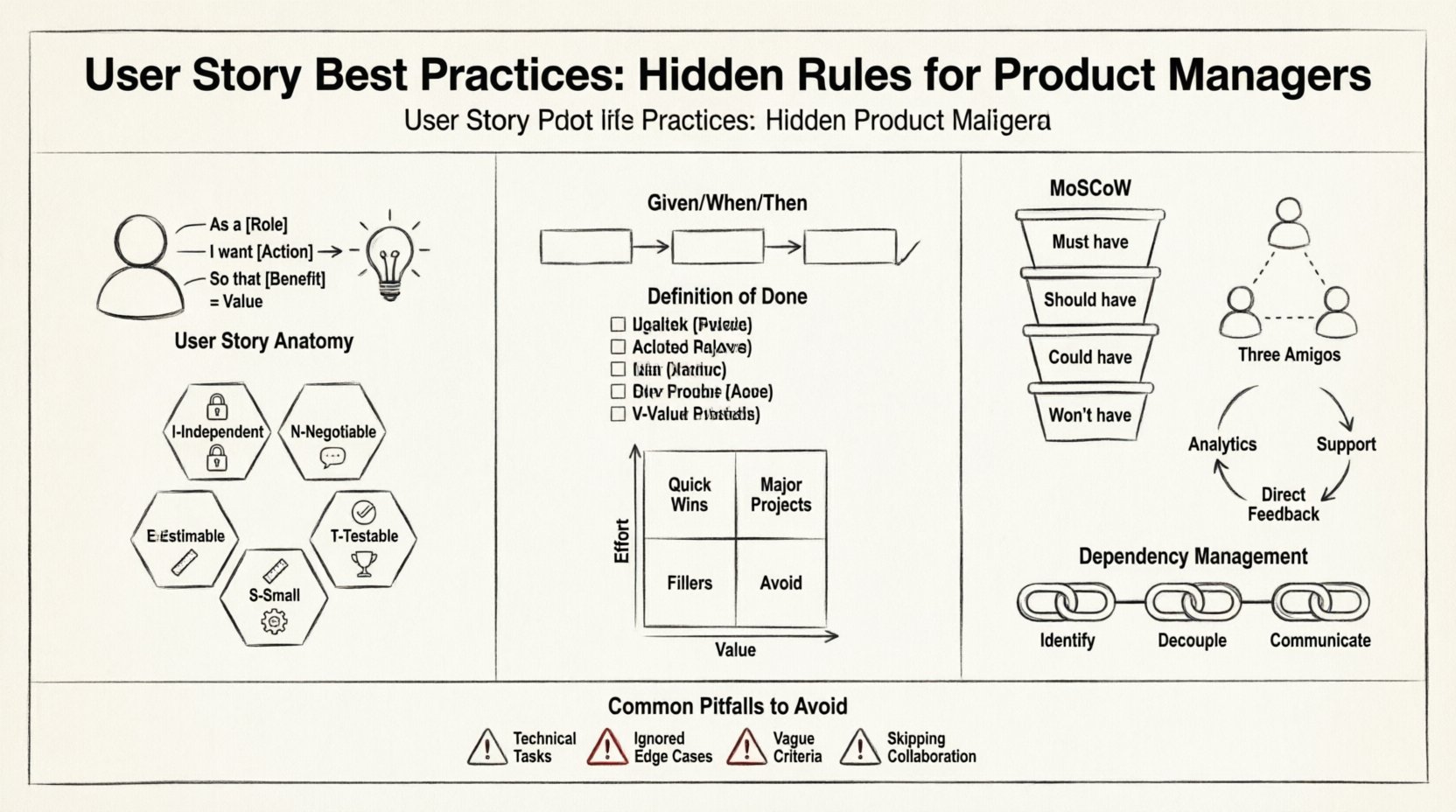
1. The Core Anatomy of a User Story 🏗️
At its simplest, a user story captures a piece of functionality from the perspective of the end user. However, it is more than just a sentence. It is a placeholder for a conversation. To ensure that conversation is productive, the story must contain specific elements.
The Role: Who is the user? Is it an admin, a guest, or a paying customer?
The Action: What are they trying to do? Is it clicking, searching, or analyzing?
The Benefit: Why does this matter? What value does it deliver?
Consider the difference between a technical task and a user story. A technical task might say, “Add a search bar to the header.” A user story says, “As a shopper, I want to search for products by name so that I can find items quickly without browsing categories.” The second version focuses on the human need, not the technical implementation.
2. The INVEST Principles 📊
To evaluate the quality of a user story, many teams rely on the INVEST acronym. This framework ensures that stories are manageable and valuable. Each letter stands for a specific criterion that must be met.
I – Independent
A story should ideally be independent of other stories. While dependencies exist in complex systems, a story that relies entirely on another story cannot be prioritized or developed separately. If Story A cannot be built without Story B, they should be grouped or the dependency removed. Independence allows the team to shuffle the order of work based on value rather than technical constraints.
N – Negotiable
The story is not a contract for specific code. It is a request for a solution. The details should be open for discussion between the product owner and the developers. If a story is too prescriptive, it stifles innovation. Developers might find a better way to solve the problem than what was initially described. Negotiation ensures the best solution is chosen.
V – Valuable
Every story must deliver value. If a story does not benefit the user or the business, it should not exist. Before adding a story to the backlog, ask: “Does this solve a problem?” or “Does this create an opportunity?” Features that are nice to have but do not drive core value often become technical debt later on.
E – Estimable
The development team must be able to estimate the effort required to complete the story. If a story is too vague, estimation is impossible. This leads to unpredictability in sprint planning. If the team cannot estimate, the story needs to be broken down further or clarified with more context.
S – Small
Stories should be small enough to be completed within a single iteration or sprint. Large stories, often called epics, should be broken down into smaller, actionable items. A story that takes two weeks to complete creates a bottleneck. Small stories allow for faster feedback and quicker delivery of value.
T – Testable
There must be a way to verify that the story is complete. If you cannot write a test case for it, it is not a complete story. This ties directly into acceptance criteria. If a feature cannot be tested, it cannot be delivered with confidence.
3. Writing Effective Acceptance Criteria ✅
Acceptance criteria are the conditions that must be met for a user story to be considered done. They are the boundary between “I think it is working” and “It is working.” Without them, the definition of completion is subjective.
Clarity: Avoid ambiguous words like “fast,” “easy,” or “modern.” Use measurable terms like “loads in under 2 seconds.”
Completeness: Cover happy paths and edge cases. What happens if the user enters invalid data? What happens if the internet connection fails?
Context: Reference specific business rules or regulatory requirements.
Using a structured format like Given/When/Then can help standardize these criteria. This structure maps well to automated testing logic.
Given: The initial context or state of the system.
When: The action taken by the user.
Then: The expected outcome or result.
For example:
Given a user is logged in
When they click the “Logout” button
Then they are redirected to the home page and their session is terminated.
4. The Definition of Done (DoD) 🛑
While acceptance criteria apply to a specific story, the Definition of Done applies to the entire team or project. It is a checklist of quality standards that must be met for any work to be considered complete. This prevents technical debt from accumulating.
A robust DoD might include:
Code has been reviewed by a peer.
Unit tests have been written and passing.
Accessibility standards have been met.
Documentation has been updated.
Performance benchmarks have been checked.
Without a DoD, stories may look finished but contain hidden bugs or technical shortcuts that will cause issues later. The DoD ensures consistency across all stories.
5. Prioritization Strategies 📈
Once you have a backlog of user stories, you must decide which ones to work on first. Prioritization is not just about importance; it is about timing and resources.
MoSCoW Method
This method categorizes stories into four buckets:
Must Have: Critical for the release. Without these, the product fails.
Should Have: Important but not vital. Can be delayed if necessary.
Could Have: Desirable features that add value but are not urgent.
Won’t Have: Agreed upon exclusions for the current scope.
Value vs. Effort Matrix
Plot stories on a 2×2 grid. On the X-axis, place Effort (Low to High). On the Y-axis, place Value (Low to High).
High Value, Low Effort: Do these first. These are quick wins.
High Value, High Effort: Plan these carefully. They require significant resources.
Low Value, Low Effort: Fillers. Do them when there is spare capacity.
Low Value, High Effort: Avoid these. They consume resources without returning value.
6. Common Pitfalls to Avoid ⚠️
Even experienced managers make mistakes. Recognizing these patterns early can save significant time and frustration.
Pitfall | Why It Fails | Better Approach |
|---|---|---|
Writing Technical Tasks | Developers need to solve problems, not just execute instructions. | Focus on the user goal, not the database schema. |
Ignoring Edge Cases | Software breaks at the boundaries of normal usage. | Explicitly write criteria for empty states and errors. |
Too Many Stories | Backlogs become overwhelming and lose focus. | Keep the active backlog lean and relevant. |
Vague Acceptance Criteria | Leads to rework and misaligned expectations. | Use specific, measurable language. |
Skipping Collaboration | Developers may not understand the business context. | Involve the team in writing the story. |
7. Refinement and Collaboration 🤝
Writing a story is not a solitary activity. It is a collaborative effort. The product manager provides the “why” and the “who.” The developers provide the “how” and the “when.” The designers provide the visual and interaction logic.
Sprint Refinement: This is a dedicated time to review upcoming stories. The goal is to ensure they are ready for the next sprint. Stories that are not clear should be pulled out and improved. Do not let vague stories enter planning.
Three Amigos: A common practice involves the Product Manager, Developer, and QA Engineer meeting briefly to discuss a story. This ensures that all perspectives are considered before work begins. It catches logic errors and testing gaps early.
8. Testing and Feedback Loops 🔄
A story is not truly finished until it has been validated by the user. This means the development process must include mechanisms for feedback. This could be through user testing sessions, beta releases, or analytics monitoring.
Analytics: Set up tracking to see if users are actually using the feature as intended.
Support Tickets: Monitor incoming support requests for confusion or errors related to new features.
Direct Feedback: Talk to customers directly. Their reaction is the ultimate measure of success.
If a story was delivered but no one uses it, the value was not realized. This feedback loop informs the next cycle of stories. It helps you understand if your assumptions about user needs were correct.
9. Managing Dependencies 🔗
In complex products, stories rarely exist in a vacuum. They depend on APIs, design systems, or other features. Managing these dependencies is crucial for maintaining velocity.
Identify Early: Find dependencies during the backlog refinement phase.
Decouple: Where possible, design the system so that stories can be built independently.
Communicate: If a dependency blocks a story, the team must know immediately. Do not hide blockers.
When a story is blocked, the focus should shift to unblocking it. The product manager may need to negotiate scope or adjust the timeline to accommodate the constraint.
10. Maintenance and Archiving 🗄️
Not all stories are created equal, and not all remain relevant forever. Some features become obsolete as the market changes. Regularly reviewing the backlog is essential.
Archive Old Stories: Move completed or irrelevant stories to an archive to keep the active view clean.
Update Outdated Context: If a story is still in the backlog but the market has shifted, update the description or value proposition.
Delete Low Value: Be willing to kill a story if it no longer serves the product strategy.
This discipline ensures that the backlog represents the current strategy, not a graveyard of past ideas.
Conclusion 🏁
Mastering the art of the user story is a journey. It requires practice, feedback, and a commitment to clarity. By following these best practices, you create a foundation for a healthy product development process. You reduce ambiguity, empower your team, and deliver value that matters.
Remember that a user story is a promise of value. It is a tool to facilitate understanding, not a document to enforce bureaucracy. Keep the user at the center of every story, and the rest will follow naturally. With these rules in place, you can build products that are not just functional, but truly useful.
Start applying these principles today. Review your current backlog. Identify the vague stories. Break down the large ones. Clarify the criteria. The effort you invest in writing better stories will pay dividends in the speed and quality of your delivery.
Related posts:
 Case Study: How a Clear User Story Format Reduced Dev Team Retrospective Time
 Troubleshooting Blurry Acceptance Criteria: How to Fix Your User Stories Before Coding Starts
 Future Outlook: How User Stories Are Evolving with AI and Modern Product Teams
 User Story Refinement Secrets: How to Prepare Stories for Sprint Planning Like a Pro