Enterprise architecture serves as the backbone for digital evolution, yet many organizations struggle to translate strategy into actionable roadmaps. ArchiMate, the open standard for enterprise architecture modeling, offers a robust framework for visualizing these connections. However, the mere existence of a model does not guarantee success. In fact, subtle errors in modeling can create significant friction, delaying initiatives and confusing stakeholders.
When teams approach the ArchiMate specification without a disciplined methodology, they risk creating artifacts that look impressive but fail to drive decision-making. This guide examines the specific pitfalls that derail transformation efforts. By understanding these common errors, architects can ensure their models remain valuable assets rather than static documentation.
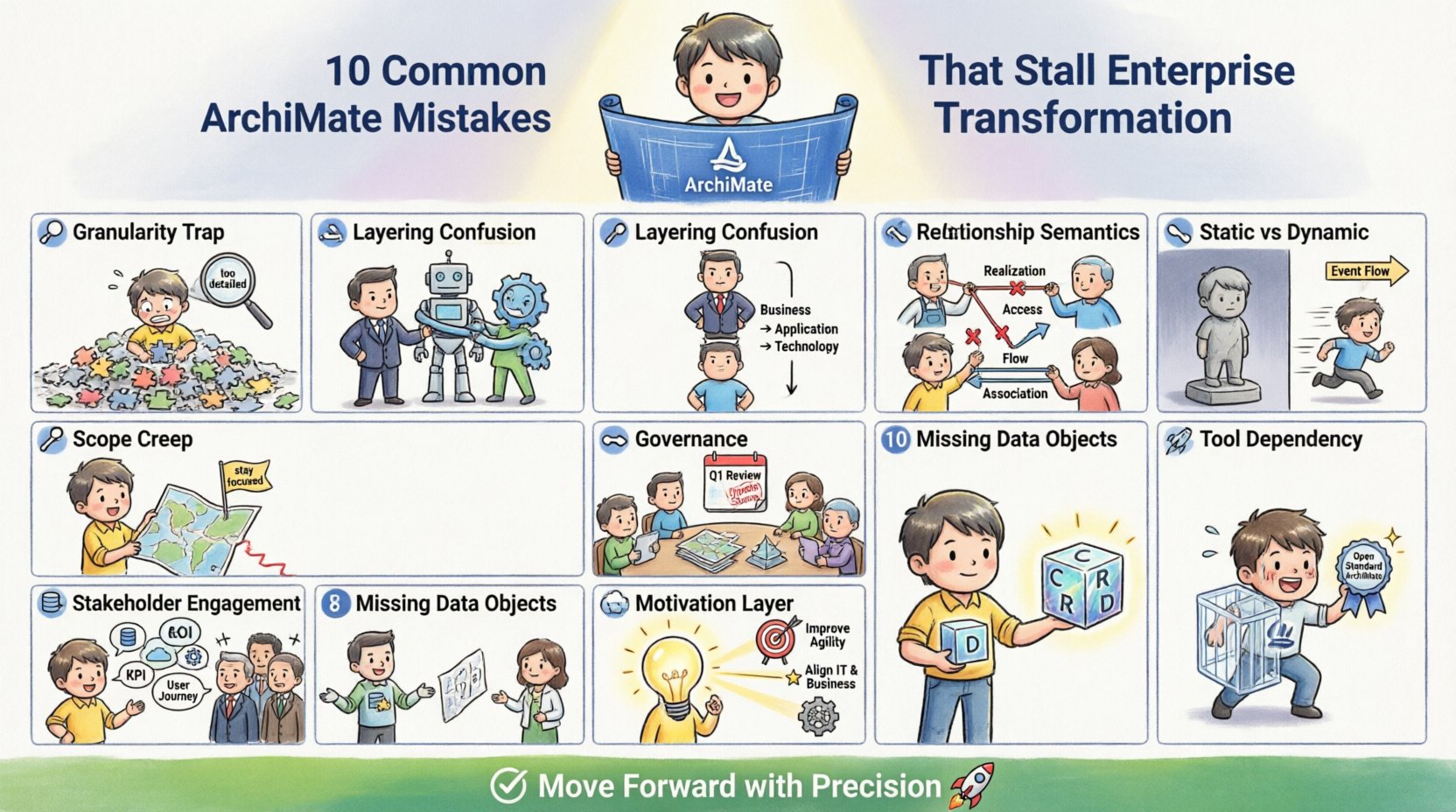
1. The Granularity Trap: Over-Modeling 🧩
One of the most frequent errors involves attempting to capture every detail of the enterprise in a single view. While comprehensive coverage seems ideal, it often leads to cluttered diagrams that obscure the actual business value. Granularity must be aligned with the specific question being asked.
- The Problem: Trying to model every single business process, application, or technology component simultaneously.
- The Consequence: Stakeholders lose focus. Executives cannot see the strategic drivers, and technical teams cannot find the specific implementation details they need.
- The Fix: Adopt a layered approach. Create high-level views for strategy and deep-dive views for specific projects. Do not mix levels of abstraction in the same diagram.
It is essential to remember that an architecture model is a communication tool, not a database dump. If a model requires a legend to explain half the symbols, it has likely become too complex. Focus on the elements that directly impact the transformation goal. Remove components that are stable or out of scope for the current initiative.
2. Layering Confusion: Blurring Business and Technology 📉
ArchiMate defines distinct layers: Business, Application, and Technology. A critical mistake occurs when these layers are conflated. This happens when business functions are drawn directly connected to technology infrastructure without an intermediary application layer.
- The Problem: Drawing a direct relationship between a Business Process and a Technology Service.
- The Consequence: This breaks the logical separation of concerns. It assumes the technology performs the business function directly, ignoring the software that enables the interaction. It makes impact analysis difficult.
- The Fix: Ensure the Application layer acts as the bridge. Business processes should realize or interact with Applications, which in turn use Technology components.
Consider the relationship between a business capability and a software system. Without the application layer, you cannot assess the cost of migration or the dependency on specific vendors. Maintaining strict layer integrity ensures that changes in technology do not necessitate a complete rewrite of the business model, and vice versa.
3. Relationship Semantics: Misusing Connections 🔗
The power of ArchiMate lies in its precise relationship types. Using the wrong relationship type creates ambiguity. A common error is using Association when a stronger dependency exists.
- Association: Indicates a loose relationship or communication. Use this for general connections.
- Realization: Indicates that one element implements or satisfies another (e.g., a Process realizes a Capability).
- Access: Indicates that one element uses or accesses another (e.g., an Application accesses a Data Object).
- Flow: Indicates the movement of information or material.
If you map a process to an application using an Association, you lose the semantic meaning of how they interact. Does the process use the application? Does it realize it? This distinction is vital for impact analysis. If the application changes, does the process change? The relationship type answers this.
Relationship Type Comparison Table
| Relationship Type | Direction | When to Use | Common Error |
|---|---|---|---|
| Realization | Source → Target | Implementation or Satisfaction | Using Association for implementation |
| Access | Source → Target | Usage or Consumption | Using Access for ownership |
| Flow | Source → Target | Data or Material Movement | Using Flow for logical dependency |
| Association | Bi-directional | General Link | Overusing for specific dependencies |
4. Static vs. Dynamic Context: Ignoring Behavior ⏳
Many models focus exclusively on the static structure (the what) and ignore the dynamic behavior (the how and when). An enterprise transformation involves change. A static model cannot show how the system behaves during a transition.
- The Problem: Modeling only the static architecture without event flows or state changes.
- The Consequence: Architects miss critical timing issues, race conditions, or process bottlenecks. The model looks correct at rest but fails under load or during migration.
- The Fix: Incorporate dynamic elements. Use Event nodes to trigger actions. Show the flow of information between processes.
Transformation is a dynamic state. If you are migrating from one architecture to another, you need to understand the transition path. Static models show the destination. Dynamic models show the journey. For a comprehensive view, you must represent the interaction of elements over time, not just their existence.
5. Scope Creep: Lack of Context 🎯
Architects often expand the scope of their models beyond what is necessary for the current project. This is known as scope creep. You might find yourself modeling the entire global infrastructure when the project is only for a regional deployment.
- The Problem: Including elements that are not relevant to the specific business value stream being analyzed.
- The Consequence: Model maintenance becomes unsustainable. The diagram becomes outdated quickly because unrelated components change frequently.
- The Fix: Define clear boundaries. Use Viewpoints to filter information for specific audiences. Explicitly state what is out of scope.
Context is king. A model designed for the CIO looks different from one designed for the Development Team. Do not attempt to create a single “master model” for everyone. Instead, create specific views that answer specific questions. This keeps the model focused and relevant.
6. Governance and Maintenance: The Living Model 🔄
An architecture model that is never updated is a liability. A common mistake is treating the model as a one-time deliverable rather than a living artifact. Without governance, the model drifts from reality.
- The Problem: No process for updating the model when changes occur in the enterprise.
- The Consequence: The model becomes a historical record rather than a planning tool. Decisions based on outdated information lead to failed implementations.
- The Fix: Integrate model updates into the change management process. Require architectural reviews for significant changes.
Governance ensures that the model remains accurate. This does not require manual updates for every minor change. It requires a trigger mechanism. If a new application is deployed, the model should reflect this. If a process is retired, it should be archived. Establishing a routine for validation prevents the model from becoming obsolete.
7. Stakeholder Engagement: Speaking the Wrong Language 🗣️
Architects often build models that are technically correct but incomprehensible to the audience. This is a failure of communication. Using complex syntax without explaining the business context alienates the people who need to approve the plans.
- The Problem: Prioritizing technical accuracy over business clarity.
- The Consequence: Stakeholders do not trust the model. They ignore the recommendations because they cannot see the business logic behind the diagrams.
- The Fix: Tailor the presentation. Use business language in the titles and descriptions. Explain technical terms in the footnotes or legends.
Effective architecture communication bridges the gap between technical constraints and business goals. If a stakeholder cannot look at a diagram and understand the risk or the opportunity, the model has not served its purpose. Simplify the visualization. Use color coding to indicate status or risk. Ensure the narrative matches the visual representation.
8. Missing Data Objects: The Invisible Backbone 📦
Data is the fuel of the enterprise, yet it is frequently overlooked in high-level architecture models. Focusing only on processes and applications without defining the data objects they manipulate creates a gap in understanding.
- The Problem: Ignoring the flow of information between systems.
- The Consequence: Inability to identify data silos or compliance risks. You cannot manage data governance if you do not know where data resides.
- The Fix: Explicitly model Data Objects. Show which applications create, read, update, or delete (CRUD) specific data entities.
Understanding data flow is critical for modernization efforts. When migrating to the cloud, knowing which data objects are sensitive is a prerequisite. When integrating systems, knowing the data contract is essential. Integrating data objects into your ArchiMate model ensures that data governance is not an afterthought.
9. Ignoring the Motivation Layer 💡
The ArchiMate specification includes a Motivation Extension, yet many teams skip it entirely. This layer connects the technical and business elements to the drivers behind them.
- The Problem: Modeling capabilities and processes without linking them to Goals, Drivers, or Principles.
- The Consequence: It becomes difficult to justify investment. You cannot trace a specific application back to a strategic goal.
- The Fix: Link every major element to a Goal or Principle. Use the Motivation Extension to show why the architecture exists.
Without motivation, architecture is just a drawing. With motivation, it is a strategy. Stakeholders need to know why a change is being proposed. By linking a new technology to a specific business goal, you create a compelling narrative for the transformation. This alignment ensures that resources are directed toward value-generating initiatives.
10. Tool Dependency vs. Standard Compliance 🛠️
While specific tools can assist in managing models, relying too heavily on proprietary features can lock you into a specific ecosystem. ArchiMate is a standard, not a tool.
- The Problem: Using features that are not part of the standard specification.
- The Consequence: Loss of portability. If you need to switch tools later, the model becomes incompatible or loses data.
- The Fix: Adhere strictly to the ArchiMate specification. Use standard export formats (like XMI) to ensure interoperability.
Focus on the concepts, not the interface. The value of ArchiMate is its ability to be vendor-neutral. If your model relies on custom tags or proprietary attributes, you lose that neutrality. Ensure that your modeling practices remain compatible with the open standard to maintain long-term flexibility.
Moving Forward with Precision 🚀
Avoiding these mistakes requires discipline and a clear understanding of the ArchiMate specification. It is not enough to draw boxes and lines; you must ensure they represent reality accurately. By focusing on granularity, layering, relationships, and governance, you create models that drive transformation rather than hinder it.
The path to enterprise maturity is paved with clear communication and accurate documentation. Treat your architecture models as strategic assets. Invest time in maintaining them, aligning them with business goals, and ensuring they remain accessible to stakeholders. When the model works, the transformation follows.