


Product & Features Review
What is the C4 Model?
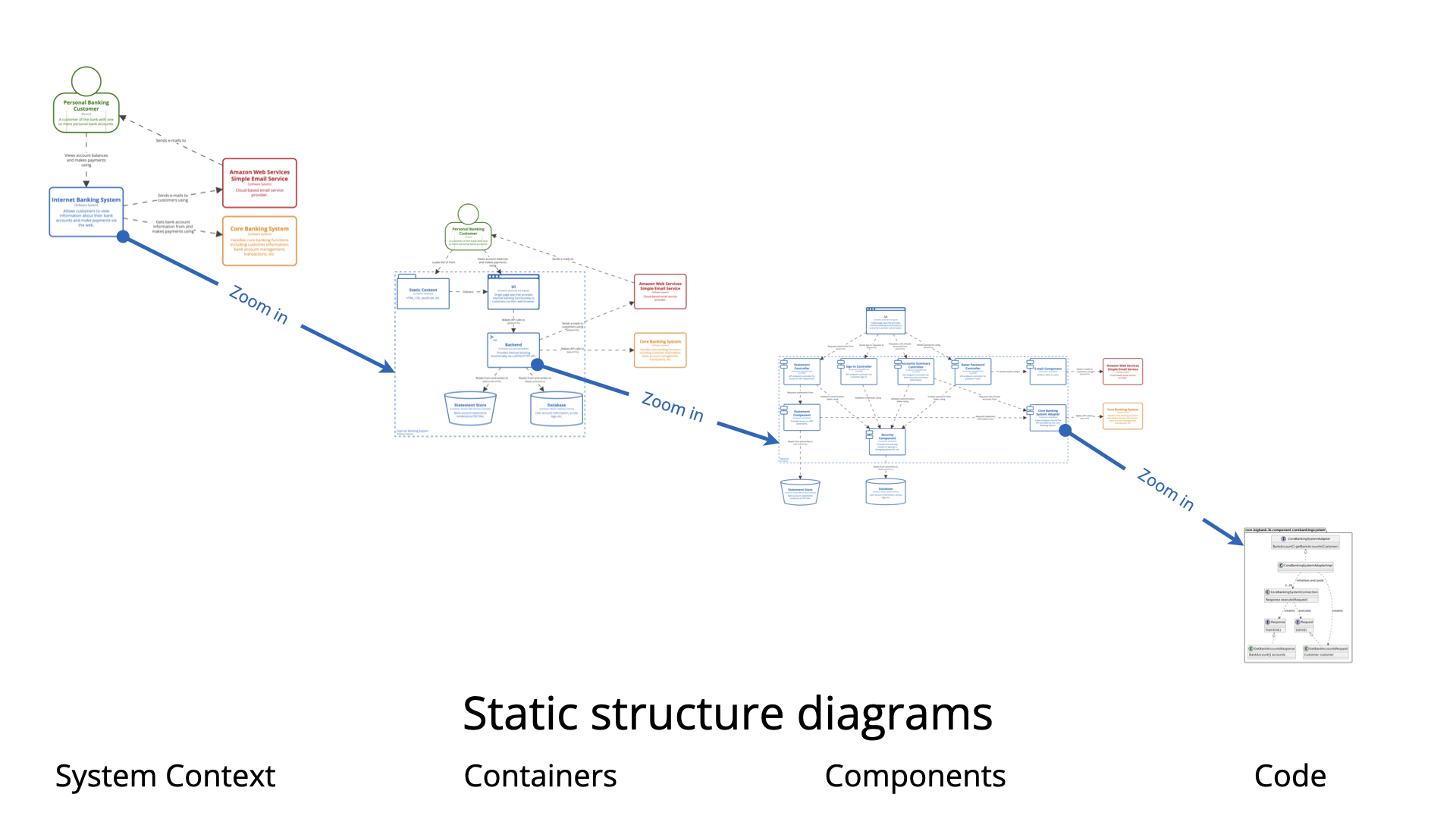
The C4 Model (Context, Containers, Components, and Code) is a hierarchical approach to visualizing software architecture. Think of it as Google Maps for your software system:
-
Level 1 – System Context: The zoomed-out view showing your system and its users/dependencies (like viewing a country on a map)
-
Level 2 – Containers: The major technology choices (like viewing a city)
-
Level 3 – Components: The internal structure of each container (like viewing neighborhoods)
-
Level 4 – Code: Optional class diagrams (like viewing individual streets)
Supporting Views include:
-
System Landscape: Multiple systems and their relationships
-
Dynamic: How the system behaves over time
-
Deployment: Physical infrastructure and hosting
Traditional diagramming tools struggle with C4 because they treat each diagram as isolated. Visual Paradigm solves this by maintaining drill-down integrity across all levels.
What is Visual Paradigm?
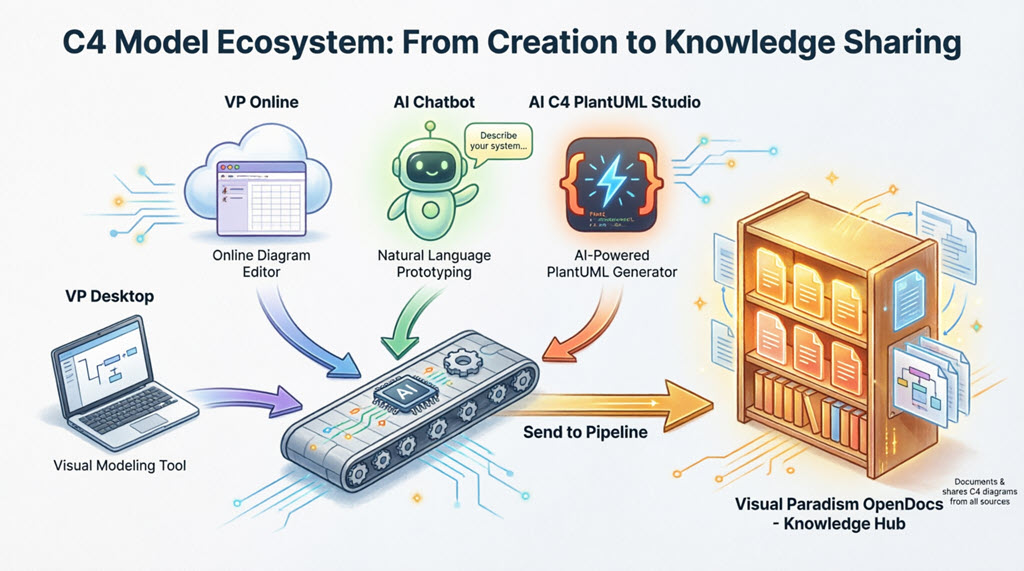
Visual Paradigm is a comprehensive software architecture and modeling platform that has evolved into one of the most AI-enhanced ecosystems for creating professional diagrams. As of the 2025-2026 releases, it offers:
-
Visual Paradigm Desktop: Full-featured offline application
-
Visual Paradigm Online: Cloud-based diagramming tool
-
AI Chatbot: Conversational diagram generation
-
AI C4 Studio (C4-PlantUML Studio): Dedicated hierarchical C4 modeling
-
OpenDocs Pipeline: Knowledge hub for team collaboration
What makes it unique is how these components seamlessly integrate—you can start with a simple chat prompt and end up with enterprise-grade, living documentation.
Who Should Use Visual Paradigm for C4 Diagrams?
🎯 Software Architects
-
Need to communicate complex systems to different audiences
-
Require drill-down capabilities from high-level to technical details
-
Must maintain documentation as systems evolve
💻 Developers & Engineers
-
Want to quickly visualize microservices architecture
-
Need to document container and component relationships
-
Prefer AI assistance over manual diagramming
👥 Team Leads & Managers
-
Require stakeholder-friendly system context diagrams
-
Need centralized documentation accessible to non-technical team members
-
Want version control and collaboration features
🎓 Students & Beginners
-
Learning software architecture patterns
-
Need intuitive tools that don’t require extensive training
-
Want to create professional diagrams quickly
🏢 Enterprise Teams
-
Require offline capabilities with cloud sync
-
Need integration with existing workflows
-
Want “living documentation” that stays current
Why Visual Paradigm Stands Out
🚀 1. AI-Powered from Natural Language
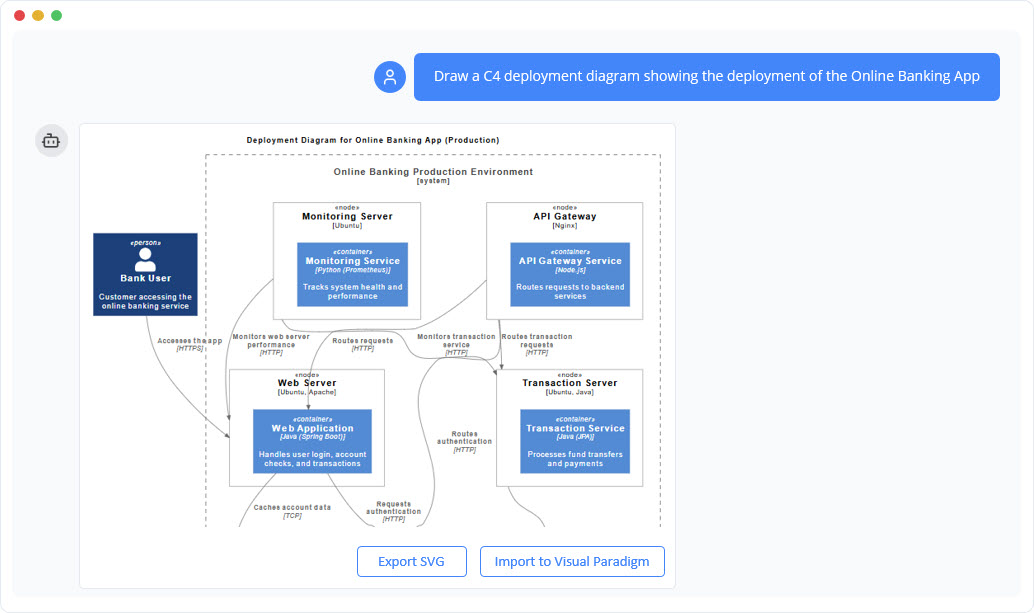
Unlike traditional tools requiring manual drawing, you can type:
“Generate a C4 Container diagram for an e-commerce system”
And get a standards-compliant diagram in seconds.
🔗 2. True Hierarchical Integrity
Most tools create disconnected diagrams. Visual Paradigm maintains logical linkages across all C4 levels. Change a container in Level 2, and it automatically reflects in related Component diagrams.
🔄 3. Bidirectional Sync Across Platforms
-
Start in AI Chatbot → Refine in Online → Edit in Desktop → Publish to OpenDocs
-
Changes sync automatically across all platforms
-
No manual file transfers or version conflicts
📚 4. Living Documentation
Diagrams in OpenDocs aren’t static images—they’re click-to-edit artifacts. Update the source, re-export, and all documentation instances update with one click.
🎨 5. Six Complete C4 Diagram Types
Full native support for:
-
System Context Diagram
-
Container Diagram
-
Component Diagram
-
System Landscape Diagram
-
Dynamic Diagram
-
Deployment Diagram
🤖 6. Context-Aware AI
The AI understands:
-
C4 notation rules
-
Audience customization (executive vs. technical)
-
Logical soundness and best practices
-
Conversational refinement (“Add a payment gateway”)
🌐 7. Flexible Deployment
-
Offline: Full Desktop application
-
Cloud: Online editor and AI Chatbot
-
Hybrid: Sync between both with a single account
Getting Started: Your First C4 Diagram
Option 1: Fastest Path (5 minutes)
-
Go to chat.visual-paradigm.com
-
Type: “Create a C4 System Context diagram for a ride-sharing app”
-
Review the generated diagram
-
Click “Import to Visual Paradigm” to refine
-
Done!
Option 2: Complete Hierarchical Model (15 minutes)
-
Access AI C4 Studio via Visual Paradigm Online
-
Enter: “Generate complete C4 model for a banking system”
-
AI creates all 4 core levels plus supporting views
-
Use the resizable navigator to switch between levels
-
Export to OpenDocs for team sharing
Option 3: Professional Offline Workflow
-
Download Visual Paradigm Desktop
-
Go to Tools → AI Diagram Generation → C4 Model
-
Describe your system in natural language
-
Edit with drag-and-drop interface
-
Use Smart Sweeper for automatic layout cleanup
-
Export to OpenDocs Pipeline
Visual Paradigm Desktop: The Powerhouse
What It Is
Visual Paradigm Desktop is the professional-grade offline application for serious architecture work. Think of it as the “Adobe Photoshop” of diagramming—full control, advanced features, no internet required.
Key Features
Embedded AI C4 Diagram Generator
-
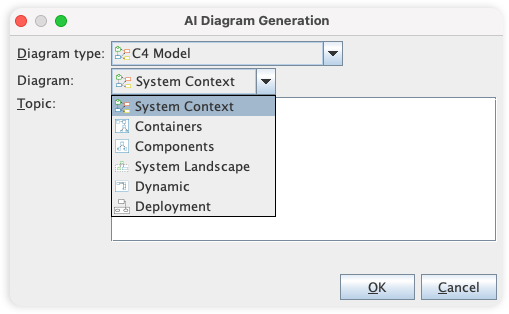
Access via Tools → AI Diagram Generation → C4 Model
-
Generate any of the 6 C4 diagram types
-
Create entire suites from one description
-
AI respects C4 notation and audience needs
Example Prompt:
“Generate a C4 Component diagram showing microservices for order processing with PostgreSQL database and Redis cache”
Advanced Editing Tools
-
Drag-and-drop interface with rich C4 symbol library
-
Smart Sweeper: Automatic layout cleanup
-
Inline text editing: Click and type
-
Sub-diagrams: Drill-down decomposition
-
Referenced diagrams: Cross-project navigation
Professional Features
-
Version control integration
-
Comments and annotations
-
Doc. Composer: Living documentation generation
-
Custom attributes and metadata
-
Export to multiple formats (PNG, PDF, SVG, PlantUML)
Cloud Integration
-
Open diagrams created in Visual Paradigm Online
-
Sync via your Visual Paradigm account
-
Bidirectional editing (Desktop ↔ Online)
-
Requires Visual Paradigm Modeler Edition or higher
Best For
✅ Enterprise teams needing offline depth
✅ Custom attributes and metadata
✅ Full lifecycle integration (requirements → architecture → code)
✅ Complex systems requiring advanced modeling
AI Chatbot: Natural Language to Diagrams
What It Is
The AI Chatbot is your conversational architecture assistant. Available at chat.visual-paradigm.com or integrated into Desktop, it turns casual conversation into professional C4 diagrams.
How It Works
Step 1: Start a Conversation
Type naturally:
-
“Create a C4 System Context diagram for a ride-sharing app”
-
“Generate a C4 Component diagram for microservices order processing”
-
“Show me a Container diagram for a healthcare portal”
Step 2: Refine Through Conversation
Continue chatting:
-
“Add a payment gateway”
-
“Rename the database to PostgreSQL”
-
“Suggest improvements for scalability”
-
“Make this more technical for engineers”
The AI understands context and refines accordingly.
Step 3: Import & Continue
Click “Import to Visual Paradigm” to:
-
Edit in Visual Paradigm Online (cloud)
-
Or open in Desktop (if you have Modeler Edition+)
-
All chats and diagrams sync to your account
Key Capabilities
✅ All Core C4 Views: System Context, Container, Component, etc.
✅ Official Notation: Follows C4 Model standards
✅ Context-Aware: Remembers your system across the conversation
✅ Specialized Knowledge: Trained on C4, UML, and architecture patterns
✅ Textual Summaries: Can generate explanations alongside diagrams
Workflow Tips
🎯 Rapid Prototyping: Use chatbot for quick architecture spikes
🎯 Onboarding: New team members can explore systems conversationally
🎯 Brainstorming: Test multiple architectural approaches quickly
🎯 Documentation: Generate diagrams during meetings in real-time
Best For
✅ Quick prototyping
✅ Non-technical stakeholders
✅ Learning and exploration
✅ Teams without diagramming expertise
AI C4 Studio: Maintaining Hierarchical Integrity
What It Is
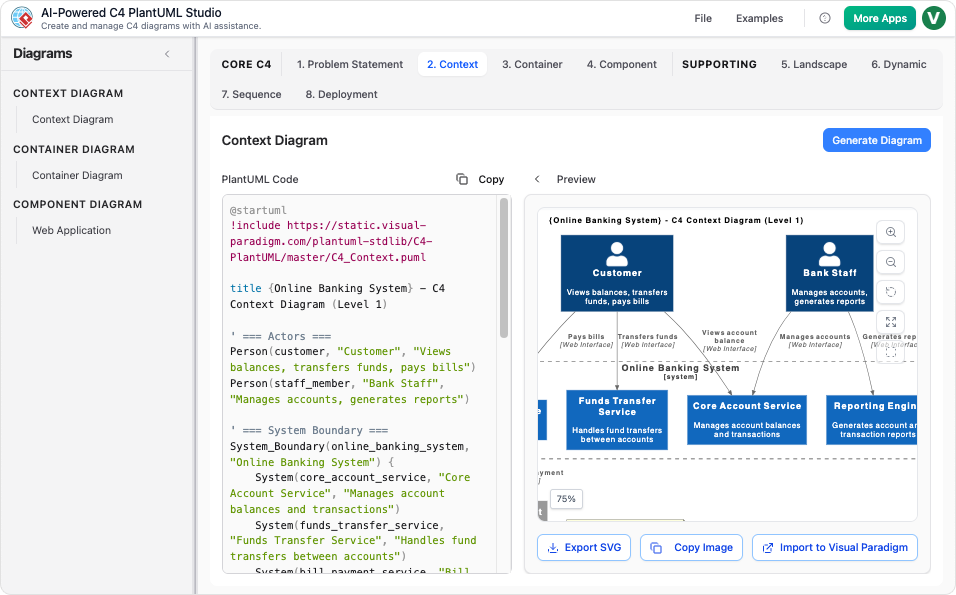
AI C4 Studio (also called AI-Powered C4 Diagram Generator or C4-PlantUML Studio) is the dedicated workspace for building complete, hierarchical C4 models. Available in Visual Paradigm Online and integrated with Desktop.
The Problem It Solves
Most diagramming tools create isolated diagrams. You draw a System Context, then separately draw Containers, then Components—with no connection between them. When the system changes, you manually update each diagram, leading to:
-
Inconsistencies
-
Outdated documentation
-
Broken references
-
Maintenance nightmares
AI C4 Studio enforces the complete C4 structure with automatic drill-down integrity.
Key Features
Full Hierarchy Enforcement
-
Standard 4-level core (Context → Container → Component → Code)
-
Supporting views (Landscape, Dynamic, Deployment)
-
Total of 7 interconnected diagrams
-
Resizable navigator for instant level switching
AI-Powered Suite Generation
Generate the entire C4 suite from one description:
“Create complete C4 model for a social media platform”
The AI creates:
-
System Context (users and external systems)
-
Container Diagram (web app, mobile app, databases)
-
Component Diagram (internal structure of each container)
-
System Landscape (related systems)
-
Dynamic Diagram (interaction flows)
-
Deployment Diagram (infrastructure)
All logically linked and structurally consistent.
Drill-Down Integrity
-
Change a container name in Level 2 → automatically updates in Level 3
-
Add a component → reflects in related Dynamic diagrams
-
Maintain consistency as the system evolves
Stakeholder Views
-
Executive View: High-level Context diagrams
-
Technical View: Detailed Component and Deployment diagrams
-
Operations View: Dynamic and Landscape diagrams
Import & Export
Import to Visual Paradigm:
-
Click any diagram → Import to Visual Paradigm
-
Edits in Visual Paradigm Online (drag-and-drop, inline changes)
-
Desktop users (Modeler Edition+) can open in Desktop
-
All syncs to your account
Export to OpenDocs:
-
Send diagrams to OpenDocs Pipeline
-
Creates living, editable artifacts
-
Not static images—click to re-edit
Best For
✅ Complete system architecture documentation
✅ Teams maintaining evolving systems
✅ Ensuring consistency across diagram levels
✅ “Living documentation” requirements
OpenDocs Pipeline: Team Collaboration Hub
What It Is
OpenDocs Pipeline is Visual Paradigm’s central knowledge hub—a secure, cloud-based repository that bridges Desktop, Online, Chatbot, and AI Studio for team-wide sharing and living documentation.
Think of it as GitHub for architecture diagrams, but with click-to-edit capabilities.
How to Send Diagrams to the Pipeline
From Desktop
-
Right-click any C4 diagram
-
Select Export → Send to OpenDocs Pipeline
-
Add optional comment
-
Confirm
From Visual Paradigm Online or AI C4 Studio
-
Use top-menu Export → Send to OpenDocs Pipeline
-
Diagram uploads to your workspace
From AI Chatbot
-
After generation, choose Export → Send to OpenDocs Pipeline
-
Diagram syncs to your team’s knowledge hub
Inserting & Sharing in OpenDocs
-
Open an OpenDocs document
-
Go to Edit → Insert → Pipeline sidebar
-
Select your diagram
-
Diagram embeds in your OpenDocs page
Key Feature: If exported from Desktop or Online, diagrams are living artifacts, not static images.
Click-to-Edit Experience
Desktop-Originated Diagrams
-
Click top-right corner → Get link to edit in full Visual Paradigm Desktop
-
Preserves offline/advanced features
-
Re-edit → Re-export → Update in OpenDocs
Online-Originated Diagrams
-
Click diagram → Visual Paradigm Online editor pops up
-
Instant refinement with drag-and-drop
-
Re-export → Update artifact in OpenDocs
Version Control & Updates
✅ Version history preserved
✅ Update to latest revision with one click
✅ Teams see real-time changes
✅ No manual file transfers
✅ Rollback capability
Team Benefits
🎯 Single Source of Truth: One diagram, multiple documents
🎯 Comments for Context: Add notes and explanations
🎯 Rollback Capability: Revert to previous versions
🎯 “Create Once, Document Everywhere”: Export to multiple OpenDocs pages
🎯 Real-Time Collaboration: Teams see updates instantly
Best For
✅ Agile teams needing centralized documentation
✅ Architecture reviews and approvals
✅ Enterprise knowledge bases
✅ Cross-team collaboration
✅ Compliance and audit trails
Integrated Workflows & Best Practices
Workflow 1: Idea → Complete C4 Suite
1. Start in AI C4 Studio
   └─ "Generate complete C4 model for [system]"

2. Review all 7 diagram levels
   └─ Use navigator to switch Context → Container → Component

3. Refine through conversation
   └─ "Add authentication service"
   └─ "Make database cluster redundant"

4. Export to OpenDocs Pipeline
   └─ Insert into architecture documentation

5. Share with team
   └─ Team members click to view/edit
Time: 15-30 minutes
Best For: New system architecture
Workflow 2: Desktop-First Professional Modeling
1. Open Visual Paradigm Desktop
   └─ Tools → AI Diagram Generation → C4 Model

2. Generate initial diagrams
   └─ Natural language description

3. Refine with advanced tools
   └─ Smart Sweeper for layout
   └─ Custom attributes
   └─ Sub-diagrams for drill-down

4. Export to OpenDocs
   └─ Right-click → Export → Send to OpenDocs Pipeline

5. Maintain documentation
   └─ Update source in Desktop
   └─ Re-export to Pipeline
   └─ Update artifact instances in OpenDocs
Time: 1-2 hours (initial setup)
Best For: Enterprise architecture, complex systems
Workflow 3: Rapid Prototyping with Chatbot
1. Open AI Chatbot
   └─ chat.visual-paradigm.com

2. Quick prompt
   └─ "C4 Container diagram for [idea]"

3. Iterate conversationally
   └─ "Add payment gateway"
   └─ "Show external dependencies"

4. Import to Visual Paradigm Online
   └─ Click "Import to Visual Paradigm"

5. Polish in Online editor
   └─ Drag-and-drop refinements
   └─ Color coding, labels

6. Export to OpenDocs or Desktop
   └─ Share with stakeholders
Time: 5-15 minutes
Best For: Quick architecture spikes, brainstorming
Workflow 4: Maintenance & Updates
1. Identify change needed
   └─ "Add new microservice"

2. Update source diagram
   └─ Desktop or Online (wherever originated)

3. Re-export to OpenDocs Pipeline
   └─ Export → Send to OpenDocs Pipeline

4. Update artifact instances
   └─ In each OpenDocs page using the diagram
   └─ Click "Update to latest revision"

5. Notify team
   └─ Comments in OpenDocs
   └─ Version history shows changes
Time: 10-20 minutes per change
Best For: Evolving systems, agile development
Best Practices
✅ 1. Define Your Audience First
-
Executives: System Context and Landscape diagrams
-
Developers: Container and Component diagrams
-
DevOps: Deployment and Dynamic diagrams
✅ 2. Generate the Full Suite
Don’t create isolated diagrams. Use AI C4 Studio to generate all levels at once for consistency.
✅ 3. Use Sub-Diagrams for Drill-Down
Break complex components into sub-diagrams rather than overcrowding one view.
✅ 4. Version Everything
-
Use OpenDocs version history
-
Add comments explaining changes
-
Tag major releases
✅ 5. Export to OpenDocs Early
Don’t wait until “perfect.” Get diagrams into OpenDocs for team feedback.
✅ 6. Maintain Living Documentation
-
Update source diagrams as code changes
-
Re-export to Pipeline
-
Update artifact instances
✅ 7. Leverage AI Refinement
-
“Make this more technical”
-
“Simplify for stakeholders”
-
“Add missing dependencies”
Pricing & Getting Started
Visual Paradigm Desktop
Download: visual-paradigm.com/download
Recommended Edition: Professional+ or Modeler Edition
-
Required for full AI features
-
Import/export to OpenDocs
-
Advanced C4 modeling
Free Trial: Available (check website for current offers)
Visual Paradigm Online / AI Chatbot / AI C4 Studio
Access:
Free Tier: Available
-
Sign in with Visual Paradigm account
-
Limited features but great for learning
-
Upgrade for full AI capabilities
OpenDocs Pipeline
Access: Via your Visual Paradigm workspace
Licensing:
-
Included with team/enterprise licenses
-
Contact support for team pricing
-
Essential for collaboration
Getting Started Checklist
Day 1: Explore
-
Create free account at chat.visual-paradigm.com
-
Try AI Chatbot: “Create C4 System Context for [your project]”
-
Import to Visual Paradigm Online
-
Explore the editor
Week 1: Learn
-
Download Desktop trial (if needed)
-
Access AI C4 Studio
-
Generate complete C4 suite for a sample system
-
Practice drill-down navigation
Week 2: Apply
-
Model your actual system
-
Export to OpenDocs (if available)
-
Share with team
-
Gather feedback
Month 1: Master
-
Establish team workflows
-
Set up OpenDocs knowledge hub
-
Create documentation templates
-
Train team members
Conclusion
Visual Paradigm’s C4 Model ecosystem eliminates the traditional pain points of software architecture documentation:
❌ No more disconnected diagrams
❌ No more manual syncing
❌ No more lost hierarchy
❌ No more outdated documentation
✅ Instead: From a single sentence to enterprise-ready, shareable architecture
✅ All connected across Desktop, Online, Chatbot, and OpenDocs
✅ AI-assisted for rapid creation and refinement
✅ Team-ready with living documentation and version control
Whether you’re a beginner creating your first C4 diagram or an enterprise architect maintaining complex systems, Visual Paradigm provides the tools to transform how your team visualizes software architecture.
- References
- Visual Paradigm Features: Official Visual Paradigm website featuring AI chatbot and diagram generation capabilities.
- Fast Track Use Case Diagrams with Visual Paradigm AI Chatbot: Guide on accelerating use case diagram creation using Visual Paradigm’s AI chatbot.
- Import AI Activity Diagram Visual Paradigm Desktop: Release notes for importing AI-generated activity diagrams into Visual Paradigm Desktop.
- AI Diagram to OpenDocs Pipeline: Documentation on syncing AI-generated diagrams to OpenDocs pipeline for living documentation.
- AI-Assisted UML Class Diagram Generator: An interactive tool that helps users create class diagrams with AI suggestions, validation, PlantUML export capabilities, and design analysis to streamline software modeling.
- AI State Machine Diagram Generator Order Lifecycle: A guide demonstrating how to combine AI-powered visual modeling with specific workflows to generate complex, professional UML state machine diagrams for order lifecycles in seconds.
- Comprehensive Review: Visual Paradigm’s AI Diagram Generation Features: A third-party review analyzing the capabilities, accuracy, and workflow integration of Visual Paradigm’s suite of AI-driven diagram generation tools.
- AI Diagram Generation Overview: The main feature page detailing the broad spectrum of AI capabilities available for generating various types of diagrams within the Visual Paradigm ecosystem.
- AI Sequence Diagram Refinement Tool: A specialized tool designed to refine and enhance existing sequence diagrams using AI to improve interaction flows and message clarity.
- AI Use Case Diagram Refinement Tool: A feature that utilizes artificial intelligence to analyze and refine use case diagrams, ensuring accurate actor relationships and system boundaries.
- AI-Assisted UML Class Diagram Generator (Main Feature): The primary interface for generating UML class diagrams from natural language prompts, offering automated entity detection and relationship mapping.
- AI Component Diagram Generator Update: Release notes announcing updates to the AI component diagram generator, focusing on improved architecture visualization and node identification.
- AI Class Diagram Generator Release: An announcement regarding the launch of the new AI class diagram generator, highlighting its ability to convert requirements directly into structured class models.
- Visual Paradigm Desktop AI Activity Diagram Generation: Updates introducing AI-driven activity diagram generation capabilities within the Visual Paradigm desktop application for process modeling.
- Guide to Powered UML Diagram Generation: A guide (likely in Traditional Chinese based on the path) explaining how to leverage the AI chatbot to powerfully generate UML diagrams through conversational interfaces.
- Choosing Between Generative AI and Visual Paradigm AI: An article comparing general generative AI tools against Visual Paradigm’s specialized AI, discussing trade-offs in accuracy, formatting, and engineering standards.
- Visual Paradigm Chat Interface: The direct access point to the Visual Paradigm AI chatbot, allowing users to interactively request and generate diagrams via text prompts.
- Visual Paradigm AI Demo Video: A YouTube video demonstration showcasing the practical application of Visual Paradigm’s AI features in real-world diagramming scenarios.
- AI Chatbot Feature Page: The official product page describing the integrated AI chatbot that assists users in creating, editing, and understanding diagrams through natural language.
- Visual Paradigm AI Tutorial Video: A second YouTube video providing a tutorial or walkthrough of specific AI diagram generation techniques within the software.
- AI Diagram to OpenDocs Pipeline Update: Release notes detailing a new pipeline that allows AI-generated diagrams to be automatically converted and synced with OpenDocs for documentation purposes.
- AI-Powered C4 PlantUML Studio: Dedicated AI workspace for building and preserving complete, hierarchical C4 models with drill-down integrity.
- OpenDocs Features: Information about Visual Paradigm’s OpenDocs knowledge hub for team collaboration and living documentation.
- C4 Diagram Tool Solution: Visual Paradigm’s professional C4 modeling solution page.
- Best AI Diagram Generator Visual Paradigm Ecosystem: Guide to Visual Paradigm’s AI-enhanced ecosystem for diagram generation.
- Visual Paradigm Download: Download page for Visual Paradigm Desktop application.
- Visual Paradigm Online: Access point for Visual Paradigm’s web-based diagramming tool.
- Sync AI Diagram to OpenDocs Pipeline Guide: Guide on keeping OpenDocs synchronized with diagrams exported from Visual Paradigm Desktop.
- Visual Paradigm Online to OpenDocs Export: Guide on keeping OpenDocs synchronized with diagrams exported from Visual Paradigm Online.
- Ready to transform your software architecture documentation? Start with the AI Chatbot today and experience the future of C4 modeling! 🚀
Related posts:
 From Cloud Diagrams to Live Documentation: My Hands-On Review of Visual Paradigm Online’s OpenDocs Integration
From Desktop to Documentation: A Hands-On Review of Visual Paradigm’s OpenDocs Integration
From Code to Community: How Visual Paradigm Pipeline Powers Agile IT Teams’ Collaborative Knowledge Hub
From Chaos to Clarity: A Comprehensive Guide to AI-Powered BPMN Modeling
From Cloud Diagrams to Live Documentation: My Hands-On Review of Visual Paradigm Online’s OpenDocs Integration
From Desktop to Documentation: A Hands-On Review of Visual Paradigm’s OpenDocs Integration
From Code to Community: How Visual Paradigm Pipeline Powers Agile IT Teams’ Collaborative Knowledge Hub
From Chaos to Clarity: A Comprehensive Guide to AI-Powered BPMN Modeling