
Mastering VPasCode: AI Chatbot-Driven Workflows for Instant Diagrams
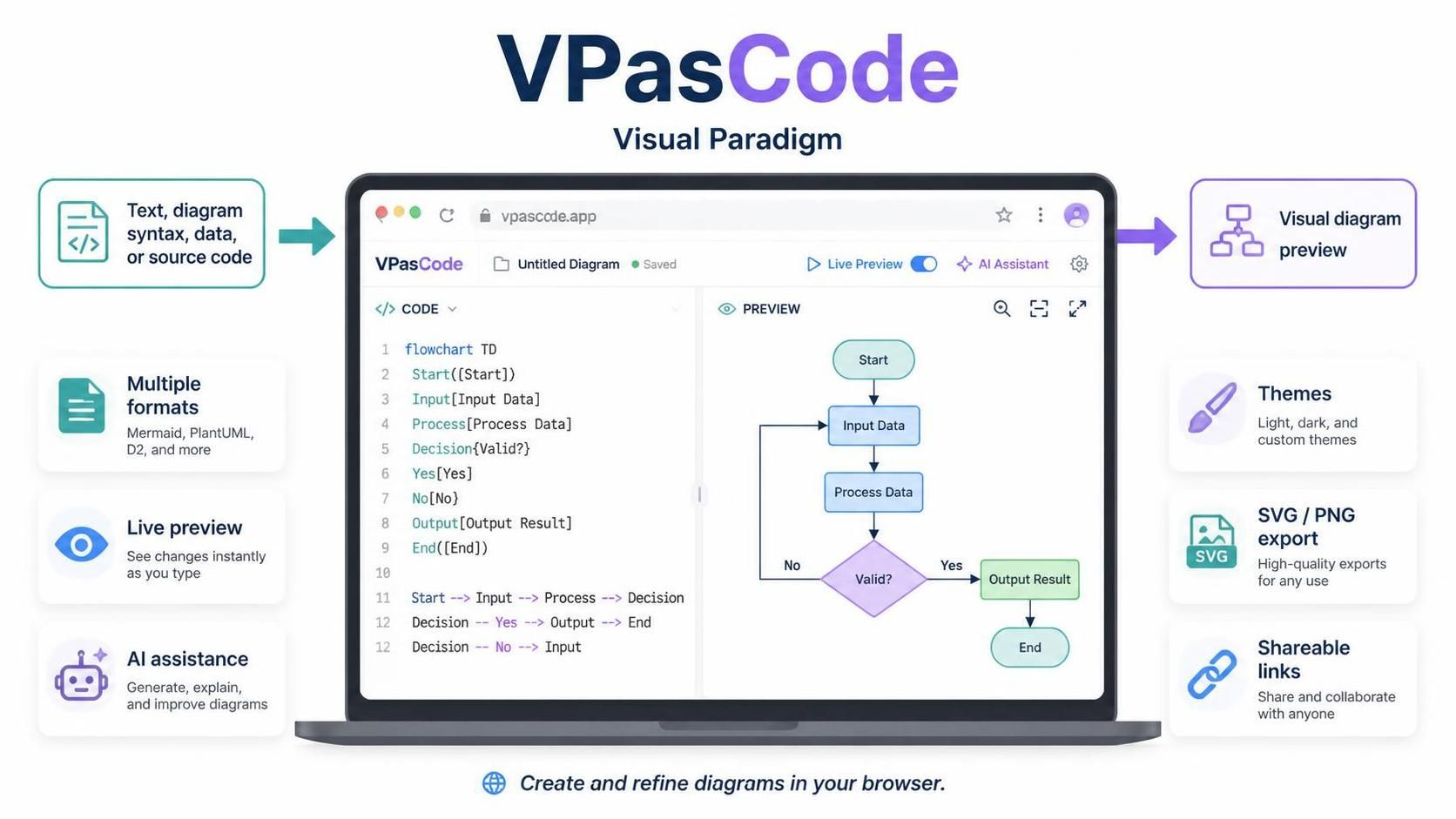
In the modern era of software architecture and system design, the gap between abstract thought and concrete visualization is often bridged by “Diagram as Code” tools. VPasCode, integrated into the Visual Paradigm ecosystem, revolutionizes this process by allowing engineers to generate, refine, and export complex system diagrams directly within a browser-based environment. This tutorial explores the architecture of VPasCode, the power of its AI integration, and the specific syntax required to build robust flowcharts.
The VPasCode Architecture: A Real-Time Translation Engine
VPasCode operates on a “Live Preview” architecture. Unlike traditional diagramming tools where you click and drag shapes, VPasCode functions as a specialized text editor that compiles code into visual representations instantly. The workflow is unidirectional: you write syntax on the left, and the rendering engine parses it to draw the diagram on the right.
The core workflow consists of three distinct stages:
- Input Generation: The process begins with text. This can be manual code (Mermaid, PlantUML) or generated concepts derived from plain language prompts.
- Visual Translation: The engine interprets the logical structure of the code. For example, it recognizes that
Start --> Inputimplies a directional flow between two nodes. - Refinement & Export: Once the structure is correct, users can apply themes (Light, Dark) and export the result in high-quality formats like SVG or PNG.
The Role of AI in the Workflow
One of the most significant advantages of the VPasCode ecosystem is its integration with the Visual Paradigm AI Diagramming Chatbot. This feature addresses the “blank page syndrome” often faced by developers. Instead of manually typing syntax for a complex system, the user can ask the AI to generate the initial diagram concepts from a plain text description.
The AI handles the heavy lifting of generating the initial code structure, which the user then refines in the VPasCode editor for precision. This hybrid approach—combining generative AI speed with manual code control—ensures both efficiency and accuracy in end-to-end documentation.
Deep Dive: Building a Flowchart with Mermaid Syntax
VPasCode natively supports Mermaid.js, a JavaScript-based diagramming and charting tool that renders Markdown-inspired text definitions to create and modify diagrams dynamically. The example provided in the interface demonstrates a classic “Input-Process-Output” loop, which is fundamental to algorithm design.
Let’s analyze the specific syntax used in the VPasCode editor to construct this logic:
flowchart TD
Start([Start])
Input[Input Data]
Process[Process Data]
Decision{Valid?}
Yes[Yes]
No[No]
Output[Output Result]
End([End])

Start --> Input --> Process --> Decision
Decision -- Yes --> Output --> End
Decision -- No --> Input
Syntax Breakdown
flowchart TD: This defines the chart type as a flowchart and the direction as Top-Down (TD).Start([Start]): The square brackets[]denote a process or rectangle, while the double brackets()denote an end node (often rounded). Here, we define the starting point.Decision{Valid?}: The curly braces{}are specifically reserved for decision diamonds in flowcharts, representing a conditional statement.Start–> Input –> Process: The double arrow-->creates a standard directed edge. The single arrow-->indicates a flow without a label.Decision— Yes –> Output: This syntax allows us to label the edges of the decision diamond. The text “Yes” is placed between the dashes to indicate the path taken when the condition is true.
Advanced Features: Themes and Collaboration
Once the logical structure is established via code, VPasCode offers immediate visual customization. The “Live Preview” feature updates the diagram as you type, eliminating the need for manual re-rendering.
For professional documentation, VPasCode supports Theme customization. Users can toggle between light and dark themes to match their documentation style or company branding. Furthermore, the tool facilitates collaboration through Shareable Links, allowing teams to view and edit diagrams in real-time within the browser, ensuring everyone is working from the same “source of truth.”
Conclusion
VPasCode transforms diagramming from a graphical chore into a code-first discipline. By leveraging the synergy between the VPasCode editor and AI generation tools, developers can rapidly prototype system architectures, validate logic flows, and produce high-quality visual documentation that is easy to version control and share.