
Mastering Knowledge Management in VP OpenDocs: The Tabbed Folders Framework
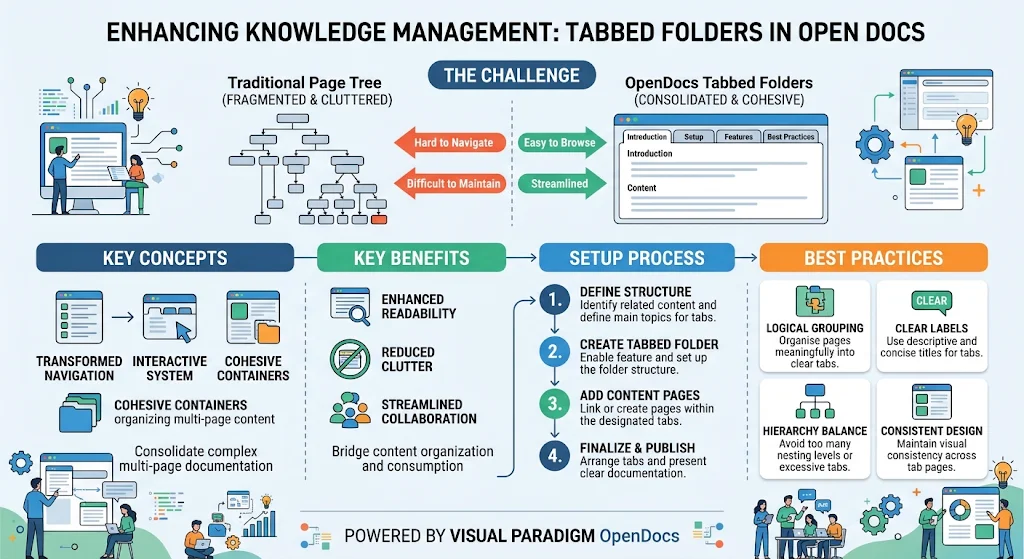
In the rapidly evolving landscape of Agile development and technical knowledge management, the traditional hierarchical page tree has often become a bottleneck. As projects scale, documentation grows, and collaboration intensifies, the “fragmented and cluttered” nature of standard file structures can impede both readability for readers and maintainability for authors. Visual Paradigm OpenDocs addresses this critical pain point with its transformative Tabbed Folders feature. This update shifts the paradigm from a static tree structure to a dynamic, tabbed navigation system, effectively bridging the gap between how content is organized and how it is consumed.
This tutorial delves into the architecture of the Tabbed Folders system, explaining why it is a superior choice for Agile teams maintaining “living” documentation, and providing a step-by-step guide to implementation.
Understanding the Challenge: Traditional vs. Tabbed Architecture
Before implementing a new structure, it is crucial to understand the architectural limitations of the traditional approach. In a standard Page Tree, content is often buried deep within nested folders. This leads to two primary issues:
- Fragmented Navigation: Readers must click through multiple layers of folders to find related information, breaking their flow state.
- Maintenance Difficulty: Authors struggle to keep track of where specific content resides, leading to duplication or orphaned pages.
The OpenDocs Tabbed Folders feature resolves this by consolidating complex, multi-page documentation into a single, cohesive container. Instead of a deep vertical tree, the system transforms into an interactive, horizontal navigation system (tabs), allowing teams to browse related content seamlessly.
Core Concepts and Benefits
The Tabbed Folders feature is built on three fundamental concepts that redefine the user experience:
- Transformed Navigation: The system shifts from a vertical scroll to a horizontal tabbed interface, mimicking the user experience of modern web browsers.
- Interactive System: Users can switch between different views or topics within a single folder without losing their context or having to navigate back to a root menu.
- Cohesive Containers: This concept ensures that related pages (e.g., “Introduction,” “Setup,” “Features”) are logically grouped, reducing visual clutter.
Why It Works for Agile Teams
For Agile development teams, documentation must be a “living” entity that evolves with the product. Tabbed Folders offer specific benefits that align with Agile principles:
- Enhanced Readability: By reducing the cognitive load required to navigate, readers can focus on the content rather than the structure.
- Streamlined Collaboration: Teams can easily assign access to specific folders and view related pages side-by-side, facilitating faster review cycles and comments.
- Reduced Clutter: Complex documentation is no longer a labyrinth of folders but a streamlined set of tabs.
Implementation Guide: The Setup Process
Implementing the Tabbed Folders architecture requires a deliberate approach to structure and content. Follow this four-step process to migrate your documentation effectively.
Step 1: Define Structure
Identify the main topics for your tabs. Before creating any folders, you must determine the logical flow of your documentation. For example, a software release note might be organized by “Introduction,” “New Features,” “Bug Fixes,” and “Best Practices.”
Step 2: Create Tabbed Folder
Within the Visual Paradigm OpenDocs interface, enable the “Tabbed Folder” feature. This sets up the container that will hold your cohesive content. This step essentially creates the “root” for your tabbed navigation.
Step 3: Add Content Pages
Link or create the individual pages that will populate your tabs. Ensure that each page corresponds to the logical structure defined in Step 1. This is where you organize your multi-page content into the designated tabs.
Step 4: Finalize & Publish
Arrange the tabs in a logical order (e.g., chronological or importance-based) and present the clear documentation. Once the structure is finalized, publish the folder to make it available for your team.
Best Practices for Documentation Architecture
To ensure your Tabbed Folders remain effective and maintainable, adhere to the following best practices.
Logical Grouping
Ensure that you organize pages meaningfully into clear tabs. Avoid grouping unrelated topics together just to save space. Each tab should represent a distinct, cohesive topic.
Clear Labels
Use descriptive and concise titles for your tabs. A label like “Setup” is good, but “System Installation & Configuration” is better if it fits the context. Clarity reduces confusion.
Hierarchy Balance
Avoid nesting levels that are too deep. While folders are useful, excessive nesting can lead to the “fragmented” issues we aimed to solve. Keep your hierarchy flat where possible to maintain a streamlined workflow.
Consistent Design
Maintain visual consistency across your tab pages. Use standard templates, fonts, and styling so that the reader perceives the entire tabbed folder as a single, unified document rather than a collection of disjointed pages.
Conclusion
By adopting the Tabbed Folders feature in Visual Paradigm OpenDocs, Agile teams can transform their knowledge management from a static repository into a dynamic, user-centric experience. This architectural shift not only reduces clutter but also fosters better collaboration and faster decision-making. Whether you are documenting complex system architectures or managing daily sprint notes, the Tabbed Folders structure provides the flexibility and clarity needed for modern development.