Mastering BPMN Gateways: Choosing the Right Path with Visual Paradigm
In the world of Business Process Model and Notation (BPMN), the gateway is the traffic controller of your process. Without them, a process is merely a linear list of tasks. With them, it becomes a dynamic, decision-driven workflow that can adapt to real-world complexity. However, selecting the correct gateway type is often the most confusing part of modeling. Using the wrong symbol can lead to ambiguous models that developers cannot execute or business stakeholders misunderstand.
This guide will demystify the three most critical gateway types: Exclusive, Inclusive, and Parallel. We will walk through their logic, when to use them, and how to implement them effectively using Visual Paradigm.
1. The Exclusive Gateway (XOR)
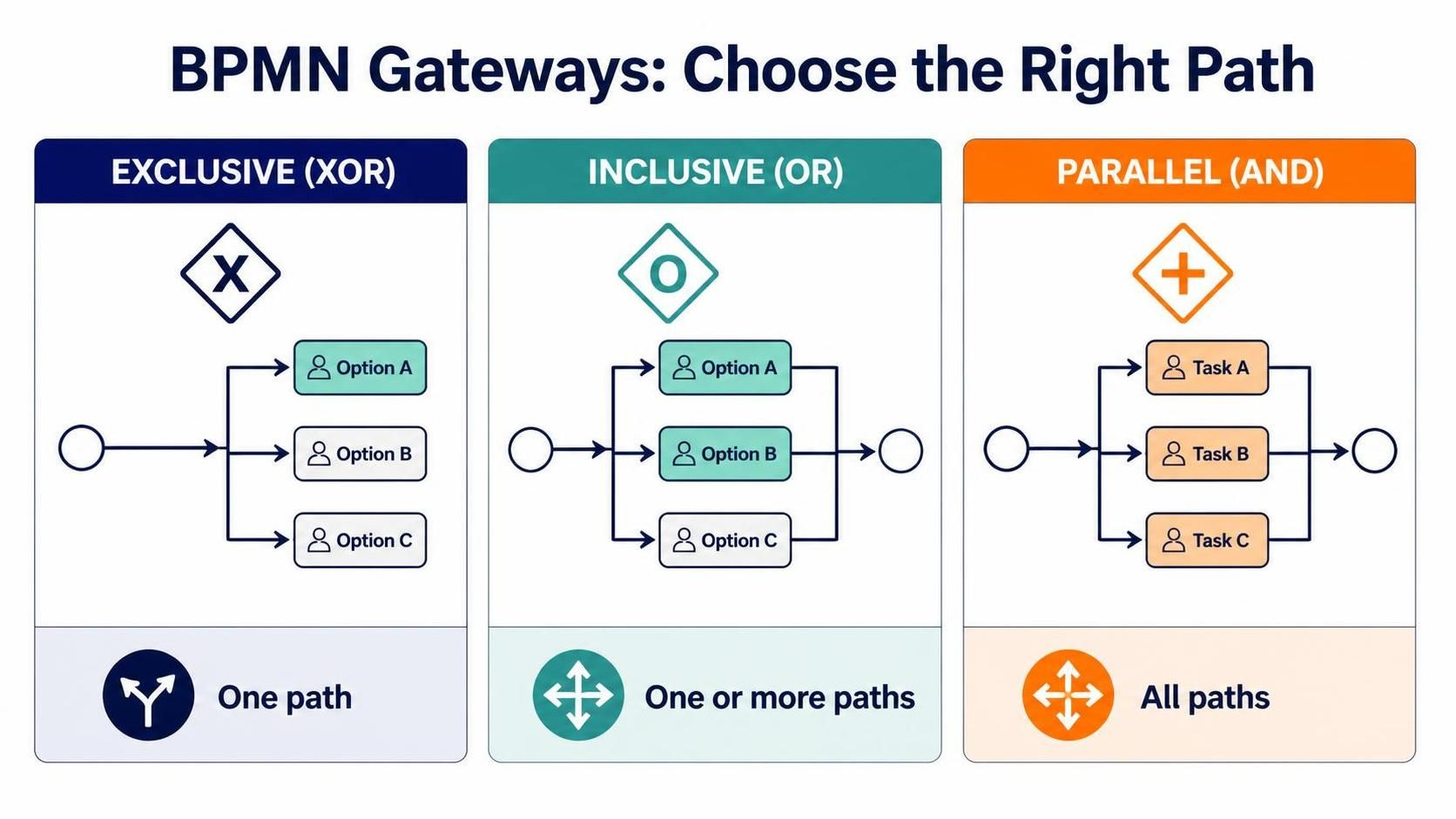
The Exclusive Gateway, often represented by a diamond containing an ‘X’, is the classic “fork in the road.” It represents a decision point where the process must choose exactly one path out of several available options. This is a binary or multi-way choice where options are mutually exclusive.
- Logic: If the condition for Path A is met, Path B and Path C are skipped. The process flows down only one line.
- Visual Paradigm Implementation: When modeling this in Visual Paradigm, ensure you attach sequence flow conditions (expressions like “Price > 100”) to the outgoing flows. Without these conditions, the engine does not know which path to take.
- Convergence: If you use an Exclusive Gateway to split the flow, you must also use an Exclusive Gateway to merge it back together.
Example Scenario
Consider a Loan Application process. After reviewing the application, the system must decide: Is the applicant approved? Or is the application rejected? Or does it need manual review? Only one of these outcomes can happen for a specific instance.
2. The Inclusive Gateway (OR)
The Inclusive Gateway, depicted by a diamond with an ‘O’, is more flexible than the Exclusive gateway. It allows the process to split into one or more paths simultaneously. The paths are not mutually exclusive; multiple conditions can be true at the same time.
- Logic: If a condition for Path A is true, the process goes there. If a condition for Path B is also true, the process goes there as well. You can have one, two, or all paths active.
- Visual Paradigm Implementation: This is often used when a specific set of tasks needs to be triggered based on a collection of attributes. For example, “If the customer is VIP, send a VIP email” AND “If the customer is new, send a welcome email.”
- Convergence: Like the Exclusive gateway, an Inclusive Gateway splits and merges. It waits for all active incoming paths to complete before proceeding.
Example Scenario
Imagine an Order Fulfillment process. An order might require shipping AND tax calculation AND inventory reservation. Since all these conditions might be true for a single order, the Inclusive Gateway allows the process to branch into all these parallel tasks based on the data.
3. The Parallel Gateway (AND)
The Parallel Gateway, shown as a diamond with a plus sign (+), is the engine of concurrency. It ignores conditions entirely. It acts as a command: “Start all of these tasks right now.” It is used to split a single flow into multiple flows that execute simultaneously.
- Logic: When the flow hits the gateway, all outgoing paths are activated at the exact same time. There are no conditions to evaluate.
- Visual Paradigm Implementation: In Visual Paradigm, you typically do not add conditions to the outgoing lines of a Parallel Gateway. The tool assumes all paths are valid.
- Convergence: The Parallel Gateway creates a synchronization point. The process will not continue past the merging Parallel Gateway until all incoming parallel paths have finished.
Example Scenario
Think of a “New Employee Onboarding” process. Once the HR form is submitted, you don’t need to wait for one task to finish before starting the next. You can simultaneously: Provision the laptop, Create the email account, and Enroll in the benefits plan. These happen in parallel to save time.
Summary of Gateway Selection
To master your BPMN modeling in Visual Paradigm, apply this simple decision matrix:
- Do I need to choose only one path?
Yes? Use Exclusive (XOR). - Do I need to choose one or more paths based on conditions?
Yes? Use Inclusive (OR). - Do I need to start ALL paths immediately, regardless of conditions?
Yes? Use Parallel (AND).
By rigorously applying these definitions, you ensure that your process models are not just pretty pictures, but executable blueprints that accurately reflect the business logic.