
AI-Driven BPMN & UML: From Chatbot Drafts to Executable Models
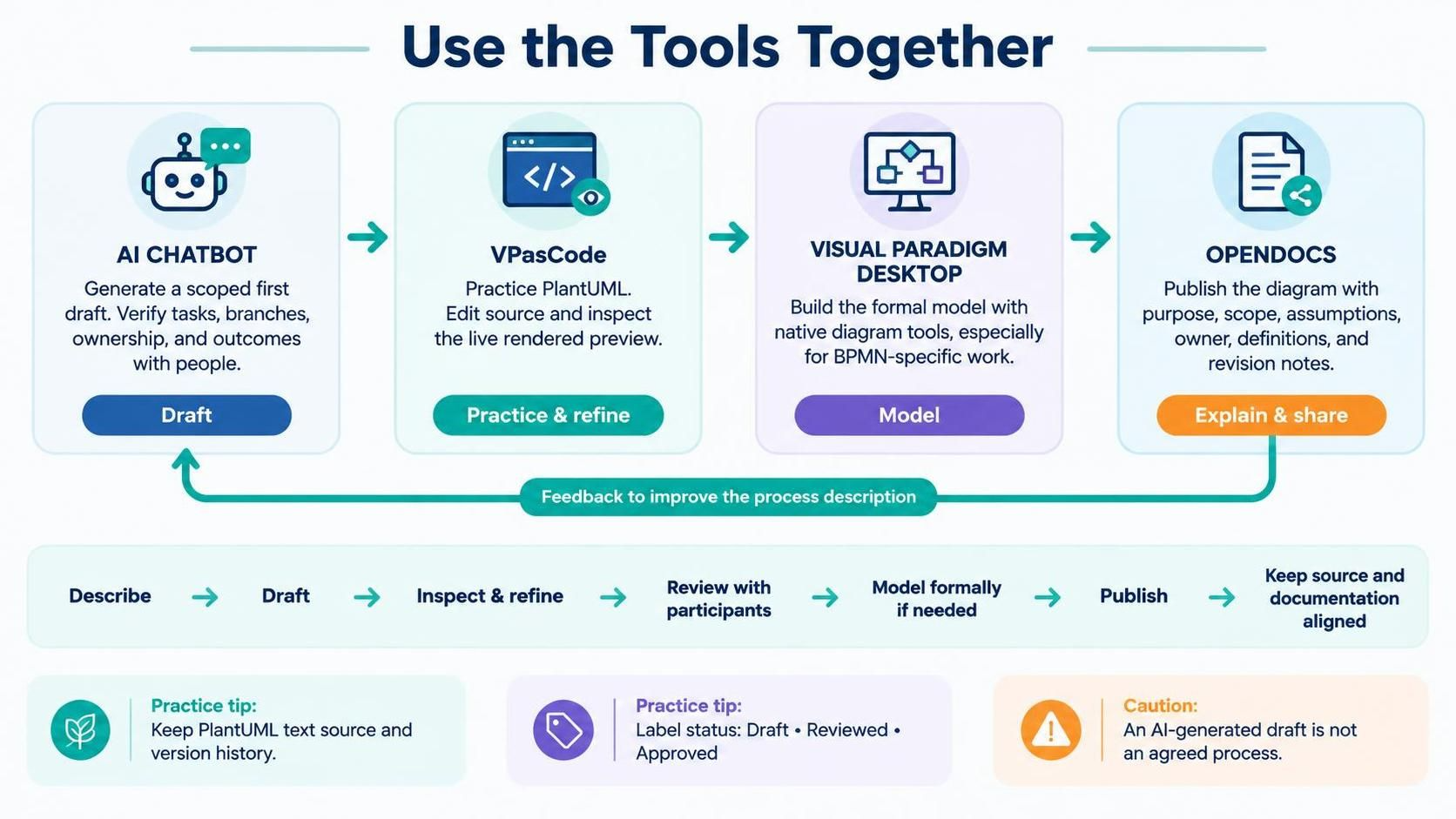
In the rapidly evolving landscape of enterprise architecture, the barrier between a rough idea and a production-ready process model is being lowered by Artificial Intelligence. However, relying solely on an AI’s output can lead to structural inconsistencies or missing business rules. The most effective strategy involves a “human-in-the-loop” workflow that leverages the specific strengths of four distinct tools: AI Chatbot, VPasCode, Visual Paradigm Desktop, and OpenDocs.
This tutorial outlines a comprehensive, iterative system architecture designed to streamline the modeling process. We will move from a high-level concept to a formalized, executable process model, ensuring that every step is documented, verified, and refined.
Phase 1: The AI Chatbot – Generating the First Draft
The journey begins with the AI Chatbot. This tool is not intended to produce the final artifact but rather to act as a collaborative brainstorming partner. Its primary function is to generate a “scoped first draft” based on a specific process description.
When interacting with the AI, it is crucial to provide a detailed context. Instead of asking for a generic chart, specify the notation you require (such as Activity Diagrams or BPMN) and define the scope of the process. The AI will output a draft that serves as a starting point for human verification.
Key Responsibilities of this Phase:
- Generate Structure: Create the initial flow of tasks, branches, and decisions.
- Identify Ownership: Ensure the AI assigns roles to specific tasks.
- Human Verification: This is the most critical step. You must manually verify the AI’s output to ensure that branch conditions are logical, outcomes are complete, and the ownership assignments match the actual organizational reality.
Phase 2: VPasCode – Practicing and Refining the Logic
Once a draft is established, the workflow moves to VPasCode. This tool is designed for the “Practice & Refine” stage. It acts as a bridge between the abstract ideas generated by the AI and the formal modeling environment.
VPasCode is an editor that supports PlantUML, a text-based diagramming language. This text-first approach is powerful because it allows you to inspect the logic of the process without getting bogged down in the visual aesthetics of a GUI editor. You can paste the AI’s output (or a translated version of it) into the VPasCode editor.
The Workflow in VPasCode:
- Input: Paste the PlantUML code derived from the AI draft.
- Render: Use the live preview feature to see how the code translates into a visual diagram.
- Refine: Revise the source code directly. If a decision diamond is missing a “No” path, or a task is mislabeled, you can fix it instantly in the text editor.
This stage is ideal for learning the syntax of process modeling and ensuring the logical integrity of the diagram before committing to a heavy formal model.
Phase 3: Visual Paradigm Desktop – Building the Formal Model
Once the logic is sound and the flow is verified, the process moves to Visual Paradigm Desktop. This is the “Model” phase, where the diagram is transformed into a formal, structured asset. While VPasCode is great for quick logic checks, Desktop is required for enterprise-grade modeling.
The progression of modeling complexity typically follows a path: Flowchart (Basic) → UML Activity Diagram (Structured) → BPMN (Business Process Model and Notation) → Execution. Visual Paradigm Desktop supports this entire spectrum.
Why use Desktop?
- Structured Modeling: It enforces strict adherence to the chosen notation (e.g., BPMN 2.0 standards).
- Team Integration: It allows for project management, team collaboration, and repository integration.
- Advanced Elements: It supports specific BPMN elements like events, gateways, and message flows that are often too complex for simple text editors.
Phase 4: OpenDocs – Explaining and Publishing
A diagram without context is merely a picture. The final stage of the workflow is OpenDocs, which handles the “Explain & Share” phase. This tool ensures that the diagram is published alongside the necessary metadata that makes it actionable.
OpenDocs is used to pair the diagram with its purpose, scope, assumptions, owner, definitions, and revision notes. It provides a platform for publishing the model so that stakeholders understand not just what the process looks like, but why it is designed that way.
The Iterative Loop: A Sensible Workflow
The power of this system lies in its feedback loop. The process is rarely linear. After publishing with OpenDocs, you may receive feedback that requires a change in the process description. This feedback should be routed back to the AI Chatbot to generate a new draft, which is then re-verified and re-refined.
Best Practices for the Workflow:
- Maintain Source Control: Always keep the text source (PlantUML) for diagrams. Use clear filenames and maintain version history to track changes over time.
- Label Status: Clearly label your diagrams with their current status: Draft, Reviewed, or Approved. This prevents confusion regarding the validity of the process.
- Avoid “AI-Only” Releases: Never present a raw AI-generated draft as an agreed-upon process. It is a starting point, not a final product.
By integrating AI Chatbot, VPasCode, Visual Paradigm Desktop, and OpenDocs, you create a robust ecosystem that balances the speed of automation with the precision of human oversight and formal modeling standards.