From AI Chatbot to VPasCode: Mastering the AI-Driven Modeling Workflow
In modern systems engineering and software architecture, the gap between high-level conceptualization and precise technical implementation is often bridged by a friction-heavy process of manual drawing and repetitive syntax coding. Visual Paradigm addresses this challenge by introducing a hybrid workflow that combines the natural language accessibility of AI with the rigorous control of code-driven diagramming. This tutorial explores the architecture of this two-phase process, demonstrating how users can leverage the AI Chatbot for rapid ideation and seamlessly transition to VPasCode for architectural refinement.
The Hybrid Architecture: Ideation vs. Engineering
The core of this workflow relies on a distinct separation of concerns. By decoupling the “thinking” phase from the “building” phase, users can avoid the cognitive load of memorizing syntax while retaining the ability to make granular adjustments later. The system operates through two primary roles:
- The AI Chatbot (The Architect): This component acts as the high-level thinker. It interprets natural language intent to generate complex diagram structures instantly. Its primary function is to lower the barrier to entry, allowing users to define relationships and actors without needing to understand underlying UML syntax.
- VPasCode (The Engineer): Once the initial structure is generated, the system transitions to a code-driven environment. Here, the AI-generated logic is exposed as editable text (PlantUML). This allows the user to act as an engineer, applying specific styling rules, enforcing layout logic, and ensuring architectural precision.
Stage 1: Natural Language Ideation
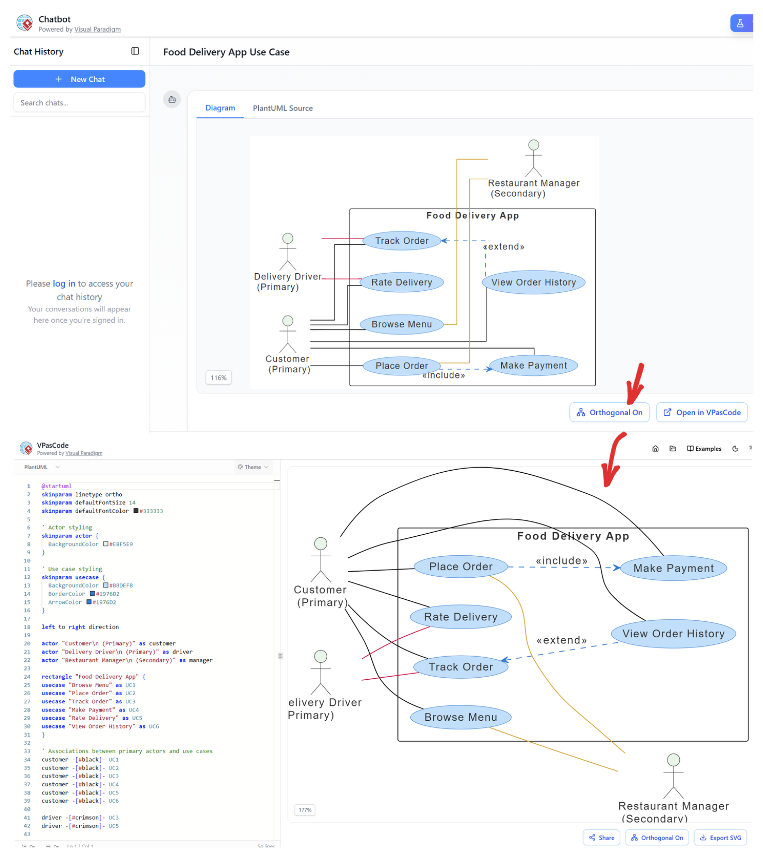
The process begins in the Chatbot interface. Here, the user provides a prompt—such as defining a “Food Delivery App” system. The AI interprets the semantic meaning of this request, identifying key entities (Customer, Driver, Manager) and their interactions.
During this stage, the AI handles the heavy lifting of structuring the diagram. It automatically determines that a “Customer” interacts with “Browse Menu” and “Place Order,” and that “Place Order” logically includes “Make Payment.” The result is a functional Use Case Diagram that captures the system’s logic without requiring the user to draw a single line or type a single keyword.
The Bridge: Exporting Logic
A critical component of this architecture is the export mechanism. The AI does not merely produce a static image; it produces structured data. By clicking the “Open in VPasCode” button, the user initiates a transition from the visual canvas to the code editor. This action exports the internal logic of the AI’s generation into a readable, editable format, preserving the semantic relationships while making the styling parameters accessible.
Stage 2: Refinement and Granular Control
Upon opening the diagram in VPasCode, the interface shifts to a split-pane view. On the left is the source code, and on the right is the real-time rendering of the diagram. This environment transforms the user from a passive observer into an active architect.
Understanding the Source Code
The power of this stage lies in the transparency of the underlying code. The system reveals the PlantUML script that drives the diagram. Users can now see exactly how the diagram is constructed. For example, the user can inspect specific commands that dictate the visual style, such as:
skinparam linetype ortho: This command instructs the renderer to use orthogonal (straight, right-angled) lines instead of curved ones.left to right direction: This defines the flow of the diagram, ensuring a logical reading order.
By editing these lines of code, users gain control over the diagram’s aesthetic and logical flow that would be difficult to achieve using only a mouse and drag-and-drop interface.
Real-Time Synchronization
The VPasCode environment operates on a “What You See Is What You Get” principle. Any modification made in the code editor immediately updates the diagram on the right. For instance, if a user changes the skinparam values to alter colors or fonts, the diagram reflects these changes instantly. This synchronization allows for rapid iteration—users can tweak a style, see the result, and refine further without the latency of manual adjustments.
Why This Hybrid Model Works
The combination of AI generation and Code-based refinement offers a significant advantage over traditional methods. Traditional diagramming tools often force a choice between speed and precision. AI tools offer speed but lack control, while manual coding offers precision but requires time and expertise.
This workflow bridges that gap. The AI Chatbot handles the “heavy lifting” of structuring relationships, ensuring that the diagram is logically sound. The VPasCode environment then allows for the “polishing” phase, where specific constraints—such as orthogonal lines and specific color palettes—are applied to meet professional standards.