


New Introduction: Building a Living Knowledge Ecosystem for Agile Teams
In today’s fast-paced agile IT environment, documentation isn’t a afterthought—it’s a strategic asset. Yet too many development teams struggle with the “documentation debt” trap: diagrams created in isolation, knowledge siloed in personal drives, and public-facing content lagging behind sprint deliverables.
Enter Visual Paradigm Pipeline: not just a file transfer tool, but a collaborative asset transit hub designed for teams who value velocity without sacrificing clarity. This guide is written specifically for agile IT development teams who need to:
-
Share architectural decisions in real-time across distributed squads
-
Maintain a single source of truth for technical specifications
-
Publish mixed-content knowledge bases that serve both internal collaborators and external stakeholders
-
Reduce context-switching between modeling, documentation, and publishing workflows
Based on hands-on experience across enterprise and startup environments, this comprehensive guide walks you through transforming your team’s documentation workflow from fragmented to fluid—using Pipeline as the connective tissue between Visual Paradigm’s modeling power and your public-facing knowledge presence.
What Is the Pipeline? The Agile Team’s Perspective
For agile IT teams, the Pipeline functions as your central nervous system for visual knowledge. It’s a secure, cloud-based bridge that eliminates the manual handoffs that slow down sprint cycles.
Before Pipeline, our team’s workflow looked like this:
Diagram created → Export as PNG → Upload to Confluence → Email link to team → "Wait, which version is this?" → Manual update requests → Version drift
With Pipeline, the flow becomes:
Diagram created → One-click "Send to Pipeline" → Instantly available in OpenDocs → Embedded in living documentation → Auto-updates when source changes
The psychological shift matters as much as the technical one. When your SysML architecture diagrams, BPMN process flows, or AI-generated microservices visuals can evolve in place within your knowledge base, documentation stops being a compliance checkbox and starts being a collaborative workspace.
The OpenDocs Connection: Where Agile Knowledge Comes Alive
OpenDocs isn’t just a document editor—it’s a diagram-aware knowledge platform that treats visuals as first-class, editable citizens. For agile teams practicing continuous documentation, this changes everything.
How the “Work-to-Publish” Flow Accelerates Your Sprint Cycles:
-
Model with confidence: Create complex UML class diagrams or system context models in Visual Paradigm Desktop, knowing they won’t get stranded on a developer’s laptop.
-
Iterate without friction: When a sprint review reveals a needed adjustment to your deployment diagram, update the source, re-send to Pipeline, and refresh the OpenDocs page—completed in minutes, not ticketed requests.
-
Collaborate across time zones: Distributed team members access the same canonical version, reducing “which diagram is current?” confusion during handoffs.
-
Publish selectively: Embed internal technical specs for your dev team while publishing curated, public-facing architecture overviews to your WordPress site—all from the same source asset.
The 5 Core Connections: Real-World Scenarios for Agile IT Teams
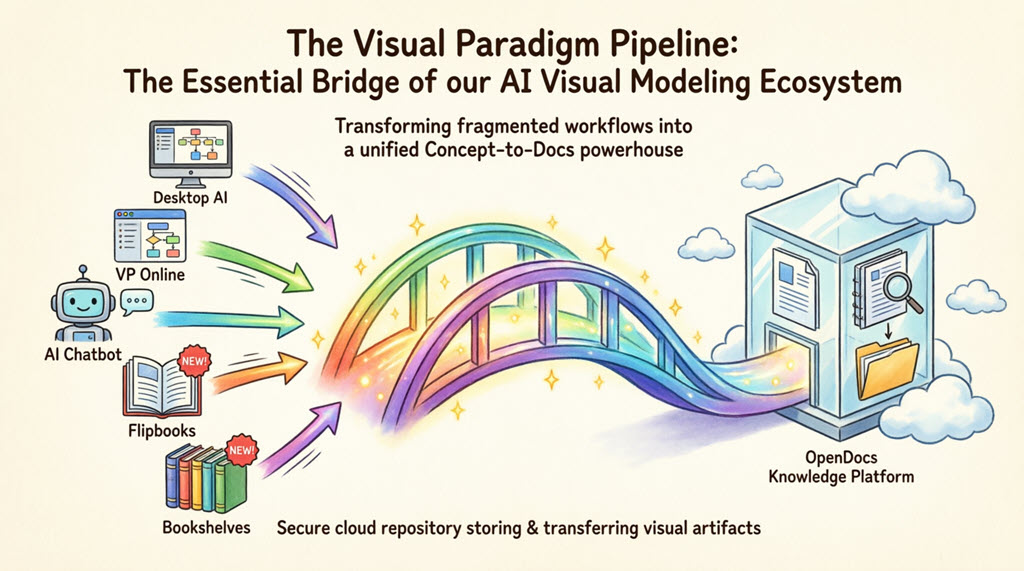
1. Visual Paradigm Desktop → OpenDocs: Power Modeling for Engineering Squads
For backend engineers and architects who rely on advanced UML, SysML, or ERD modeling, the Desktop-to-OpenDocs pipeline eliminates the “export-and-forget” pattern.
Step-by-step agile workflow:
-
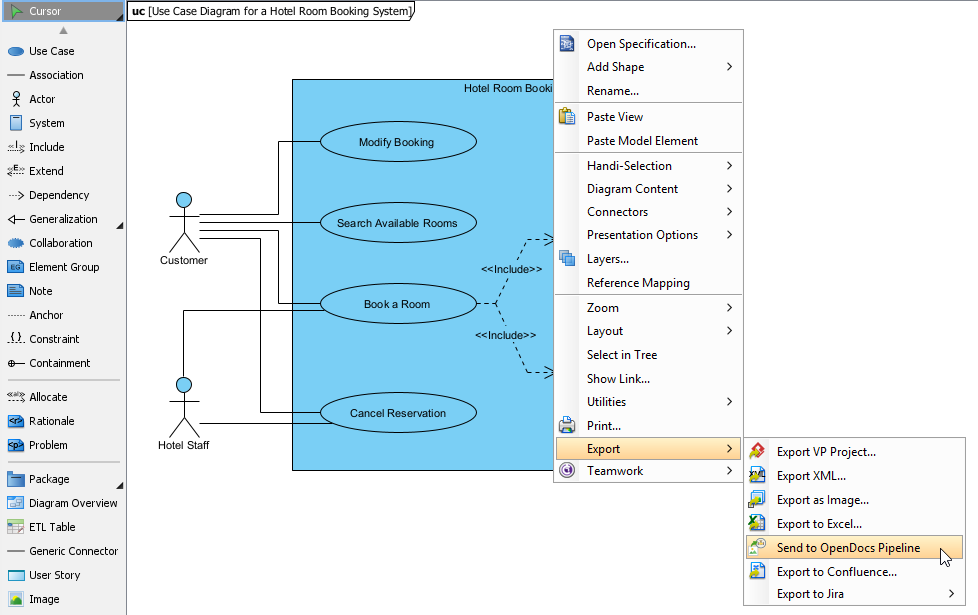
Open your microservices architecture diagram in Visual Paradigm Desktop during sprint planning.
-
Right-click the diagram canvas → Export > Send to OpenDocs Pipeline.
-
Save the project when prompted (ensures version integrity for audit trails).
-
Add a sprint-context comment: “Sprint 24 – Added auth service boundary”.
-
Confirm export—the diagram uploads to your team’s cloud repository in seconds.
-
In OpenDocs, edit your technical specification, click Insert > Pipeline, and select the artifact. It embeds instantly with full editability.
Agile team takeaway: On a recent cloud migration project, this workflow reduced documentation update time by ~70%, freeing up sprint capacity for feature development.
2. Visual Paradigm Online → OpenDocs: Cloud-Native Collaboration for Distributed Teams
For quick iterations, pair modeling sessions, or cross-functional workshops, Visual Paradigm Online + Pipeline creates a frictionless cloud-to-cloud flow.
Real-time collaboration workflow:
-
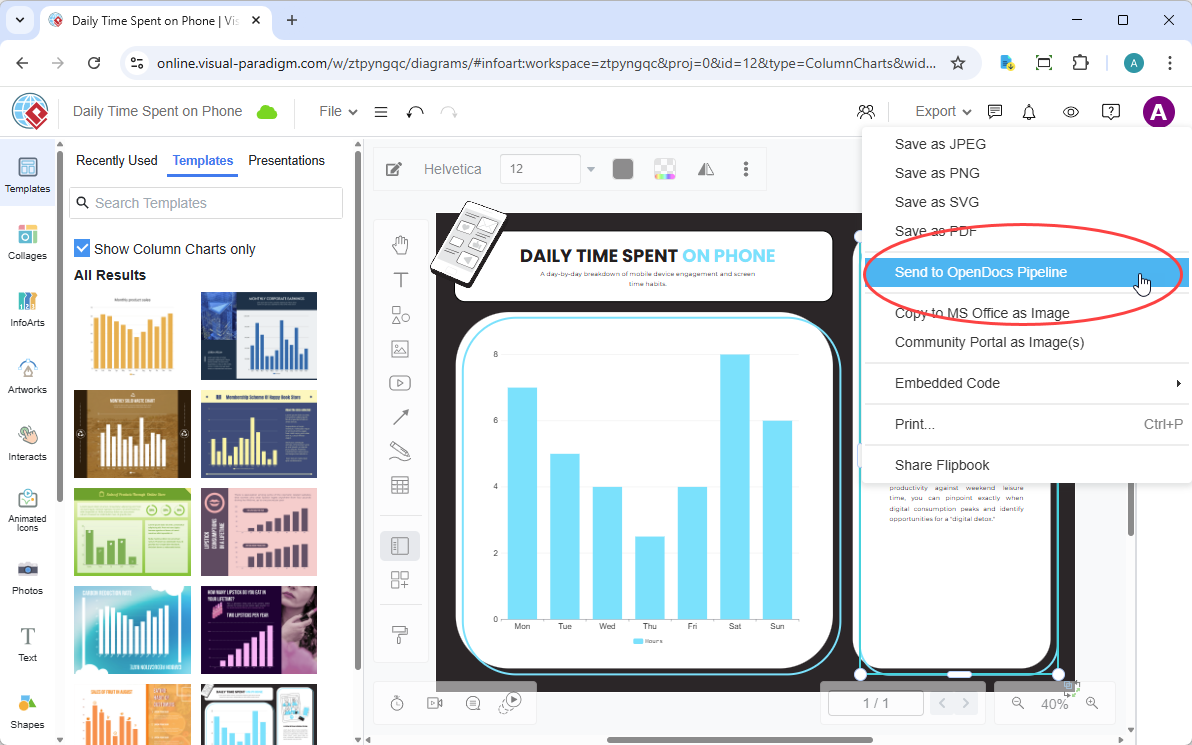
While refining a user journey flowchart in VP Online during a remote sprint retrospective, navigate to Export > Send to OpenDocs Pipeline.
-
Add a descriptive note: “Checkout flow v3.2 – Added guest user path”.
-
Confirm export—the asset appears in your team’s Pipeline library immediately.
-
In OpenDocs, insert via Insert > Pipeline and position within your product requirements document.
Agile observation: During a recent distributed sprint planning, we updated a service dependency map and had it reflected in our shared Confluence-alternative documentation before the Zoom call ended—no follow-up emails required.
3. AI Chatbot → OpenDocs: Accelerating Ideation to Executable Specs
This connection transforms brainstorming sessions into actionable documentation. When exploring architectural options, prompt the AI Chatbot: “Generate a container diagram for a serverless event-driven system.”
From idea to embedded spec:
-
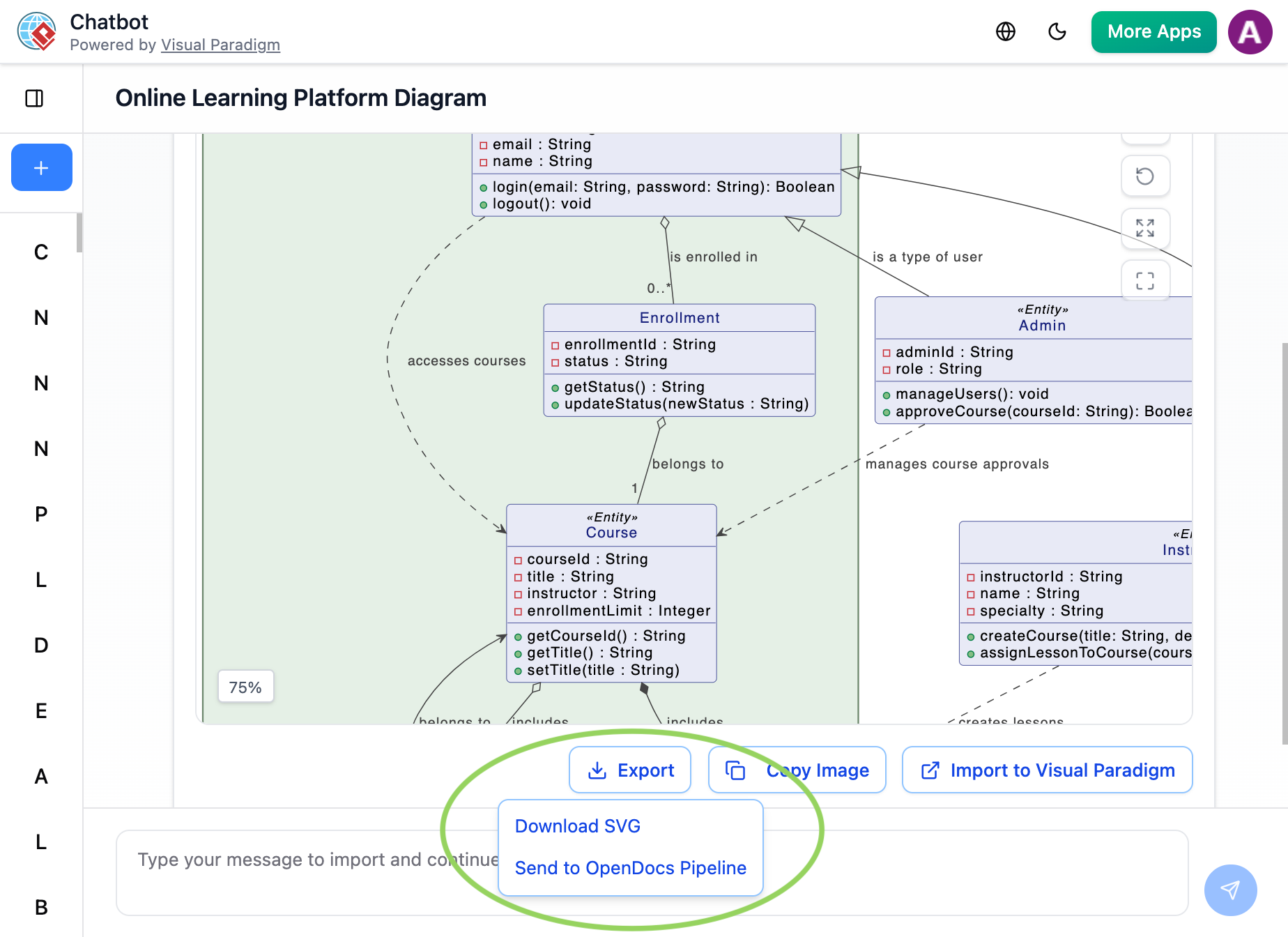
Once the AI-generated visual appears, click Export > Send to OpenDocs Pipeline directly from the chat interface.
-
The AI-generated artifact lands in your team’s Pipeline library, ready for refinement by the architecture guild.
-
In OpenDocs, embed it into an ADR (Architecture Decision Record) and add contextual rationale.
Agile insight: This isn’t just about speed—it’s about capturing ephemeral architectural discussions before they evaporate. Pipeline ensures AI-assisted visuals become persistent, versioned knowledge assets, not lost chat history.
4. Flipbooks → OpenDocs: Interactive Runbooks for On-Call Teams
Recently, our SRE team needed to embed an interactive incident response playbook into our internal knowledge base. Sending the Flipbook through Pipeline preserved its interactivity within OpenDocs—a huge win for on-call engineers who need to quickly navigate procedures under pressure. No iframe hacks, no external hosting dependencies.
5. Bookshelves → OpenDocs: Scaling Knowledge Across Squads
When organizing onboarding materials across multiple product squads, sending entire Bookshelves to OpenDocs via Pipeline created a centralized, searchable library. This scaled beautifully for a recent enterprise platform launch, reducing new engineer ramp-up time by enabling self-service discovery of architecture patterns, API contracts, and deployment guides.
Workflow Evolution: Before vs. After Pipeline for Agile Teams
| Traditional Agile Documentation Workflow | Pipeline-Enabled Collaborative Workflow |
|---|---|
| Export diagram as PNG → Upload to wiki → Manual version tracking | One-click “Send to Pipeline” → Auto-versioned, instantly available in OpenDocs |
| “Can someone resend the latest diagram?” Slack messages | “Update to latest revision” in OpenDocs → always current, with change comments |
| Static images that become outdated after next sprint | Deep-linked, editable artifacts that evolve with the codebase |
| Files scattered across GitHub wikis, Google Drive, email | Centralized cloud repository with search, comments, and role-based access |
| Public docs manually recreated from internal specs | Same source asset embedded internally and published externally with selective visibility |
Team verdict: The time savings are measurable, but the bigger win is reduced cognitive load. Engineers spend less energy managing documentation logistics and more energy on system design and code quality.
Application Areas: Where Agile IT Teams See Maximum Impact
Based on cross-industry implementation experience, Pipeline delivers exceptional value in:
-
Microservices Architecture: Modeling service boundaries, API contracts, and data flows. Real-time sync keeps technical docs aligned with evolving codebases, supporting trunk-based development practices.
-
DevOps & SRE: Creating runbooks, deployment diagrams, and incident response flows. Pipeline ensures on-call documentation always references the latest operational design.
-
Product Discovery: Embedding user journey maps, story maps, and feature flag configurations directly into product briefs. Product managers and engineers collaborate on the same living artifact.
-
Security & Compliance: Integrating threat models, data flow diagrams, and audit trails into compliance documentation. Version history and access controls support regulated environments.
-
Developer Experience: Publishing internal API catalogs, SDK guides, and integration patterns that can be selectively exposed to partner developers via public WordPress posts.
WordPress Integration: Publishing Mixed Internal/Public Knowledge Bases
A unique strength for agile teams: the ability to maintain a single source of truth while publishing selectively to public audiences.
Direct Page Export to WordPress
-
Use the WordPress Integration to export selected OpenDocs pages directly as fully functional WordPress Pages.
-
Setup requires a one-time connection using a WordPress Application Password (found in your WordPress user profile).
-
Embedded Pipeline artifacts retain their interactivity and auto-update capabilities even after publication.
Embedding via Iframe for Flexible Publishing
-
Use the Embed Code feature in OpenDocs to generate an
<iframe>snippet. -
Paste this code into a Custom HTML block in the WordPress editor.
-
Display your knowledge hub content on any public post while maintaining the ability to update the source diagram in Visual Paradigm.
Strategic Publishing Patterns for Agile Teams:
-
Internal-only: Technical deep-dives, security models, and sprint retrospectives visible only to authenticated team members.
-
Partner-facing: API documentation, integration guides, and architecture overviews shared with external developers.
-
Public community: High-level product architecture, technology blog posts, and open-source contribution guides published to your company blog.
Pro tip: Use OpenDocs’ permission layers to control visibility at the artifact level—same diagram, different audiences.
Self-Hosting Options for Security-Conscious Agile Teams
For teams in regulated industries or with strict data residency requirements:
-
Publication Server: Set up a private Publication Server (e.g., on-premises Mac/Linux server) to host flipbooks, slideshows, and diagrams on your own infrastructure.
-
Benefits: Full control over data location, integration with existing IAM systems, and compliance with air-gapped environment policies.
-
Trade-off: Requires additional DevOps overhead for maintenance and updates.
Important Considerations for Agile Adoption
A few practical notes based on cross-team implementation experience:
-
Subscription requirements: Pipeline access requires Visual Paradigm Online Combo Edition or Professional Edition. Verify licensing during sprint planning to avoid workflow interruptions.
-
Onboarding velocity: Initial setup took our team ~30 minutes, but adoption was rapid because the mental model (“send to cloud, insert anywhere”) aligns with agile principles of simplicity and feedback.
-
Connectivity dependencies: As a cloud-centric feature, Pipeline requires internet connectivity. For highly regulated environments with air-gapped systems, evaluate the self-hosting option early in your sprint 0 planning.
-
Change management: Frame Pipeline adoption as reducing “documentation drag”—a metric agile teams already care about—rather than adding new process.
New Conclusion: Building a Documentation Culture That Scales with Your Agile Journey
After implementing Visual Paradigm Pipeline across multiple agile teams—from startup squads to enterprise transformation programs—the consistent outcome isn’t just efficiency gains. It’s a fundamental shift in how teams think about documentation.
Pipeline transforms documentation from a compliance artifact into a collaborative workspace. When your architecture diagrams, process flows, and AI-generated prototypes can evolve in real-time within your knowledge base—and selectively publish to public channels—you create a living ecosystem that grows with your product.
For agile IT teams specifically, the value compounds:
-
Reduced sprint drag: Less time managing files, more time building features.
-
Improved knowledge retention: New team members onboard faster with searchable, visual-first documentation.
-
Stronger stakeholder alignment: Product, engineering, and security teams collaborate on the same canonical artifacts.
-
Confident public communication: Publish curated technical content to your community without maintaining parallel documentation systems.
The Pipeline isn’t a silver bullet—but for teams already invested in the Visual Paradigm ecosystem, it’s the connective tissue that turns fragmented workflows into a cohesive “Concept-to-Community” pipeline. If your team struggles with documentation debt, version confusion, or the internal/external publishing dilemma, a hands-on trial could transform not just your workflow, but your team’s relationship with knowledge sharing itself.
Sometimes, the right tool doesn’t just save time. It changes how your team thinks about the work—and who gets to participate in it.
References
- Export OpenDocs to WordPress Page: Official release notes detailing how to export OpenDocs content directly to WordPress pages using Application Password authentication.
- Visual Paradigm Online to OpenDocs Export: Documentation covering the integration workflow between Visual Paradigm Online diagrams and OpenDocs via the Pipeline feature.
- AI Diagram to OpenDocs Pipeline Integration: Announcement and guide for exporting AI-generated diagrams from the Visual Paradigm Chatbot directly to OpenDocs through Pipeline.
- Visual Paradigm Pipeline Demo Video: Video walkthrough demonstrating the end-to-end Pipeline workflow between Visual Paradigm tools and OpenDocs documentation platform.
- Pipeline Workflow Tutorial Video: Step-by-step video guide showing how to use the Pipeline feature for diagram synchronization and documentation embedding.
- Visual Paradigm Features Overview: Comprehensive listing of Visual Paradigm’s product capabilities, including diagramming, modeling, AI assistance, and documentation tools.
- Visual Paradigm Official Website: Main portal for Visual Paradigm products, resources, pricing, and ecosystem information.
- Visual Paradigm Diagram Examples Library: Collection of sample diagrams across UML, BPMN, flowcharts, ArchiMate, and other modeling notations for reference and inspiration.
- P&ID Software Features in Visual Paradigm Online: Dedicated page outlining Piping and Instrumentation Diagram capabilities within the cloud-based diagramming tool.
- Visual Paradigm User Guide: Pipeline Feature: Official user guide section providing detailed instructions for using the Pipeline export and embedding functionality.
- **Class Diagram Tutorial Using Visio **(Comparative Reference): External resource on class diagram creation, included for contextual comparison of modeling approaches across different tools.
- Sync AI Diagram to OpenDocs Pipeline Guide: Detailed tutorial for synchronizing AI-generated diagrams from Visual Paradigm to OpenDocs via Pipeline.
- Share Visual Paradigm Flipbooks to OpenDocs: Release notes explaining how to send interactive flipbooks from VP Online to OpenDocs through the Pipeline.
- Flipbook Integration Demo Video: Video demonstration of embedding and updating flipbooks within OpenDocs documentation.
- Slideshow to Pipeline Tutorial Video: Step-by-step guide showing how to send slideshows to the Pipeline and insert them into OpenDocs documents.
- My Journey to Seamless Documentation: Community case study detailing real-world implementation of Visual Paradigm to OpenDocs workflow.
- OpenDocs Embed HTML Code Tutorial: Guide for generating and using iframe embed codes to display OpenDocs content on external websites.
- Integrate Visual Paradigm OpenDocs into WordPress: Third-party comprehensive guide for embedding AI-powered Visual Paradigm knowledge bases into WordPress sites.
- Make Flipbook Visible to the Public: Blog post explaining sharing and privacy settings for publishing flipbooks to public audiences.
- Flipbook Knowledge Base Documentation: Official knowledge base article covering flipbook creation, management, and sharing capabilities.
- Setup Self-Host Publication Server: Technical guide for deploying a private publication server to host flipbooks and slideshows on-premises for enhanced security and control.
Related posts:
 From Cloud Diagrams to Live Documentation: My Hands-On Review of Visual Paradigm Online’s OpenDocs Integration
From Desktop to Web: A User’s Honest Review of Visual Paradigm’s PowerPoint Web Viewer
Mastering BPMN with Best Practices, AI, and Integrated Documentation
From Chaos to Clarity: A Comprehensive Guide to AI-Powered BPMN Modeling
From Cloud Diagrams to Live Documentation: My Hands-On Review of Visual Paradigm Online’s OpenDocs Integration
From Desktop to Web: A User’s Honest Review of Visual Paradigm’s PowerPoint Web Viewer
Mastering BPMN with Best Practices, AI, and Integrated Documentation
From Chaos to Clarity: A Comprehensive Guide to AI-Powered BPMN Modeling