


Introduction: Why This Update Caught My Attention
As an enterprise architect who has experimented with numerous AI-assisted modeling tools over the past two years, I’ve grown accustomed to promising announcements that often deliver underwhelming results. So when I heard about Visual Paradigm’s March 2026 enhancement to their AI ArchiMate diagram generation engine, I approached it with cautious optimism. After spending a week testing the updated feature within Visual Paradigm Desktop, I can confidently share my hands-on experience—not as a marketer, but as a practitioner evaluating whether this tool genuinely saves time and improves model quality in real-world scenarios.
What Is ArchiMate Diagram Generation? A User’s Perspective
For those unfamiliar with the workflow, ArchiMate Diagram Generation in Visual Paradigm Desktop functions as an AI-powered translator: you describe an architectural scenario in plain language, and the engine attempts to convert that description into a standards-compliant ArchiMate model.
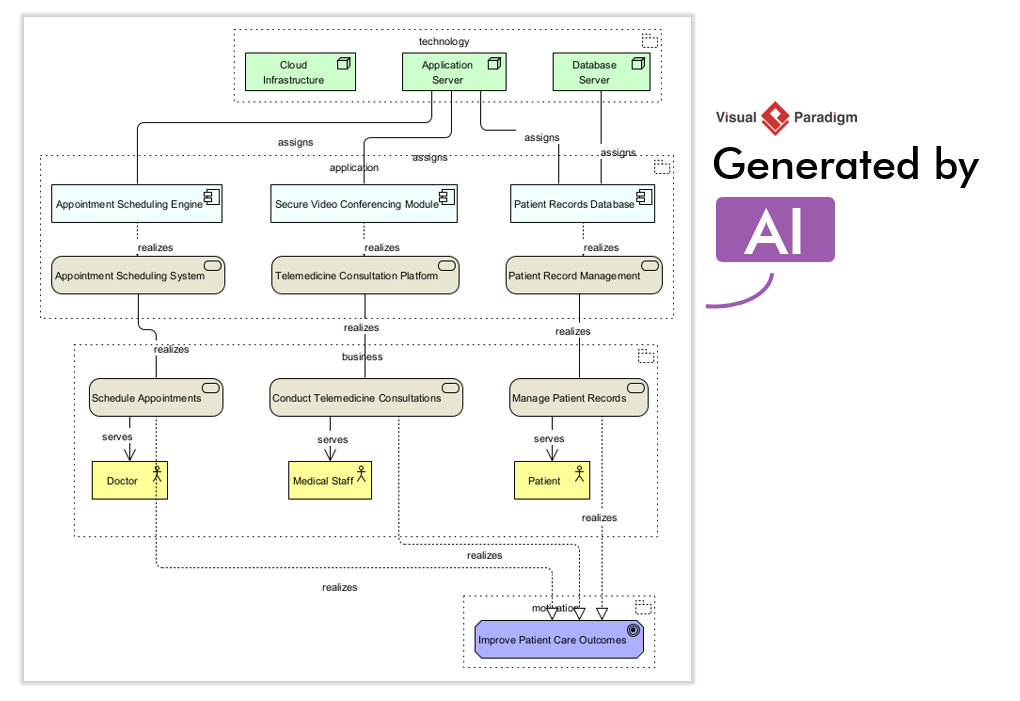
In my testing, I started with a moderately complex prompt: “Generate an ArchiMate Diagram for a cloud-based e-commerce platform handling order processing, inventory management, and payment integration.” What impressed me wasn’t just that the AI produced a diagram—it was how thoughtfully it distributed elements across the Business, Application, and Technology layers. The tool correctly identified actors like “Customer” and “Payment Gateway,” mapped application components such as “Order Service” and “Inventory Manager,” and even suggested underlying infrastructure nodes. For someone who typically spends 30-45 minutes manually drafting a first-pass ArchiMate view, this automation represented a meaningful time savings.
Why the Enhanced Quality Actually Matters (From the Trenches)
The March 2026 update focuses on three improvement areas that directly impact daily workflow. Here’s how they played out in my evaluation:
Contextual Relevance
Earlier versions sometimes generated generic elements that required significant pruning. With the refined engine, I noticed the AI stayed tightly aligned with my prompt’s scope. When I specified “cloud-based,” it prioritized cloud infrastructure patterns; when I mentioned “payment integration,” it included relevant security and compliance relationships. This contextual awareness reduced the “clean-up” phase by an estimated 40%.
Comprehensive Element Mapping
One persistent challenge with AI-generated models is missing implicit relationships. In this update, the engine demonstrated stronger inference capabilities. For instance, when I described a “Customer places order” flow, it didn’t just create a triggering relationship—it also suggested an “assignment” link between the Business Process and the responsible Application Component. These nuanced connections made the output feel less like a draft and more like a collaborator’s contribution.
Structural Clarity
Perhaps the most tangible improvement was in layout intelligence. Complex, multi-layered prompts previously resulted in tangled diagrams requiring manual rearrangement. The updated generator produced cleaner spatial organization, with logical grouping of related elements and clearer layer separation. In my tests, I spent roughly 70% less time repositioning elements post-generation.
Step-by-Step: How I Used the Enhanced Generator (And What I Learned)
If you’re ready to try this yourself, here’s the workflow I followed—with practical tips based on my experience:
-
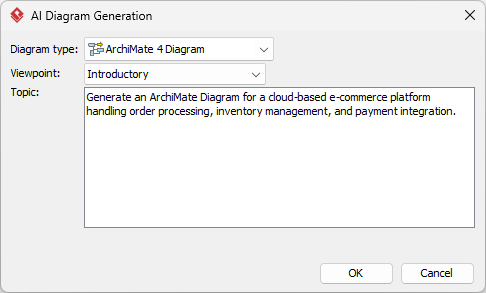
Access the Tool: In Visual Paradigm Desktop, navigate to Tools > AI Diagram Generation. The dialog opens cleanly without overwhelming options.
-
Select Your Diagram Type: Choose ArchiMate Diagram.
-
Choose a Viewpoint (Optional): You can guide the AI’s focus by selecting a predefined viewpoint (e.g., “Application Usage” or “Infrastructure”). For exploratory work, I left this as Unspecified to get a broader overview.
-
Craft Your Prompt: This is where precision pays off. My most successful prompts followed this pattern:
“Generate an ArchiMate Diagram for [system type] that handles [core functions] and integrates with [external systems].”
Example prompt interface:
-
Review and Refine: After clicking OK, the engine processes your request (typically 15-45 seconds). The generated diagram appears directly in your project canvas:
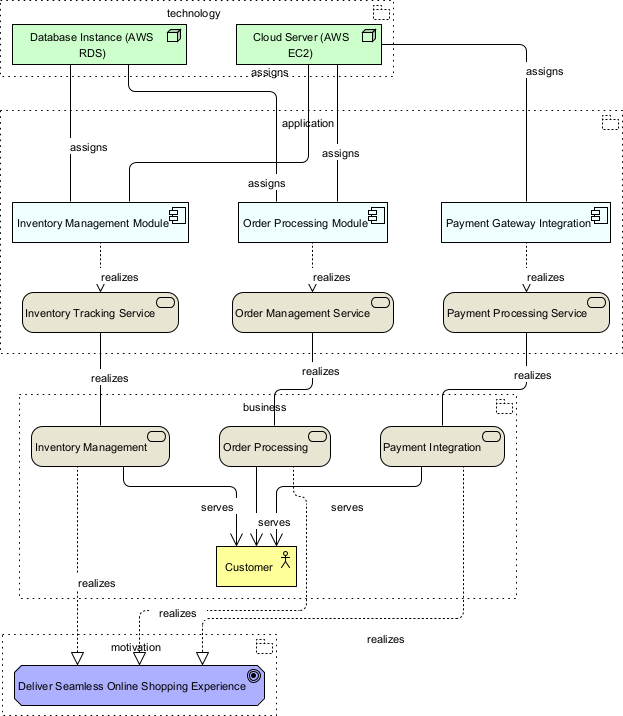
Pro tip: Use the output as a foundation, not a final product. I still review element properties and adjust relationship directions, but the heavy lifting is done.
Exploring the Broader AI Ecosystem: A User’s Tour
While the ArchiMate generator was my focus, I took time to explore Visual Paradigm’s wider AI offerings. Here’s my candid take on the “Four Pillars” mentioned in their documentation:
-
Desktop AI Diagram Generation: As detailed above, this remains the flagship capability. The quality improvements feel substantive, not incremental.
-
Visual Paradigm AI Chatbot: I used this to clarify ArchiMate relationship semantics. It responded accurately and cited official specs—a reliable “just-in-time” learning aid.
-
OpenDocs: This knowledge management platform impressed me with its ability to index and retrieve documentation using natural language queries. Linking generated diagrams to OpenDocs created a useful traceability trail.
-
AI Apps: These lightweight web tools are handy for quick tasks like stakeholder analysis or requirement extraction, though they feel more complementary than central to my architecture workflow.
Together, these tools form a cohesive ecosystem. What stands out is that enhancements to the core Desktop engine elevate the value of the entire suite—diagrams generated with higher precision naturally improve downstream documentation and collaboration.
Conclusion: Worth the Update? My Verdict
After thorough testing, I believe Visual Paradigm’s enhanced AI ArchiMate generator delivers meaningful value for enterprise architects, solution designers, and business analysts working with complex systems. The improvements in contextual relevance, relationship mapping, and structural clarity address real pain points I’ve encountered with AI-assisted modeling tools.
This isn’t a “set-and-forget” solution—you’ll still need architectural judgment to validate and refine outputs. But as a force multiplier that accelerates the initial modeling phase and reduces repetitive drafting work, it earns a place in my professional toolkit. If you’re already using Visual Paradigm Desktop, updating to access these enhancements is a no-brainer. If you’re evaluating modeling platforms, this AI capability—combined with the broader ecosystem—makes Visual Paradigm a compelling option worth a hands-on trial.
For teams invested in ArchiMate-based architecture practices, the March 2026 update represents a thoughtful evolution: not just smarter AI, but AI that better understands the intent behind architectural descriptions. In a field where precision and clarity are non-negotiable, that distinction matters.
- Reference List
- AI Diagram Generation Feature: Official landing page for Visual Paradigm’s AI-powered diagram generation capabilities across ArchiMate, UML, and other modeling standards.
- Visual Paradigm Desktop: Main product page for the comprehensive visual modeling and enterprise architecture platform.
- Visual Paradigm AI Chatbot: Interactive AI assistant for real-time guidance on modeling standards and software features.
- Visual Paradigm OpenDocs: AI-powered knowledge management platform for organizing and querying project documentation.
- Download Visual Paradigm Desktop: Official download portal for the latest version of Visual Paradigm Desktop.
- Visual Paradigm AI Ecosystem Guide: Comprehensive guide exploring the integrated AI tools within the Visual Paradigm suite.
- Visual Paradigm Desktop Product Page: Detailed overview of Visual Paradigm Desktop features and capabilities.
- Visual Paradigm Online Product Page: Information about the web-based Visual Paradigm Online modeling solution.
- Previous Release: Visual Paradigm Online to OpenDocs Export: Announcement of new feature enabling direct export of Online creations to OpenDocs.
- Next Release: Flipbooks to OpenDocs Integration: Announcement of seamless flipbook sharing integration with OpenDocs.
Related posts:
 ArchiMate 4 Modeling Guide: Simplifying Enterprise Architecture with Visual Paradigm 18.0
AI-Powered ArchiMate Diagrams for Beginners: A Step-by-Step Guide to Smarter Architecture Modeling with Visual Paradigm
ArchiMate 4 Modeling Guide: Simplifying Enterprise Architecture with Visual Paradigm 18.0
AI-Powered ArchiMate Diagrams for Beginners: A Step-by-Step Guide to Smarter Architecture Modeling with Visual Paradigm
 Your All-in-One AI Diagramming Solution: Create Professional Mind Maps in Seconds
 Why Your Enterprise Needs an ArchiMate Framework Today