In the fast-paced environment of modern software creation, clarity is currency. When teams attempt to translate abstract ideas into functional features, the user story serves as the primary contract between stakeholders, product managers, and engineering resources. However, a gap in communication often leads to friction. When user stories lack precision, the entire development lifecycle suffers. Delays occur, resources are wasted, and the final product may miss the mark.
Many teams assume that writing a user story is a trivial administrative task. They believe that as long as the core idea is captured, the rest will follow. This assumption is dangerous. Ambiguity in requirements is one of the most significant causes of technical debt and project stagnation. By identifying and correcting common structural errors in story writing, organizations can streamline their workflow and ensure steady progress toward release goals.
This guide outlines five specific pitfalls that frequently disrupt product development. We will examine the root causes, the tangible consequences, and the corrective actions needed to restore flow to your backlog. Understanding these patterns is essential for maintaining a healthy product lifecycle.
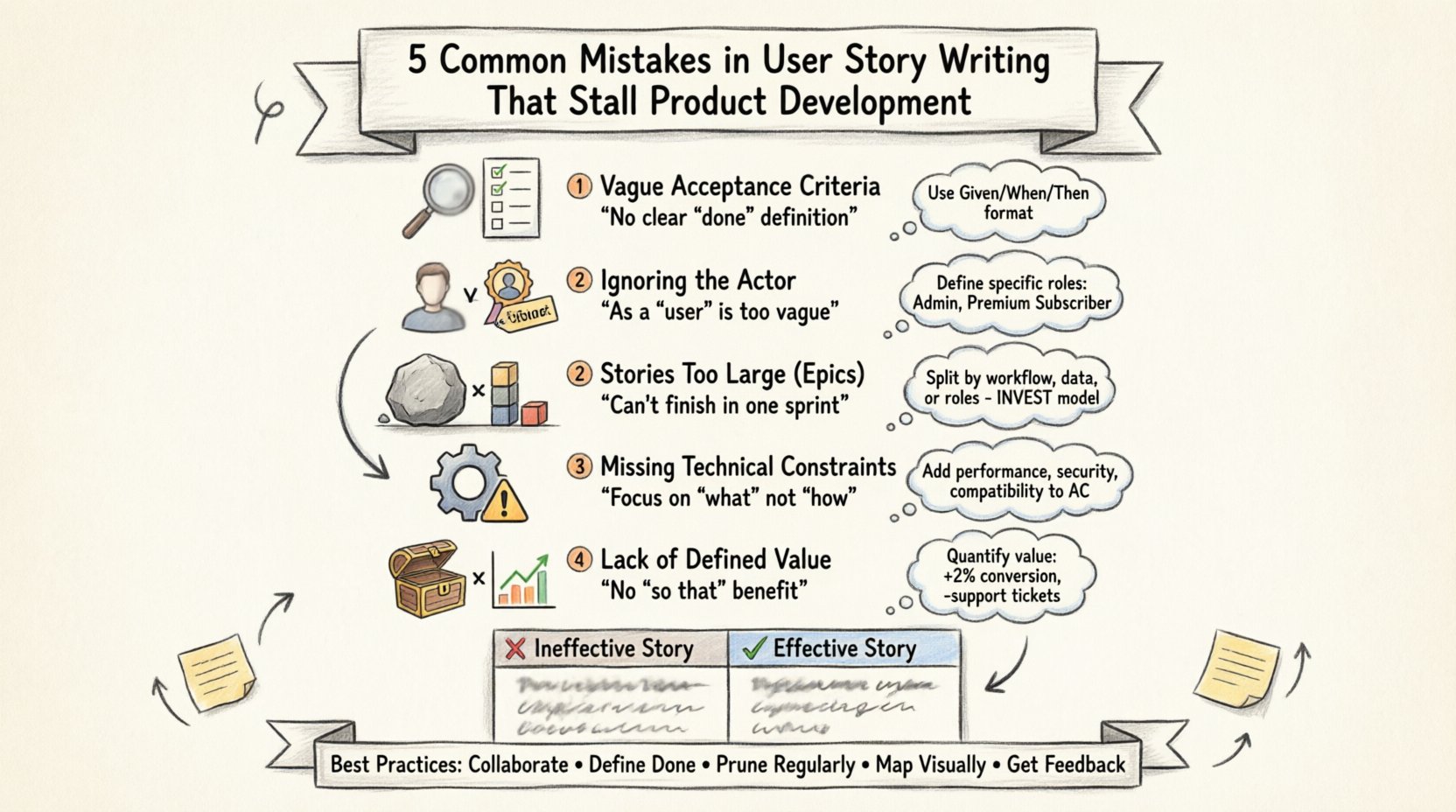
1. Vague Acceptance Criteria 🧐
The Acceptance Criteria (AC) define the boundaries of a user story. They specify the conditions that must be met for a story to be considered complete. Without clear criteria, the definition of “done” becomes subjective. Different team members will interpret the requirement differently, leading to divergent implementations.
The Problem
When acceptance criteria are missing or written as general statements, developers are left guessing. They might build a feature that functions technically but fails to solve the user problem. Conversely, they might over-engineer a solution because they fear missing a hidden requirement.
- Testing Ambiguity: QA engineers cannot create effective test cases without specific conditions.
- Estimation Errors: Developers cannot gauge the effort required if they do not know the scope of validation.
- Scope Creep: As the story progresses, new requirements are added because the original boundaries were not set.
Real-World Consequence
Consider a story regarding a “Login” feature. If the AC simply states “User can log in,” the developer might implement it with email and password. They might not account for password complexity rules, account lockout after failed attempts, or session timeouts. Later, during QA, these requirements surface. The sprint is now compromised, and the feature is not ready for deployment.
The Fix
Adopt a structured format for your criteria. Use Given/When/Then logic to describe scenarios. This format forces the writer to think about triggers and expected outcomes.
- Given: The user is on the login page.
- When: They enter valid credentials and click submit.
- Then: They are redirected to the dashboard within 2 seconds.
This structure removes interpretation. It provides a clear checklist for completion. Every condition must be verifiable.
2. Ignoring the Actor (Who) 🧍
A standard user story template often follows the format: “As a [role], I want [feature], so that [benefit].” While the format is useful, teams frequently skip the role definition or make it too generic. They write “As a user” instead of “As an administrator” or “As a premium subscriber.” This omission strips the story of context.
The Problem
Every role has different permissions, needs, and behaviors. A generic “user” story forces the development team to make assumptions about which user type is being served. This often results in building features that satisfy no one specifically.
- Permission Confusion: Developers may build access controls that are either too restrictive or too open.
- UX Inconsistency: The interface might not align with the specific workflow of the target persona.
- Backlog Noise: Stories become difficult to prioritize because the value proposition is tied to the wrong audience.
Real-World Consequence
Imagine a team building a “Export Data” feature. If the story does not specify the actor, developers might build a simple CSV export for all users. However, only “Power Users” have the need to export large datasets. Regular users only need to view reports. Building the export tool for everyone wastes development time and adds unnecessary complexity to the system for the majority.
The Fix
Define personas clearly in your backlog. Map roles to specific capabilities. Ensure the “As a…” section identifies a specific group with a distinct problem to solve.
| Weak Actor Definition | Strong Actor Definition |
|---|---|
| As a user… | As a Registered Customer… |
| As an admin… | As a System Administrator… |
| As a member… | As a Team Lead… |
Specificity drives relevance. When the team knows exactly who the story serves, they can tailor the solution effectively.
3. Stories That Are Too Large (Epics) 🏗️
Agile methodologies rely on iterative delivery. To deliver iteratively, work must be broken down into manageable units. A common error is treating large epics as single user stories. These oversized stories are often referred to as “thick” or “heavy” stories. They contain too much complexity to be completed within a single sprint.
The Problem
When a story is too big, it cannot be estimated accurately. It cannot be tested thoroughly in a short timeframe. It creates a bottleneck in the sprint cycle. If a story is not finished by the end of the sprint, it blocks the team’s velocity and creates a sense of failure.
- Velocity Volatility: Sprint completion rates drop because stories spill over.
- Refinement Paralysis: Teams spend too much time discussing one massive story instead of moving forward with smaller, incremental wins.
- Feedback Loops: The user does not get value until the very end of the large effort, increasing the risk of building the wrong thing.
Real-World Consequence
Consider a story that says: “As a user, I want to complete the entire onboarding process.” This includes account creation, profile setup, payment entry, tutorial viewing, and first transaction. This is not a story; it is a project. If the team attempts this in one sprint, they will likely fail to meet the deadline. If they fail, the product manager cannot release the feature to the market. The entire sprint goal is jeopardized.
The Fix
Apply the INVEST model criteria. A good story should be Independent, Negotiable, Valuable, Estimable, Small, and Testable. If a story is not small, break it down.
- Split by workflow steps (e.g., Create Account, then Update Profile).
- Split by data complexity (e.g., Save basic info, then Save advanced settings).
- Split by user roles (e.g., Guest checkout, then Logged-in checkout).
Ensure that each story delivers a slice of value on its own. This allows for partial releases and continuous feedback.
4. Missing Technical Constraints ⚙️
Functional requirements describe what the system does. Non-functional requirements describe how the system behaves under specific conditions. Many teams focus exclusively on the “what” and ignore the “how.” This leads to stories that are technically unfeasible or create long-term maintenance issues.
The Problem
Ignoring constraints like performance, security, or compatibility results in technical debt. Developers may implement a feature that works initially but crashes under load or exposes security vulnerabilities. Fixing these issues later is significantly more expensive than planning for them upfront.
- Performance Issues: A feature might work with 10 records but fail with 10,000.
- Security Gaps: Data handling might not comply with privacy standards.
- Integration Failures: The feature might not communicate correctly with existing services.
Real-World Consequence
A team builds a “Search Function” without specifying performance constraints. The developer creates a solution that works for small datasets. When the product goes live, the database queries slow down the entire application. The team must halt feature development to refactor the search engine. This stalls the roadmap for months.
The Fix
Include technical constraints directly in the story or as a linked dependency. Do not hide them in a separate technical document.
- Performance: “The page must load in under 3 seconds.”
- Security: “Data must be encrypted in transit using TLS 1.2.”
- Compatibility: “Must support Chrome, Firefox, and Safari latest versions.”
Make these constraints part of the acceptance criteria. If they are not met, the story is not done.
5. Lack of Defined Value or Priority 📉
The final mistake is writing stories that lack a clear business value. A story that describes a feature without explaining why it is being built is difficult to prioritize. Stakeholders may request features that look good on paper but do not move the needle for the business or the user.
The Problem
When value is missing, the backlog becomes a graveyard of ideas. The team spends time building things that do not matter. Product managers struggle to decide which story to tackle next because every story appears equally important or equally unimportant.
- Resource Wastage: Engineering time is spent on low-impact tasks.
- Stakeholder Frustration: Business leaders do not see ROI on the development work.
- Team Morale: Developers feel demotivated when they build features that no one uses.
Real-World Consequence
A team builds a “Dark Mode” toggle for a productivity tool. While technically interesting, the data shows that 95% of users do not access the app at night. The feature takes two weeks to build. It provides no measurable improvement in retention or engagement. The opportunity cost of those two weeks was the loss of a feature that would have reduced churn by 5%.
The Fix
Every story must answer the “So That” part of the template. If you cannot articulate the benefit, the story should be revisited or discarded.
- Quantify Value: “Increase conversion rate by 2%.”
- Reduce Effort: “Decrease support ticket volume regarding login issues.”
- Compliance: “Ensure adherence to GDPR regulations.”
Use a scoring model, such as RICE (Reach, Impact, Confidence, Effort), to prioritize stories objectively. Ensure the value is understood by the entire team during refinement sessions.
Comparison of Effective vs. Ineffective Stories 📊
To summarize the distinctions discussed above, review the following table. It contrasts common errors with corrected versions.
| Feature | Ineffective Story (Problem) | Effective Story (Solution) |
|---|---|---|
| Checkout | As a user, I want to buy items so I can get them. | As a Guest User, I want to pay via PayPal so I can complete purchase without creating an account. |
| Search | As a user, I want search functionality. | As a Buyer, I want to filter results by price so I can find products within my budget quickly. |
| Notifications | As a user, I want email notifications. | As a Account Holder, I want to receive an email confirmation upon order status change so I know my shipment is on the way. |
| Profile | As a user, I want to edit my profile. | As a Manager, I want to update my team’s access permissions so I can ensure only authorized personnel view sensitive data. |
Best Practices for Backlog Health 🛡️
Beyond avoiding these five mistakes, maintaining a healthy backlog requires ongoing discipline. Here are additional strategies to ensure your user stories remain effective throughout the product lifecycle.
1. Collaborative Refinement
Do not write stories in isolation. Involve developers, testers, and designers in the refinement process. They will spot missing constraints and vague criteria that a product manager might miss. This collaboration reduces rework and builds shared ownership.
2. Definition of Done (DoD)
Establish a clear Definition of Done for the entire team. This applies to every story. It should include code review completion, passing automated tests, documentation updates, and deployment to the staging environment. Stories cannot be marked complete without meeting the DoD.
3. Regular Pruning
Backlogs tend to grow indefinitely. Review them regularly. Remove stories that are no longer relevant. Deprioritize items that do not align with current goals. Keep the backlog focused on high-value work to prevent decision fatigue.
4. Visual Mapping
Use user story mapping to visualize the flow of features. This helps identify gaps in the journey and ensures that stories are not written in a vacuum. It provides a holistic view of the product experience.
5. Continuous Feedback
After a sprint, review the quality of the stories. Did the team struggle? Was there rework? Use this data to improve future writing. Treat the process of writing stories as a skill that requires practice and improvement.
Final Thoughts on Clarity and Flow 💡
Product development is a complex endeavor. It requires alignment across multiple disciplines. The user story is the tool that facilitates this alignment. When it is written poorly, the tool fails, and the process breaks down. By addressing the five common mistakes outlined in this guide, teams can restore clarity to their workflow.
Focusing on specific actors, precise acceptance criteria, manageable story sizes, technical constraints, and clear value ensures that every line of code serves a purpose. It shifts the focus from mere completion to meaningful delivery. This shift is what separates stagnant projects from those that achieve consistent momentum.
Invest time in the writing process. It pays dividends in execution. A well-crafted story is not just a task description; it is a promise of value delivered to the end user. Honor that promise by ensuring the foundation is solid.
Start reviewing your current backlog today. Identify the stories that suffer from these common pitfalls. Apply the corrective measures. Watch as your velocity increases and your product quality improves. The path to efficient development begins with clear communication.