


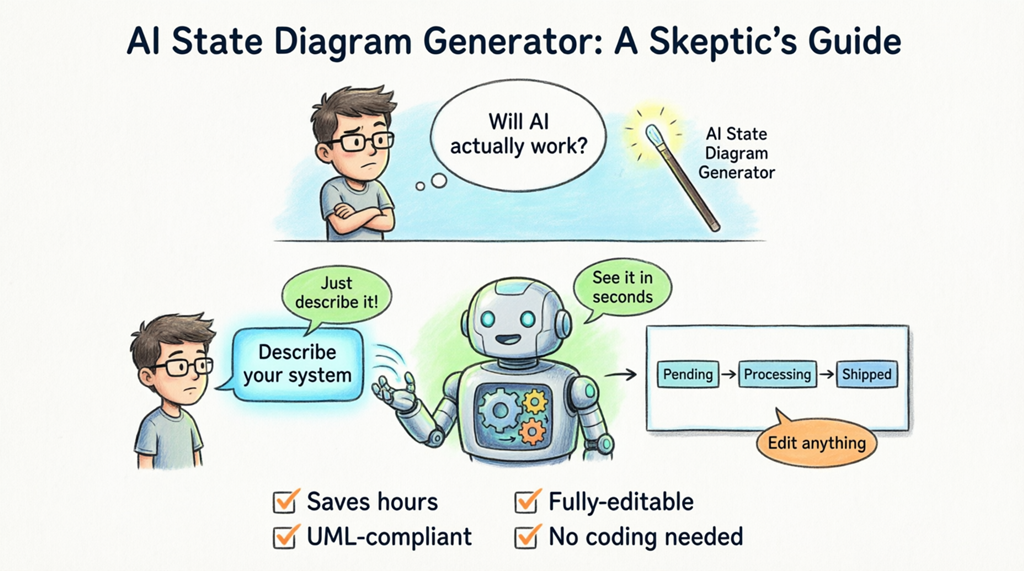
If you’re nodding along, you’re not alone. Many professionals hesitate to embrace AI-powered tools. But what if you could see, step by step, exactly how an online AI state diagram maker transforms simple text into a professional UML diagram? No magic, no mystery—just practical assistance that actually works.
Why State Diagrams Are Worth the Effort (Even If You’re Skeptical About AI)
Before we dive into the AI part, let’s acknowledge why state diagrams matter in the first place. Whether you’re modeling an e-commerce order system, a customer support ticket workflow, or any process with distinct stages, state diagrams help you visualize:
- The different states an object can be in
- What triggers transitions between states
- Conditions that must be met for changes to occur
- The complete lifecycle of your system components
Traditionally, creating these diagrams meant manually placing each state, drawing arrows, labeling transitions, and ensuring everything followed UML standards. It’s precise work that can take hours. This is where an AI state machine diagram tool changes the game—not by replacing your expertise, but by handling the tedious parts while you focus on the logic.
How AI Diagram Generation Actually Works (No Black Box Here)
Let’s pull back the curtain. When you use an AI-powered UML diagram generator, here’s what’s really happening:
Step 1: You describe your system in plain English—just like explaining it to a colleague.
Step 2: The AI analyzes your description, identifying states, transitions, and events using natural language processing.
Step 3: It applies UML rules and best practices to structure your diagram correctly.
Step 4: You get a complete, editable diagram that you can refine, adjust, or expand.
The key insight? The AI isn’t guessing or creating randomly. It’s following established modeling patterns and UML semantics. You remain in control, and the tool simply accelerates the mechanical aspects of diagram creation.
Seeing Is Believing: Real Examples from Real Users
Let’s look at actual results. The first example shows what happens when someone asks an online state diagram creator to model a support ticket system:
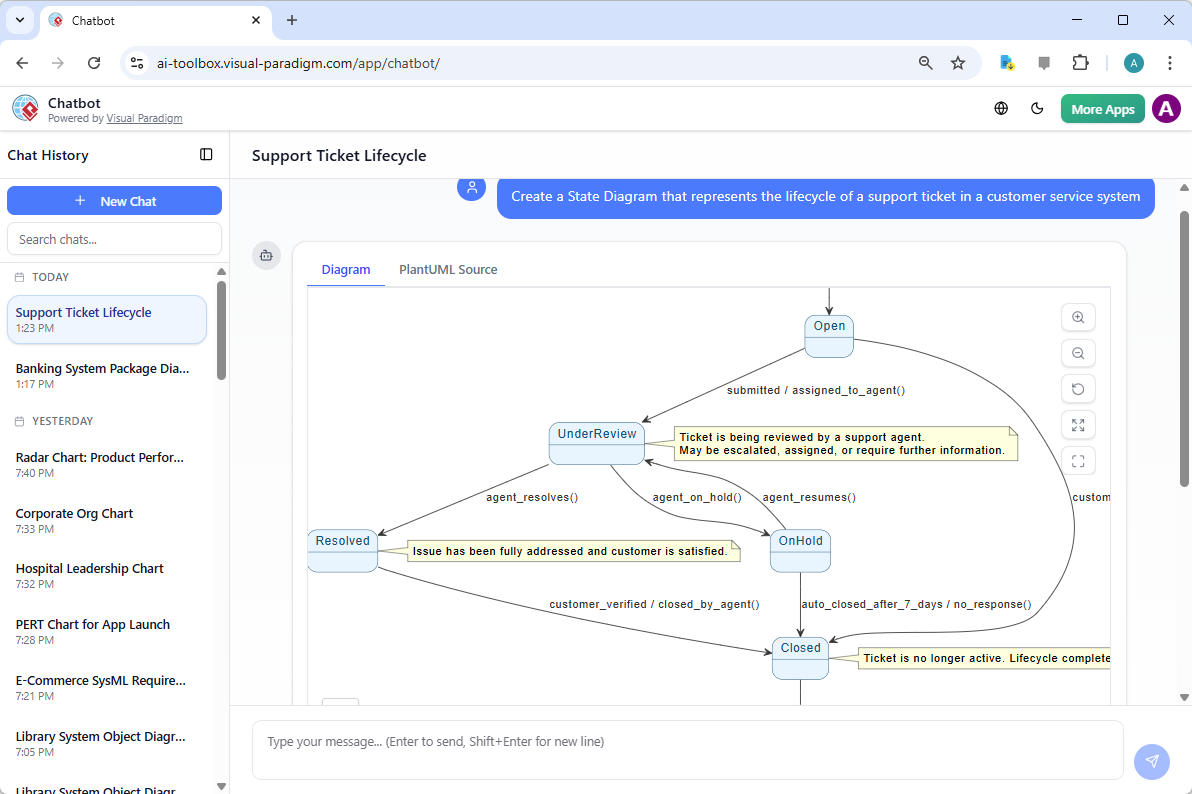
Notice what happened here. The user simply typed: “Create a State Diagram that represents the lifecycle of a support ticket in a customer service system.” The AI Chatbot didn’t just create boxes and arrows—it understood the context and generated:
- Relevant states: Open, UnderReview, Resolved, OnHold, and Closed
- Meaningful transitions with proper event triggers
- Helpful annotations explaining each state
- Correct UML notation throughout
This wasn’t a generic template. The AI interpreted the specific domain (customer service) and applied appropriate logic. That’s the difference between a basic diagram maker and an intelligent AI modeling tool.
Now, let’s see the desktop experience. Some professionals prefer working in a full-featured application rather than a chat interface. Here’s how the Visual Paradigm Desktop AI diagram generation feature works:
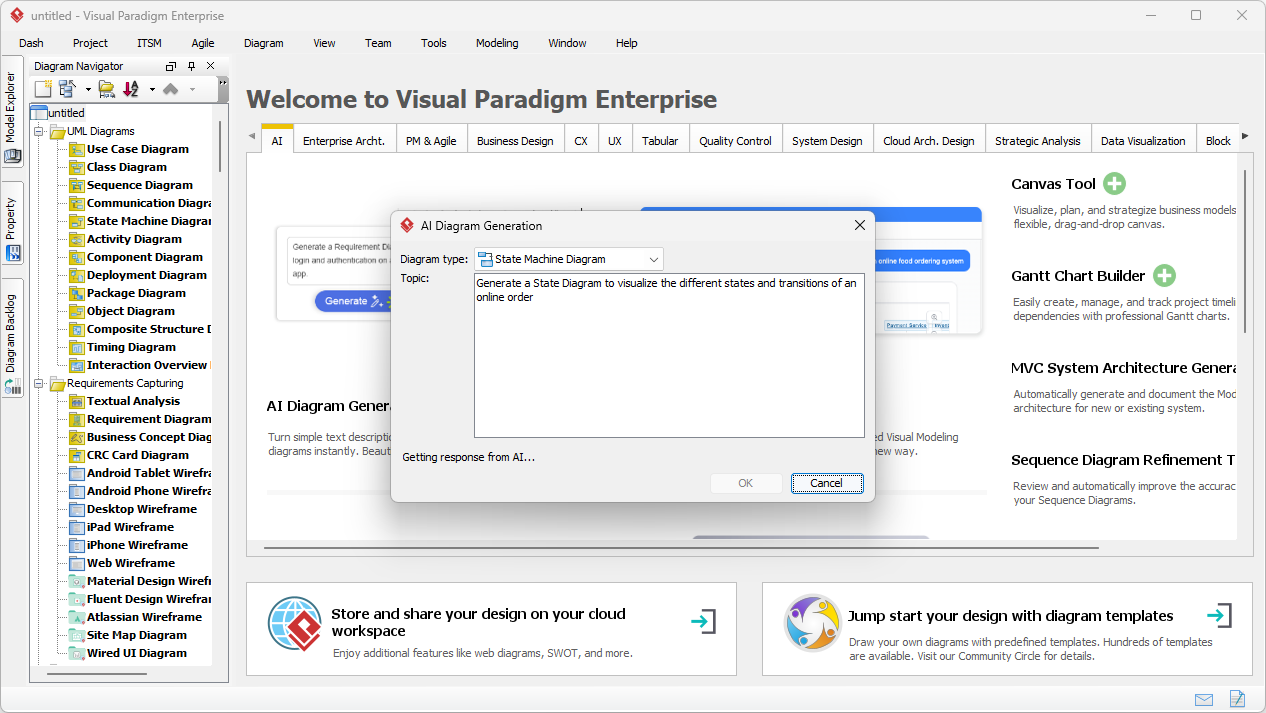
The interface is straightforward. You select “State Machine Diagram” as your type, enter your description (“Generate a State Diagram to visualize the different states and transitions of an online order”), and the automated state diagram generator gets to work. No complex settings, no steep learning curve—just describe what you need.
And here’s the result:
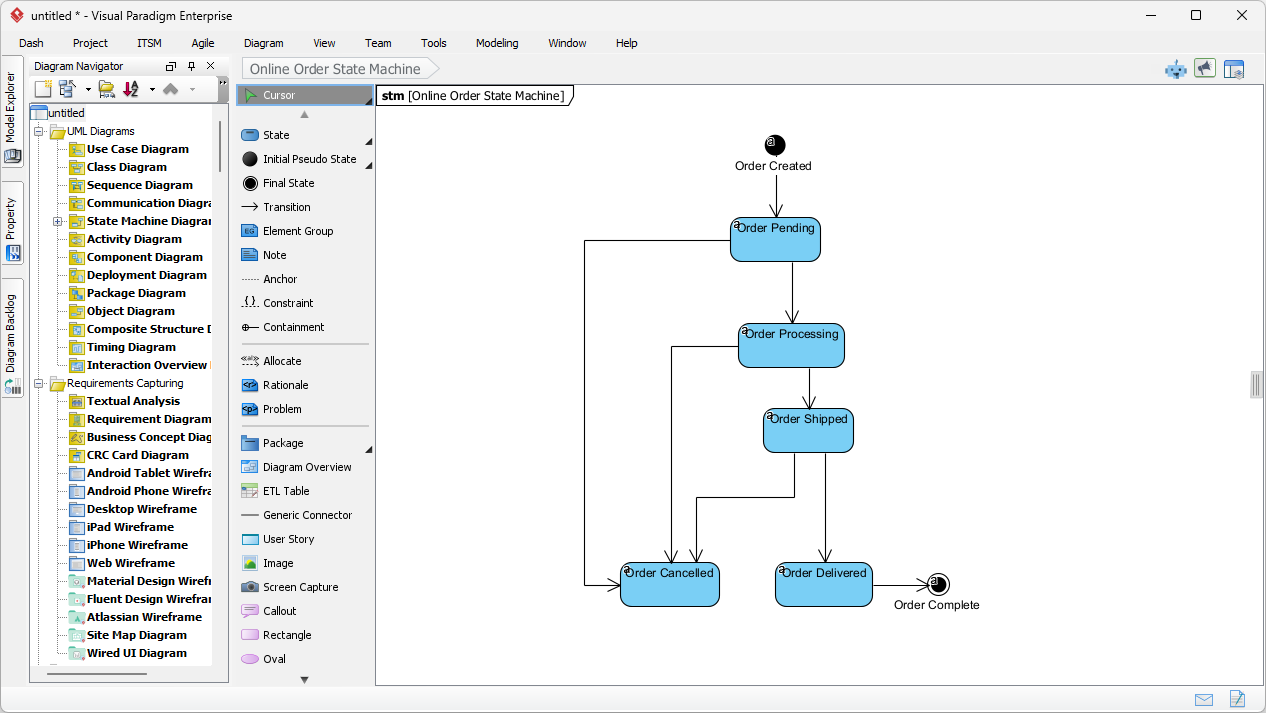
The AI state machine tool produced a complete “Online Order State Machine” with:
- Clear initial and final states
- Logical progression from “Order Created” through “Order Pending,” “Order Shipped,” “Order Delivered,” to “Order Complete”
- Professional formatting ready for presentations or documentation
- Fully editable elements for customization
The entire process took seconds. But here’s what matters most: the diagram is correct, follows UML standards, and captures the business logic accurately.
Addressing Common Concerns About AI Diagram Tools
If you’re still hesitant, let’s tackle the objections head-on:
“Will the AI make mistakes?”
Yes, it might—just like any tool. But here’s the difference: when you create a diagram manually, mistakes come from fatigue, oversight, or rushing. With an AI UML diagram generator, you get a solid foundation that follows proper notation. You then review and refine it, catching any issues quickly because you’re editing rather than building from scratch. It’s faster to correct a 90% complete diagram than to create one from zero.
“Will I lose control over my design?”
Absolutely not. The diagrams generated by Visual Paradigm AI are fully editable native diagrams. You can:
- Move states around
- Add or remove transitions
- Modify guard conditions
- Add substates for complex behaviors
- Link to other diagrams in your project
The AI gives you a starting point, not a finished product you’re stuck with. Think of it as having a junior modeler draft the initial version while you provide the expertise and final approval.
“Is this just for simple diagrams?”
Not at all. While the examples shown are straightforward, AI-powered visual modeling software can handle complex scenarios. The key is that you can iterate. Start with a basic description, get your initial diagram, then refine it by adding more details or requesting specific modifications. The online diagram generator learns from context and can build increasingly sophisticated models.
“What if I need diagrams beyond state machines?”
Visual Paradigm supports over 40 diagram types. Whether you need SysML for systems engineering, C4 for software architecture, ArchiMate for enterprise architecture, or business tools like SWOT and PESTLE analysis, the same AI diagram maker approach applies. One tool, multiple diagram types, consistent AI assistance.
Tangible Benefits for Skeptics Who Want Results
Let’s talk about what you actually gain by trying an automated UML tool:
Time Savings You Can Measure
Manual state diagram creation involves:
- Setting up the canvas
- Creating each state shape
- Drawing transition arrows
- Labeling events and conditions
- Checking UML compliance
- Formatting for readability
With an AI state diagram generator, you skip directly to reviewing and refining. What used to take 2-3 hours now takes 10-15 minutes. That’s time you can spend on actual design thinking instead of mechanical drawing.
Consistency Across Your Team
When multiple people create diagrams manually, you get variations in notation, labeling styles, and formatting. An online AI diagram tool applies consistent rules every time. Your entire team produces diagrams that look professional and follow the same standards, making collaboration smoother.
Better Documentation, Faster
The AI doesn’t just create shapes—it can add explanatory notes, like “Ticket is being reviewed by a support agent” in the examples above. This makes your diagrams more useful for stakeholders who might not be modeling experts. Your AI-powered modeling software helps bridge the gap between technical and non-technical audiences.
Rapid Exploration of Alternatives
Want to see how a different workflow would look? With manual diagramming, creating alternatives is tedious. With an AI state machine diagram maker, you can quickly generate multiple versions, compare them, and choose the best approach. This encourages experimentation and better design decisions.
Why Visual Paradigm Stands Out Among AI Diagram Tools
Not all AI diagram generators are created equal. Here’s what makes Visual Paradigm’s approach particularly effective for skeptics:
It’s Built on Solid Foundations: Visual Paradigm has decades of experience in visual modeling. The AI isn’t a standalone gimmick—it’s integrated into a mature, professional toolset. You’re not betting on an unproven startup; you’re using AI to enhance industry-standard software.
No Vendor Lock-in: The diagrams you create are standard UML. You own your work, and it’s compatible with other tools if needed. The AI UML tool assists your work without trapping you in a proprietary format.
Seamless Integration: Whether you use the web-based AI Chatbot for quick diagrams or the desktop application for complex projects, your work flows together. Start with AI generation, continue with manual refinement, export when needed—it’s all connected.
Continuous Improvement: The AI learns and improves. As more professionals use the automated state diagram creator, it gets better at understanding different domains and use cases. You benefit from collective expertise without extra effort.
Real-World Applications That Prove the Concept
Still not convinced? Consider these practical scenarios where an online state diagram generator delivers immediate value:
Scenario 1: The Tight Deadline
Your manager asks for a state diagram of the new payment processing system by tomorrow morning. It’s 4 PM. Instead of panicking, you open the AI diagram maker, describe the workflow, and have a professional diagram in 5 minutes. You spend the next hour refining it. Done.
Scenario 2: The Complex Legacy System
You need to document a 10-year-old system with intricate state logic. Manually mapping this would take days. With an AI state machine tool, you describe each component’s behavior, generate individual diagrams, and assemble the complete picture in hours instead of weeks.
Scenario 3: The Cross-Functional Meeting
You’re in a meeting with developers, business analysts, and stakeholders. Someone suggests a workflow change. Instead of saying “I’ll draw that later,” you use the AI-powered visual modeling software on your laptop, generate the updated diagram in real-time, and get immediate feedback. Decisions happen faster.
Getting Started: A Low-Risk Approach
If you’re ready to test the waters, here’s how to start without commitment:
Try the Free Online Option First: Visit the Visual Paradigm AI Chatbot and experiment with simple descriptions. No installation, no cost, no risk. See how the online AI state diagram generator interprets your requests.
Start Small: Don’t try to model your entire enterprise system on day one. Begin with a simple workflow you know well. Compare the AI-generated diagram with what you would have drawn manually. You’ll likely find it’s faster and just as accurate.
Iterate and Learn: Each time you use the AI diagram generation feature, you’ll get better at describing what you need. The tool adapts to your style, and you learn its capabilities. It’s a skill that compounds over time.
Explore Desktop Features: Once you’re comfortable, download Visual Paradigm Desktop to access the full AI diagram maker capabilities. The desktop version offers more control, advanced editing, and integration with your existing projects.
The Bottom Line: AI as Your Assistant, Not Your Replacement
Here’s the truth that skeptics need to hear: AI diagram tools don’t replace your expertise. They amplify it.
You still need to:
- Understand the system you’re modeling
- Know what states and transitions matter
- Validate the logic and completeness
- Make design decisions
- Communicate with stakeholders
The AI state diagram generator simply handles the mechanical translation of your knowledge into visual form. It’s the difference between writing a letter by hand versus using a word processor. The content, the ideas, the decisions—they’re all yours. The tool just makes the process faster and cleaner.
For developers, architects, and business analysts who’ve been hesitant about AI, the message is clear: you don’t have to believe in AI magic. You just need to see that it works. And when you see a professional UML diagram appear in seconds from a simple text description, skepticism turns into practical adoption.
Take the Next Step
Ready to see for yourself? The best proof is your own experience. Head to the Visual Paradigm AI Chatbot right now. Describe a simple system you’re working on. Watch as the online state machine diagram maker creates your diagram in real-time. Then refine it, adjust it, make it yours.
You might be surprised at how quickly “I’m skeptical about AI” becomes “How did I work without this?”
Further Learning Resources
Want to dive deeper? These resources will help you master both state diagrams and AI-powered modeling:
- Understanding State Diagrams in UML: Master the fundamentals of state diagram components and their role in software engineering.
- What is a State Machine Diagram? Comprehensive Guide: Deep dive into state machine applications for real-world system design.
- Step-by-Step State Machine Diagram Tutorial: Hands-on guide from basic concepts to advanced modeling with AI assistance.
- State Machine Diagram User Guide: Official manual for creating and managing state transitions in Visual Paradigm.
- Free State Machine Diagram Templates: Ready-to-use templates for efficient behavioral modeling.
- Definitive Guide to UML State Machine Diagrams with AI: Learn how AI-enhanced tools improve architectural design and object behavior modeling.
- Mastering State Diagrams with AI: Automated Toll Systems: Real-world case study of AI-enhanced diagrams in specialized system software.
- Generating Source Code from State Machines: Translate your state diagrams directly into functional source code.
- State Machine vs Activity Diagram: Key Differences: Understand when to use each diagram type for behavior modeling.
- Comprehensive Guide to the 3D Printer State Machine: Explore state machine concepts through practical 3D printing system examples.
Remember: the goal isn’t to trust AI blindly. It’s to use smart tools that make your work easier, faster, and better. The AI state diagram generator is proof that sometimes, the skeptics become the biggest advocates—
Related posts:
 Mastering UML for Exams and Projects: A Step-by-Step AI Assistant Guide
AI-Powered ArchiMate Diagrams for Beginners: A Step-by-Step Guide to Smarter Architecture Modeling with Visual Paradigm
From Cloud Diagrams to Live Documentation: My Hands-On Review of Visual Paradigm Online’s OpenDocs Integration
From Desktop to Documentation: A Hands-On Review of Visual Paradigm’s OpenDocs Integration
Mastering UML for Exams and Projects: A Step-by-Step AI Assistant Guide
AI-Powered ArchiMate Diagrams for Beginners: A Step-by-Step Guide to Smarter Architecture Modeling with Visual Paradigm
From Cloud Diagrams to Live Documentation: My Hands-On Review of Visual Paradigm Online’s OpenDocs Integration
From Desktop to Documentation: A Hands-On Review of Visual Paradigm’s OpenDocs Integration