Mastering the VP Unified Platform: The Central Hub for Modeling, AI, and Documentation
The landscape of software engineering and system architecture has evolved from isolated tool usage to interconnected ecosystems. At the forefront of this evolution is the Visual Paradigm Unified Platform. This system represents a significant architectural shift in how professionals approach the Software Development Life Cycle (SDLC). Rather than viewing modeling, web apps, and documentation as separate silos, the Unified Platform acts as the central nervous system that orchestrates these elements.
The Core Architecture: An Integration Layer
At the heart of this ecosystem is the concept of the Unified Platform. It is crucial to understand that this is not merely a login portal; it is an organizing and integration layer. It serves as a central workspace that bridges the gap between the robust capabilities of the Visual Paradigm Desktop modeling environment and the accessibility of VP Online web applications.
The primary architectural goal is to solve the “fragmentation problem.” In traditional workflows, a model created on a desktop might be disconnected from the web-based collaboration tools or the AI-driven documentation pipelines. The Unified Platform eliminates this friction by making work created across these tools easier to find, launch, and carry into other workflows.
Deconstructing the Platform Ecosystem
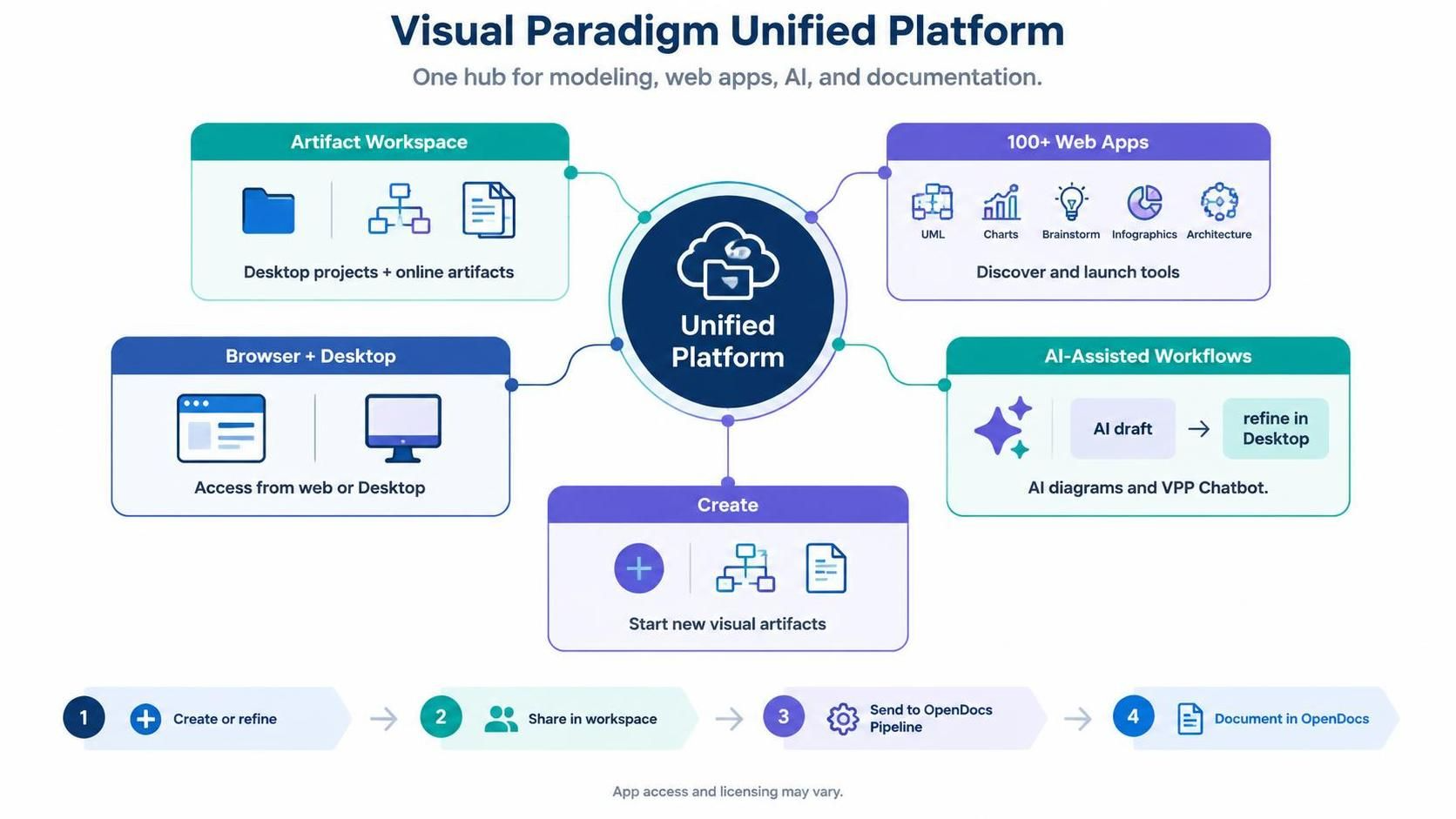
To fully grasp the power of this system, we must examine its five core pillars. Each component connects to the central hub, facilitating a seamless flow of data and artifacts.
1. The Artifact Workspace
The workspace is the repository of truth. It aggregates Desktop projects and online artifacts into a single, unified view. This ensures that whether a model was created in a local desktop environment or a browser-based app, it resides in a consistent location for retrieval and management.
2. The 100+ Web Apps Suite
The platform provides immediate access to over 100 specialized web applications. This suite includes:
- UML Diagrams: For structural and behavioral modeling.
- Charts: For data visualization and analysis.
- Brainstorming Tools: For collaborative ideation.
- Infographics: For high-level communication.
- Architecture Tools: For system design.
This library allows users to “Discover and launch tools” without needing to install separate software packages for every specific task.
3. Browser + Desktop Access
Flexibility is a key architectural constraint in modern engineering. The platform supports a hybrid access model, allowing users to switch contexts fluidly. You can start a session in a browser, move to the desktop for heavy processing, and return to the web for sharing, all while maintaining state.
4. AI-Assisted Workflows
This is the cutting-edge component of the architecture. The platform integrates an AI Ecosystem directly into the workflow. It enables “AI draft” capabilities, where models can be generated or suggested by AI, and then immediately refined within the Desktop environment. This creates a loop of AI draft → Refine in Desktop.
5. The Create Module
The entry point for new work is the “Create” module. This allows users to start new visual artifacts instantly. It acts as the trigger that initiates the creation of a new project, which is then immediately registered in the Artifact Workspace.
The OpenDocs Pipeline: A 4-Step Workflow
The most critical application of the Unified Platform is the streamlined workflow for documentation and sharing. This process is visualized as a linear pipeline, often referred to as the OpenDocs Pipeline. It dictates the lifecycle of an artifact from creation to distribution.
- Step 1: Create or Refine
Using the “Create” module or the Desktop environment, the engineer builds or updates the model. This is the generation phase.
- Step 2: Share in Workspace
Once the artifact is ready, it is committed to the Unified Platform’s workspace. This makes it discoverable by team members and other tools.
- Step 3: Send to OpenDocs Pipeline
The artifact is routed to the documentation pipeline. This is the automation layer where the system prepares the content for publication.
- Step 4: Document in OpenDocs
The final step involves generating the official documentation. The system renders the models and data into a cohesive document format, completing the lifecycle.
Conclusion
The Visual Paradigm Unified Platform is more than a tool; it is a methodology for managing complexity. By centralizing access, integrating AI, and automating the documentation pipeline, it allows technical teams to focus on architecture and logic rather than tool management and file hand-offs.