AI-Assisted Diagramming with VPasCode: 3 Practical Use Cases
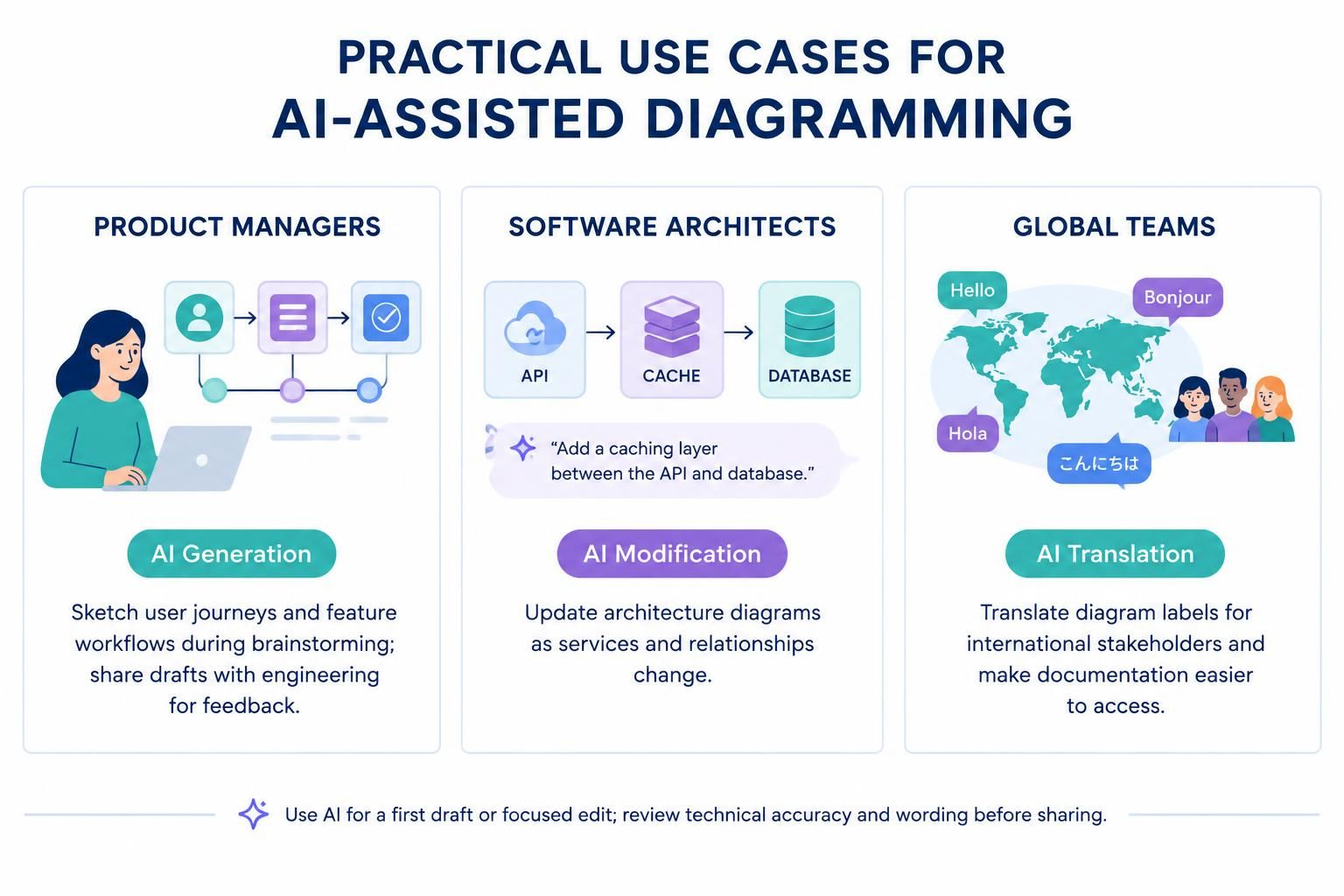
In the rapidly evolving landscape of software development, the ability to communicate complex system architectures efficiently is just as critical as the code itself. Modern tools like Visual Paradigm VPasCode have integrated Embedded AI to bridge the gap between human intent and technical diagramming. This tutorial explores three distinct practical use cases: AI Generation, AI Modification, and AI Translation, demonstrating how these features streamline workflows for Product Managers, Software Architects, and Global Teams.
1. AI Generation: Rapid Prototyping for Product Managers
Product Managers often find themselves in the “idea phase,” where the focus is on user flow and feature logic rather than strict syntax. Traditionally, creating a user journey map or a feature workflow required switching between whiteboard tools and formal diagramming software.
With AI Generation, this friction is removed. Instead of manually dragging and dropping boxes, you can describe the desired flow in natural language. The AI interprets the context and generates the corresponding diagram structure immediately.
Step-by-Step Workflow:
- Define the User Journey: Identify the starting point (e.g., “User Login”) and the end goal (e.g., “Order Confirmation”).
- Input to AI: Describe the process: “Sketch a user journey for a shopping app where a user logs in, browses items, adds to cart, and checks out.”
- Review and Refine: The AI generates a draft workflow. This serves as a conversation starter with engineering teams.
- Feedback Loop: Share the draft. Engineers can validate the feasibility of the steps before the architecture is locked in.
Example Prompt Logic:
AI: "Generate a user journey map for an e-commerce checkout process. Include steps for: Login, Search Product, Add to Cart, and Payment."2. AI Modification: Dynamic Architecture for Software Architects
System architectures are living documents. Microservices are added, legacy components are retired, and caching layers are introduced. Updating a diagram to reflect these changes manually can be tedious and error-prone, often leading to outdated documentation.
AI Modification allows you to treat your diagram as a dynamic canvas. You can issue direct commands to insert, remove, or alter components without needing to know the underlying syntax (like PlantUML or Mermaid).
Case Study: Adding a Caching Layer
Consider a standard architecture where an API connects directly to a Database. As traffic increases, you realize a bottleneck exists. Instead of redrawing the entire flow, you can instruct the AI to modify the specific interaction.
The Modification Command:
Instruction: "Add a new caching layer between the API and the database."The AI will intelligently insert the CACHE node, adjust the connector direction (API → Cache → Database), and update the relationship labels to reflect the new data flow.
3. AI Translation: Global Collaboration
Software development is increasingly global. A system designed in one country may need to be explained to stakeholders in another. Language barriers can lead to misunderstandings regarding technical specifications.
AI Translation ensures that your diagrams are accessible to everyone. This feature allows you to translate diagram labels, notes, and descriptions into various languages while maintaining the visual integrity of the diagram.
Benefits for Global Teams:
- Accessibility: Make technical documentation readable for team members regardless of their primary language.
- Localization: Prepare presentation-ready diagrams for international clients instantly.
- Consistency: Ensure that key technical terms are translated consistently across the entire project documentation.
Translation Workflow:
- Select the text elements within your diagram (e.g., “Database,” “API”).
- Invoke the AI Translation tool.
- Choose the target language (e.g., Spanish, French, Japanese).
- The AI rewrites the labels while preserving the layout and connector logic.
Conclusion: The Human-in-the-Loop Approach
While AI tools like VPasCode significantly accelerate the diagramming process, the role of the human expert remains central. AI is excellent for generating first drafts, performing focused edits, and breaking language barriers. However, final technical accuracy and wording should always be reviewed by a human expert before sharing with stakeholders.
By integrating Generation, Modification, and Translation into your workflow, you transform diagramming from a static documentation task into a dynamic, collaborative engine for software design.