
VP OpenDocs: Mastering Tabbed Folders for Agile Documentation Architecture
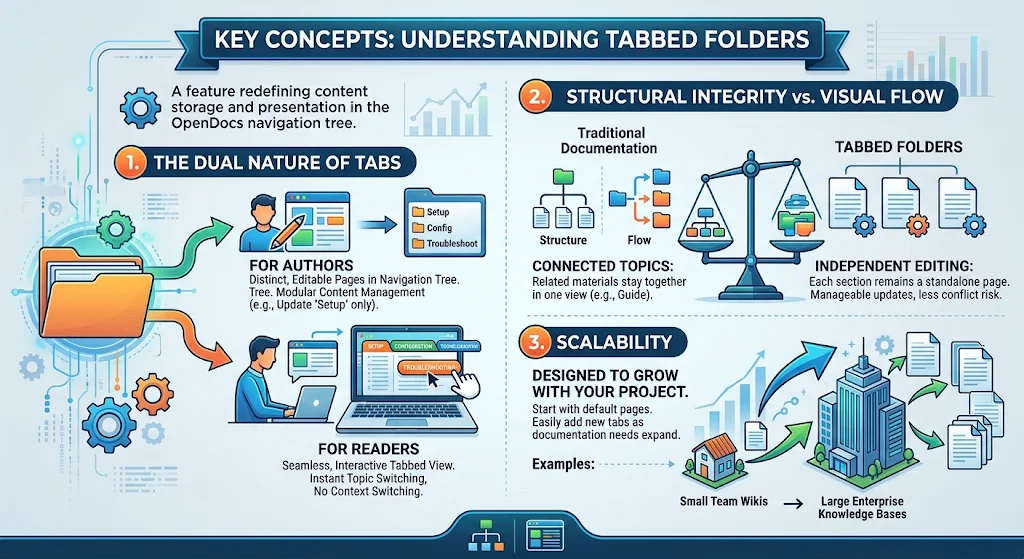
In the rapidly evolving landscape of Agile development, documentation is no longer a static deliverable but a “living” asset that requires constant iteration and collaboration. Visual Paradigm OpenDocs introduces a powerful architectural pattern known as Tabbed Folders. This feature fundamentally redefines how content is stored versus how it is presented to the user.
As a technical tutor, I will guide you through the structural logic of Tabbed Folders, explaining why this hybrid approach solves the classic trade-off between document structure and user experience.
1. The Dual Nature of Tabs: Bridging Storage and Presentation
At the core of OpenDocs’ architecture is the concept of a Tabbed Folder. This is a specialized container within the navigation tree that functions differently depending on your role within the system. It creates a distinct separation between the backend structure and the frontend experience.
For Authors: Modular Storage
From the perspective of the Content Author, a Tabbed Folder is not a single monolithic file. Instead, it acts as a logical grouping of distinct, editable pages within the page tree.
- Independence: Each tab corresponds to a unique page. You can update the “Setup” section without touching the “Configuration” section.
- Version Control: Because the content is modular, you can maintain version history for specific sections without cluttering the entire document.
For Readers: Seamless Experience
For the end-user or developer consuming the documentation, the distinction between separate files is invisible. The system renders the content as a seamless, interactive tabbed interface.
- Context Retention: Users can switch between topics instantly without navigating away from the current page context.
- Reduced Latency: There is no need for the browser to reload or navigate to a new URL for every new piece of information.
2. Structural Integrity vs. Visual Flow
Traditional documentation architectures often force a binary choice: Structure or Flow.
- The “One Page” Approach: Keeps content flowing smoothly but creates massive, unmanageable files that are difficult to version or edit.
- The “Many Pages” Approach: Offers excellent structure and modularity but breaks the reading flow, forcing users to click back and forth between multiple browser tabs.
Tabbed Folders offer the middle ground:
Connected Topics
Related materials, such as Setup, Configuration, and Troubleshooting, are grouped into a single view. This maintains the logical flow required for complex guides.
Independent Editing
Under the hood, each section remains a standalone page. This ensures that updates are manageable and reduces the risk of editing conflicts when multiple team members are working on the same documentation set.
3. Scalability: From Wiki to Enterprise
The architecture of Tabbed Folders is designed to grow with your project. They start with a default set of pages but allow for the dynamic addition of new tabs as documentation needs expand.
- Small Team Wikis: Ideal for quick start guides and project-specific documentation.
- Large Enterprise Knowledge Bases: Capable of handling extensive, multi-section manuals without performance degradation.
Best Practices for Agile Teams
To maximize the efficiency of Visual Paradigm OpenDocs with Tabbed Structures, consider the following architectural patterns:
- Logical Grouping: Do not group unrelated topics. A Tabbed Folder should represent a single “Guide” or “Module.”
- Consistent Naming: Ensure tab names are concise and consistent across the navigation tree to aid discoverability.
- Modular Updates: Leverage the independence of tabs to allow different SMEs (Subject Matter Experts) to edit their respective sections without blocking others.