
Mastering Cross-Functional BPMN Modeling with VPasCode: The Purchase Requisition Blueprint
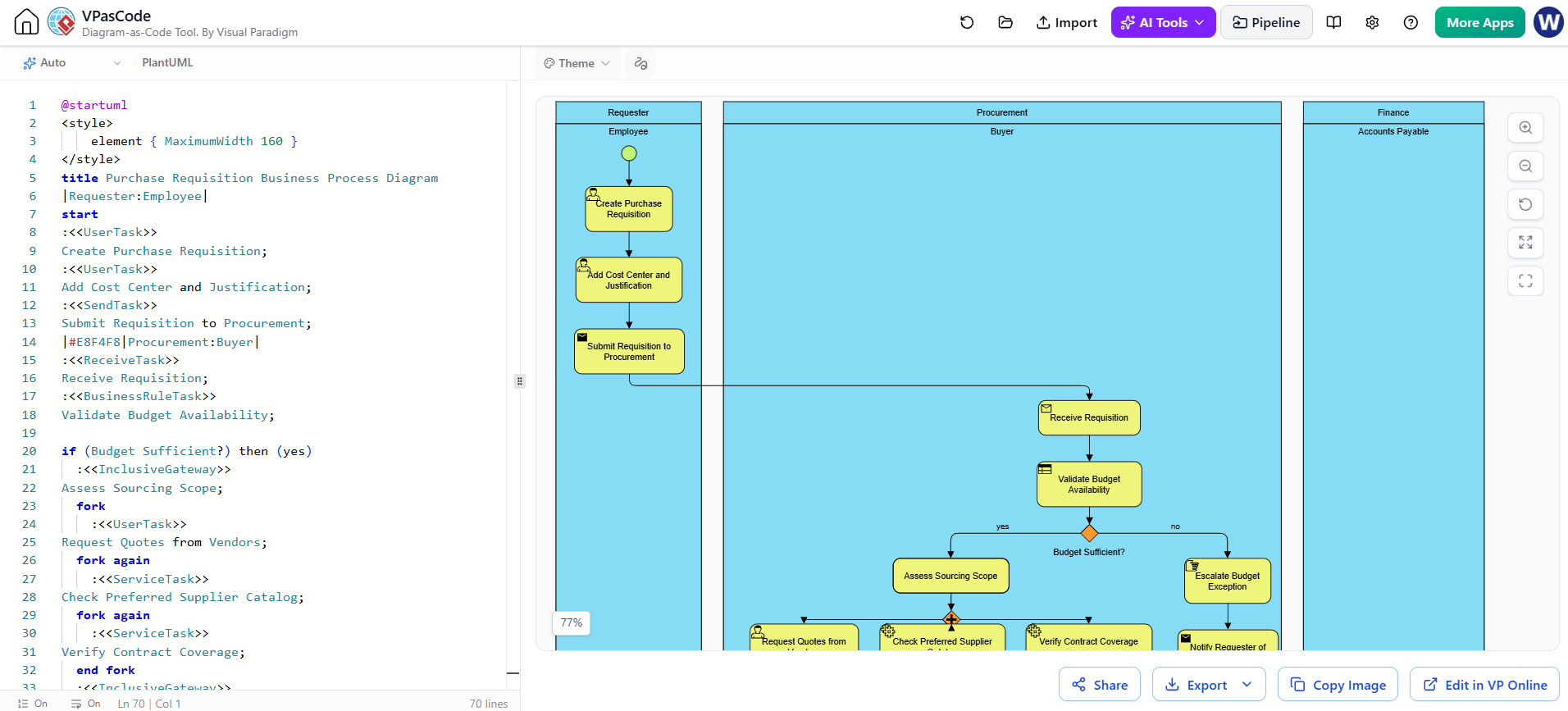
In the realm of Business Process Model and Notation (BPMN), clarity is king. When complex workflows span multiple departments, the challenge shifts from simply “drawing” a process to architecting a system that clearly delineates responsibility, flow, and logic. This tutorial explores the architecture of a sophisticated Purchase Requisition Process, utilizing the power of VPasCode to generate a multi-pool, multi-lane diagram. We will deconstruct how this system bridges the gap between an initiating Employee, the Procurement department, and Finance, utilizing advanced gateway logic and error handling.
The Architecture of VPasCode and BPMN
VPasCode represents a paradigm shift in process modeling. Instead of manually dragging and dropping shapes onto a canvas, developers and analysts use a text-based, code-driven approach similar to programming. This allows for precise control over logic, easy version control, and rapid iteration.
The diagram provided illustrates a classic “Swimlane” or “Pool” architecture. In BPMN terms, a Pool represents a major participant in the process (e.g., a specific organization or department), while Lanes break down the pool into specific roles. The diagram at hand features three distinct pools:
- Requester (Employee): The initiator of the workflow.
- Procurement (Buyer): The department responsible for sourcing and purchasing.
- Finance (Accounts Payable): The department handling the final financial settlement.
Deconstructing the Workflow Logic
1. Initiation and Handoff
The process begins in the Requester pool. It is crucial to note the distinction between User Tasks and Send Tasks. The process starts with human interaction:
- Create Purchase Requisition: A
<<UserTask>>where the employee initiates the request. - Add Cost Center and Justification: A second
<<UserTask>>ensuring necessary data is captured. - Submit Requisition to Procurement: This is a
<<SendTask>>. In BPMN, this explicitly denotes the “throwing” of a message that crosses the boundary of the pool, triggering the next phase.
2. The Gatekeeper: Budget Validation
Upon entering the Procurement pool, the process immediately faces a critical decision point. The <<ReceiveTask>> captures the incoming message. This is followed by a <<BusinessRuleTask>> labeled “Validate Budget Availability.”
This task is immediately followed by an Inclusive Gateway (the diamond shape). Unlike a standard Exclusive Gateway (XOR), which forces a single path, an Inclusive Gateway allows for multiple paths to be active based on conditions. Here, the logic bifurcates:
- Path A (No): If the budget is insufficient, the process escalates. A
<<ManualTask>>handles the “Escalate Budget Exception,” and the process terminates with astopevent, notifying the requester of the block. - Path B (Yes): If funds are available, the process moves forward to “Assess Sourcing Scope.”
3. Parallel Processing and Forking
Once the budget is cleared, the process enters a parallel execution phase known as a Fork. This is a vital concept in BPMN optimization. The code snippet below demonstrates how VPasCode handles parallel threads:
if (Budget Sufficient?) then (yes)
   :<<InclusiveGateway>> Assess Sourcing Scope;
   fork
      :<<UserTask>> Request Quotes from Vendors;
   fork again
      :<<ServiceTask>> Check Preferred Supplier Catalog;
   fork again
      :<<ServiceTask>> Verify Contract Coverage;
   end fork
   :<<InclusiveGateway>> Consolidate Sourcing Results;
Notice the use of fork, fork again, and end fork. This creates three simultaneous threads:
- Request Quotes: A human task likely involving outreach to vendors.
- Check Catalog: An automated service task checking a database.
- Verify Contract: Another automated service task.
The process cannot proceed until all these threads are complete, at which point they converge at the Consolidate Sourcing Results gateway.
4. Decision Logic and Management Approval
After gathering data, the system faces another critical decision: Value Above Threshold?. This is a standard XOR decision point.
- If No: The process bypasses management approval and proceeds directly to issuing the Purchase Order (PO).
- If Yes: The process enters a nested decision block. It requires a
<<UserTask>>for “Obtain Management Approval.” If approved, it issues the PO. If rejected, it executes a<<ScriptTask>>to record the reason and notifies the requester before stopping.
5. The Handoff to Finance
Finally, the process flows into the third pool: Finance (Accounts Payable). This represents the “Post-Process” phase. The diagram shows a <<ReceiveTask>> for an “Invoiceless Order Confirmation.” This indicates that the procurement process has successfully handed off the finalized order to the supplier. The finance team then performs the “Three-Way Match” (Order, Receipt, and Invoice) and releases payment.
Visualizing the Syntax
One of the most powerful aspects of VPasCode is its ability to render complex BPMN logic through simple text. The diagram you see is generated from the following structural logic:
|#E8F4F8|Procurement:Buyer|
:<> Receive Requisition;
:<> Validate Budget Availability;
if (Budget Sufficient?) then (yes)
This syntax explicitly defines the lane color (via CSS-like properties) and the sequence of tasks, ensuring that the visual output matches the logical intent perfectly.
Conclusion
This Purchase Requisition Process demonstrates a robust implementation of BPMN standards. By utilizing VPasCode, we have created a diagram that is not only visually intuitive but also technically precise. It effectively manages the handoffs between the Requester, Buyer, and Finance teams, utilizing inclusive gateways for flexible budget checks and parallel forks for efficient sourcing. Whether you are an analyst designing a new workflow or a developer automating one, mastering these modeling concepts is essential for enterprise success.