
Mastering BPMN Flow Logic: Avoiding the Top 4 Common Mistakes
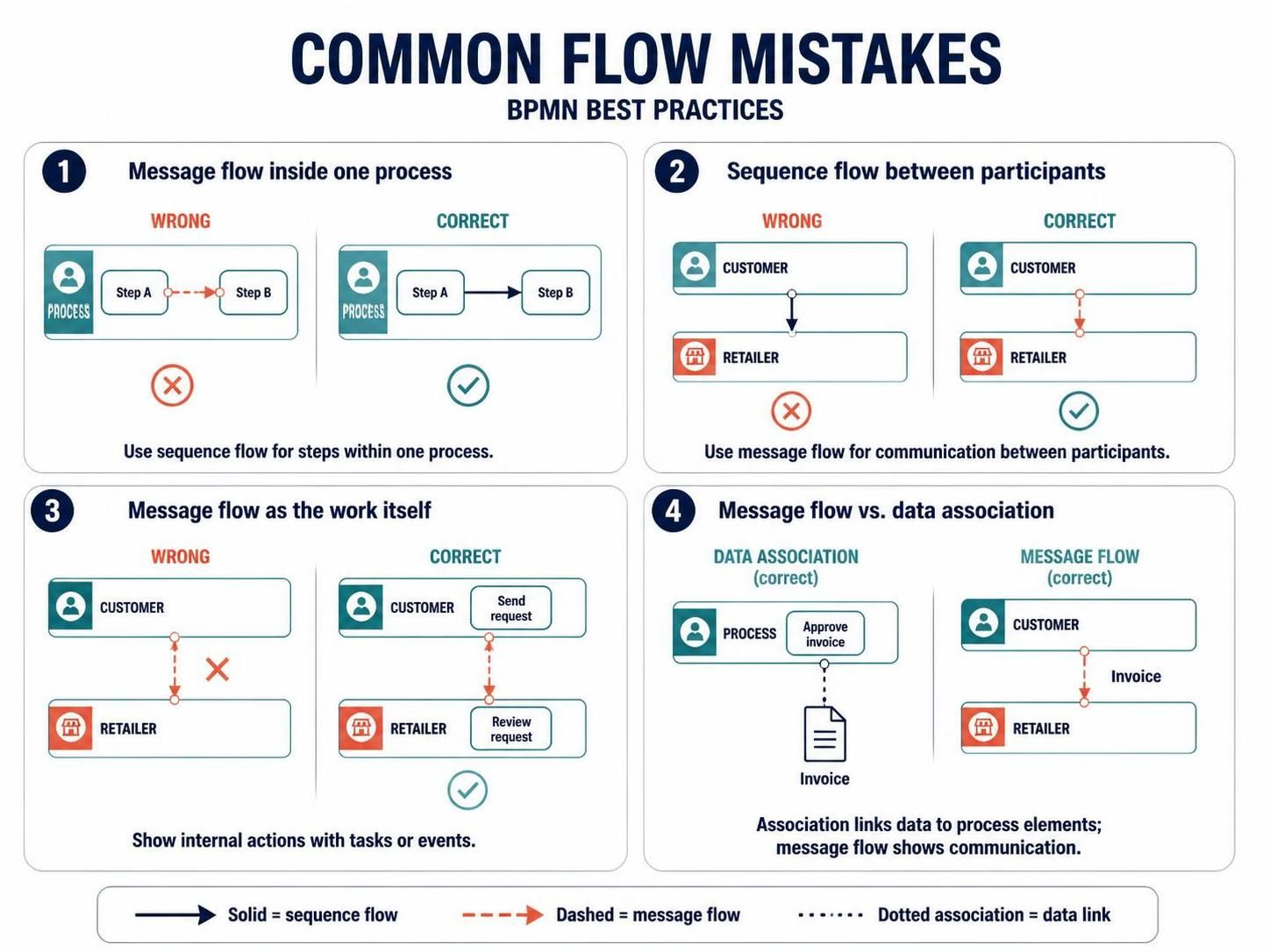
Business Process Model and Notation (BPMN) is a universal language for business processes. However, even experienced modelers often fall into the trap of using connectors incorrectly. The visual language of BPMN relies on specific line styles to convey precise meanings regarding control flow, communication, and data. Using the wrong connector doesn’t just look messy; it fundamentally changes the logic of your model, potentially leading to confusion or errors in automated execution.
In this tutorial, we will dissect four critical mistakes often seen in diagrams and establish the correct architectural patterns for your visual paradigms.
1. The Internal Flow Trap: Message vs. Sequence
The most frequent error occurs when modelers treat steps inside a single participant’s scope as if they were communicating with an external party. If one activity leads directly to another within the same process (the same pool or lane), you are defining the internal logic and control flow.
The Wrong Way: Connecting Step A to Step B with a dashed orange line.
The Correction: Always use a Sequence Flow (a solid black line with an arrow) to show that one activity triggers the next within the same process.
Sequence Flow = Solid Line
Message Flow = Dashed Line
Think of the Sequence Flow as the heartbeat of your process—it dictates the order of operations. The Message Flow is strictly reserved for the boundary between participants.
2. The Inter-Participant Error: Crossing the Boundary
When modeling a collaboration between two different entities—such as a Customer and a Retailer—the boundary between them is sacred. This boundary represents the “handshake” or communication channel between two separate systems or organizations.
The Wrong Way: Drawing a solid black line that cuts directly from the Customer’s process into the Retailer’s process.
The Correction: You must use a Message Flow (dashed orange line) to represent communication. This indicates that the Customer’s process does not directly control the Retailer’s process; rather, it sends a signal or request that the Retailer processes independently.
This distinction is vital because it defines where responsibility lies. A sequence flow implies control; a message flow implies communication.
3. The “Magic Arrow” Fallacy: Message Flow vs. Work
A common misconception is that a Message Flow represents the work itself. It does not. A message flow merely tells the reader that information is passing between participants. It does not describe what happens on the sending side or the receiving side.
The Wrong Way: Connecting the Customer directly to the Retailer with a message flow and assuming the work is implied.
The Correction: You must model the internal actions explicitly using Tasks or Events.
If a customer sends a request, there must be a Task (e.g., “Send Request”) inside the Customer’s pool. If the retailer reviews it, there must be a corresponding Task (e.g., “Review Request”) inside the Retailer’s pool. The Message Flow simply connects these two specific points of interaction.
4. Data Associations vs. Message Flows
Finally, it is crucial to distinguish between data that is passed between participants and data that is used within a process.
- Message Flow: Used when an object (like an Invoice) is physically or digitally transferred from one participant to another.
- Data Association: Used when a data object is referenced, created, or consumed by a specific task within the same participant.
If a task “Approve Invoice” reads a document, you use a dotted line (Association) to link the Task to the Document. If the Customer sends the Invoice to the Retailer, you use a Message Flow between the pools.
Summary of Connector Syntax
To ensure your diagrams are professional and unambiguous, adhere to this legend:
- Sequence Flow: Solid Line. Connects tasks within the same process.
- Message Flow: Dashed Line. Connects activities between different participants.
- Data Association: Dotted Line. Links data objects to tasks.
By respecting these boundaries, you create models that are not just visually appealing, but logically sound and ready for execution.