Mastering Software Architecture Visualization with the C4 Model
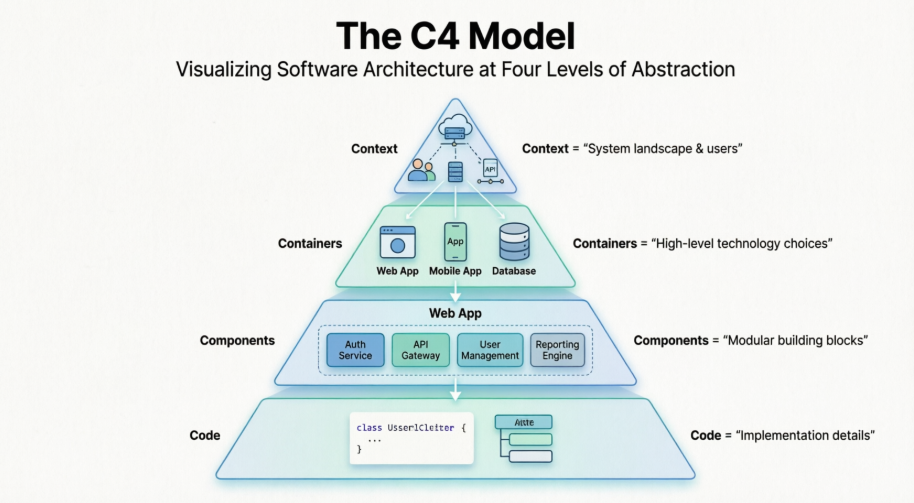
Effective communication in software engineering often fails because developers and stakeholders are looking at the system at different levels of detail. To solve this, Simon Brown introduced the C4 model, a hierarchical approach to visualizing software architecture. Think of it like a map: you start with a globe view to understand where you are in the world, zoom in to the country to see the geography, then the city to see the streets, and finally the house to see the layout.
This tutorial walks you through the four levels of the C4 model, explaining how to use them to create a shared understanding of your system’s structure.
Level 1: System Context (The “Globe” View)
Level 1 is the broadest view of your system. It shows your software system as a single “black box” and illustrates how it fits into the wider world. This level is crucial for defining boundaries and identifying high-level dependencies.
Key Elements
- People: The users of your system (e.g., Admin, Customer).
- Software Systems: External systems that interact with yours (e.g., Payment Gateway, Email Service).
- Relationships: The data flows between your system and the outside world.
This diagram is designed for everyone—stakeholders, product managers, and developers. It answers the question: “What does this system do and who uses it?”
Level 2: Containers (The “City” View)
Once we zoom in, we see the “City” view. Here, the black box of Level 1 is decomposed into its constituent containers. A container is a high-level technical building block that needs to be executed or hosted. Examples include a web application, a mobile application, a microservice, or a database.
Key Elements
- Web Apps: Single Page Applications (SPAs) or server-rendered sites.
- Mobile Apps: iOS or Android applications.
- Databases: SQL or NoSQL data stores.
- Technical Choices: This level reveals the technology stack (e.g., Java, Python, PostgreSQL).
This diagram is typically for technical leads and architects. It answers the question: “How is the system built and what technologies are used?”
Level 3: Components (The “Street” View)
Zooming further into a specific container (e.g., the Web App), we reach Level 3: Components. This view breaks down the container into its internal building blocks. Components are more granular than containers and usually represent a module or a library within the codebase.
Key Elements
- Controllers: Handle incoming requests.
- Services: Contain the business logic.
- Repositories: Handle data access.
- Interfaces: Show how components interact with each other.
This diagram is primarily for developers. It answers the question: “How is the application structured internally?”
Level 4: Code (The “House” View)
Level 4 is the most detailed view, showing the implementation details like UML class diagrams. However, it is worth noting that this level is often skipped in modern agile environments. Why? Because the code itself and Integrated Development Environments (IDEs) serve this purpose effectively. Generating static diagrams for Level 4 can quickly become out of sync with the actual codebase.
Tooling and Implementation
To create these diagrams efficiently, many teams utilize tools like Visual Paradigm combined with AI assistance. These tools allow you to define your architecture in a structured way and automatically generate the visual representations for all four levels.
Here is a conceptual example of how you might structure a C4 diagram definition (pseudo-code) for a simple “Online Order Process”:
@startuml
title C4 Model: Online Order System

' Level 1: System Context
Person(customer, "Customer", "Browses products and places orders")
System(system, "Order System", "Processes orders and manages inventory")
Person(admin, "Admin", "Manages product catalog")
System(payment, "Payment Gateway", "Handles external payments")

Rel(customer, system, "Places order")
Rel(system, payment, "Processes payment")
Rel(admin, system, "Updates inventory")

' Level 2: Containers
Container(webApp, "Web Application", "SPA", "User interface")
Container(api, "API Server", "Java Spring Boot", "Backend logic")
Container(db, "Database", "PostgreSQL", "Persistent data")

Rel(webApp, api, "HTTP/REST")
Rel(api, db, "JDBC")

' Level 3: Components
Container_Boundary(webApp, "Web App Boundary") {
  Component(home, "Home Page", "React", "Displays products")
  Component(cart, "Shopping Cart", "React", "Manages cart state")
}
@enduml
By mastering the C4 model, you ensure that your architecture is not just a complex web of code, but a clear, communicable blueprint that everyone from the CEO to the junior developer can understand.