VP OpenDocs: Static Snapshots vs. Live Updates in Release Control
In the modern era of software development and system architecture, documentation is no longer a static artifact created at the end of a project. It is a living entity that must evolve alongside the system it describes. Visual Paradigm’s OpenDocs ecosystem addresses this challenge through its intelligent distribution engine, which offers two distinct yet complementary sharing modes: Static Snapshots and Live Updates.
This tutorial explores the technical architecture behind these sharing modes, explaining how they function within the broader “Pipeline” workflow and guiding you on when to apply each strategy for maximum efficiency and compliance.
The Architecture of Distribution
When you utilize the “Share” functionality in OpenDocs, you are essentially configuring a delivery protocol for your knowledge assets. The system distinguishes between two fundamental approaches to data transmission:
1. Static Snapshots (The “Frozen” State)
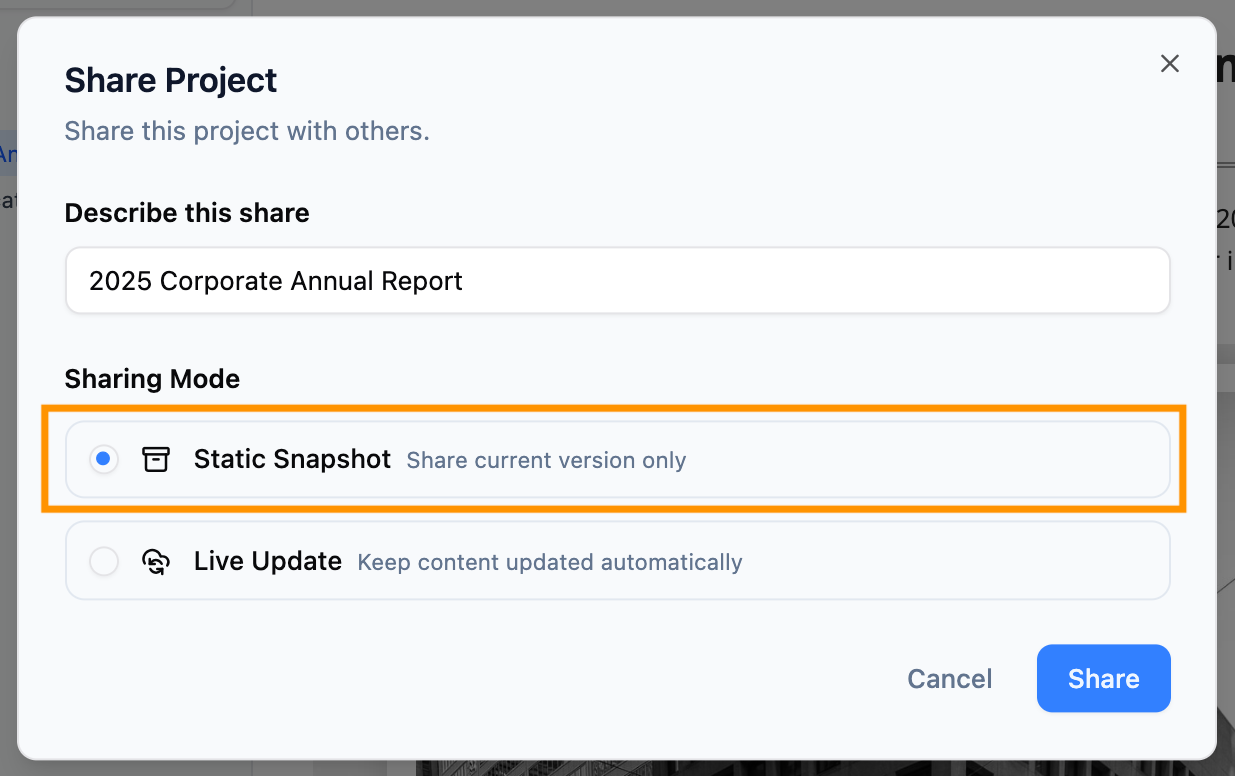
A Static Snapshot represents a specific point in time. When you select this mode, the system captures the state of your diagrams, documents, and artifacts exactly as they exist at the moment of generation. It creates a read-only view of the project.
- Technical Behavior: The content is effectively “baked” or serialized into a specific version. Any subsequent changes made to the source diagrams in Visual Paradigm Online will not reflect in the shared link.
- Use Case: This is critical for formal documentation, such as Annual Reports, Compliance Audits, or Legal Specifications. If a regulation requires you to document the system state “as of December 31st, 2025,” a Static Snapshot guarantees that the data remains immutable, regardless of future updates.
2. Live Updates (The “Real-Time” State)
Live Update is a dynamic linking strategy. Instead of copying data, the shared link maintains a persistent connection to the source project in the OpenDocs Pipeline. It acts as a “window” into the project rather than a “photograph.”
- Technical Behavior: The link points to the repository’s current state. When you update a diagram in the source model (e.g., changing an OAuth2 flow) and publish the revision, the shared documentation automatically refreshes to reflect that change.
- Use Case: This is ideal for Developer Onboarding guides, API documentation, and “Living Specifications.” It ensures that external teams or new hires always see the most current system architecture without you needing to re-export or re-share the file.
Workflow Integration: From Model to Share
To utilize these features effectively, you must integrate them into a cohesive workflow. The image provided illustrates the user interface for selecting your sharing strategy. Here is the step-by-step process of how this integrates with the Visual Paradigm ecosystem:
- Artifact Creation: You create a model or diagram in Visual Paradigm Online. For example, a sequence diagram for user authentication.
- Pipeline Integration: You send the artifact to the OpenDocs Pipeline. This step links the raw diagram data to a Markdown-based documentation page.
- Configuration: You navigate to the
Sharebutton in the navigation bar. The system presents the Sharing Mode options. - Selection: You toggle between Static Snapshot and Live Update based on the needs of the audience.
- Deployment: You generate the link or embed code. If “Live Update” is selected, you can embed this page directly into a WordPress portal or internal wiki, and it will remain current.
Managing the Lifecycle
The power of the OpenDocs ecosystem lies in its ability to manage versioning without version chaos. The Browse Share History feature provides an audit dashboard, allowing administrators to see exactly what version was shared, when, and by whom. This visibility is essential for enterprise governance, ensuring that teams can trace back to specific static snapshots if a bug is introduced in a later “Live” update.
For example, if a security vulnerability is discovered in a “Live” documentation set, you can immediately revert to a previous Static Snapshot for legal purposes while simultaneously fixing the underlying model. The system separates the creation of knowledge from the distribution of knowledge, giving you granular control over your information lifecycle.
Conclusion: Choosing the Right Tool for the Job
The decision between Static and Live sharing is not merely a technical preference; it is a strategic choice regarding how your organization communicates change. By understanding the underlying architecture of these modes, you can leverage OpenDocs to create documentation that is either a reliable historical record or a dynamic tool for real-time collaboration.
Whether you are generating a frozen report for stakeholders or embedding an interactive guide for developers, OpenDocs ensures that your documentation remains a true Single Source of Truth.