
Revolutionizing UML Modeling: Mastering the AI Modify Feature in VPasCode
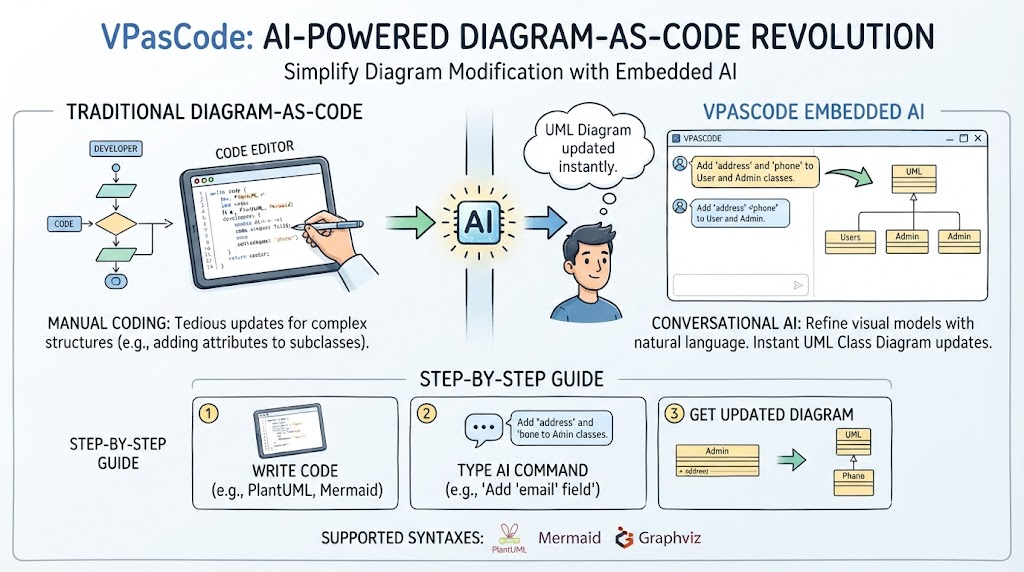
In the realm of modern software engineering, the “Diagram-as-Code” (DaC) approach has fundamentally changed how we document system architecture. Tools like VPasCode have emerged as unified, browser-based platforms supporting multiple syntaxes including PlantUML, Mermaid, and Graphviz. While writing code to generate diagrams offers precision, manually updating complex structures—such as adding attributes to multiple subclasses—can be tedious and prone to syntax errors.
This is where VPasCode’s Embedded AI shines. By integrating natural language processing directly into the editor, VPasCode allows developers to refine their visual models conversationally. This guide explores how to leverage the “AI Modify” feature to instantly update a UML Class Diagram, bridging the gap between textual code and visual design without ever leaving your workspace.
Understanding the Architecture of VPasCode
VPasCode functions as a bridge between traditional text-based programming and visual system modeling. Unlike legacy tools where diagrams are static images, VPasCode treats diagrams as living code artifacts that can be manipulated via natural language commands.
The Shift from Manual Coding to Conversational AI
Traditionally, modifying a Class Diagram in a DaC workflow requires the developer to:
- Locate the specific class definition in the source code.
- Manually type the new attributes or methods.
- Ensure strict adherence to the specific syntax (e.g., PlantUML or Mermaid) to prevent rendering errors.
- Re-run the rendering engine to visualize the change.
VPasCode streamlines this by allowing you to simply describe the change you want to make. The AI interprets the intent, generates the necessary code modifications, and renders the updated diagram instantly.
Supported Syntaxes and Capabilities
VPasCode is designed to be agnostic of the specific modeling language you prefer. Whether you are a purist using PlantUML, a web-focused developer using Mermaid, or a data architect using Graphviz, the AI engine is trained to understand and modify all these formats.
Key Supported Languages:
- PlantUML: Ideal for detailed UML specifications including Class, Sequence, and State diagrams.
- Mermaid: Perfect for lightweight, web-friendly flowcharts and sequence diagrams.
- Graphviz: Excellent for complex graph structures and dependency mapping.
Step-by-Step Guide: Using AI Modify for UML Class Diagrams
To demonstrate the power of VPasCode, let’s walk through a common scenario: updating a class hierarchy to include new attributes. Imagine you have a base class structure, and you need to add specific fields to derived classes.
Step 1: The Initial State (The “Code” View)
First, visualize the starting point. In a standard DaC environment, you might have a base class Admin and a subclass Users (or vice versa depending on the hierarchy). You need to add an address and a phone attribute to both.
@startuml
class Users
class Admin

Users --|> Admin

note right of Users
  This is the Users class.
end note

note right of Admin
  This is the Admin class.
end note
@enduml
Step 2: The AI Interaction (The “Command” View)
Instead of rewriting the class definitions, you interact with the AI assistant in the VPasCode interface. You can type a natural language command that describes exactly what you want to achieve.
Input Command:
“Add ‘address’ and ‘phone’ attributes to both the Users and Admin classes.”
Step 3: The Instant Update (The “Result” View)
VPasCode parses this command, identifies the relevant classes in the code, and injects the new attributes. The diagram updates instantly to reflect the new data structure.
@startuml
class Users {
  +address : String
  +phone : String
}
class Admin {
  +address : String
  +phone : String
}

Users --|> Admin

note right of Users
  Updated with address and phone.
end note

note right of Admin
  Updated with address and phone.
end note
@enduml
Why This Matters for System Architecture
The ability to modify diagrams conversationally is not just a convenience; it is a paradigm shift for documentation maintenance. In complex systems, requirements change frequently. If you maintain your architecture as code, you are already ahead of teams using static images. By adding AI to that workflow, you eliminate the friction of updating documentation, ensuring your visual models always match the source code.
This approach supports the “Single Source of Truth” principle. When you modify the diagram via AI, you are technically modifying the code, which can then be version-controlled, diffed, and reviewed just like any other software artifact.