
Mastering the Modern Architecture Workflow: Building System Diagrams with VPasCode
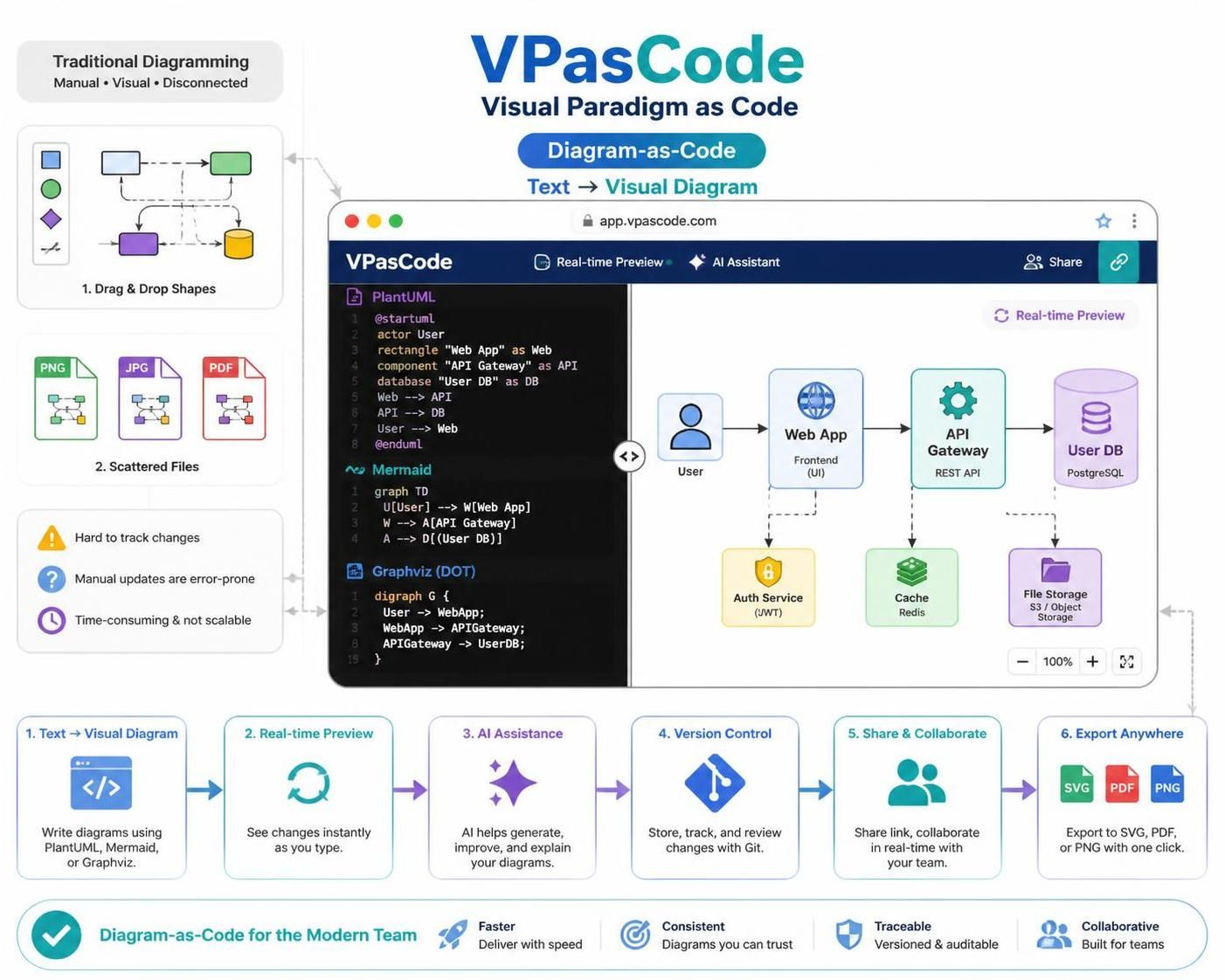
In the rapidly evolving landscape of software engineering, the gap between documenting system architecture and maintaining it is often too wide to bridge with traditional tools. For decades, architects have relied on drag-and-drop interfaces, but as systems grow in complexity, these methods often lead to “diagram rot”—visuals that are beautiful on the day of creation but obsolete by the next sprint.
VPasCode (Visual Paradigm as Code) represents a paradigm shift in how we visualize software. By treating diagrams as text files, it integrates the rigor of software development directly into the design phase. This tutorial explores the architecture of VPasCode, the underlying modeling concepts of “Diagram-as-Code,” and how to leverage this workflow to build robust, maintainable system architectures.
The Core Philosophy: Text as the Source of Truth
The fundamental shift in VPasCode is the move from a visual-first interface to a text-first interface. In traditional tools, the “source of truth” is a binary file (like a .vsd or .drawio file) where the position of a box is determined by the last mouse click. In VPasCode, the source of truth is a plain text file using languages like PlantUML, Mermaid, or Graphviz.
This approach aligns diagramming with the rest of the software development lifecycle. Just as you would write a function in Python or a query in SQL, you write a diagram definition in a structured language. This offers several immediate architectural benefits:
- Version Control: Because the diagram is text, it can be stored in Git. You can track exactly who changed the system boundary and when, seeing diffs of your architecture over time.
- Collaboration: Merging changes becomes a matter of merging text files, avoiding the “whooverwrote-whose” problem common in image-based editors.
- Automation: Diagrams can be regenerated automatically. If you update your codebase, you can automatically regenerate the architecture diagram to ensure it matches the implementation.
Understanding the VPasCode Architecture
The system architecture of VPasCode is built around a real-time rendering engine that interprets text-based definitions and converts them into visual representations. Unlike static diagramming tools, VPasCode functions as a dynamic workspace.
The workflow follows a linear, iterative path:
- Text Input: The user writes the diagram definition in a supported language (e.g., PlantUML).
- Real-time Rendering: The engine parses the text and renders the visual diagram immediately in the preview pane.
- AI Assistance: Integrated AI tools can help generate boilerplate code, explain complex logic, or refactor the diagram structure.
- Version Control & Sharing: The text file is committed to version control (Git), and the workspace allows for real-time collaboration via shared links.
Practical Modeling: System Context Diagrams
To understand how VPasCode handles system architecture, let’s look at a practical example: a System Context Diagram. This type of diagram defines the boundary of the system, the users interacting with it, and the external systems it communicates with.
Below is a comprehensive example using PlantUML, one of the primary languages supported by VPasCode. This snippet defines a “Web App” architecture involving a User, an API Gateway, and a Database.
@startuml
skinparam componentStyle rectangle

' Define Actors
actor User "End User"
database "User DB" as Database

' Define Components
rectangle "Web App" as WebApp {
    component "Frontend" as UI
    component "API Gateway" as API
}

rectangle "External Services" as Ext {
    component "Auth Service" as Auth
    component "File Storage" as Storage
}

' Define Relationships
User --> UI : Uses
UI --> API : Requests
API --> Database : Queries
API --> Auth : Validates JWT
API --> Storage : Stores Files
@enduml
Breaking Down the Code
When you write the code above, VPasCode parses specific keywords to understand the intent:
skinparam: Controls the global styling of the diagram (e.g., making components rectangular).rectangle: Defines containers or groupings. Here, we group the internal components into “Web App” and “External Services”.actor&component: These define the specific nodes in the graph.-->: The arrow syntax defines the direction and nature of the data flow between nodes.
Switching to Mermaid syntax, which is popular in documentation ecosystems, requires a slightly different structure. In Mermaid, you define the graph type first, then map nodes and edges.
graph TD
    U[User] --> W[Web App]
    W --> A[API Gateway]
    A --> D[(User DB)]
    A --> S[File Storage]

    style U fill:#f9f,stroke:#333,stroke-width:2px
    style W fill:#bbf,stroke:#333,stroke-width:2px
    style D fill:#ff9,stroke:#333,stroke-width:2px
Notice the style directives. In a code-based workflow, visual aesthetics are also defined programmatically, allowing you to enforce design guidelines across your entire architecture documentation.
The Role of AI in Diagramming
One of the most powerful features of the VPasCode environment is the integration of AI assistance. In a traditional editor, creating a diagram from scratch requires knowing the exact syntax. In VPasCode, the AI assistant acts as a co-pilot.
For example, you can prompt the AI to “Create a diagram showing a microservices architecture with a load balancer,” and it will generate the initial PlantUML or Mermaid code. You can then refine the diagram by editing the text directly. This lowers the barrier to entry for creating high-quality architecture diagrams, allowing architects to focus on the what and how of the system rather than the where to place the boxes.
Conclusion: The Future of Architecture Documentation
VPasCode represents the maturation of the “Diagram-as-Code” movement. By unifying the text editor, the rendering engine, and the collaboration tools into a single browser-based workspace, it solves the maintenance issues that have plagued software documentation for years.
Whether you are documenting a simple monolith or a complex distributed system, treating your diagrams as code ensures that your documentation evolves alongside your software. It transforms architecture from a static image into a living, version-controlled, and maintainable asset.