
Mastering the Flipbook Maker: A Dual-Workflow Architecture for Digital Publishing
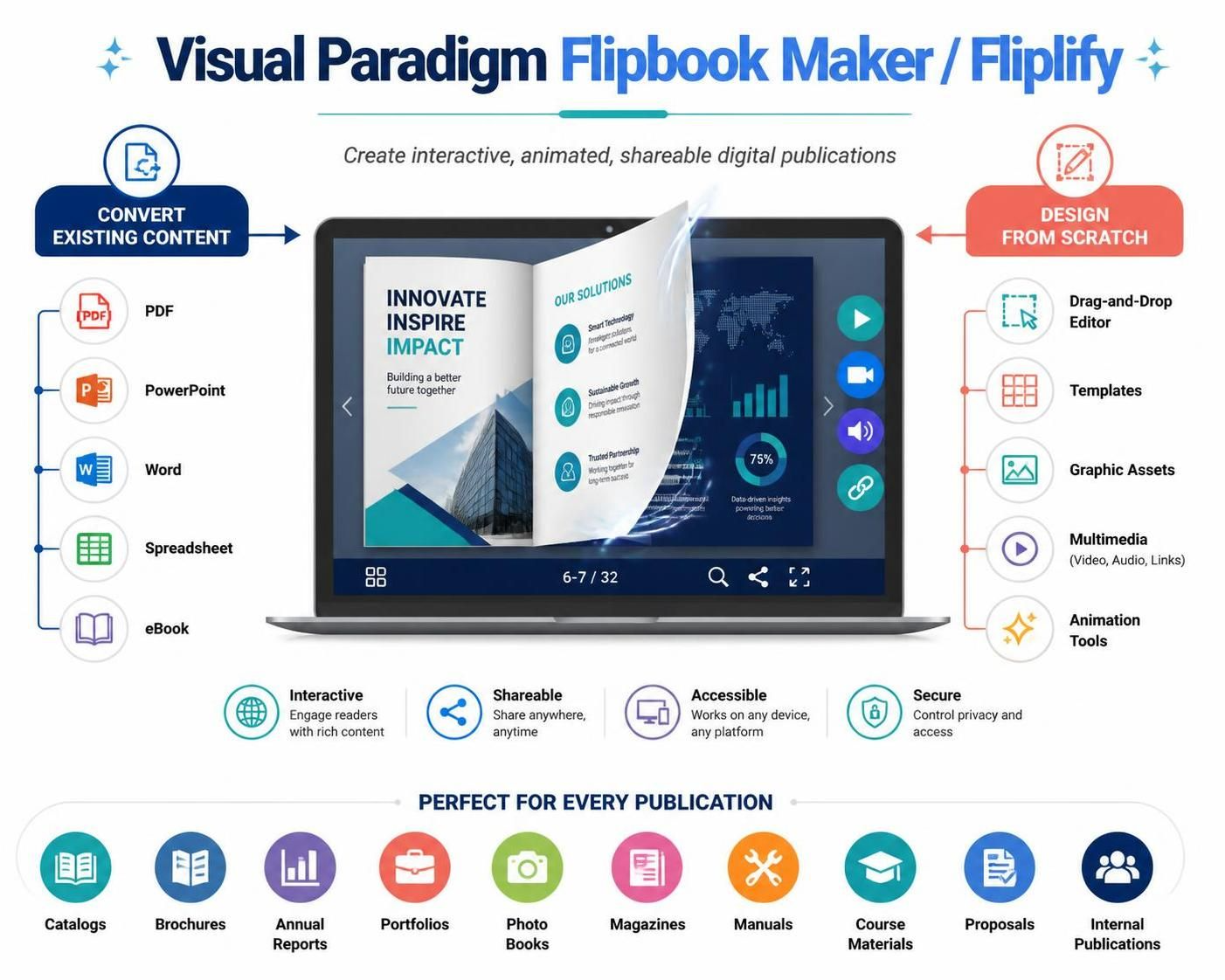
In the rapidly evolving landscape of digital publishing, the requirement to present static documents as engaging, interactive experiences has never been higher. Visual Paradigm’s Flipbook Maker (also known as Fliplify within the Online ecosystem) addresses this by implementing a sophisticated dual-path architecture. This system is designed to bridge the gap between traditional document creation and modern web-based storytelling.
This tutorial breaks down the internal logic and technical capabilities of the Flipbook Maker, exploring how it harmonizes the “Conversion” workflow with the “Design” workflow to create high-fidelity digital publications.
The Core Architectural Concept: Dual-Path Input
The fundamental logic of the Visual Paradigm Flipbook Maker is built on a bifurcated input system. Unlike simple converters that merely reformat files, this tool operates as a hybrid engine. It accepts legacy data structures while simultaneously offering a blank canvas for new creative assets.
Path A: The Conversion Engine (Legacy Integration)
The left side of the system architecture is dedicated to the ingestion of existing content. This module functions as a parser and renderer, capable of interpreting the structural data of:
- PDF (Portable Document Format): Preserves layout fidelity, fonts, and vector graphics, acting as the primary source for technical manuals and reports.
- PowerPoint Presentations: Converts slide decks into a fluid, vertical-scrolling or page-turning narrative, retaining slide transitions.
- Microsoft Word: Handles text-heavy documents, stripping formatting inconsistencies to create clean, readable digital pages.
- Spreadsheets: Transforms tabular data into visual representations suitable for financial reports or data analysis summaries.
- eBooks: Supports ePub or similar formats, maintaining the chapter structure and metadata.
Path B: The Design Studio (Native Creation)
Conversely, the right side of the architecture represents the “Design from Scratch” workflow. This is a declarative interface where users construct publications without the constraints of pre-existing page counts. It relies on a component-based architecture where users assemble the following elements:
- Drag-and-Drop Editor: A GUI (Graphical User Interface) layer that maps UI events to DOM manipulation, allowing for real-time layout adjustments.
- Templates: Pre-defined structural schemas that ensure design consistency and adherence to grid systems.
- Graphic Assets: A library of vector and raster assets integrated directly into the rendering pipeline.
- Multimedia Integration: The embedding of external resources, specifically video, audio, and hyperlinks, which transforms the publication from a static view into a multimedia experience.
- Animation Tools: A timeline-based or trigger-based system that applies CSS transitions or JavaScript animations to elements, simulating the physical motion of turning a page.
Output Standards and Publishing Logic
The ultimate goal of this architecture is to generate a “Shareable” and “Accessible” digital object. The system ensures that the output is not just a file, but a web-ready application.
The output must satisfy four critical technical constraints:
- Interactivity: The final product must support rich content engagement, such as embedded media playback and clickable navigation.
- Shareability: The output must be portable, capable of being hosted on any platform or shared via a direct link.
- Accessibility: The rendering engine must support cross-device compatibility, ensuring the flipbook works on desktops, tablets, and mobile phones (Responsive Design).
- Security: The system includes permission controls to manage privacy and access rights for sensitive internal publications.
Use Case Application
This dual-approach makes the tool particularly versatile for specific industry verticals:
- Corporate Reporting: Convert raw data from Spreadsheets or Word drafts into stunning Annual Reports and Brochures.
- Education: Assemble course materials using PowerPoint slides or build entirely new Manuals using the Drag-and-Drop editor.
- Marketing & Sales: Create interactive Catalogs and Proposals that blend static product images with Video demonstrations.