
Mastering C4 Modeling: From Idea to Git with Visual Paradigm AI
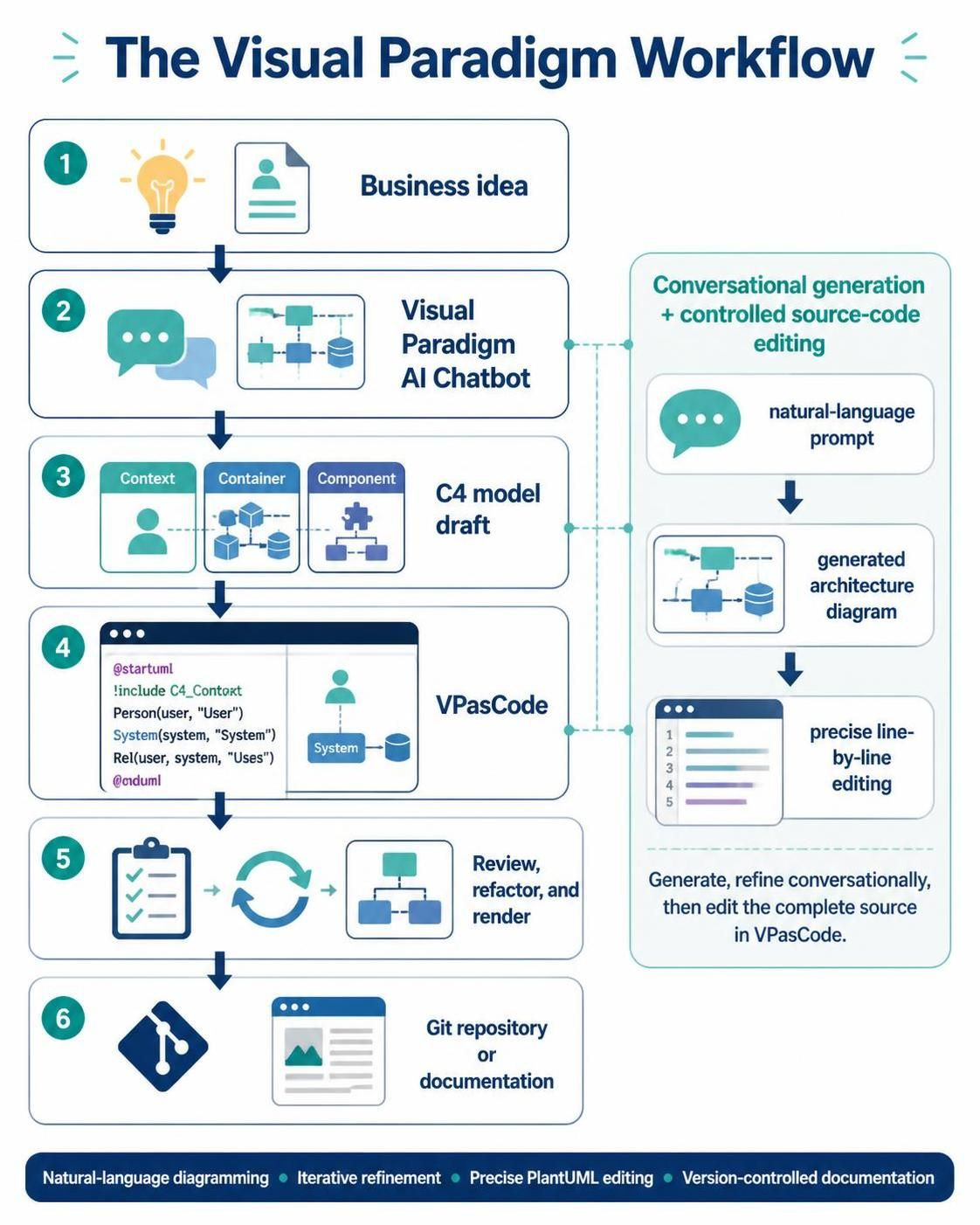
In the rapidly evolving landscape of software architecture, the gap between a conceptual idea and a documented, version-controlled system is often bridged by tools that balance creativity with precision. The Visual Paradigm workflow redefines this process by combining the fluidity of natural-language AI generation with the rigor of controlled source-code editing. This tutorial breaks down the six-step lifecycle of modern architecture modeling, guiding you from a spark of inspiration to a finalized C4 model ready for your repository.
Step 1: The Spark – Business Idea
The journey begins with a raw concept. In this initial stage, you define the Business Idea. This is the foundational problem statement or the functional scope of the system you intend to build. Whether it is a new microservice, a legacy refactor, or a startup MVP, the goal here is to capture the “what” and “why” before worrying about the “how.”
Step 2: The Catalyst – Visual Paradigm AI Chatbot
Once the idea is defined, the workflow leverages the Visual Paradigm AI Chatbot. This tool acts as a natural-language diagramming interface. Instead of manually dragging boxes onto a canvas, you can interact with the AI to generate initial architecture diagrams.
- Natural-Language Prompting: You describe your system in plain English.
- Conversational Generation: The AI interprets your intent and produces a visual representation.
- Iterative Refinement: If the initial draft isn’t quite right, you can simply ask for changes conversationally, refining the model without touching the underlying code immediately.
Step 3: The Structure – C4 Model Draft
As the diagram emerges, it adheres to the C4 Model standard, which provides a hierarchical approach to software architecture documentation. The workflow specifically targets three key levels:
- Context: Defines the system boundaries and its relationship with users and external systems.
- Container: Breaks the system down into runtime containers (e.g., web apps, mobile apps, databases).
- Component: Details the logical components within a container, showing how they interact to deliver functionality.
This structured approach ensures that your diagrams are not just pretty pictures, but technically accurate representations of the system’s architecture.
Step 4: The Precision – VPasCode
While the AI handles the high-level generation, the VPasCode (Visual Paradigm as Code) environment provides the necessary precision for professional engineering. This is where the diagram is rendered from source code, specifically using PlantUML.
VPasCode allows you to view the generated diagram alongside its code representation. This dual-pane view is critical for developers who need to:
- Inspect the exact syntax of the model.
- Perform precise line-by-line editing to fix specific relationships or styling issues.
- Ensure that the diagram logic is consistent with the codebase.
Understanding the Syntax
In the VPasCode editor, you will encounter standard PlantUML syntax. A typical C4 context model definition looks like this:
@startuml
!include C4_Context

Person(user, "User", "A user of the system")
System(system, "System", "The main system")

Rel(user, system, "Uses")
@endumlStep 5: The Polish – Review, Refactor, and Render
With the code refined in VPasCode, the workflow moves to the final rendering stage. This is an iterative loop where you:
- Review: Check the rendered diagram against your original business idea.
- Refactor: Use the code editor to optimize the model structure, perhaps moving a container or adding a new component.
- Render: Generate the final, high-quality visual output.
This step ensures that the diagram is not only technically correct but also communicative for stakeholders.
Step 6: The Artifact – Git Repository or Documentation
The final step of the Visual Paradigm workflow is integration into the software development lifecycle. Because the diagram is generated from code (PlantUML), it is perfectly suited for version control systems like Git.
By storing your architecture as code in a repository, you gain several advantages:
- Version Control: Track changes to your architecture over time, just like you do with application code.
- Documentation: Automatically generate documentation pages or PDF reports from the source.
- Collaboration: Enable teams to collaborate on architecture design using standard pull-request workflows.
This concludes the workflow, transforming a simple business idea into a robust, version-controlled architectural asset.