
Mastering BPMN Online: Architecture, Modeling, and Collaboration with Visual Paradigm
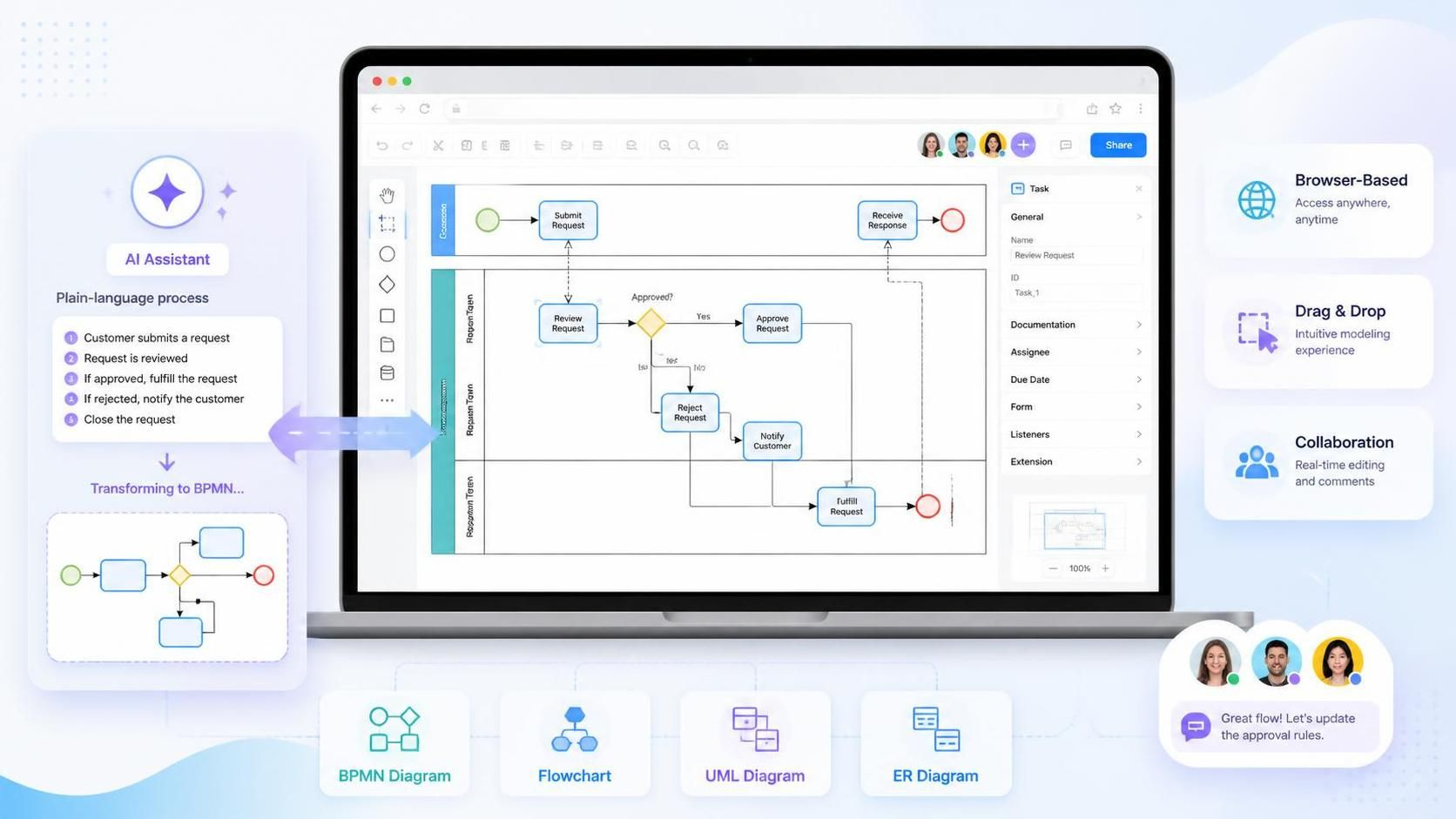
In the modern enterprise, the gap between a business idea and a documented process is often filled with friction. Traditional desktop modeling tools, while powerful, can create silos where the analyst builds the map in isolation, only to deliver a static file to stakeholders who cannot edit it. Visual Paradigm BPMN Online disrupts this model by shifting the architecture from a “file-based” workflow to a “browser-based” collaborative environment. This tutorial explores how this system bridges the gap between plain-language requirements and standardized Business Process Model and Notation (BPMN) diagrams.
The Architecture of Browser-Based Modeling
The fundamental shift in Visual Paradigm BPMN Online is the removal of local software installation. Instead of relying on a heavy executable file, the modeling environment runs within a web browser, utilizing cloud-based workspaces. This architecture offers three distinct advantages:
- Universal Access: Process owners, customers, and technical teams can open the same model without needing specific versions of software installed on their machines.
- Real-Time Collaboration: The environment supports shared review processes where participants can comment on missing steps or unclear decisions in real-time, rather than exchanging multiple file versions.
- Unified Tooling: BPMN is rarely an isolated activity. The platform unifies BPMN with Flowcharts, UML diagrams, and Entity-Relationship (ER) diagrams, allowing teams to document data models and logic flows in a single context.
From Plain Language to Structured Logic
The most transformative feature of the platform is the integration of AI-assisted modeling. Traditionally, creating a BPMN diagram requires a blank canvas and a deep understanding of syntax. Visual Paradigm Online eliminates the “blank-page problem” by allowing users to input a plain-language description of a process.
The system parses this natural language input—such as “Customer submits a request, which is reviewed. If approved, fulfill the request; if rejected, notify the customer”—and automatically generates a draft diagram. This transforms the user’s role from a “diagram drawer” to a “diagram reviewer,” allowing analysts and stakeholders to focus on the logic rather than the geometry.
Understanding the BPMN Structure
Once the initial diagram is generated, the visual editor allows for the refinement of the process flow. The example shown in the system interface illustrates a classic Swimlane Diagram, which is essential for clarifying responsibilities.
1. Swimlanes (Partitions)
The diagram is vertically divided into sections, such as “Customer,” “Request Team,” and “Requisition Team.” These swimlanes visually segregate the process steps by the actor responsible for them. This is critical for analyzing departmental responsibilities and identifying hand-offs between teams.
2. Gateway Logic (The Diamond)
At the center of the “Request Team” lane lies a diamond shape. In BPMN, this represents a Gateway or decision point. In the generated example, the gateway asks, “Approved?”. This splits the flow into two distinct paths:
- Yes (Approved): The flow moves to “Approve Request” and then to “Fulfill Request.”
- No (Rejected): The flow moves to “Reject Request” and “Notify Customer.”
3. Events and Tasks
The process begins with a green circle (Start Event) and ends with a red circle (End Event). The rectangular boxes represent specific tasks or activities performed by the assigned swimlane. The arrows connecting these elements define the sequence flow, ensuring the logic moves linearly from start to finish.
Tooling: Visual Paradigm BPMN + Usage Cases
To fully leverage the Visual Paradigm BPMN Online platform, it is essential to understand the core pillars of its tooling and the specific user personas who benefit from them.
Core Pillars of the Platform
- Visual Diagram Editor: A drag-and-drop interface that allows users to manually refine the AI-generated diagrams. It supports standard BPMN symbols alongside other diagram types like Flowcharts and UML.
- Cloud-Based Workspace: The repository for all process models. It ensures that the version of the diagram being reviewed is the single source of truth.
- AI Assistant: The engine that converts plain-language text into structured BPMN syntax, significantly reducing the time required for initial modeling.
Who Will Use It?
The platform is designed to be accessible to a wide range of professionals across the organizational hierarchy:
- Business Analysts: Who document current processes and analyze responsibilities. They use the tool to map out complex workflows and identify bottlenecks.
- Students & Learners: Who use the platform to learn BPMN notation without the overhead of installing desktop software.
- Managers: Who map departmental responsibilities and oversee process improvements.
- Project Teams: Who design future-state workflows and collaborate on system requirements.
- Consultants: Who prepare process documentation for clients, often requiring a quick, browser-based setup.
- Subject-Matter Experts (SMEs): The employees who actually perform the work. They contribute process knowledge by reviewing the diagram, suggesting changes, and correcting operational details.
By combining these user groups with the platform’s collaborative tools, Visual Paradigm BPMN Online creates a feedback loop where the process is not just documented, but continuously refined by the people who execute it.