
Mastering BPMN Event Sub-Processes for Modular Process Design
In the world of Business Process Model and Notation (BPMN), clarity is king. As processes grow in complexity, diagrams can quickly become unreadable spaghetti. One of the most powerful tools for maintaining clarity is the Event Sub-Process. This tutorial will guide you through the architecture of event sub-processes, how to use them to handle specific events like timers or messages, and how to leverage tools like Visual Paradigm to manage these complex modular structures.
What is an Event Sub-Process?
An Event Sub-Process is a specialized type of sub-process that is triggered by a specific event. Unlike a standard sub-process which is triggered by the completion of a preceding activity, an event sub-process “waits” in the background until a specific condition is met. This makes them ideal for handling interruptions, exceptions, or periodic tasks without cluttering the main flow of the process.
Key characteristics include:
- Modularity: It allows you to encapsulate logic for a specific event, keeping the main diagram clean.
- Reusability: You can reuse the same sub-process definition across multiple different parent processes.
- Readability: It reduces the cognitive load on the reader by hiding complexity until it is relevant.
Deconstructing the Architecture: The “Check Mail” Scenario
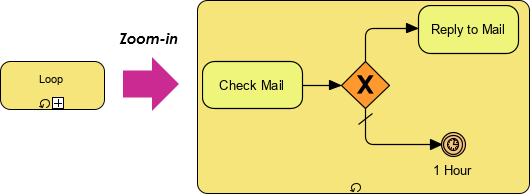
Let’s analyze the diagram provided to understand how an Event Sub-Process functions in a real-world context. The image depicts a “Zoom-in” view of a sub-process, revealing its internal logic.
1. The Entry Event
Notice the small circle with the icon inside it on the bottom edge of the sub-process container. This is the Event Trigger. In this specific example, the icon represents a Timer Event (indicated by the clock symbol). This means the entire block of logic inside the yellow container is suspended until the timer fires.
2. The Main Flow
Once the timer triggers, the process initiates the first task: “Check Mail”. This is a standard activity represented by a rounded rectangle.
3. The Gateway Logic
After checking the mail, the flow hits a diamond shape with an X inside. This is an Exclusive Gateway (XOR). It represents a decision point where the path taken depends on the outcome of the previous task.
- Path A: If mail is found, the process proceeds to “Reply to Mail”.
- Path B: If no mail is found (indicated by the slash on the line), the process moves to the end.
4. The Loop Back
The bottom path leads to a End Event labeled “1 Hour”. Crucially, this end event is connected back to the start. This creates a Loop. The process checks the mail, and if nothing is there, it waits 1 hour and checks again. This is the power of the Event Sub-Process: it creates a self-contained loop that runs in the background without blocking the main process.
Implementing Event Sub-Processes with Visual Paradigm
When using tools like Visual Paradigm, you can utilize AI chatbots to help generate these structures or navigate complex diagrams. However, understanding the underlying BPMN specification is vital to ensure the model is valid.
To create this structure in Visual Paradigm:
- Create a Parent Process.
- Add a Sub-Process element.
- Open the Sub-Process in a new tab (Zoom-in).
- Place a Start Event (Timer) on the boundary of the sub-process.
- Draw your internal flow (Check Mail -> Gateway -> Reply).
- Ensure the End Event loops back to the Start Event to create the polling mechanism.
graph TD
    subgraph Parent_Process [Parent Process]
        A[Start] --> B[Perform Main Task]
        B --> C{Event Triggered?}
    end

    subgraph Event_Sub_Process [Event Sub-Process]
        direction TB
        E_Start((Timer Start))
        E_Check[Check Mail]
        E_Gateway{XOR Gateway}
        E_Reply[Reply to Mail]
        E_End((End 1 Hour))

        E_Start -.-> E_Check
        E_Check --> E_Gateway
        E_Gateway -- Yes --> E_Reply
        E_Gateway -- No --> E_End
        E_End -.-> E_Start
    end
Best Practices for Event Sub-Processes
While powerful, Event Sub-Processes can be misused. Here are some guidelines to ensure your diagrams remain professional and accurate.
- Keep it Focused: Do not put unrelated logic inside an Event Sub-Process. It should handle one specific event type.
- Define Clear Exit Points: Ensure your sub-processes have defined end events. A “hanging” sub-process can confuse execution engines.
- Use Consistent Naming: Name your sub-processes based on the event they handle (e.g., “Handle Timeout” or “Process Complaint”) rather than generic names like “Sub-Process 1”.
Conclusion
Event Sub-Processes are the backbone of modular BPMN design. They allow you to break down complex business rules into manageable, reusable chunks. By mastering the “Zoom-in” view and understanding how timers and gateways interact within a sub-process, you can create diagrams that are not only visually appealing but also technically robust and ready for automation.