
Mastering VPasCode: The Ultimate Guide to Code-Driven Architecture with Embedded AI
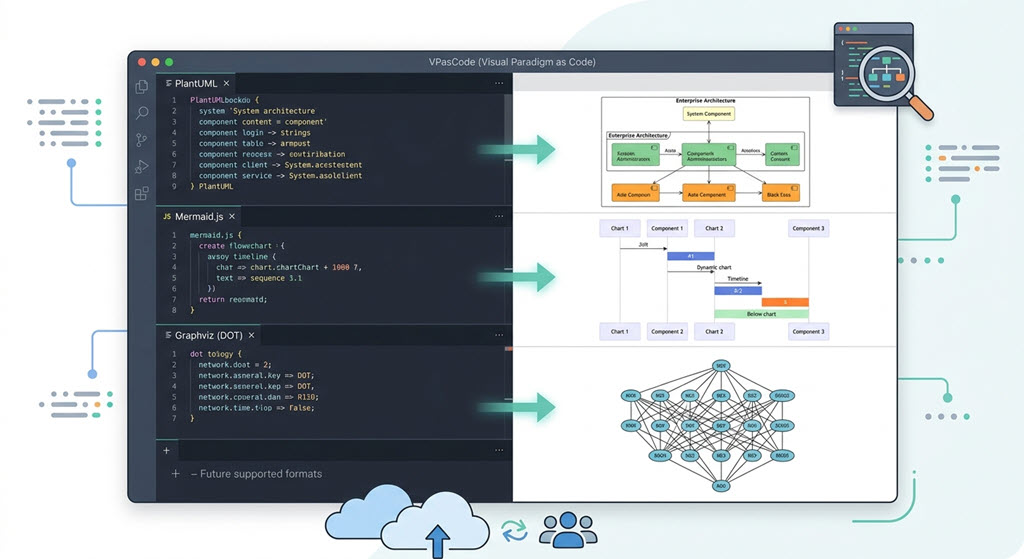
In the rapidly evolving landscape of software engineering, the gap between architectural design and implementation often leads to “drift”—where the code no longer matches the documentation. To solve this, VPasCode (Visual Paradigm as Code) has emerged as a critical tool for modern development teams. Unlike traditional modeling tools that rely solely on drag-and-drop interfaces, VPasCode allows architects and developers to define complex system architectures using text-based syntax like PlantUML, Mermaid, and Graphviz.
This tutorial dives deep into the VPasCode ecosystem, exploring how it integrates with AI to streamline the modeling process, maintain version control, and ensure your documentation remains perfectly synchronized with your source code.
The “As Code” Philosophy in Architecture
Traditionally, creating a UML diagram or a system architecture map required opening a specialized desktop application, dragging shapes onto a canvas, and manually drawing connections. While intuitive for beginners, this approach is often difficult to version control. If two architects try to edit the same diagram simultaneously, merging changes is a nightmare.
VPasCode flips this paradigm. By treating diagrams as text files, you gain the power of modern software development:
- Version Control: Diagrams can be stored in Git repositories alongside your source code.
- Collaboration: Developers can use standard merge tools to handle changes in architecture definitions.
- Automation: Diagrams can be generated automatically from code repositories or CI/CD pipelines.
Core Syntax: PlantUML and Mermaid
VPasCode is built to be syntax-agnostic, supporting the industry standards that developers already know. The interface typically presents a split view: a code editor on the left and a real-time rendered preview on the right.
1. PlantUML for Structural Diagrams
PlantUML is the gold standard for UML diagrams. In VPasCode, you define the logic of your system using simple text blocks. For example, defining a system with various components looks like this:
@startuml
!pragma useIntermediateCompression false

title Enterprise Architecture

component "Login" as login {
  component "User Interface" as ui
  component "Authentication" as auth
}

component "Data Layer" as data {
  component "Database" as db
  component "Cache" as cache
}

login --> data : Uses
data --> db : Stores
data --> cache : Caches

@enduml
When you type this into the VPasCode editor, the engine parses the syntax and instantly renders a professional-grade component diagram, complete with connectors and styling.
2. Mermaid for Flowcharts and Timelines
For flowcharts, sequence diagrams, or timelines, Mermaid is the preferred choice. VPasCode supports the JavaScript-based Mermaid syntax, allowing for dynamic visualization of processes.
%%{init: {'theme': 'base', 'themeVariables': { 'fontSize': '14px' }}}%%
sequenceDiagram
    autonumber
    participant Dev as Developer
    participant VP as Visual Paradigm
    participant AI as AI Assistant

    Dev->>VP: Write Mermaid Code
    VP->>VP: Render Diagram
    VP->>AI: Detect Context
    AI->>VP: Suggest Optimization
    VP->>Dev: Show Updated Diagram
Why VPasCode is Unique: The Embedded AI Revolution
What sets VPasCode apart from other “code-to-diagram” tools is the deep integration of Embedded AI features. Most tools simply render what you type; VPasCode helps you write what you need.
The AI-Driven Workflow:
- Intent-Based Generation: Instead of writing syntax from scratch, you can prompt the integrated AI assistant with a high-level goal, such as “Generate a component diagram for a banking system.”
- Syntax Correction: If your PlantUML or Mermaid syntax contains a subtle error that prevents rendering, the AI detects the discrepancy and suggests the fix.
- Contextual Refinement: The AI understands the context of your project. If you are modeling a microservices architecture, it will automatically suggest appropriate patterns like API Gateways or Load Balancers.
Integrating into the Ecosystem: OpenDocs & VPasCode
The true power of VPasCode is realized when it is part of the broader Visual Paradigm ecosystem. The integration with OpenDocs creates a seamless workflow for technical documentation.
VPasCode acts as the source of truth. You define your architecture in code. When you need to create a formal document for stakeholders, VPasCode sends the diagram to OpenDocs. Because the diagram is “diagram-aware,” if you update the code in your repository, OpenDocs detects the change and prompts you to sync, ensuring your documentation is never outdated.
Advanced Tip: Graphviz Integration
For those dealing with complex network topologies or dependency graphs, VPasCode also supports Graphviz (DOT). This allows for highly mathematical layout calculations that are often superior to standard UML layouts.
digraph G {
  node [shape=circle];
  A -> B;
  A -> C;
  B -> D;
  C -> D;
  D -> E;
  // Layout engine can be specified for complex graphs
  rankdir=LR;
}
Conclusion
VPasCode represents the future of system architecture. By combining the precision of code with the visual clarity of diagrams, and supercharging it with embedded AI, it bridges the gap between design and development. Whether you are using PlantUML for UML diagrams, Mermaid for flows, or Graphviz for networks, VPasCode ensures your architectural vision is captured accurately and efficiently.