
From Business Model to Executable Workflow: A Guide to BPMN Automation Readiness
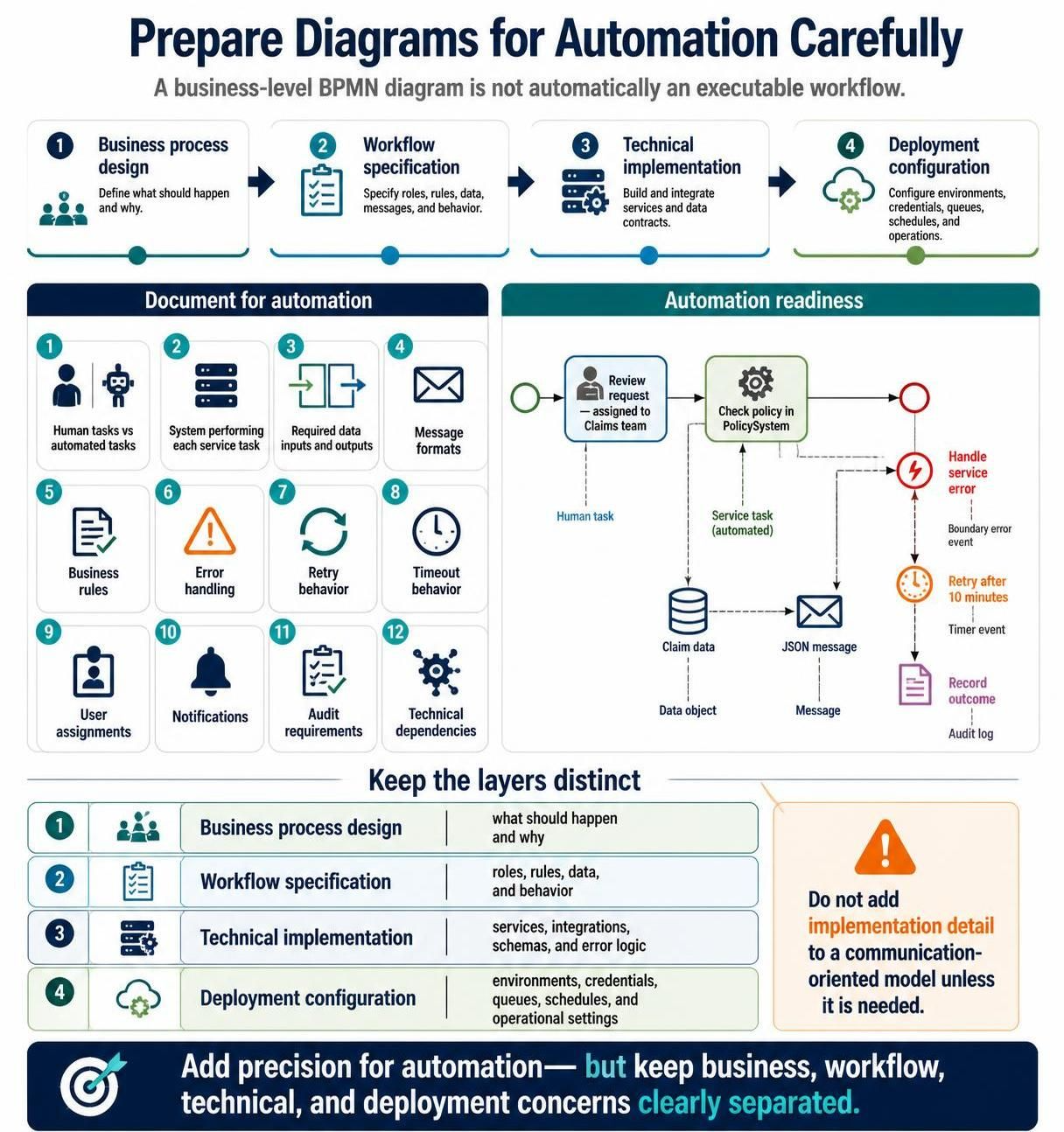
Transitioning from a high-level business concept to an executable software workflow is one of the most critical steps in enterprise architecture. While a standard business diagram effectively communicates the “what” and “who,” it often lacks the granularity required for software to execute logic automatically. This tutorial explores the architectural requirements for converting a business process model into a fully automated workflow, emphasizing the distinct layers of design, specification, and implementation.
The Four Layers of Process Modeling
To build a robust system architecture, it is essential to maintain a clear distinction between four specific modeling layers. Confusing these layers often leads to “spaghetti code” or rigid systems that are difficult to maintain.
- Business Process Design: This layer focuses on the “what should happen and why.” It is primarily communication-oriented and used by stakeholders to understand the flow of value. It defines roles and high-level steps without technical constraints.
- Workflow Specification: This layer bridges the gap between business and IT. It specifies roles, rules, data, messages, and behavior. This is where the logic is formalized to ensure the process is repeatable.
- Technical Implementation: This involves building and integrating services and data contracts. It defines the specific APIs, database schemas, and code logic that power the automation.
- Deployment Configuration: This final layer configures the runtime environment, including credentials, queues, schedules, and operational settings.
Visualizing the Distinction
When modeling, you must adhere to the principle of separation of concerns. Do not clutter a communication-oriented business model with implementation details unless they are strictly necessary for understanding the process flow.
[Business Design]          [Workflow Specification]
   "Review Request"      -->    "Assign to Claims Team"
   "Check Policy"          -->    "Call Policy API"
   "Handle Error"          -->    "Retry Logic / Timeout"

[Technical Implementation]
   - API Endpoint: /api/policy/check
   - Payload: JSON Object
   - Database: PolicyDB
Documenting for Automation: The 12 Critical Requirements
A business-level BPMN diagram is not automatically executable. To prepare diagrams for automation carefully, you must document specific technical details. The following 12 points are required to transform a static model into a dynamic workflow engine.
1. Human Tasks vs. Automated Tasks
You must explicitly define which tasks are performed by people and which are executed by machines. In BPMN, this is often represented by the type of task (User Task vs. Service Task) and the associated swimlane.
2. System Performing Each Service Task
For every automated step, you need to identify the specific system or microservice responsible. For example, a “Check Policy” task might be routed to a specific microservice named PolicySystem.
3. Required Data Inputs and Outputs
Automation requires data. You must define the schema for every data object. For instance, a “Claim Data” object might require fields like claimId, amount, and policyNumber.
4. Message Formats
Interactions between systems must follow strict contracts. You should define the message format (e.g., JSON, XML, CSV) for all data exchanges.
// Example: JSON Message Format
{
  "claimId": "CLM-9988",
  "amount": 5000.00,
  "status": "pending_review"
}
5. Business Rules
Logic gates in a workflow often depend on business rules. These should be documented separately to allow for easy updates without changing the diagram structure.
6. Error Handling
What happens when things go wrong? A robust automation model must define error handling strategies. This includes boundary error events in BPMN that catch exceptions.
7. Retry Behavior
Transient errors (like a temporary network outage) are common. You must define the retry logic: How many times should the system retry?
8. Timeout Behavior
Tasks should not hang indefinitely. Define a timeout period. If a service takes too long, the workflow must trigger a timeout event.
9. User Assignments
For human tasks, the model must specify the assignment logic. Is it assigned to a specific role (e.g., “Claims Specialist”), a specific user, or is it a pool of available workers?
10. Notifications
Automation often requires alerting. Define when and how users are notified—via email, SMS, or system dashboard alerts—when a task is assigned or a critical event occurs.
11. Audit Requirements
Compliance is key. Define what actions must be logged. For example, every time a policy is checked or a claim is reviewed, an entry must be made in an audit log.
12. Technical Dependencies
Identify external dependencies such as third-party APIs, database connections, or middleware that the workflow relies upon.
Case Study: Claims Processing Workflow
Let us look at a practical example of how these requirements translate into a technical diagram. Consider a “Review Request” process where a human reviews a claim, followed by an automated policy check.
graph TD
    A[Start Event] --> B[Review Request
Human Task]
    B --> C[Check Policy in PolicySystem
Service Task]

    C --> D[Success Boundary Event]
    C -.->|Error| E[Boundary Error Event]

    E --> F[Timer Event: Retry after 10 minutes]
    F --> C

    D --> G[Record Outcome
Audit Log]

    subgraph Data
        H[Claim Data]
        I[JSON Message]
    end

    B -.-> H
    C -.-> I
In this diagram, we see the application of the 12 requirements:
- Human vs. Automated: The “Review Request” is a User Task, while “Check Policy” is a Service Task.
- Error Handling & Retry: A boundary error event is attached to the service task. If an error occurs, a timer event triggers a retry after 10 minutes.
- Data Objects: The workflow consumes “Claim Data” and produces a “JSON Message.”
- Audit Requirements: The final step is to “Record Outcome” to an audit log.
Conclusion
Successfully automating business processes requires a shift in mindset from “drawing a flowchart” to “engineering a system.” By strictly separating business design, workflow specification, technical implementation, and deployment configuration, you ensure that your models remain flexible yet executable. Always document the 12 critical requirements—ranging from message formats to retry behaviors—to prevent ambiguity during the development phase.
To effectively manage this complexity, it is highly recommended to utilize comprehensive modeling environments that support both high-level design and technical precision. The Visual Paradigm BPMN Tool is an excellent solution for this purpose, offering robust features for creating automation-ready diagrams, defining data contracts, and simulating workflows before deployment.