
Building a Foundational Requirement Hierarchy with VPasCode
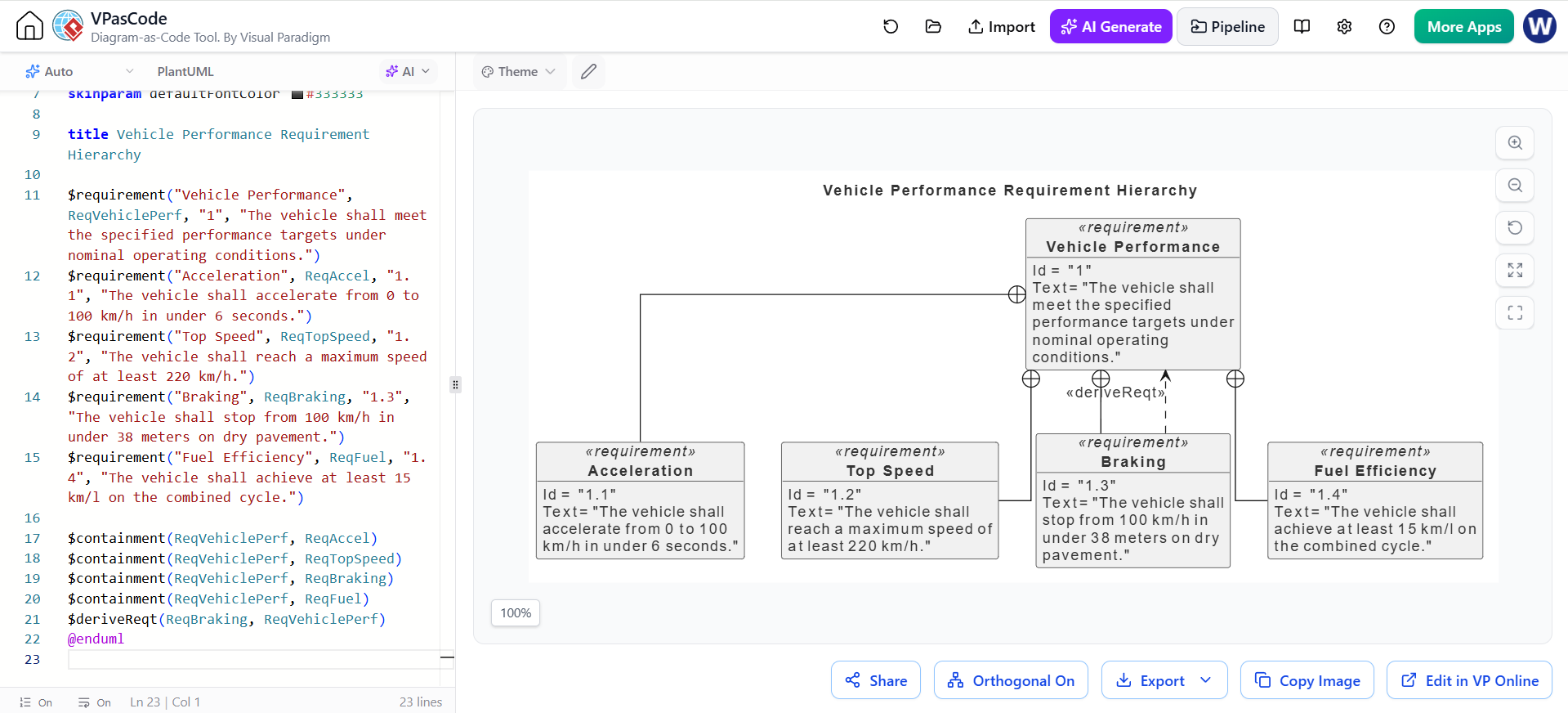
System engineering relies heavily on clear, traceable documentation to ensure that complex products meet their intended goals. One of the most critical diagrams in this process is the Requirement Hierarchy Diagram. It serves as the skeleton of your project, breaking down high-level performance goals into measurable, actionable sub-requirements.
In the context of Visual Paradigm’s VPasCode tool, we can define these structures using a concise, text-based syntax that instantly renders into a professional UML diagram. This tutorial walks you through creating a vehicle performance hierarchy, demonstrating the core concepts of containment and derivation.
The Anatomy of a Requirement Diagram
A requirement diagram in UML (Unified Modeling Language) is not just a list; it is a structured map. Every requirement is an element that can be contained by a parent requirement or derived from a higher-level goal. When using VPasCode, we translate these relationships into specific commands.
1. Defining Requirements ($requirement)
The foundation of any diagram is the element definition. In VPasCode, we use the $requirement function. This command creates a box that displays the requirement’s name, ID, and text.
For our Vehicle Performance example, we start with a top-level requirement and define four sub-requirements:
$requirement("Vehicle Performance", ReqVehiclePerf, "1", "The vehicle shall meet the specified performance targets under nominal operating conditions.")

$requirement("Acceleration", ReqAccel, "1.1", "The vehicle shall accelerate from 0 to 100 km/h in under 6 seconds.")

$requirement("Top Speed", ReqTopSpeed, "1.2", "The vehicle shall reach a maximum speed of at least 220 km/h.")

$requirement("Braking", ReqBraking, "1.3", "The vehicle shall stop from 100 km/h in under 38 meters on dry pavement.")

$requirement("Fuel Efficiency", ReqFuel, "1.4", "The vehicle shall achieve at least 15 km/l on the combined cycle.")
Notice the parameters: "Name", VariableName, "ID", and "Description". The VariableName (e.g., ReqVehiclePerf) is crucial because it acts as the handle for connecting elements later.
2. Establishing Containment ($containment)
Containment represents a “part-of” or “breakdown” relationship. It visually groups sub-requirements under a parent. In the diagram, this is represented by a solid line connecting the parent to the child.
To define that the four sub-requirements belong to the main “Vehicle Performance” requirement, we use the $containment command:
$containment(ReqVehiclePerf, ReqAccel)
$containment(ReqVehiclePerf, ReqTopSpeed)
$containment(ReqVehiclePerf, ReqBraking)
$containment(ReqVehiclePerf, ReqFuel)
These lines tell the renderer to draw solid lines from ReqVehiclePerf to each of the specific metrics.
3. Modeling Derivation ($deriveReqt)
Derivation is a powerful concept in requirements engineering. It signifies that a specific requirement was created specifically to satisfy or derive from a higher-level requirement. Unlike containment, which implies a “part-of” relationship, derivation implies a “solution-to” or “verification-of” relationship.
In the provided diagram, there is a special dashed relationship between Braking and Vehicle Performance. This indicates that the Braking requirement is a specific derivation of the general performance targets.
$deriveReqt(ReqBraking, ReqVehiclePerf)This command draws a dashed line with an open arrow pointing from the child (Braking) to the parent (Vehicle Performance), labeled <<deriveReqt>>.
Complete Code Structure
Below is the complete code snippet used to generate the diagram shown in the example. It demonstrates how to mix containment and derivation within a single diagram block.
title Vehicle Performance Requirement Hierarchy

$requirement("Vehicle Performance", ReqVehiclePerf, "1", "The vehicle shall meet the specified performance targets under nominal operating conditions.")
$requirement("Acceleration", ReqAccel, "1.1", "The vehicle shall accelerate from 0 to 100 km/h in under 6 seconds.")
$requirement("Top Speed", ReqTopSpeed, "1.2", "The vehicle shall reach a maximum speed of at least 220 km/h.")
$requirement("Braking", ReqBraking, "1.3", "The vehicle shall stop from 100 km/h in under 38 meters on dry pavement.")
$requirement("Fuel Efficiency", ReqFuel, "1.4", "The vehicle shall achieve at least 15 km/l on the combined cycle.")

$containment(ReqVehiclePerf, ReqAccel)
$containment(ReqVehiclePerf, ReqTopSpeed)
$containment(ReqVehiclePerf, ReqBraking)
$containment(ReqVehiclePerf, ReqFuel)

$deriveReqt(ReqBraking, ReqVehiclePerf)

@endumlKey Takeaways for System Architects
- Traceability: Always assign unique IDs (like “1.1”, “1.2”) to your requirements. This makes it easier to reference them in tests and documentation.
- Clarity: Use
$deriveReqtsparingly and only when a specific requirement is a direct logical derivation of a parent goal. Do not confuse it with simple containment. - Efficiency: Using VPasCode allows you to version-control your requirements in text files (like Git), making it easier to collaborate on large systems than drawing boxes manually.
By mastering these basic syntax rules, you can rapidly prototype and document the architecture of any system, from simple software modules to complex vehicle engineering projects.