
Architecting the Single Source of Truth with the Visual Paradigm Pipeline
In the modern era of technical documentation, the disconnect between a living system and its static documentation is a major liability. When a diagram is exported as a PNG and inserted into a document, that link is broken. Any subsequent change requires a manual export, re-upload, and replacement process. This tutorial explores the Visual Paradigm Pipeline, a sophisticated architectural solution designed to bridge the gap between modeling tools and documentation platforms.
The Pipeline is not merely a file transfer mechanism; it is a centralized connection layer that maintains the relationship between a source model and its published visual representation. By utilizing this ecosystem, teams can achieve a “Single Source of Truth” where documentation automatically reflects the latest state of the architecture.
1. The Core Workflow: From Model to Living Document
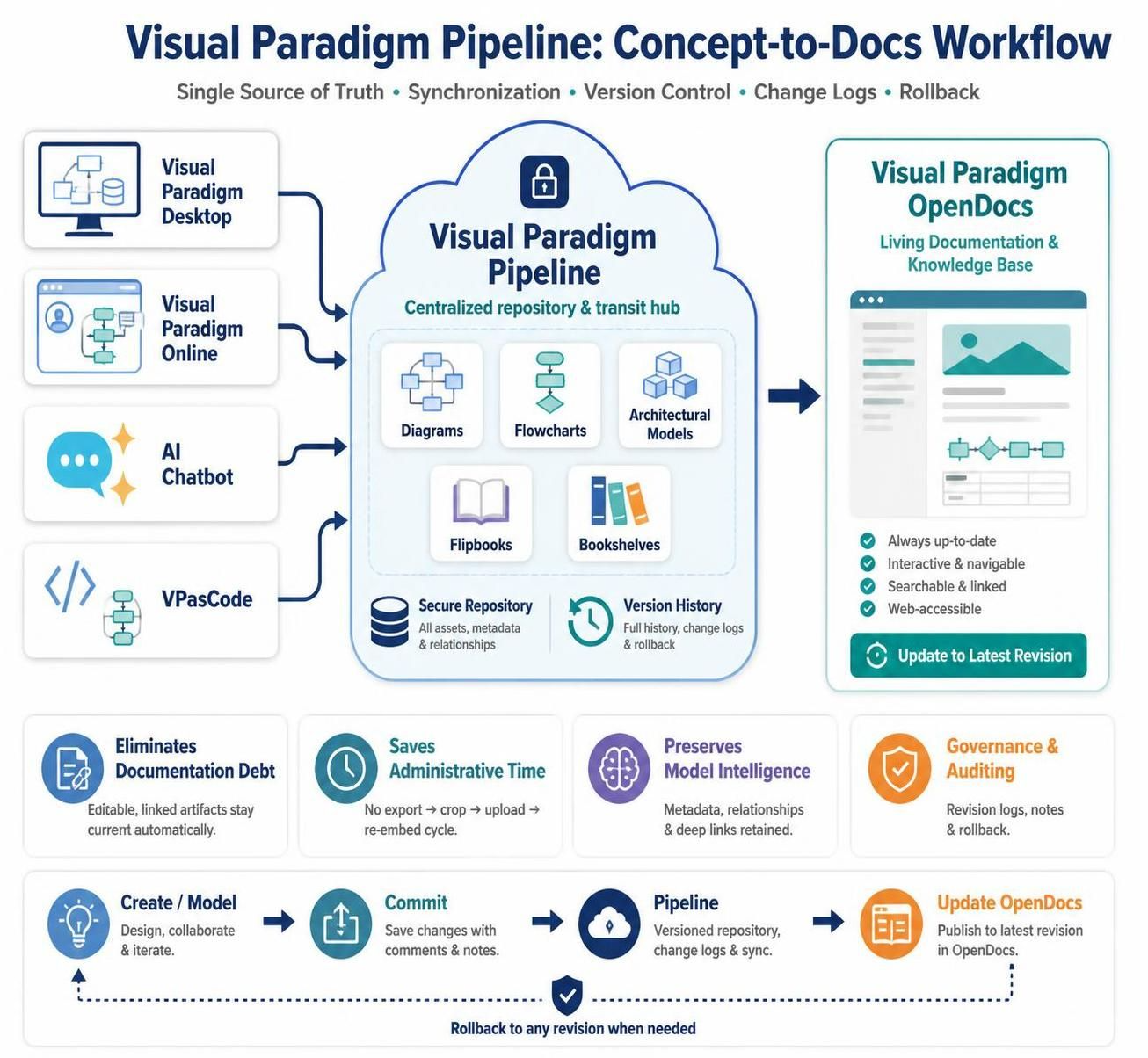
The fundamental shift provided by the Pipeline is the move from a static “export-and-upload” workflow to a dynamic “commit-and-sync” workflow. The system operates on a continuous loop designed to eliminate documentation debt.
- Create or Generate: The process begins in the Generation Layer. Whether you are using advanced desktop modeling tools, browser-based collaboration, or text-based diagramming, the source model is created here.
- Commit to Pipeline: Instead of exporting an image, the model is committed to the Pipeline. This action stores the asset in a cloud-based repository, preserving metadata and relationships.
- Embed in OpenDocs: The asset is inserted into Visual Paradigm OpenDocs not as an image file, but as a managed element. This creates a live link between the document and the model.
- Review Changes: Because the link is active, OpenDocs can detect when the source model has been updated. It flags the asset as having a newer revision available.
- Update Documentation: With a single click, the documentation is refreshed to the latest version of the diagram, ensuring the visual representation is always current.
2. The Ecosystem: Three Layers of Visualization
To understand how the Pipeline functions, it is helpful to visualize it as a three-layer ecosystem. Each layer serves a distinct purpose in the lifecycle of a technical asset.
Layer 1: The Generation Layer
This is the production floor where diagrams and models are born. The Pipeline integrates with a wide variety of tools to ensure flexibility in how models are created:
- Visual Paradigm Desktop: Used for heavy-lifting tasks like enterprise modeling, database design, and complex UML/BPMN architecture.
- Visual Paradigm Online: Facilitates browser-based, real-time collaborative diagramming.
- AI Diagramming Chatbot: Accelerates the initial creation phase by converting natural language prompts into structured visual models.
- VPasCode: Provides a code-oriented approach for diagramming using languages like PlantUML, Mermaid, and Graphviz.
Layer 2: The Pipeline Layer
The Pipeline acts as the transit and management hub. It is a cloud-based repository that stores assets and assigns them identifiable references. Its primary value lies in Revision Management. It records every change to a visual asset, allowing users to review history, check change logs, and rollback to earlier versions if necessary. It also preserves the “intelligence” of the model—metadata and relationships that are usually lost during image export.
Layer 3: The Documentation Layer
Visual Paradigm OpenDocs serves as the destination. It is a living documentation platform used for wikis, knowledge bases, and system specifications. When assets are embedded here, they are not static images; they are managed elements that retain their connection to the source model.
3. The Problem with Static Diagrams
Before adopting the Pipeline, most organizations rely on a traditional, manual workflow that introduces significant friction:
- Create a diagram.
- Export it as PNG, JPG, SVG, or PDF.
- Manually upload it to a wiki or document.
- Modify the original diagram later.
- Export it again and manually replace the old image.
This process leads to Documentation Debt. It creates multiple copies of the same diagram, makes it difficult to know which revision is authoritative, and wastes administrative time on repetitive file management tasks.
4. Key Benefits of the Pipeline Architecture
By centralizing assets and managing the connection between tools and documentation, the Pipeline delivers four distinct advantages:
Centralized Asset Storage
All diagrams, flowcharts, flipbooks, and bookshelves are stored in a shared, secure, cloud-based repository. This eliminates the need to hunt for source files scattered across local drives.
Transit Between Tools
The system acts as a universal translator, connecting the creation tools (Desktop, Online, AI, VPasCode) with the consumption tool (OpenDocs). It supports a vast array of diagram types including UML, BPMN, ERD, ArchiMate, and architecture diagrams.
Revision Management
Version control is built-in. The Pipeline records changes to visual assets, enabling teams to review newer revisions or restore earlier versions instantly.
Live Documentation Integration
This is the most critical function. It allows visual assets to be embedded as managed elements. When the source changes, OpenDocs identifies that a newer revision is available, keeping the documentation synchronized with the project evolution.
Summary
The Visual Paradigm Pipeline transforms the relationship between design and documentation. By maintaining a persistent link between the source asset and the published visual, it ensures that technical documentation is always accurate, searchable, and up-to-date. It replaces the error-prone cycle of manual file management with a streamlined, automated workflow that keeps your team’s knowledge base in sync with reality.