
Mastering ArchiMate: A Deep Dive into the Three Core Structure and Behavior Aspects
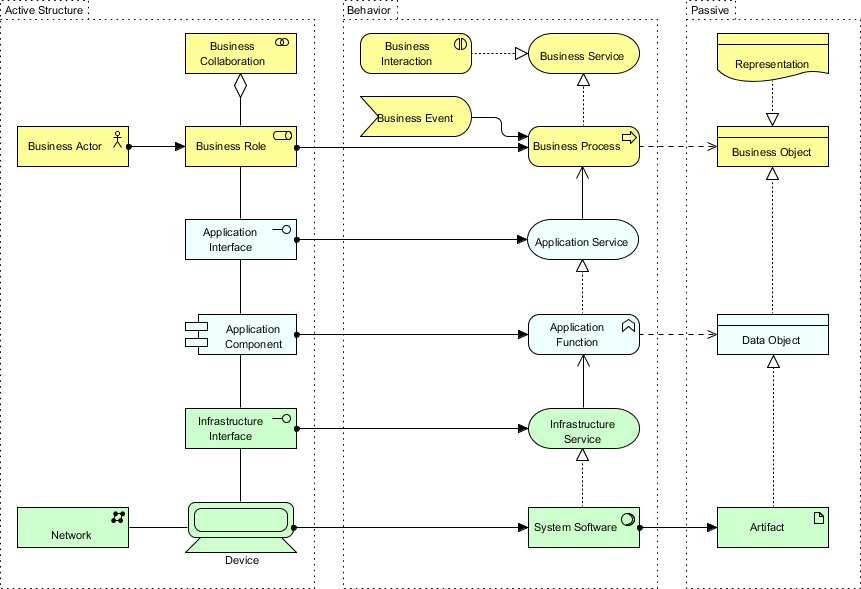
Archimate is a powerful, open standard enterprise architecture modeling language. Unlike other diagramming tools that focus on a single layer of IT or business, ArchiMate provides a comprehensive framework to visualize the relationship between strategy, business processes, applications, and infrastructure. The architecture of the language itself is built upon a fundamental concept: the separation of Structure and Behavior.
In this tutorial, we will dissect the visual diagram you are looking at. This diagram is the “backbone” of the ArchiMate 3 specification. It illustrates the three core layers—Business, Application, and Technology—and how they interact through three distinct “Aspects”: Active Structure, Behavior, and Passive Structure.
The Architecture of ArchiMate: The Three Pillars
To understand complex enterprise systems, you cannot simply draw boxes and lines; you must understand the semantic relationships between them. The diagram you are viewing organizes concepts into three vertical columns, known as Aspects.
1. Active Structure (The “Who” and “What”)
The leftmost column represents the Active Structure. These are the structural concepts that exhibit behavior. They are the active agents in the system.
- Definition: These are the entities that perform actions or have the capability to execute processes.
- The “Subject”: In modeling terms, these are the “Subject” of the sentence.
- Key Examples:
- Business Actor: A human or external organization (e.g., a Customer or Supplier).
- Business Role: A distinct part of a business that plays a specific part (e.g., “Cashier”).
- Application Component: A modular part of an application system (e.g., “Payment Module”).
- Device: Physical hardware (e.g., a Server or Laptop).
2. Behavior (The “Action”)
The central column represents the Behavior aspect. This column contains concepts that are assigned to the Active Structure concepts to show what they actually do.
- Definition: These are the activities, functions, events, and services performed by the active structure.
- Assignment: In ArchiMate, behavior is not free-floating; it must be assigned to an active structure element to be valid.
- Key Examples:
- Business Process: A set of activities that together produce a specific result.
- Application Service: A collection of functionality provided by an application.
- Infrastructure Service: A service provided by the technology layer (e.g., Network Connectivity).
3. Passive Structure (The “Object”)
The rightmost column represents the Passive Structure. These are the objects on which behavior acts. They do not perform actions themselves; they are the “patients” of the process.
- Definition: These represent information, data, or physical objects that are processed or transformed.
- The “Object”: In modeling terms, these are the “Object” of the sentence.
- Key Examples:
- Business Object: Information objects in the business domain (e.g., “Invoice”, “Order”).
- Data Object: Data structures within an application (e.g., “Database Table”).
- Artifact: Physical computer files or software components (e.g., a .jar file).
Visualizing the Relationships
Looking at the diagram, you can see how these aspects connect. The arrows represent specific ArchiMate relationships:
The “Assignment” Relationship
The solid lines with open arrowheads connecting the Active Structure to the Behavior represent the Assignment relationship. This answers the question: “Who is doing this?”
Business Actor --[Assignment]--> Business Role
Application Component --[Assignment]--> Application Function
Device --[Assignment]--> System Software
The “Realization” Relationship
The dashed lines with open arrowheads connecting the Behavior to the Passive Structure (or sometimes Active Structure) often represent Realization or Access relationships. This answers: “What is being used or created?”
Business Process --[Realization]--> Business Object
Application Function --[Realization]--> Data Object
Layered Analysis: Business, Application, and Technology
The diagram also shows horizontal layers. This is crucial for “Cross-Layer” modeling.
- Business Layer (Yellow): Focuses on strategy, governance, and organization. It uses concepts like Business Actors, Business Processes, and Business Objects.
- Application Layer (Blue/White): Focuses on software capabilities. It uses concepts like Application Components, Application Services, and Data Objects.
- Technology Layer (Green): Focuses on hardware and physical infrastructure. It uses concepts like Devices, Network, and Artifacts.
By stacking these layers, you can trace a requirement from a Business Goal all the way down to the specific Server or Database that supports it.
Conclusion
Understanding the distinction between Active Structure, Behavior, and Passive Structure is the key to unlocking the power of ArchiMate. It prevents the common pitfall of creating “spaghetti diagrams” where anything connects to anything. By strictly adhering to these aspects and the corresponding assignment rules, you create a clear, logical, and auditable model of your enterprise architecture.